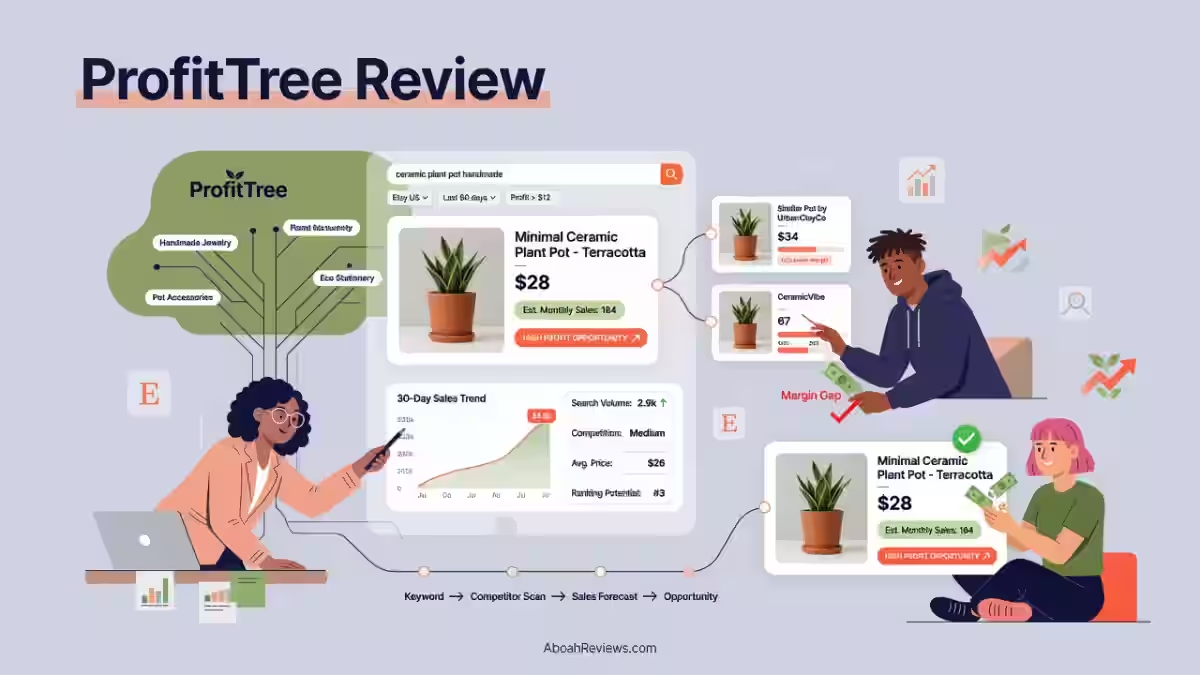
If you sell on Etsy, you already know the problem: which products will actually sell, who your real competitors are and whether you’re making money after fees eat into your margins. That’s the exact problem ProfitTree claims to solve, so I spent 30 days putting it to the test.
This ProfitTree review breaks down everything from hands-on testing of the Product Finder, Shop Finder, Etsy Radar and Rupert AI, ProfitTree’s standout AI research assistant, to pricing, real user complaints and where the platform falls short.
If you’re an Etsy seller or print-on-demand entrepreneur trying to decide whether ProfitTree is worth your money in 2026, this review gives you the unfiltered answer, backed by a 7.2/10 score, a full feature breakdown, and honest comparisons to alternatives like EverBee and Marmalead.
ProfitTree Review Verdict (2026)
| Category | Verdict |
| Best For | Etsy sellers and print-on-demand sellers who want product research, competitor tracking and market intelligence in one platform |
| Not Ideal For | Anyone primarily focused on advanced profitability reporting without an active Etsy shop |
| Pricing | Free ($0/mo), Starter ($9.99/mo), Growth, ($29.99/mo), Pro ($49.99/mo). 40% off on annual subscription |
| Rating | ⭐⭐⭐ 7.2/10 |
| Standout Feature | Rupert AI produces structured Etsy market analysis reports, not just generic AI idea lists |
| Biggest Weakness | Core profitability features require a connected Etsy shop. Chrome extension has documented performance issues, but seems to only occur when Etsy changes their UI and their tech is quick to fix |
| Learning Curve | Beginner |
| Worth It? | Yes for Etsy sellers who want research and competitor intelligence. Conditional for sellers who need profit tracking verified independently |
Bottom line: ProfitTree is a solid Etsy product research platform. Rupert AI is its strongest and most differentiated feature.
The profit tracking capabilities look promising based on user reports, but I couldn’t personally verify them during my 30-day test because I was unable to complete an Etsy shop connection.
Buy if research and competitor tracking are your primary needs. Hold off if verified profit reporting is your main goal until you’ve confirmed the shop connection works for your account.
ProfitTree Quick Specs
| Feature | Details |
| AI Model | Rupert AI (proprietary AI assistant; underlying model not publicly disclosed) |
| Platform | Web app (profittree.io) + Chrome extension |
| Primary Use | Etsy product research, competitor tracking, profit tracking, POD integration |
| Integrations | Etsy, Printify, Printful |
| Best For | Etsy sellers, print-on-demand sellers, Etsy beginners |
| Contact/Support | admin@profittree.io; support@profittree.io; Help Center at support.profittree.io |
| User Ratings | Trustpilot: 4.0/5 (18 reviews during the time of writing, unclaimed profile) |
| Refund Policy | Monthly plans are non-refundable. Annual plans have a 48-hour refund window for accidental purchases. |
Key Takeaways About this ProfitTree Review
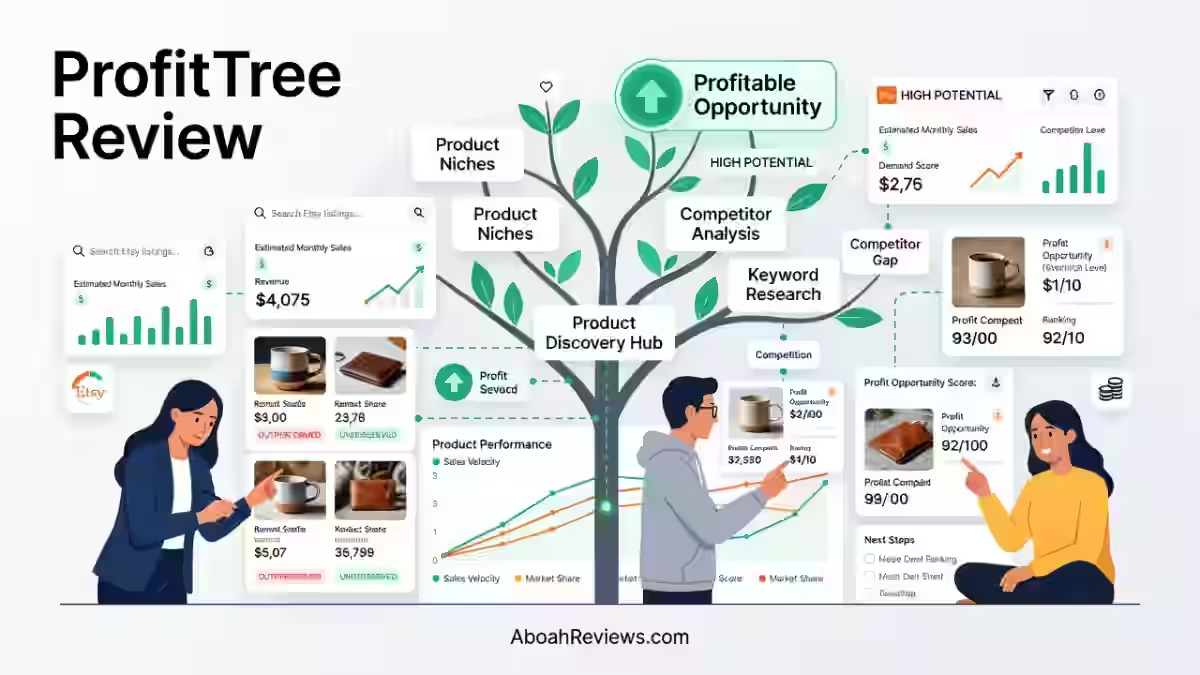
In this ProfitTree review, it scores 7.2/10 as an Etsy product research and market intelligence platform that solves the problem of manually browsing Etsy to find profitable products and understand competitor performance.
After 30 days of daily use across the Product Finder, Etsy Radar, Shop Finder, Tracking, Chrome extension and Rupert AI, I found it most valuable for:
- Etsy beginners researching their first products
- Print-on-demand sellers identifying market opportunities
- Established Etsy sellers wanting to consolidate research and competitor monitoring into one tool
Several features, including profit tracking, listing reports and advertisement insights, require an Etsy shop connection because they rely on data from the seller’s own store.
I was unable to complete the connection during my test, so I could not independently evaluate these features.
What I Loved vs. What Needs Work
| What I Loved | What Needs Work |
| Rupert AI delivers genuinely detailed Etsy market reports, not just keyword lists | Product Finder page took up to 30 seconds to fully load during my test |
| Product Finder filters, including “High Demand, Low Competition,” are easy to use | Internal profit and seller analytics require an Etsy shop connection. |
| Etsy Radar adds live research data directly to Etsy while you browse | Chrome extension functionality can be temporarily affected by unannounced Etsy UI changes. |
| Shop Finder helps identify competitors quickly by keyword or category | Profit tracking, listing reports and ad analytics require an Etsy shop connection to access data from your own store |
| Free plan exists with 200 Rupert AI credits per week | Some Trustpilot reviewers questioned the accuracy of estimated sales figures. However, ProfitTree, like other marketplace research tools, uses estimates for external shop data because actual competitor revenue is not publicly available. |
| Setup took approximately 12 minutes before the core research tools were usable | Starter tier ($9.99/month) appears to lock significant data behind blur overlays per user reports |
How I Tested ProfitTree
I tested ProfitTree for 30 days on the Pro plan ($49.99/month), focusing on the features accessible without a connected Etsy shop.
Here is what I tested directly:
- Product Finder: Searched for “Samsung Galaxy S25 phone cases,” applied filters including “High Demand, Low Competition,” and exported filtered results
- Etsy Radar + Chrome Extension: Installed the extension, browsed Etsy for “eco friendly phone case,” and reviewed listing-level metrics surfaced by the extension
- Shop Finder: Searched for competing shops by keyword and category
- Tracking: Reviewed the dashboard for monitoring listings and shops over time
- Rupert AI: Submitted a structured phone-case market research request, selected the “Research first” option, and evaluated the final report generated approximately 2 minutes after confirmation
- Dashboard and onboarding: Timed the setup process (approximately 12 minutes) and noted page-load performance
What I Couldn’t Test Personally Without An Active Shop
- Profit Tracking
- Product Reports
- Listing Reports
- Advertisement Insights
- Orders
- COGS Management
- Printify integration
- Printful integration
These features require an Etsy shop connection, which I was unable to complete during my test.
For those features, I relied on ProfitTree’s published documentation and clearly identified third-party user experiences where relevant. I do not present those features as personally tested results.
I did not run rank tracking on Etsy listings during this test. Traffic change metrics are not applicable to this tool type in the same way they apply to SEO autoblogging tools.
The review focuses on the product research, competitor intelligence and AI analysis workflow.
What Is ProfitTree?

ProfitTree is an Etsy-specific product research, competitor monitoring and profit tracking platform.
It helps Etsy sellers identify products with potentially strong demand and revenue signals using listing data, shop performance estimates and competitor insights.
It is not a general e-commerce analytics tool. It does not support Amazon, Shopify or other marketplaces in any meaningful way.
In a sea of generic e-commerce apps, ProfitTree’s laser focus on Etsy and POD users is its greatest strength.
The platform combines four core areas: research tools (Product Finder, Etsy Radar, Shop Finder), competitor tracking, profit analytics (for connected shops), and an AI assistant called Rupert.
It provides a large Etsy product dataset that users can search and filter using demand and competition signals.
The platform can also help users compare product ideas, identify potential niche opportunities, generate spin-off ideas and build product strategies around specific Etsy markets.
The mental model: ProfitTree is what you use before you list on Etsy and to track whether your listings are actually making money after fees.
A Simple Way to Think About the Workflow
| Stage | Traditional Approach | ProfitTree Approach |
| Product Discovery | Browse Etsy manually, copy competitor ideas | Product Finder + Rupert AI market report |
| Demand Validation | Count reviews, guess at sales | Estimated sales, revenue, cart activity data |
| Competitor Research | Open 10+ tabs, manually compare | Shop Finder + Tracking dashboard |
| Profit Calculation | Manual spreadsheet | Connected shop profit tracking (advertised) |
| Listing Creation | Start from scratch | Rupert AI listing drafts |
Who Is ProfitTree Built For?
ProfitTree is best suited for:
- Etsy beginners who don’t know what to sell yet and need structured guidance
- Print-on-demand sellers using Printify or Printful who need market research and profitability insights together
- Established Etsy sellers who are still tracking profits in spreadsheets
- Multi-product Etsy shops wanting to identify which listings are actually profitable after fees
- Sellers planning product expansions who need competitor intelligence before entering a new category
Where ProfitTree Fits Compared With Etsy’s Native Analytics
Most Etsy sellers either rely on Etsy’s native analytics or use browser extensions to spot trending listings.
The problem is that Etsy’s native analytics don’t show competitor performance and standalone extensions don’t connect research to profitability.
ProfitTree attempts to consolidate both into one platform.
For sellers already using e-commerce tools like Hypotenuse AI for content workflows, ProfitTree occupies a comparable niche on the Etsy side: structured research before production.
Who Should Avoid ProfitTree?
- Sellers who require estimated competitor revenue data. External Etsy shop revenue is private and isn’t available to third-party research tools.
- Sellers on platforms other than Etsy (ProfitTree is Etsy-exclusive)
- Anyone who needs a refund-friendly, no-questions-asked billing policy
- Users with older or lower-spec machines where Chrome extension performance could be a problem
ProfitTree Features
1. Product Finder
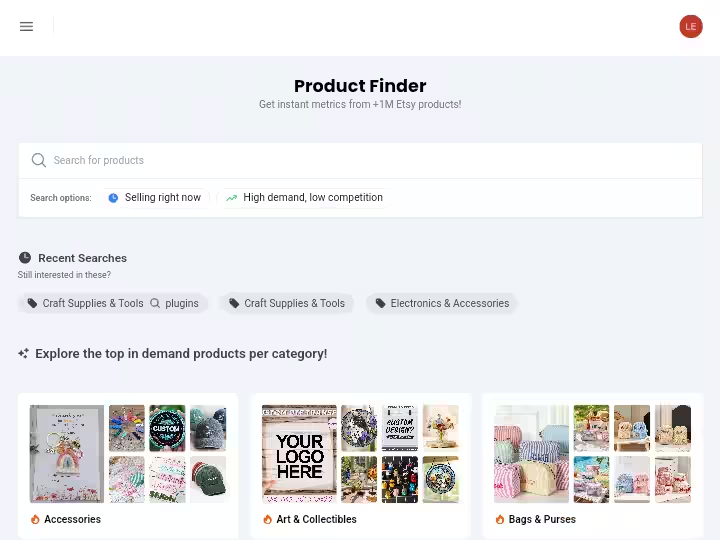
Product Finder is ProfitTree’s internal Etsy product research database. It lets you search a keyword and get a full table of competing listings with demand data, sales, revenue, and tags.
It is best for dedicated research sessions where you’re exploring a new niche.
My Testing Experience:
I searched for “Samsung Galaxy S25 phone case.” The tool returned a filtered table of Etsy product data.
The most useful filter during my test was “High Demand, Low Competition,” a toggle designed to surface products combining stronger demand signals with comparatively lower competitive density.
After filtering, I used the Export button to pull the results into a CSV.
The data returned included estimated sales, revenue figures, listing age and tag data. This is the kind of research that would otherwise require opening 30–40 Etsy tabs manually.
Limitations:
- The Product Finder page took under 2 minutes to fully load when returning large product datasets, not instant
- All figures are estimates, not verified Etsy sales data
- Deeper historical data (all-time metrics) is locked to the Pro plan at $49.99/month
Pro Tip: Use the “High Demand, Low Competition” filter as your starting point, then cross-reference the top results against Shop Finder to understand which sellers are actually winning those searches.
2. Etsy Radar + Chrome Extension
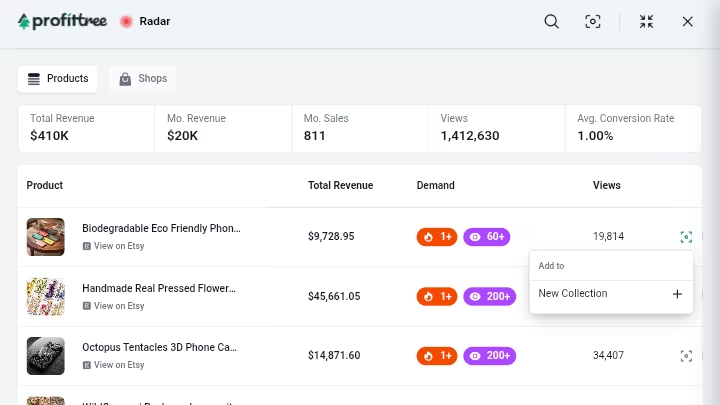
Etsy Radar is ProfitTree’s research layer that works directly within Etsy via the Chrome extension.
It adds a research panel to Etsy listing pages while you browse, allowing you to view ProfitTree’s estimated metrics without leaving Etsy.
Both Product Finder and Etsy Radar show the same core demand signals; the difference is where and how you access them.
My Testing Experience:
After installing the Chrome extension, I searched Etsy for “eco friendly phone case.”
The extension overlaid additional research data onto the standard Etsy results including estimated revenue, views, monthly sales, and average conversion rate at the listing level.
This is useful for on-the-fly research while browsing Etsy the way you naturally would.
The key distinction from Product Finder: Product Finder is better for structured discovery sessions inside ProfitTree. Etsy Radar is better for real-time analysis while you’re already on Etsy.
Limitations:
- The extension can be temporarily affected when Etsy makes unannounced changes to its website interface.
- During my test, I noticed heavier browser load while the extension was active, although I did not experience a full freeze.
- Third-party user reports have also described browser-performance problems, but these reports do not establish that the issue occurs consistently for all users.
Pro Tip: Disable the extension when you’re not actively doing Etsy research. Don’t leave it running in the background during regular browsing sessions.
3. Shop Finder
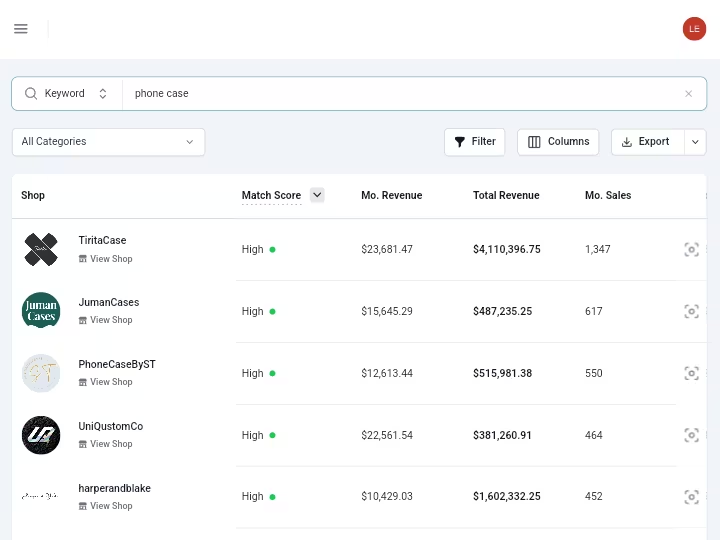
Shop Finder identifies competing Etsy shops by keyword, category, or niche so you’re not spending time manually searching Etsy for who’s winning a given product space.
My Testing Experience:
I used Shop Finder to search for competing shops in specific product niches.
The output surfaces shop-level data that helps answer the question: who is already winning this niche and what are they doing?
This maps directly to competitor research in SEO, the equivalent of identifying the top-ranking domains before deciding whether a niche is worth targeting.
ProfitTree lets you track competitor shops, listings, product launches, and pricing changes from a single dashboard, making it easier to identify market trends, validate product ideas, and understand what drives growth in your niche.
Limitations:
- Competitor data depth increases with higher plan tiers (all-time competitor metrics require the Pro plan at $49.99/month; 7-day competitor metrics are available on the Starter at $9.99/month)
- Shop Finder is most useful when combined with Tracking, discovering shops and then monitoring them over time
Pro Tip: Add the most relevant competitor shops to your Tracking dashboard immediately after finding them. Returning to Shop Finder to find the same shops repeatedly adds unnecessary friction.
4. Tracking
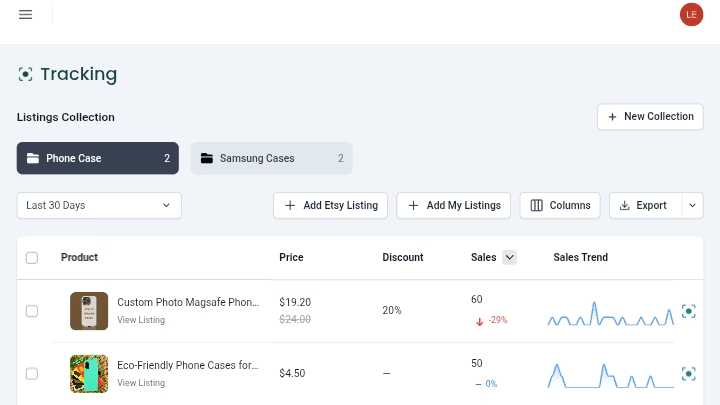
Tracking monitors selected Etsy listings and shops over time, removing the need to manually revisit Etsy to check for changes in pricing, new product launches, or shifts in sales activity.
My Testing Experience:
I added several shops and listings to the Tracking dashboard during my test. The interface for this was clean and easy to follow.
Listing Tracking in ProfitTree allows users to monitor competitor shops, competitor listings, and their own Etsy listings by organizing them into collections.
The practical use case is straightforward: instead of bookmarking competitor shops and manually checking them, you create a monitored collection and return to a summary view.
For anyone who has tried to track Etsy competitor activity manually, the time reduction is real.
Limitations:
- Historical tracking depth depends on plan tier (30-day competitor metrics on Growth at $29.99/month; all-time on Pro)
- Tracking is only as useful as the shops and listings you initially add. It requires an upfront research session to populate meaningfully
Pro Tip: Build your Tracking collection during your first Product Finder and Shop Finder session. A populated tracker from day one gives you actionable comparative data faster.
5. Rupert AI
Rupert AI is ProfitTree’s AI research assistant. It helps users research markets, validate product ideas, and create listings without starting from scratch.
It covers profitable niches, product idea comparison, spin-off opportunities and product strategies tailored to your goals.
My Testing Experience:
This was the feature I spent the most time with, and it was the most impressive part of my 30-day test.
I asked Rupert AI to find product ideas around phone cases.
Before running the analysis, Rupert asked how I wanted it to proceed and offered two options: “Research first” or “Go ahead now.” I selected “Research first.”
Rupert explained it would analyze Etsy demand and competition before identifying specific opportunities. After confirmation, the final report took approximately 2 minutes to generate.
What Rupert AI Estimated:
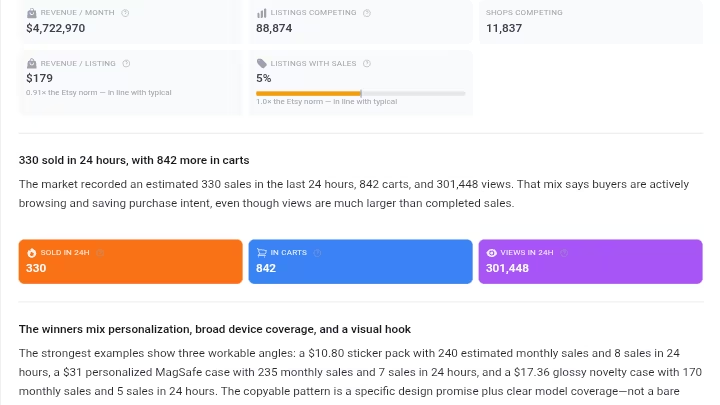
The phone-case market analysis was not a generic AI-generated list. It produced a structured Etsy market report covering:
- Estimated monthly market revenue: $4.7 million
- Competing listings: 88,874
- Competing shops: 11,837
- Listings with estimated sales: approximately 5.2%
- Average revenue per selling listing: approximately $179
- Estimated sales in the previous 24 hours: 330
- Items in carts: 842
- Views in 24 hours: 301,448
It also identified the strongest selling-price range ($19-$27), the median selling price ($27.49), the middle 50% price band ($21.39–$34.27) and gave the phone-case market a competition score of 0.53, classifying it as moderately crowded.
Rupert noted that approximately 26.2% of phone-case listings included personalization, compared with Etsy’s overall personalization rate of approximately 14.1%.
This is important because it means personalization alone is not a differentiator in this niche.
The recommended test strategy was specific: launch 2–3 closely related product concepts (personalized monogram case, Samsung S25-specific case, gift-oriented novelty case), price-test in the $21.39-$34.27 range and monitor performance before expanding.
The report used bar charts and structured data tables, not just a wall of text. That presentation level mattered; it was closer to a market brief than a chatbot response.
Limitations:
- 200 Rupert AI credits per week on Free and Lifetime plans; higher usage requires paid plans
- Reports take approximately 2 minutes to generate when “Research first” is selected
- Figures are estimates based on Etsy data signals, not verified seller-reported sales
Pro Tip: Always select “Research first” rather than “Go ahead now.” The extra 2 minutes produces a structured brief rather than a quick guess, and the data quality difference is significant.
6. Dashboard and Onboarding
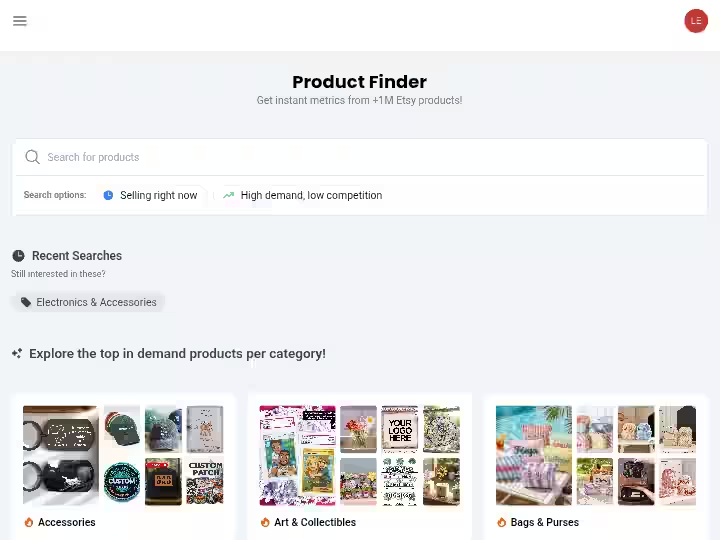
The dashboard acts as ProfitTree’s central hub for research and tracking, with additional profit and seller analytics available when an Etsy shop is connected.
My Testing Experience:
Setup took approximately 12 minutes from account creation to having the core research tools accessible.
The onboarding didn’t prompt me to connect to an Etsy shop and this is not required to access research features like Product Finder, Shop Finder, Etsy Radar and Rupert AI.
I could not complete the Etsy shop connection during my test.
As a result, sections of the dashboard related to profit tracking, order analytics, listing reports, and advertisement insights showed placeholders rather than live data.
Limitations:
- Etsy shop connection is required for profitability features
- Dashboard sections that require a connected shop remain blank until setup is complete, which creates an incomplete first impression for users who can’t immediately connect their shop.
ProfitTree Results After 30 Days of Testing
Because this test focused on Etsy product research rather than an SEO publishing workflow, traditional DR/impression metrics are not applicable here.
The table below reflects what I was able to measure within the scope of my 30-day test:
| Metric | Result |
| Setup time | 12 minutes |
| Core features tested firsthand | 6 |
| Rupert AI report generation time | ~2 minutes (Research First mode) |
| Product Finder page load time | Under 2 minutes |
| Etsy shop connection completed | No |
| Profit tracking independently verified | No |
| Chrome extension performance issues observed | Minor (heavier browser load; no full freeze) |
| Trustpilot rating at time of review | 4.0/5 (18 reviews) |
| Pricing plan tested | Pro ($49.99/month) |
ProfitTree Workflow Comparison: Before vs. After
| Task | Traditional Approach | ProfitTree Approach | Estimated Time Reduction |
| Product discovery | Manually browsing Etsy, opening multiple tabs | Product Finder with demand filters + export | ~60–70% |
| Competitor research | Bookmarking shops, manual revisits | Shop Finder + Tracking dashboard | ~50–65% |
| Live listing analysis | Opening each listing individually | Etsy Radar Chrome extension overlay | ~40–50% |
| Etsy market sizing | Manual research and spreadsheet analysis | Rupert AI market report | ~75–80% |
| Profit calculation | Manual spreadsheet with fees and costs | Connected shop profit tracking | Up to 90% (per user reports) |
ProfitTree Pricing for 2026
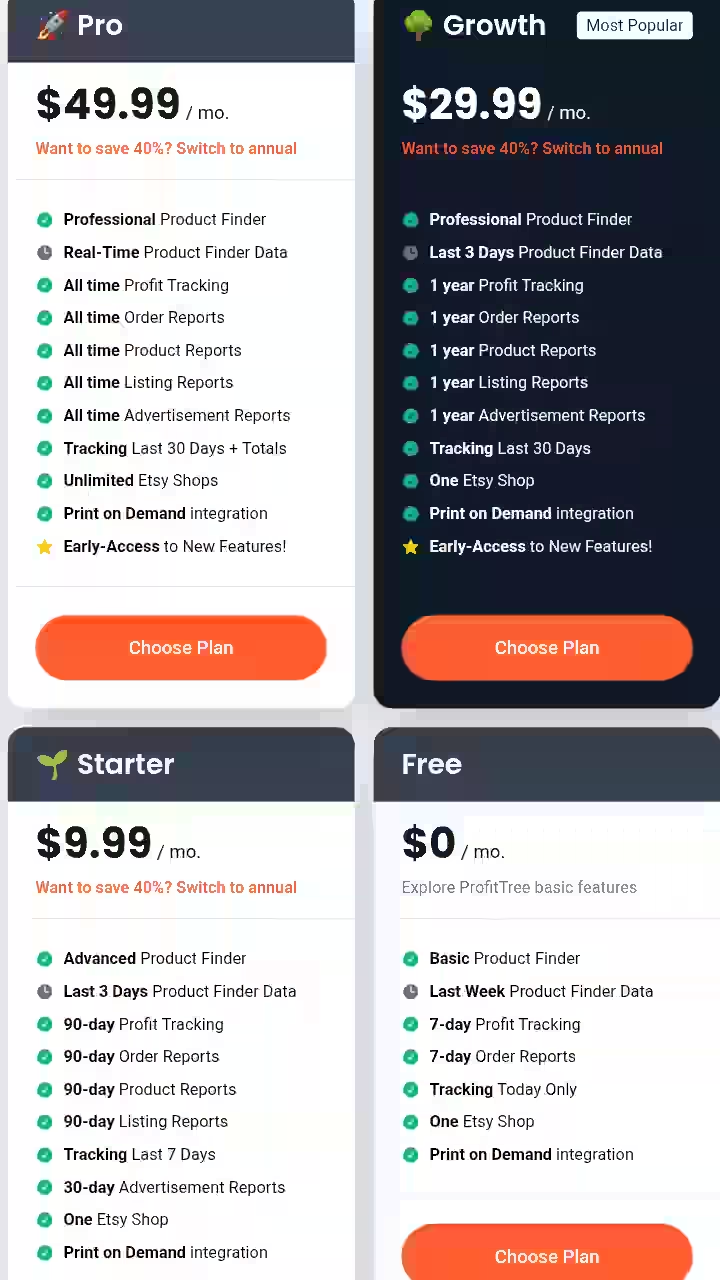
| Plan | Monthly Billing | Annual Billing | Key Included Features |
| Free | $0 | $0 | Basic research, competitor tracking, limited profit history, Rupert AI credits |
| Starter | $9.99/month | $5.99/month | More research data, 7-day competitor metrics, 90-day profit history, Product and Listing Reports |
| Growth | $29.99/month | $17.99/month | Demand, visibility and conversion insights, 30-day competitor metrics, 1-year profit history |
| Pro | $49.99/month | $29.99/month | All-time listing/shop metrics, all-time competitor metrics, all-time profit history, unlimited Etsy shops |
Plan-by-Plan Feature Breakdown
Free: $0/month
The Free plan includes:
- ProfitTree AI
- 200 credits per week
- Basic Product & Shop Finder
- Basic Competitor Tracking
- Profit Tracking Dashboard
- Up to 7 days of history
- Orders tracking
- Advertisement Insights
- One Etsy shop
- Print-on-Demand integration
Starter: $9.99/month
Everything in Free, plus:
- ProfitTree AI
- Unlimited credits until August 16th
- Revenue insights
- Sales insights
- Smarter insights for evaluating products and shops
- 7-day metrics for competitor tracking and deeper insights
- 90 days of history
- Product & Listing Reports
Growth: $29.99/month
Everything in Starter, plus:
- ProfitTree AI
- Unlimited credits until August 16th
- Exclusive demand insights
- Visibility scores
- Conversion rate insights
- 30-day competitor metrics and trends
- One year of history
Pro: $49.99/month
Everything in Growth, plus:
- ProfitTree AI
- Unlimited credits until August 16th
- All-time sales and revenue metrics for listings and shops
- All-time total metrics for competitors
- All-time history
- Unlimited Etsy shops
- Early access to new features
Note: All plans include a 40% off on annual subscription.
ProfitTree Pros & Cons
Pros
- All-in-One Dashboard: Combines profit/loss (P&L) tracking, competitor tracking, and niche product research in a single platform.
- Real Profit Calculation: Automatically factors in hidden or tedious costs like Etsy transaction fees, shipping, ad spend and production expenses.
- Print-on-Demand (POD) Friendly: Seamlessly syncs costs with major suppliers like Printify and Printful.
- Ad Optimization Clarity: Gives clear insights into whether Etsy ads are actually generating a profit rather than just driving empty clicks.
- Time-Saving Research: Features like the Product Finder and Chrome extension tags help quickly spot trending items and evaluate niche demand.
Cons
- Customer Support: User reviews occasionally highlight that support responses can be slow or hard to reach when troubleshooting technical issues.
- Niche Focus: It is heavily optimized for Etsy; sellers running multi-platform empires (such as Shopify plus Amazon and Walmart simultaneously) might find the ecosystem a bit limited compared to broad e-commerce alternatives.
- Data Limits on Lower Tiers: Advanced metric histories can require upgrading to higher subscription levels.
ProfitTree Alternatives and Comparisons
ProfitTree vs. EverBee
| Criteria | ProfitTree | EverBee |
| Product research | Product Finder + Etsy Radar + Rupert AI | Chrome extension-first research |
| Profit tracking | Yes (connected shop required) | Yes |
| AI assistant | Rupert AI (structured market reports) | More limited AI features |
| Chrome extension performance | Mixed reviews; some browser slowdown reported | Generally reported as more stable |
| Free plan | Yes (200 Rupert AI credits/week) | Yes |
| Best for | Sellers who want AI-assisted research + profitability in one platform | Sellers prioritizing Chrome extension reliability |
| Verdict | Stronger AI research layer; extension performance is a risk factor | More stable extension; weaker AI research |
ProfitTree vs. Marmalead
| Criteria | ProfitTree | Marmalead |
| Primary focus | Product research + profit tracking | Keyword and SEO research for Etsy |
| AI features | Rupert AI market analysis | Limited AI |
| Profit tracking | Yes (advertised; shop connection required) | No |
| Best for | Sellers wanting research-to-profitability in one tool | Sellers focused specifically on Etsy SEO and keyword optimization |
| Verdict | Broader scope; Marmalead is more focused on Etsy keyword strategy |
Which Tool Should You Choose?
- Choose ProfitTree if you want product research, competitor tracking, and profit analytics together, and you’re willing to connect your Etsy shop to unlock the full platform
- Select EverBee if Chrome extension reliability is a primary concern and you don’t need structured AI market reports
- Pick Marmalead if Etsy keyword and SEO optimization is your primary need and you’re not concerned with profit tracking
ProfitTree Real Use Cases
1. Etsy Beginner Finding a First Product
Identify a product category with demand and manageable competition before investing in product creation.
- Open Product Finder, search for a broad category (e.g., “digital planners”)
- Apply “High Demand, Low Competition” filter
- Export top results
- Run a Rupert AI “Research first” analysis on the top 2–3 product types
- Review market size, pricing distribution, and competition score
- Add top competitor shops to Shop Finder, then Tracking
- Identify gaps in the top listings: personalization, device targeting, audience specificity
- Launch 2–3 tightly positioned test products based on Rupert’s recommended price range
Estimated time saved vs. manual research: 4–6 hours per product discovery cycle
2. Print-on-Demand Seller Validating a New Niche
Determine whether a POD niche (e.g., pet-themed phone cases) has enough demand to justify Printify production costs.
- Use Rupert AI to generate a market report for the specific niche
- Review estimated monthly revenue, number of competing listings, and price distribution
- Identify whether personalization is common and what design angles are underrepresented
- Cross-reference with Etsy Radar while browsing the niche on Etsy
- Connect Printify integration (advertised) to align product costs with the recommended price range
- Set Tracking on the top 5 competing shops
Estimated time saved: 3–5 hours per niche validation cycle
3. Established Seller Replacing Manual Spreadsheets
Estimate per-listing profitability after Etsy fees, shipping, production costs, and other seller-provided expenses without maintaining a manual spreadsheet.
The gap between gross sales and what a seller actually keeps after production costs, Etsy’s transaction fees (6.5%), listing fees ($0.20), payment processing charges (~3% + $0.25), and any ad spend is what determines whether a shop is financially healthy.
Workflow (per ProfitTree’s advertised features and user reports):
- Connect Etsy shop to ProfitTree
- Enter COGS for each product type
- Connect Printify or Printful if applicable
- Review the profit dashboard for per-order and per-listing net profit
- Use Advertisement Insights to identify which Etsy ads are margin-positive
Note: I could not independently verify this workflow. One Trustpilot reviewer who used ProfitTree for their Etsy shop said it made a significant difference: “Before, I was just guessing my profits, but now I can clearly see what I’m actually making after fees and costs. Much better than my own clunky spreadsheets.”
4. SEO Professional or Agency Entering the Etsy Space
Apply structured market research methodology to Etsy product selection for a client or new side project.
- Use Rupert AI to generate a market brief for the target niche
- Use Product Finder to identify the top-performing listings by demand signals
- Use Shop Finder to map the competitive landscape
- Build a Tracking collection of the top 10 competing shops
- Review pricing distribution and personalization prevalence before advising on product positioning
- Return to Tracking weekly for competitive monitoring
This workflow is familiar to anyone who has done keyword research and competitive analysis for SEO.
The output from Rupert AI: market size, competition score, pricing distribution, product type breakdown is structured similarly to what a solid keyword research brief looks like.
ProfitTree Reviews and Complaints from Users
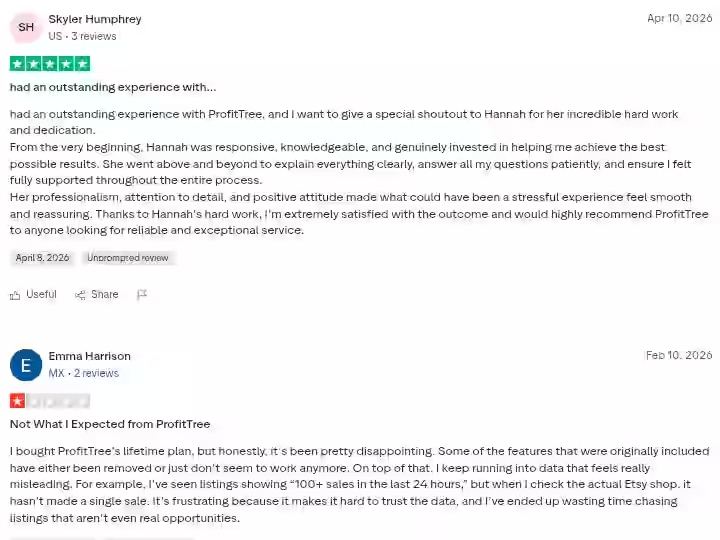
ProfitTree has an unclaimed Trustpilot profile rated 4.0/5 based on 18 reviews at the time of this review.
Trustpilot indicates that the profile is unclaimed and that the company has not invited customers to leave reviews.
That does not make the reviews invalid, but it means the 18-review sample should not be treated as representative of the entire customer base.
Treat the review distribution accordingly.
Positive:
One reviewer who had been using ProfitTree since 2025 said it serves a dual purpose: tracking P&L as an Etsy seller and helping find new opportunities.
Others called it a “must have tool” and said it “does a great job helping identify demand in just a few clicks” and had “made a huge difference” to their business.
Testimonials on ProfitTree’s own website include claims of better understanding of business performance and improved decision-making from the cost breakdown and stats.
Several reviewers specifically mentioned customer support, with one noting “an outstanding experience” and praising a support team member for being “responsive, knowledgeable, and genuinely invested in helping.”
Negative:
One 1-star Trustpilot reviewer who purchased the lifetime plan reported that some features had been removed or no longer worked, and that they encountered data they found misleading.
The reviewer specifically alleged that some listings displayed “100+ sales in the last 24 hours” even though the reviewer could not confirm corresponding sales activity on Etsy.
Because ProfitTree’s external marketplace figures are estimates, individual differences between estimated and manually observed sales should be interpreted in that context.
The reviewer’s experience is worth noting, but one report isn’t sufficient to establish that ProfitTree’s estimates are systematically inaccurate.
At least one Chrome Web Store reviewer also raised concerns about changes to ProfitTree’s pricing and lifetime-plan structure after purchasing lifetime access.
Because this reflects an individual customer experience, I would not generalize it to every lifetime-plan customer without additional evidence.
Multiple user reports describe browser slowdown or freezing, although I experienced only heavier browser load rather than a full freeze during my test.
ProfitTree Weighted Scoring
| Category | Weight | Score | Weighted Score |
| Features and Functionality | 30% | 7.5/10 | 2.25 |
| Ease of Use | 20% | 8.5/10 | 1.70 |
| Pricing and Value | 20% | 7.0/10 | 1.40 |
| Support and Customer Experience | 15% | 6.5/10 | 0.975 |
| Trust and Credibility | 15% | 6.0/10 | 0.90 |
| Total | 100% | 7.225 / 10 (Rounded to 7.2) |
Scoring rationale:
- Features and Functionality: Product Finder, Etsy Radar, Shop Finder, and Rupert AI all delivered during my test. The deduction reflects features I couldn’t personally verify (profit tracking, ad analytics) and the Chrome extension performance concerns.
- Ease of Use: The research tools are genuinely beginner-friendly. Setup was straightforward. The inability to complete Etsy shop connection was a blocker, but the research side of the platform is immediately accessible.
- Pricing and Value: The Free plan offers real value, while the paid plans provide progressively deeper research and historical data. The Starter tier’s data restrictions lower the score; if more data were available at the entry-level paid tier, this would score higher.
- Support and Customer Experience: Mixed Trustpilot evidence. Strong individual support praise, offset by reports of slow support and refund friction.
- Trust and Credibility: ProfitTree relies on estimated external marketplace data, which users should understand before making product decisions. The small Trustpilot review sample also limits how confidently broader conclusions can be drawn from individual reviews.
ProfitTree Risk Assessment
1. Estimated Data Requires Context
ProfitTree’s external Etsy marketplace figures are estimates rather than verified seller-reported sales. This is important to understand when using Product Finder, Etsy Radar and Rupert AI.
External Etsy shop revenue is private, so third-party research tools cannot provide competitors’ actual revenue figures. The estimates should therefore be treated as directional market signals rather than guaranteed results.
Mitigation: Use ProfitTree’s estimates to shortlist products and niches, then manually validate promising opportunities on Etsy before committing significant production or advertising costs.
2. Chrome Extension Performance Risk
At least one user reported having to remove the extension because it caused their computer to freeze.
Other reviews also mention browser-performance problems, so the issue is worth testing on your own system before relying on the extension heavily.
However, I did not experience a full freeze during my 30-day test.
Mitigation: Test the extension on a machine you’re comfortable loading before using it for live research sessions. Use the extension in focused sessions, not as a permanent background process.
3. Pricing and Plan Dependency
Some advanced historical metrics and analytics are restricted to higher subscription tiers. Sellers should compare the current plan limits against their research needs before subscribing.
4. Etsy API Dependency
ProfitTree’s data quality is tied to Etsy’s marketplace data and API access.
Any changes to Etsy’s API terms or data availability could affect the accuracy and availability of ProfitTree’s research tools.
This is a systemic risk for any Etsy-specific tool, not a ProfitTree-specific issue.
Final Verdict on this ProfitTree Review for 2026
Buy if you:
- Are an Etsy seller or POD seller who currently does product research manually
- Want AI-assisted market analysis that goes deeper than a keyword list
- Are comfortable treating estimated data as directional rather than exact
- Are primarily interested in the research and competitor tracking features
Skip if:
- You sell primarily on platforms other than Etsy
- Chrome extension performance is a hard requirement on your current machine
- You need automated profit tracking but don’t have an Etsy shop to connect
- You want a paid plan with a more flexible refund policy
Frequently Asked Questions About ProfitTree
What is ProfitTree used for?
ProfitTree is an Etsy-specific platform for product research, competitor monitoring, and profit tracking. It helps sellers identify profitable products using demand signals, analyze competitor shops, and (for connected shops) calculate true net profit after fees and costs.
Is ProfitTree free?
Yes, ProfitTree has a Free plan that includes basic research features and 200 Rupert AI credits per week. Paid plans start at $9.99/month (Starter) with Growth at $29.99/month and Pro at $49.99/month.
How accurate is ProfitTree’s sales data?
All figures produced by ProfitTree including Product Finder results and Rupert AI market reports are estimates based on Etsy marketplace signals, not verified seller-reported data. At least one Trustpilot reviewer reported seeing estimated sales figures that differed significantly from actual shop sales when cross-checked manually.
What is Rupert AI in ProfitTree?
Rupert AI is ProfitTree’s AI research assistant. It generates structured Etsy market reports that include estimated market size, competing listings, pricing distribution, personalization prevalence, top-selling product patterns, and recommended product strategies. It is the most differentiated feature in the platform compared with competing Etsy research tools.
Which is better, EverBee or ProfitTree?
ProfitTree and EverBee are both popular tool suites for Etsy sellers, but they serve different primary needs. EverBee focuses heavily on front-end product research, competitor sales estimation and keyword validation, whereas ProfitTree leans into back-end profit tracking, financial analytics and print-on-demand (POD) integrations alongside its research features.
Is ProfitTree legit?
Yes, ProfitTree (profittree.io) is a real, legitimate software company built for Etsy sellers to track real-time profit margins, analyze competitors and research products. However, user experiences are mixed regarding its reliability and value compared to established alternatives like eRank or EverBee.

- #1 Best Plugin for Automatic Blog Posting in WordPress (2026) - September 13, 2026
- 13 Best WordPress Autoblogging Plugins I Tested & Ranked for 2026 - September 13, 2026
- 13 Best Google AI Overview Checking Tools in 2026 (Tested & Ranked) - September 9, 2026