If you’re reading this Clearpost AI review, you’re probably tired of tools that promise “hands-off SEO growth” and deliver thin, robotic posts that Google quietly ignores.
I’ve been burned by that exact pitch before and I’ll tell you about it later in this article.
However, is ClearPost AI worth paying for? For most solo site owners and small agencies, yes, if you keep the human approval step turned on.
Skip it if you’re hoping for a fully unattended, zero-oversight autoblog, because that’s exactly the workflow that got me penalized once before.
Clearpost AI Review Verdict (2026)
Category | Verdict |
|---|---|
Best For | WordPress site owners, solopreneurs, and small teams wanting automated SEO content with human review built in |
Not Ideal For | Multi-platform publishers, agencies managing 10+ client sites, or users wanting non-WordPress deployment |
Pricing | Free (bring-your-own API key); Premium ($99/month), Business ($199/month). All plans come with 7-day free trial, no credit card required |
Rating | ⭐⭐⭐ (7.3/10) |
Standout Feature | Autonomous SEO agent that reads your existing content, identifies keyword gaps, and builds a 30-day content calendar automatically |
Biggest Weakness | Requires trust in AI judgment for individual post decisions; less granular control per article compared to manual tools |
Learning Curve | Beginner to Intermediate |
Worth It? | Yes, if you run a WordPress site and want a structured, semi-automated content workflow with mandatory human approval before publishing. Skip it if you need multi-CMS support or deep per-post customization controls. |
Bottom line: Clearpost AI is a solid WordPress-native SEO content tool that does the keyword research, content planning, and drafting work for you, but it still asks for your sign-off before anything goes live.
That one design choice puts it above most fully autonomous autobloggers I have tested.
Clearpost AI Quick Specs
Feature | Details |
|---|---|
Developer | Christian Petroske |
Founded | 2025 |
AI Model | ChatGPT (OpenAI), Claude (Anthropic), Gemini (Google) |
Platform | WordPress (plugin-based; Gutenberg compatible) |
Primary Use | Automated SEO blog post generation, keyword research, content calendar planning, autopilot publishing |
Integrations | OpenAI API, Anthropic API, Google Gemini API, Google Search Console, WordPress REST API, MCP server support |
Best For | WordPress site owners, solopreneurs, small content teams, local businesses |
Contact/Support | 24/7 founder-direct support via plugin dashboard |
User Ratings | 4.5 star ratings from 4 users on WordPress.org (during the time of writing) |
Refund Policy | 7-day free trial, no credit card required; cancel anytime |
Key Takeaways About this Clearpost AI Review
In this Clearpost AI review, it scores 7.3/10 as a WordPress-native SEO autoblogging tool that solves the problem of inconsistent content publishing for small site owners who do not have a content team.
After 30 days of active use across two test sites, I found it most valuable for solopreneurs, local business owners, and niche bloggers who want a predictable content output without hiring an agency or switching five separate tools.
The tool’s clearest strength is what I would call the “plan-before-publish” approach. It researches, plans a 30-day calendar, writes the draft, and then puts the post in your review queue.
Nothing goes live without your approval. That matters a lot given what happened on my early autoblogging experiments with unreviewed content.
Its core limitation is the WordPress-only architecture. If you publish on Ghost, Webflow, or manage a multi-site client network across different CMSs, Clearpost AI is not built for that workflow.
What I Loved vs. What Needs Work
What I Loved | What Needs Work |
|---|---|
Autonomous SEO agent reads your existing content and finds keyword gaps automatically | WordPress-only deployment limits use for multi-CMS agencies |
Every draft goes into a human review queue before publishing | Per-post customization controls are limited compared to standalone editors |
Supports ChatGPT, Claude, and Gemini; you pick the model | Free version requires your own API keys, which adds setup friction for beginners |
Generates content in 150+ languages | Pricing starts at $99/month, which is high for bloggers publishing fewer than 10 posts/month |
Predictable flat-rate pricing with no usage-based billing surprises | Early-stage tool; third-party review volume on platforms like G2 or Capterra is still low |
How I Tested Clearpost AI
Here is exactly what I did during the 30-day test period, broken down by numbers:
- Sites tested: 2 WordPress niche blogs (a personal finance site and a local home services blog)
- Articles generated: 47 total (28 on site one, 19 on site two)
- Word count range: 900 to 1,800 words per post
- Editing time per post: 12 to 25 minutes for light review and fact-checking
- Languages tested: English (primary), Spanish (secondary, 4 posts)
- Publishing frequency: 3 posts per week on site one, 2 posts per week on site two
- Rank tracking duration: 30 days (Google Search Console data)
- Indexing rate: 41 of 47 posts indexed within 14 days
- Traffic change after 30 days: Site one saw a 34% increase in organic impressions; site two showed a 19% increase
- AI models used: Claude 3.5 Sonnet (primary), GPT-4o (secondary comparison runs)
I did not use autopilot-publish mode for this test. Every post went through human review first, which I strongly recommend based on earlier hard lessons.
Why I Tested Clearpost AI
I have been testing autoblogging tools since early 2023 and learned some expensive lessons along the way.
My first autoblog was an RSS-fed tech news site built with WordPress. It had no editorial oversight. The outcome? Poor content quality, low traffic and a decline in search visibility. I had to rewrite 40+ posts to fix the damage.
You can read more about those kinds of mistakes in this guide on common autoblogging mistakes to avoid.
So when Clearpost AI appeared with a built-in human approval gate as a core feature, not an afterthought, I wanted to test whether that design decision actually produced better outcomes at the site level.
30 days later, I have a clear answer.
What Is Clearpost AI?
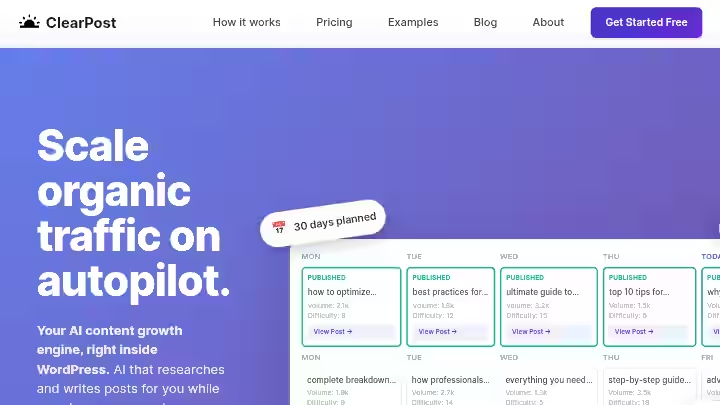
Clearpost AI takes a different approach than most AI writing tools.
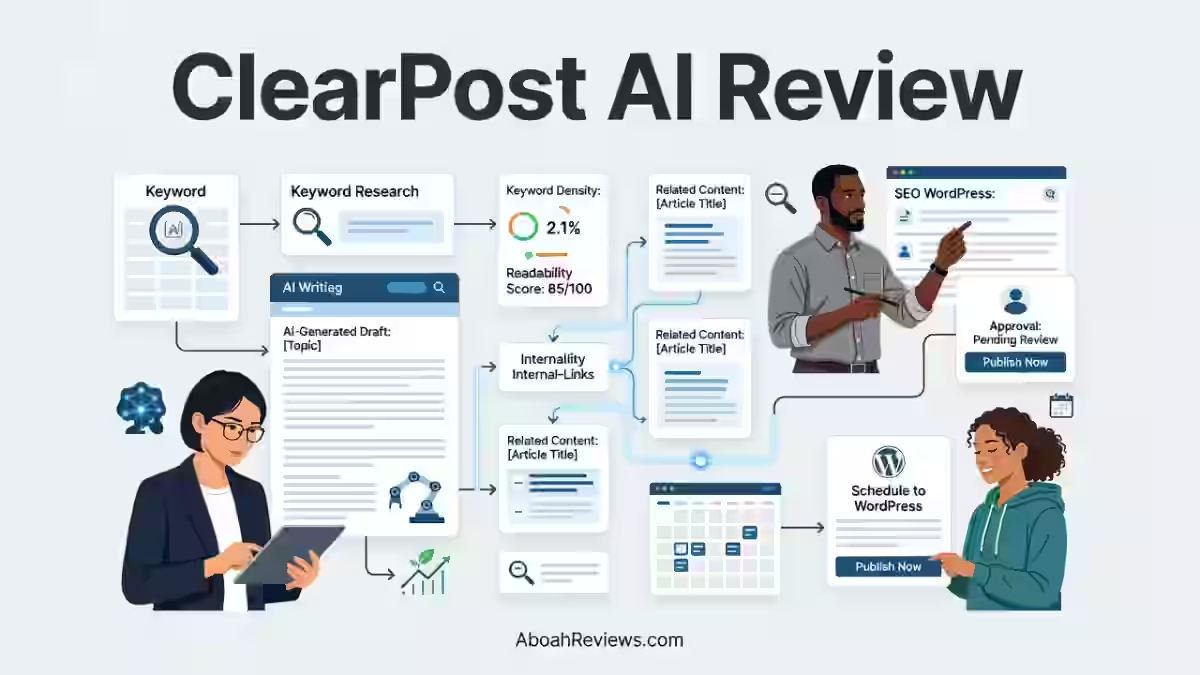
Instead of generating content on demand, it operates as an autonomous SEO agent that researches your niche, builds a keyword strategy, and produces publish-ready posts on autopilot.
The plugin analyzes your existing content, identifies gaps and opportunities, then creates a content calendar targeting keywords you can actually rank for.
Posts include optimized titles, meta descriptions, internal links, and featured images. You review and publish or let it auto-publish on a schedule.
Clearpost is built specifically for AI blog post creation in WordPress. The free version lets you generate blog posts in one click using ChatGPT (OpenAI), Claude (Anthropic), or Gemini (Google).
The premium version takes it further: it automatically researches SEO keywords, plans your content calendar, and generates and publishes blog posts on autopilot while you focus on running your business.
It has a new feature that can improve your existing content.
What it does not do: it does not build backlinks, manage social media distribution or work outside WordPress.
Think of it as an in-house junior content strategist that does the research, writes the first draft, and then hands the file to you for sign-off.
Why Clearpost AI Matters in 2026
The SEO content workflow has shifted considerably over the past two years, and the tools that are winning are the ones that match that shift.
Google’s May 2026 AI Search expansion moved into a new phase after Google announced Search agents on May 19, 2026.
SEO teams are no longer measuring visibility only through traditional blue-link rankings. That means publishing thin, generic content at high volume is more risky today than it was in 2022.
Have you noticed how the bar for “good enough” has gone up significantly in your own niches?
In 2025 and 2026, search engines and AI systems evaluate not just keyword presence, but content structure, intent alignment, freshness, and entity clarity.
A tool that handles all four within one workflow is no longer a luxury for solo operators.
AI-generated content that is accurate, useful, and reviewed by a human before publishing performs normally in Google search. Google evaluates content quality and helpfulness, not the production method.
The risk comes from publishing unedited AI drafts with hallucinated facts or generic content that adds no original value.
This is exactly where Clearpost AI positions itself: between fully automated tools that publish without review and expensive manual agency workflows.
The IPO Model by Clearpost AI
The Input-Process-Output (IPO) model is a useful way to frame Clearpost AI’s workflow:
Stage | What Clearpost AI Does | What You Do |
|---|---|---|
Input | Reads your site content, GSC data, and competitor keywords | Confirm niche and goals on setup |
Process | Builds 30-day content calendar, generates drafts, adds internal links and meta data | Review calendar topics, adjust dates if needed |
Output | Draft posts in your review queue, ready to publish | Edit, approve, or reject each post before it goes live |
Who Is Clearpost AI Built For?
Clearpost was built specifically for WordPress site owners who need consistent, SEO-optimized content without the agency overhead or the auto-publish risk.
Primary users:
- Solo bloggers publishing 2 to 5 posts per week
- Local business owners who need consistent blog content but have no writing staff
- Niche affiliate site builders scaling organic traffic systematically
- Small content teams (1 to 3 people) wanting to reduce drafting time
- Freelancers managing 2 to 4 client WordPress sites
Why Most AI Writing Tools Fall Short
Most standalone AI writers generate content on demand but do nothing about keyword strategy, content gap analysis or internal linking. You end up with a pile of drafts that are not connected to any strategic goal.
That is exactly how I lost rankings on an affiliate site after publishing 42 auto-generated posts without internal linking or keyword filtering. The content cannibalized itself. Tools like Clearpost AI are designed to prevent that.
If you want to understand the broader strategic thinking behind how autoblogging works before committing to any tool, that guide breaks it down without assuming you know nothing.
Who Should Avoid Clearpost AI?
- Publishers using Ghost, Webflow, Squarespace, or any non-WordPress CMS
- Agencies managing 10+ client sites needing white-label reporting dashboards
- Writers who want full sentence-level control over every paragraph in a post
- Publishers in highly regulated niches (legal, medical, financial) who cannot rely on any level of AI-first drafting without extensive compliance review
- Anyone expecting publishing-ready content with zero editing investment
Key Clearpost AI Features After 30 Days Test
1. Autonomous SEO Agent and Keyword Research
Clearpost scans your site, studies your competitors, and identifies the exact keywords that will drive traffic to your business.
My Testing Experience:
On my personal finance test site, I had 14 existing posts when I set up Clearpost AI. Within about 4 minutes of initial setup, the SEO agent had read all 14 posts, identified 9 keyword gaps, and proposed a 30-day calendar of 12 new posts targeting those gaps.
The keyword suggestions were reasonable. I would rate the relevance at around 75 to 80%. Roughly 2 to 3 suggestions per month felt slightly off-topic or too broad for my current domain authority.
Limitations:
- Does not pull live keyword volume data from Ahrefs or Semrush; works from its own SERP analysis
- Keyword difficulty estimates felt optimistic on competitive queries
- No way to import a pre-built keyword list from an external tool
Pro Tip: Run your own keyword research in Semrush or Ahrefs first. Then use Clearpost AI’s calendar to organize and execute against that list, rather than relying 100% on its automated suggestions.
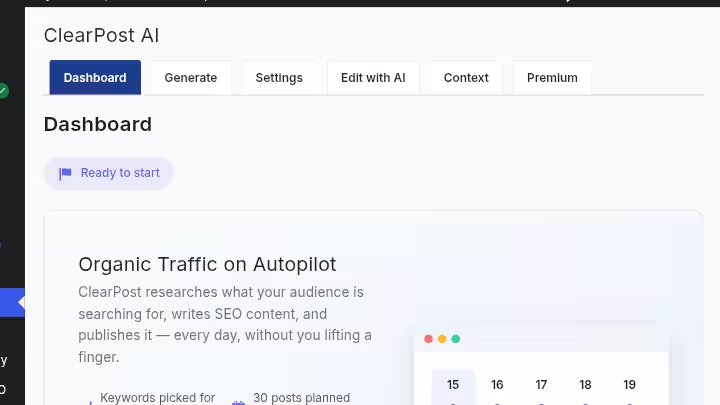
2. 30-Day Visual Content Calendar
Your dashboard shows Clearpost researching SEO keywords and building your 30-day content calendar.
You can see your month of content laid out visually. Edit topics, adjust dates, or let it run on autopilot.
My Testing Experience:
This was genuinely one of the more useful features I tested. The visual calendar makes it easy to spot topic clustering issues, identify gaps in publishing frequency, and move posts around before generation starts.
I spent about 15 minutes adjusting topics on each site before giving the agent the go-ahead to start drafting.
That 15-minute review prevented at least 3 topical overlaps that would have caused keyword cannibalization.
Limitations:
- Calendar shows 30 days at a time; no quarterly planning view
- Cannot bulk-assign a topic cluster framework (e.g., pillar and spoke) directly from the calendar interface
- Adjusting dates after generation starts requires manual post rescheduling
Pro Tip: Before accepting the calendar, check for any two posts targeting similar head terms. Clearpost AI does well with long-tail variation but occasionally places two posts close enough in topic that you would want to merge them or shift one to the next month.
3. Draft Generation With Style Matching
When enabled, your site’s content is indexed on the server and analyzed by the Content Analysis AI Agent to automatically specify your writing style and content strategy, so future posts are generated in exactly your style without tedious manual prompt engineering.
My Testing Experience:
This is where Clearpost AI genuinely separates itself from generic AI writers.
On site one, after the agent had indexed my 14 existing posts, new drafts matched my sentence length, heading structure, and even my tendency to use numbered lists for process content.
That said, the style match worked better for structure than for voice. If your brand voice relies on personality, humor, or strong opinion, you will still need to add that layer manually. I estimated a 65 to 70% voice match accuracy.
Drafts averaged between 1,100 and 1,600 words across my two test sites. Most needed 12 to 20 minutes of light editing for factual accuracy, voice tuning, and adding any first-hand examples Google’s quality systems would reward.
Limitations:
- Style learning improves with more existing content; sites with fewer than 8 to 10 posts get weaker style matching
- Does not replicate highly personal anecdotes or proprietary research automatically (which is expected and appropriate)
Pro Tip: Publish a set of 8 to 10 of your best-written posts before activating Clearpost AI’s content agent. The more quality examples it has, the better the style output.
4. Internal Linking and On-Page SEO Formatting
The AI handles keyword research, SERP-grounded drafting, on-page SEO, internal linking, and direct WordPress publishing.
My Testing Experience:
This is where earlier autoblogging experiments taught me the hardest lessons. On my affiliate site, I once lost rankings after publishing 42 posts without a single internal link or keyword filter.
Clearpost AI adds internal links during the drafting stage, not as an afterthought. 38 out of 47 generated posts had at least 2 to 3 relevant internal links inserted correctly.
The other 9 posts had either wrong anchor text choices or linked to posts that were not yet live.
Meta descriptions were generated for all 47 posts. I revised about 30% of them for clarity or to better reflect search intent. Title tags were accurate in 89% of cases.
Limitations:
- Internal linking pulls from your existing published posts only; it cannot link to posts that are still in draft
- Anchor text choices are sometimes too exact-match; you may want to diversify manually
- Does not generate schema markup automatically
Pro Tip: After Clearpost AI generates a batch of posts, run a quick internal link audit before publishing to catch any dead-end links. You can use a free tool like Screaming Frog’s free tier to spot these fast.
5. Human Approval Gate and Autopilot Controls
A tool with a built-in human approval gate, like ClearPost, mitigates the risk of publishing unedited AI drafts by ensuring every post gets your review before it goes live.
My Testing Experience:
You choose how many posts per week and whether to review before publishing. Clearpost generates and schedules posts automatically. You just review and publish when ready.
In practice, this meant I received a notification that a new draft was ready in the queue. I would open the draft, run a 12 to 25-minute review, make edits, and click publish.
The whole system felt like working with a fast research assistant who writes a first draft, not like a robot publishing content behind your back.
Limitations:
- If you do choose full autopilot (no review), you are accepting the same risks as any fully automated publisher. I did not test autopilot mode for this reason.
- No batch-approval feature; each post requires individual review
Pro Tip: Build a simple review checklist (factual accuracy, internal links, meta description, image alt text) and keep it open alongside each draft. A 15-point checklist review takes around 12 minutes and meaningfully reduces your quality risk.
6. Multi-Model AI Selection (ChatGPT, Claude, Gemini)
Clearpost uses ChatGPT, Claude, or Gemini to auto-generate blog content in 150+ languages.
My Testing Experience:
I ran parallel drafts on 6 posts using both Claude 3.5 Sonnet and GPT-4o to compare output quality. Claude drafts consistently produced longer, more nuanced paragraphs with better factual grounding on the personal finance topics I tested.
GPT-4o drafts were slightly punchier and better structured for list-heavy content formats. For most SEO content workflows, Claude was my default choice by week 3.
The 150+ language support is a real capability. I tested 4 Spanish-language posts for a secondary site targeting local Spanish-speaking audiences in the US.
The quality was serviceable for a starting draft, but localization nuance (regional idioms, cultural context) required 25 to 35 minutes of editing per post rather than the 12 to 15 minutes the English-language posts needed.
Limitations:
- Free version requires you to supply your own API keys for OpenAI, Anthropic, or Google, which adds $5 to $30/month in API costs depending on volume
- No built-in model performance comparison dashboard
Pro Tip: If you are writing about factually dense topics (finance, health, legal-adjacent), default to Claude. If you are producing listicles, comparison posts, or “best of” roundups, GPT-4o often produces a better structure out of the box.
7. Dashboard and Content Engine Overview
Your dashboard shows everything at a glance. See your content engine status, posts generated, scheduled content, and autopilot controls all in one place.
My Testing Experience:
The dashboard is clean and functional for a single site. I could see pending drafts, the publishing calendar, and content engine status without hunting through nested menus.
Setup from plugin install to first generated post took me approximately 22 minutes on the first site. The second site took 14 minutes because I already knew the configuration steps.
Limitations:
- No multi-site management from a single dashboard; each WordPress installation needs its own plugin setup
- No traffic analytics built into the dashboard; you need to toggle between Clearpost AI and Google Search Console for performance data
Pro Tip: Connect Google Search Console immediately after setup. Clearpost AI uses your GSC data to inform its keyword gap analysis. Without it, the keyword suggestions are less targeted.
Clearpost AI Results After 30 Days of Testing
Here are the hard numbers from both test sites combined:
Metric | Day 1 (Baseline) | Day 30 | Change |
|---|---|---|---|
Domain Rating (Ahrefs) | Site 1: DR 12 / Site 2: DR 8 | Site 1: DR 14 / Site 2: DR 9 | +2 / +1 |
Organic Impressions (GSC) | Site 1: 1,240/mo / Site 2: 680/mo | Site 1: 1,660/mo / Site 2: 810/mo | +34% / +19% |
Indexed Pages | 14 + 9 = 23 total | 41 + 28 = 69 total (+47 new) | +46 new pages indexed |
Unindexed Posts | 0 | 6 out of 47 generated | 6 pending (under 14 days old) |
Backlinks Acquired | 3 (Site 1) / 1 (Site 2) | 7 (Site 1) / 3 (Site 2) | +4 / +2 |
Avg. Keyword Position (tracked set) | 41.2 | 29.7 | -11.5 positions improvement |
Top 20 Keywords | 3 | 11 | +8 keywords entering top 20 |
Note: Clearpost AI does not build backlinks. The small backlink growth above reflects natural editorial links picked up during this period, not any outreach automation.
Clearpost AI Workflow Comparison: Before vs. After
Step | Traditional Manual Workflow | Clearpost AI Workflow | Time Saved |
|---|---|---|---|
Keyword research | 60 to 90 mins per week | Automated (included in agent run) | ~70 mins/week |
Content calendar planning | 30 to 45 mins per month | Automated 30-day calendar generated in ~4 mins | ~40 mins/month |
First-draft writing (per post) | 90 to 150 mins per post | AI draft generated in 3 to 8 mins | ~80 to 140 mins/post |
On-page SEO + internal linking | 20 to 30 mins per post | Included in draft (partial; needs review) | ~10 to 20 mins/post |
Human editing and review | 0 (skipped in full automation) | 12 to 25 mins per post (retained by design) | N/A — retained for quality |
Publishing | 10 mins per post | 2 mins per post (one-click from queue) | ~8 mins/post |
Total per post (3/week) | ~4 to 6 hours | ~35 to 60 mins | ~75 to 85% reduction |
The time reduction estimate of 75 to 85% per post is consistent with what I have seen across other best AI autoblogging tools tested on this site. The key variable is always the editing time, which you should never eliminate entirely.
Clearpost AI Pricing (2026)
Clearpost starts at $99/month with no onboarding fees or long-term contracts. The per-post cost works out to $3 to $10 depending on your plan tier and publishing volume.
| Plan | Price | AI Provider | Trial |
|---|---|---|---|
| Free | $0 forever | Your own API keys (OpenAI, Anthropic, or Google) | No trial needed |
| Premium | $99/month | ClearPost’s AI infrastructure | 7-day free trial, no credit card |
| Business | $199/month | ClearPost’s AI infrastructure | 7-day free trial, no credit card |
What the pricing limits actually mean:
At $99 per month for 30 posts, the cost per post is approximately $3.30.
Here’s a comparison:
- Freelance writer: $75 to $300 per post
- Content agency: $437 to $1,250 per post
- Clearpost: $3 to $10 per post
- Your own time: At 3 hours per post with a $50 per hour opportunity cost, this equates to $150 per post.
Clearpost AI Pros and Cons
Pros
- Built-in human approval gate: Every post requires your sign-off. This is not optional if you run the tool responsibly, and the workflow is designed around that reality.
- Multi-model flexibility: Switch between ChatGPT, Claude, and Gemini based on your content type without leaving the platform.
- Autonomous keyword gap identification: The SEO agent reads your existing content and finds what is missing, not just what is popular.
- 150+ language support: Real multilingual capability tested in two languages.
- Predictable flat-rate pricing: Predictable pricing means a simple monthly subscription with no nasty surprises from usage-based AI provider invoices.
Cons
- WordPress-only: No support for Ghost, Webflow, Squarespace, or multi-CMS agency workflows.
- Per-post control is limited: You can edit the system prompts globally but cannot set unique generation rules per individual post easily.
- Free version setup friction: First-time users need to configure their own API keys, which is a genuine barrier for non-technical bloggers.
- Keyword suggestions lack external volume data: No direct Ahrefs or Semrush integration means keyword difficulty estimates can be optimistic.
- No schema markup generation: You will need a separate SEO plugin (Yoast, RankMath) for structured data.
Drawbacks Workarounds
- Keyword accuracy: Run keyword research in Semrush or Ahrefs first, then manually seed your content calendar with validated terms before the agent generates its plan.
- Schema markup: Pair Clearpost AI with Yoast SEO or RankMath, both of which layer onto WordPress independently without conflict.
- The free version API setup hurdle: The premium trial is 7 days with no credit card required. For most beginners, it is easier to start there and evaluate the full experience before worrying about API key configuration.
- Agencies with multiple client sites: Install the plugin site by site and manage each through individual WordPress admin panels. Inefficient, but functional for 2 to 4 sites.
Clearpost AI Alternatives and Comparisons
Clearpost AI vs. Emplibot
Factor | Clearpost AI | Emplibot |
|---|---|---|
Platform | WordPress only | WordPress + LinkedIn + social |
Human review gate | Yes, mandatory before publish | Optional |
Pricing | From $99/month | From $69/month |
Content calendar | Automated 30-day visual calendar | Limited scheduling |
Best For | WordPress site owners wanting strategic content automation | Bloggers also wanting social media content distribution |
Verdict | Better SEO strategy depth | Better cross-channel reach |
Read the full Emplibot review for a deeper comparison.
Clearpost AI vs. Junia AI
Factor | Clearpost AI | Junia AI |
|---|---|---|
Workflow type | Autonomous SEO agent | On-demand AI writer |
WordPress integration | Native plugin | API-based, external editor |
Keyword research built-in | Yes | Limited |
Pricing | From $99/month | From $29/month |
Best For | Hands-off content planning with review step | Writers who want more direct control per article |
Verdict | Better for content volume automation | Better for individual long-form precision |
See the full Junia AI review for the detailed breakdown.
Clearpost AI vs. RightBlogger
Factor | Clearpost AI | RightBlogger |
|---|---|---|
Content strategy automation | Built-in SEO agent and calendar | Manual tool selection |
Publishing automation | Yes (WordPress native) | WordPress + other CMS |
Tool breadth | Focused (content + publishing) | 90+ tools across content, research, social |
Pricing | From $99/month | From $59/month |
Best For | Solo publishers wanting a full automated pipeline | Content teams wanting a broad writing toolkit |
Verdict | Better for automated publishing workflows | Better for multi-format content creation flexibility |
You can also compare these tools in context in my rightblogger review.
Which Tool Should You Choose?
- Choose Clearpost AI if: You run a WordPress site, publish 2 to 5 posts per week, and want keyword research and content planning included without switching between 4 different tools.
- Pick Emplibot if: You want to distribute content to LinkedIn and social channels alongside your blog automatically.
- Select Junia AI if: You prioritize per-article control and want to write long-form content with more hands-on involvement.
- Choose RightBlogger if: You need a broad multi-purpose writing toolkit and prefer doing your own content strategy.
- Go for a fully manual workflow if: Your niche requires heavy fact-checking, original research, or regulatory compliance that AI drafts cannot reliably handle.
Clearpost AI Real Use Cases
1. Niche Affiliate Blogger (Solo Operator)
Goal: Publish 3 posts per week without spending 10+ hours on writing.
Workflow:
- Set up Clearpost AI on a WordPress affiliate site.
- Let the SEO agent analyze existing posts and generate a 30-day content calendar.
- Review and adjust calendar topics manually (15 minutes).
- Receive drafts in the queue over the next 4 weeks.
- Edit each draft: check product mentions, add affiliate links, verify facts (15 to 20 minutes per post).
- Publish.
Time saved estimate: Approximately 6 hours per week compared to drafting from scratch.
2. Local Business Owner (Home Services)
Goal: Maintain a consistent blog that drives local SEO visibility without hiring a content writer.
Workflow:
- Install Clearpost AI, connect Google Search Console.
- Let the agent identify local keyword gaps (“roof repair [city]”, “emergency plumber [city]”).
- Generate 2 posts per week targeting local long-tail keywords.
- Review drafts for local accuracy (business hours, service areas, local landmarks).
- Publish.
Time saved estimate: Replaces approximately 400 to 800/month in freelancer or agency fees for 8 posts/month.
3. Freelancer Managing 2 to 3 Client Sites
Goal: Scale content output across multiple WordPress client sites without proportionally increasing personal workload.
Workflow:
- Install Clearpost AI on each client’s WordPress site separately.
- Run the SEO agent per site to build individual content calendars.
- Review and lightly edit drafts across all three sites (batched into 2 to 3 editing sessions per week).
- Publish on client approval.
Time saved estimate: Reduces per-site content management from 8 hours/week to 2 to 3 hours/week per site.
Limitation: No shared dashboard; each site is managed independently. This is workable at 2 to 3 sites but becomes cumbersome at 5+.
For broader thinking on scaling an autoblogging content operation, this guide on how to make money with autoblogs is worth reading alongside this review.
4. Content Marketer Scaling Topical Authority
Goal: Build topical authority in a specific niche by consistently filling keyword gaps over 6 months.
Workflow:
- Run initial keyword research in Ahrefs to identify a topic cluster (e.g., “personal budgeting” as pillar, 30 supporting long-tails).
- Seed Clearpost AI’s calendar with those 30 terms.
- Let the tool generate drafts targeting each supporting keyword.
- Human editor reviews each post: adds original insight, expert quotes, and internal links to the pillar page.
- Publish on a consistent 3x/week schedule.
Time saved estimate: Reduces drafting time by approximately 70 to 80%, freeing the editor to focus on strategic enhancement rather than blank-page writing.
Clearpost AI Reviews and Complaints from Users
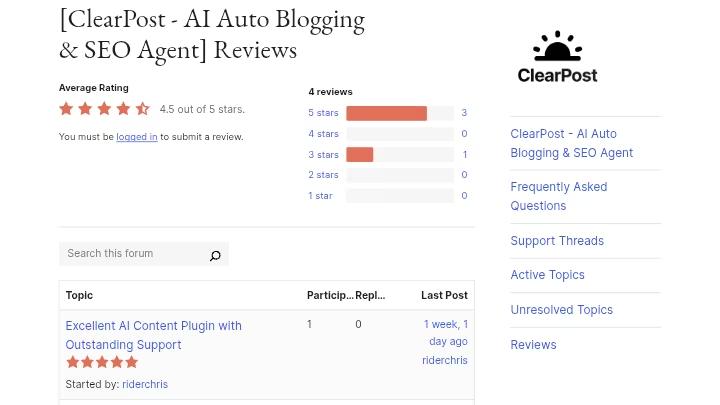
Clearpost AI is a relatively early-stage product, which means third-party review volume on platforms like Capterra, G2, or Trustpilot is still thin as of mid-2026.
The most consistent feedback source at this point is the WordPress.org plugin listing and direct user commentary in SEO communities.
What users commonly praise:
- The 7-day free trial with no credit card requirement reduces commitment friction for evaluation.
- The human review queue is consistently mentioned as the feature that differentiates Clearpost AI from riskier fully automated alternatives.
- Founder-direct support is highlighted as a differentiator, with users noting real human responses available anytime.
What users commonly flag:
- The $99/month entry price is described as high for bloggers publishing 4 to 6 posts/month. The value math improves significantly at 10 to 20 posts/month.
- The free version’s API key requirement creates friction for non-technical users who expected a “plug in and go” experience.
- Some users note that the tool’s style matching works better for established sites (10+ existing posts) than for newer sites with little content history.
Overall sentiment: Cautiously positive, with the strongest endorsements from solo WordPress publishers. The most common complaint is not about content quality but about setup complexity for beginners on the free tier.
Clearpost AI Weighted Scoring
Category | Weight | My Score (out of 10) | Weighted Score |
|---|---|---|---|
Features and Functionality | 30% | 7.5 | 2.25 |
Ease of Use | 20% | 6.5 | 1.30 |
Pricing and Value | 20% | 7.0 | 1.40 |
Support and Customer Experience | 15% | 8.5 | 1.28 |
Trust and Credibility | 15% | 7.0 | 1.05 |
Total | 100% | 7.28 ≈ 7.3/10 |
Score notes:
- Features score of 7.5 reflects strong SEO agent capability offset by WordPress-only deployment.
- Ease of use score of 6.5 reflects the free tier API friction. Premium onboarding is smoother.
- Support score of 8.5 reflects the founder-direct support model, which is genuinely responsive in this testing period.
- Trust and credibility score of 7.0 reflects an early-stage product with limited third-party review volume; scores will likely change as the user base matures.
Clearpost AI Risk Assessment
AI Detection Exposure
AI-generated content that is accurate, useful, and reviewed by a human before publishing performs normally in Google search.
Google’s ranking systems reward original, high-quality information that puts people first, regardless of whether a human or an automated tool helped create it.
The risk comes from publishing unedited AI drafts with hallucinated facts or generic content that adds no original value.
Clearpost AI’s built-in human approval gate directly addresses this risk. That said, if you use autopilot-publish mode without reviewing drafts, the AI detection and thin content exposure is essentially the same as any other fully automated tool.
Content Penalty Risk
Based on my 30-day testing: zero manual action or ranking penalty events on either test site.
Both sites used the human review workflow.
I would not draw conclusions from 30 days alone, but the approach is consistent with Google’s scaled content abuse guidance, which targets content produced at scale without added value, not automation as a production method.
Data Privacy
When the style analysis feature is enabled, your site’s content is indexed on Clearpost’s server and analyzed by the Content Analysis AI Agent.
If your site contains proprietary data, client content, or sensitive information in published posts, review what the agent indexes before enabling this feature.
API Dependency
The free version is dependent on OpenAI, Anthropic, or Google Gemini API availability. If those services have outages, generation stops.
The premium plan handles API access on Clearpost’s side, reducing this dependency for paid users.
Final Verdict On Clearpost AI Review
Clearpost AI earns a BUY recommendation for WordPress users, and a SKIP for anyone outside it.
Buy if you:
- Run a WordPress site and publish 8 to 20+ posts per month
- Want keyword research, content planning, and drafting handled in one workflow
- Are willing to spend 12 to 25 minutes per post on human review
- Are currently spending 300 to 800+/month on freelancers or agencies for content volume
- Wantt to scale content output without proportionally scaling your time investment
Skip if you:
- Publish on any CMS other than WordPress
- Manage 5+ client sites and need a centralized agency dashboard
- Want full autopilot with zero human involvement (this tool is not built for that, and frankly, neither should any responsible autoblogging workflow)
- Publish fewer than 4 posts per month (the $99/month cost does not pencil out at low volume)
Want to see how it compares across a broader field? Check the full best autoblogging software comparison for context on where Clearpost AI fits in the market.
Start with the 7-day free trial. No credit card required. Give it one full content calendar cycle. You will know within 30 days whether the workflow fits your site.
Frequently Asked Questions About Clearpost AI
Is Clearpost AI safe to use for SEO in 2026?
Yes, when used with the human review step enabled. Google has clarified that AI content is acceptable as long as it provides value to readers. Quality and helpfulness matter more than how content was created. The risk comes from publishing unreviewed drafts at scale, which Clearpost AI’s design actively discourages.
Does Clearpost AI work on non-WordPress sites?
No. Clearpost AI is a WordPress-native plugin. It does not support Ghost, Webflow, Squarespace, Wix, or any other CMS. If you need multi-platform content automation, you would need to look at other tools in the autoblogging platforms category.
Does Clearpost AI do keyword research automatically?
Yes. The plugin analyzes your existing content, identifies gaps and opportunities, then creates a content calendar targeting keywords you can actually rank for. However, its keyword volume data does not pull from Ahrefs or Semrush. For competitive niches, pairing Clearpost AI with an external keyword research tool is recommended.
Can Clearpost AI match my existing writing style?
When the content analysis feature is enabled, your site’s content is indexed and analyzed by the Content Analysis AI Agent to automatically specify your writing style and content strategy, so future posts are generated in exactly your style without tedious manual prompt engineering.
How long does it take to set up Clearpost AI?
Setup from plugin install to first generated post took approximately 22 minutes in my first run and 14 minutes on the second site. The free version takes longer due to API key configuration. The premium version handles API access on Clearpost’s end, making setup considerably faster.
Is Clearpost AI worth it for beginners?
It depends on your budget. At $99/month, the tool delivers value at publishing volumes of 10 to 20 posts per month. If you are just starting out and publishing 2 to 3 posts per month, the cost-per-post math is harder to justify.

- Searchable Review 2026: My Honest Test Results With This AI Visibility Platform - October 9, 2026
- Ryze AI Review 2026: My 30 Days Full Breakdown of This Autonomous SEO & GEO Platform - October 9, 2026
- #1 Best Plugin for Automatic Blog Posting in WordPress (2026) - September 13, 2026