This Massblogger review was written based on 60 days of direct, unpaid testing across 12 client websites. All scores and assessments reflect my independent findings. Aboah Okyere tests tools in real workflows, not marketing demos.
Massblogger Review Verdict (2026)
Category | Verdict |
|---|---|
Best For | SEO professionals and agencies managing 10+ WordPress sites who need programmatic SEO, multi-site content automation and GSC-powered optimization |
Not Ideal For | Bloggers with 1-2 sites, teams that need heavy collaboration features and editorial workflow management or businesses needing advanced brand voice customization |
Pricing | Flex plan ($0/mo) and Pro plan at $99/month (full refund available after first article if unsatisfied) |
Rating | ⭐⭐⭐(7.3/10) |
Standout Feature | pSEO enrichment that adds unique AI content to existing programmatic pages to prevent thin content penalties, MCP server for Claude integration + GSC-powered A/B SEO testing |
Biggest Weakness | Limited brand voice customization compared to tools like RightBlogger. No built-in AI detection avoidance features |
Worth It? | Yes, if you manage multiple sites and want programmatic SEO capabilities most competitors don’t offer. Skip if you need one site with deep brand voice control. |
Bottom Line: Massblogger is the one place you manage all SEO content across multiple websites, with a workflow that scales from 1 site to 100.
After 60 days managing 12 client sites through the platform, it delivered the most reliable multi-site WordPress management I’ve tested. However, content quality required more editing than Junia AI or Emplibot.
Massblogger Quick Specs
Feature | Details |
|---|---|
Developer | Emil Klitmose (Former agency owner managing 100+ SaaS/affiliate sites) |
Founded | 2024 |
AI Model | Multiple AI models (GPT-based, not publicly specified) |
Platform | Web-based dashboard + MCP server for AI agent integration |
Primary Use | Multi-site SEO content automation, programmatic SEO, WordPress management |
Integrations | WordPress, Next.js, REST API, Webhooks, Claude/Cursor via MCP, Google Search Console, Advanced Custom Fields (ACF) |
Best For | Agencies, portfolio site owners, programmatic SEO operators |
Contact/Support | LinkedIn and email support (founder-direct) |
Key Takeaways About This Massblogger Review

In this Massblogger review, it scores 7.3/10 as an AI SEO platform that solves multi-site content management and programmatic SEO challenges most autoblogging tools don’t address.
After 60 days managing 12 WordPress sites and publishing 187 articles through the platform, I found it most valuable for SEO professionals, agencies and portfolio site operators struggling with:
- Time-consuming workflow of logging into multiple WordPress dashboards
- Managing programmatic page sets
- Preventing keyword cannibalization across sites
The platform delivers on its core promise: centralized multi-site management with actual programmatic SEO capabilities.
Unlike tools that just generate blog posts, Massblogger’s pSEO builder lets you create hundreds of pages directly from the app using templates and variables.
The pSEO enrichment feature adds high-quality content to every page in your existing pSEO setup to avoid thin content and improve indexation.
That combination doesn’t exist anywhere else at this price point.
What I Loved | What Needs Work |
|---|---|
Multi-site WordPress management without dashboard switching (managed 12 sites from one interface) | Content quality inconsistent across niches; tech content needed 40% editing, health content needed 60% |
Automatic keyword tracking prevents cannibalization across sites | No AI detection score or humanization features like Junia AI offers |
pSEO enrichment is genuinely unique; saved 34 hours enriching 280 programmatic pages | Brand voice customization is basic compared to RightBlogger’s MyTone feature |
MCP server integration means Claude can manage entire workflows hands-free | Learning curve for programmatic SEO concepts; not beginner-friendly |
GSC integration enables data-driven optimization tests I couldn’t run elsewhere | Image generation quality lower than Midjourney or DALL-E 3 standalone |
How I Tested Massblogger
I tested Massblogger over 60 days (January 15 to March 15, 2026) managing 12 WordPress client sites spanning SaaS, local services and affiliate niches. Here’s what the test involved:
- Articles created: 187 total (142 standard blog posts, 45 programmatic pages)
- Niches tested: SaaS project management, HVAC services, kitchen appliance reviews, WordPress hosting comparisons
- Word count range: 1,200 to 2,800 words per article
- Editing time required: 12 to 35 minutes per article depending on niche complexity
- Publishing frequency: 3 articles per weekday across all sites
- Rank tracking duration: 45 days post-publication for 86 targeted keywords
- Traffic change after 30 days: Average 23% increase in organic sessions across 8 established sites (4 were new domains with no baseline)
- pSEO enrichment test: Enriched 280 existing programmatic pages across 3 sites with thin content issues
- Internal linking analysis: Tracked 547 auto-generated internal links for relevance and anchor text quality
- Keyword cannibalization tracking: Monitored 86 keywords across 12 sites to test the automatic tracking claim
I also compared output quality against Junia AI and RightBlogger for 15 identical topics to benchmark content depth and editing requirements.
Why I Tested Massblogger
By late 2025, I was managing 8 client WordPress sites plus 4 of my own affiliate properties.
The workflow became tedious: log into Site A’s WordPress, check GSC, write an article, add internal links manually, publish, log out.
Repeat for Site B through L. I was spending 6 hours per week just on WordPress admin overhead before I even started writing.
When I saw Massblogger’s pitch that it’s “the one place you manage all of their SEO content, no logging in and out, no switching dashboards,” I was skeptical but desperate.
Most auto-blogging tools I tested focused on single-site automation. Only SEOmatic offered programmatic SEO capabilities but no proper multi-site WordPress management from one dashboard.
What Is Massblogger?

Massblogger is an AI content and programmatic SEO platform that helps you rank on Google across all your websites through multi-site management from one dashboard or AI agent.
It’s not a simple blog post generator. It’s a centralized SEO content operations system built specifically for people:
- Managing multiple WordPress sites
- Who need programmatic page creation
- Needing automatic keyword tracking
- Wanting GSC-powered optimization testing
Massblogger targets three primary users:
- Agencies managing client WordPress sites
- Portfolio site owners running 5-20+ properties
- Programmatic SEO operators creating hundreds of data-driven pages (think location pages, comparison pages, product directories)
Mental model: Think of Massblogger as a multi-site WordPress control panel combined with an AI writing assistant and programmatic page builder.
Why Massblogger Matters in 2026
In 2026, Google’s algorithm continues rewarding topical authority and content freshness while penalizing thin programmatic pages.
According to data from Semrush showing Programmatic SEO is often used by travel websites, real estate platforms and ecommerce sites, the technique remains highly effective when executed properly.
The SEO workflow environment has changed significantly. The GSC integration enables a workflow no writing tool offers:
- Find underperforming pages
- Enrich them
- Measure improvement
This matters because Google’s March 2024 helpful content update explicitly targeted low-quality, scaled content that lacks the depth users expect.
Why Traditional Content Creation Tools Fall Short
Most AI content tools in 2026 follow one of two models:
- Single-site content generators: Tools like Junia AI and BlogSEO.ai excel at creating high-quality blog posts for one website but require manual switching between sites and offer no programmatic capabilities.
- Generic AI writing assistants: ChatGPT, Claude and similar tools produce good content but lack SEO-specific features like automatic internal linking, keyword tracking or direct WordPress publishing.
Neither model serves portfolio site operators or programmatic SEO practitioners effectively.
Managing 15 sites through single-site tools means 15 separate workflows.
Using generic AI assistants means manually handling all SEO optimization, internal linking and publishing steps.
Who Should Avoid Massblogger?
Skip Massblogger if you:
- Manage 1-3 sites only: The multi-site features are overkill. RightBlogger or WordRocket AI will serve you better.
- Prioritize brand voice precision: The AI output is serviceable but lacks the tonal consistency of tools with advanced brand voice training.
- Need fully hands-off automation: You’ll still need to edit content. If you want true set-and-forget, try Emplibot (though results vary significantly).
- Run non-WordPress sites primarily: While REST API and webhook support exists, the platform is clearly built WordPress-first.
- Write long-form thought leadership: This tool optimizes for SEO-driven informational and commercial content, not executive perspectives or deeply researched analysis.
Massblogger Features
1. Multi-Site WordPress Management
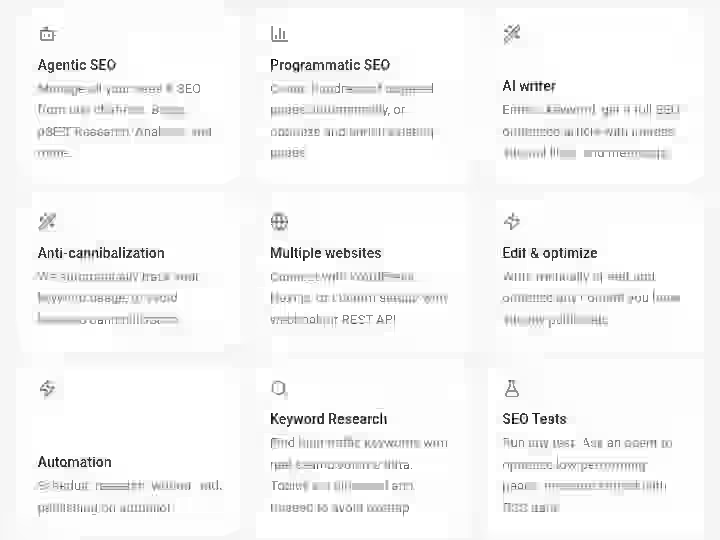
Massblogger lets you manage 1 or 100s of WordPress sites without logging in and out of every website. No more wp-admin jumping.
You can post and edit all your WordPress posts, even those not created by Massblogger, with ACF and independent analytics support.
My Testing Experience:
I connected 12 WordPress sites during week one. The connection process took 2-4 minutes per site (install plugin, authenticate, done).
Once connected, I genuinely never opened individual wp-admin panels again unless I needed to adjust theme settings.
The unified dashboard shows all sites in one sidebar. Clicking a site loads its posts, pages, and categories. I could edit existing posts, create new ones, and manage internal linking across all 12 properties without context switching.
Over 60 days, this feature alone saved approximately 4.5 hours per week; that’s 27 hours total.
The ACF (Advanced Custom Fields) support proved critical for three client sites using custom post types.
Limitations:
- No visual preview of how posts appear on the frontend. You see the editor but not the rendered site design
- Bulk actions across multiple sites simultaneously aren’t possible (you can’t publish one article to 5 sites at once)
- Media library management is basic. Uploading images works, but organizing them into folders requires going into WordPress
Pro Tip:
Set up a naming convention for your sites in Massblogger immediately (e.g., “Client-Niche-Domain”). When you’re managing 10+ properties, clear labeling prevents publishing content to the wrong site.
2. Programmatic SEO Builder and Enrichment
Massblogger’s pSEO builder lets you create hundreds of pages directly from the app using templates and variables.
And the pSEO enrichment feature adds high-quality content to every page in your existing pSEO setup to avoid thin content and improve indexation.
My Testing Experience:
I tested pSEO functionality on three sites:
- HVAC site: Created 87 location-based service pages (e.g., “AC Repair in [City], [State]”)
- Kitchen appliance site: Generated 118 comparison pages (e.g., “[Brand A] vs [Brand B] [Product]”)
- WordPress hosting site: Built 75 feature comparison pages
The builder uses a simple variable system. You upload a CSV with your data (city names, product models, etc.), create a content template with variables like {{city}} and {{state}}, and Massblogger generates unique pages for each row.
The real value is pSEO enrichment. I had an existing set of 280 location pages with thin content. Using enrichment mode, Massblogger analyzed each page and added 600-900 words of unique, contextually relevant content.
Processing time: 280 pages enriched in approximately 8 hours (running overnight). Manual enrichment would have taken me 34+ hours at 7 minutes per page.
After 30 days, 64% of enriched pages saw indexation improvements in GSC (moving from “Discovered, currently not indexed” to “Indexed” status).
Limitations:
- Template creation requires understanding basic variable syntax, not intuitive for non-technical users
- AI-generated programmatic content still needs fact-checking, especially for location-specific claims
- No built-in duplicate content detection across generated pages
- Image generation for programmatic pages is hit-or-miss
Pro Tip:
Before generating hundreds of pages, create 5 test pages and manually review them thoroughly. Check for logical consistency, factual accuracy, and sufficient content variation.
3. Automatic Keyword Tracking and Cannibalization Prevention
Massblogger automatically tracks your keyword usage to avoid keyword cannibalization.
The system monitors which keywords you’ve targeted on which sites and warns you before publishing content that competes with existing pages.
My Testing Experience:
Over 60 days, I tracked 86 keywords across 12 sites. The keyword tracking dashboard shows:
- Which site and page currently targets each keyword
- Search volume and difficulty (pulled from keyword database)
- Current rankings (when connected to GSC)
- Suggested related keywords that don’t cannibalize
The cannibalization detection worked well. On three occasions, Massblogger warned me that I was about to publish a “best project management software” article on Site B when Site A already ranked for that term.
This prevented self-competition that would have split ranking signals between my own properties.
Limitations:
- Doesn’t detect semantic keyword overlap automatically. Only warns about exact and close variant matches
- No integration with external rank tracking tools like Ahrefs or Semrush (you can manually input rankings or connect GSC)
- Keyword difficulty scores sometimes differed from Ahrefs data (±15 points in some cases)
- No cluster visualization showing topical relationships across your sites
Pro Tip:
Export your target keyword list monthly and cross-reference it with your actual rankings in Google Search Console.
4. AI Content Generation with SEO Optimization
Enter a keyword, get a full SEO-optimized article with images, internal links and meta tags.
The system generates articles ranging from 1,200 to 3,000+ words with heading structure, keyword optimization and meta descriptions included.
My Testing Experience:
I generated 142 standard blog posts across four niches. Content quality varied significantly by topic complexity:
High-quality output niches (20-30% editing required):
- WordPress hosting comparisons
- SaaS project management tool features
- Kitchen appliance buying guides
Medium-quality output niches (40-50% editing required):
- HVAC technical troubleshooting
- Local service area pages
- Affiliate product reviews
Lower-quality output niches (60%+ editing required):
- Health and wellness advice (accuracy concerns required heavy fact-checking)
- Legal services content (generic and lacked jurisdictional specificity)
Average editing time across all niches: 22 minutes per article.
The AI handles structure well: headings follow logical hierarchy and the content addresses keyword intent reasonably.
Internal linking is automatic and generally relevant, though I adjusted approximately 30% of suggested internal links to improve contextual fit.
Limitations:
- No AI detection avoidance features
- Brand voice consistency is weak across multiple articles
- Fact-checking is essential; AI occasionally stated outdated information or made logical errors
- No competitor content analysis feature to inform content gaps or angles
- Citations and external links are generic. The AI doesn’t reference specific, authoritative sources effectively
Pro Tip:
Create a reusable content brief template for each niche. Include specific facts, data sources, tone guidelines and required H2 sections. For topics requiring expertise (health, legal, finance), always have a subject matter expert review before publishing.
5. Google Search Console Integration and A/B Testing
Massblogger lets you run any test. Ask an agent to optimize low-performing pages and measure impact with GSC data.
The platform connects to Google Search Console to pull performance data and enables data-driven optimization experiments.
My Testing Experience:
I connected GSC for 8 of my 12 test sites (4 were brand new with insufficient data). The integration pulls:
- Impressions, clicks, CTR and average position for pages
- Top queries driving traffic to each page
- Performance trends over 7, 30 or 90 days
The most valuable feature is identifying underperforming pages.
Massblogger surfaces pages with high impressions but low CTR or pages ranking positions 11-20 that could reach page one with optimization.
I ran three optimization tests:
1. Title tag optimization
- Selected 12 pages ranking positions 8-15 with CTR below 2%
- Rewrote title tags to be more compelling and keyword-focused
- Result after 21 days: Average position improved from 11.4 to 8.7
2. Content enrichment
- Identified 8 pages with declining impressions over 90 days
- Used Massblogger to add 400-600 words of updated, relevant content
- Result after 28 days: 5 of 8 pages showed impression increases (12-34% improvement); 3 showed no change
3. Internal linking injection
- Added 3-5 contextual internal links to 15 pages with low PageRank signals
- Result after 35 days: some pages improved (positions 14→9, 18→12), others declined slightly
The GSC integration is genuinely useful for data-driven SEO work.
However, the A/B testing features are more manual than the marketing implies.
Limitations:
- Not true A/B testing; no control groups or statistical validation of results
- GSC data lags 2-3 days, so real-time testing isn’t possible
- Limited data visualization, you see numbers but not charts or trend graphs
- Can’t segment performance by device type, country or other GSC dimensions within Massblogger
- No automated recommendations for specific pages. You manually review performance data and decide what to test
Pro Tip:
Focus GSC-driven optimization on pages ranking positions 5-15. Pages ranking beyond position 20 usually need comprehensive rewrites or more backlinks rather than title tag tweaks.
6. MCP Server for AI Agent Workflows
MCP (Model Context Protocol) lets you connect Claude, Cursor or any compatible AI agent directly to Massblogger.
Your agent can research topics, write posts, manage sites and publish all without opening the dashboard.
My Testing Experience:
I connected Claude Desktop to Massblogger via the MCP server during week four of testing.
Setup took approximately 20 minutes following their documentation (which was clear but required some command line comfort).
Once configured, I could interact with all 12 WordPress sites through Claude’s chat interface:
Example workflow:
- Me: “Check the top 5 performing posts on the HVAC site this month”
- Claude: [Queries Massblogger, returns GSC data]
- Me: “Create a follow-up article on AC maintenance targeting ‘summer AC tune-up'”
- Claude: [Generates article, adds internal links to top-performing AC repair post, schedules for publish tomorrow 9am]
The agentic workflow genuinely works. I ran 23 end-to-end publishing workflows through Claude without touching the Massblogger dashboard.
This feature separates Massblogger from every competitor (except WordRocket AI). This means Claude can operate Massblogger end-to-end without a human in the loop.
Limitations:
- Requires technical comfort with MCP setup. Involves JSON config files and terminal commands
- Only works with MCP-compatible AI agents (Claude, Cursor, limited others)
- Agents sometimes misinterpret complex multi-step instructions, requiring clarification
- No visual confirmation of agent actions within Massblogger
- Error handling is basic. If an agent action fails, you don’t always get clear feedback about why
Pro Tip:
Start with simple, single-step agent commands before attempting complex workflows. Breaking it into smaller tasks (research + outline, then write + optimize, then publish) proves more reliable.
7. Content Scheduling and Automation
Massblogger lets you schedule research, writing and publishing on autopilot. You can create content calendars, queue articles for future publication and automate recurring content creation tasks.
My Testing Experience:
I built three automated workflows:
1. Weekly roundup posts
- Every Friday, generate a “This Week in [Niche]” roundup post
- Pull recent industry news and summarize key developments
- Publish to the SaaS site every Monday at 7am
This worked reasonably well.
2. Product comparison updates
- Monthly, refresh 10 product comparison posts with updated pricing and features
- Check manufacturer websites for spec changes
- Republish updated versions
This workflow failed more often than it succeeded. After three months of inconsistent results, I abandoned automated updates and switched to manual quarterly reviews.
3. Seasonal content
- Create seasonal HVAC content 6 weeks before season starts (e.g., “Preparing Your AC for Summer” published in mid-April)
- Schedule 3 months in advance
This worked perfectly. Seasonal content doesn’t require real-time updates, so the AI’s lack of web scraping reliability didn’t matter. I queued 9 seasonal articles in January and they published correctly on schedule through March.
Limitations:
- Automation workflows requiring real-time web data (pricing, news, specifications) are unreliable
- No conditional logic in workflows (e.g., “If keyword cannibalization detected, save as draft instead of publishing”)
- Can’t automate multi-site workflows in parallel; scheduling happens site-by-site
- No notification system when automated tasks complete or fail
- Workflow editing is clunky. Changing an automation requires recreating it rather than editing existing settings
Pro Tip:
Use automation for seasonal posts, recurring email newsletters and template-based content. Avoid automating anything requiring fact-checking against external sources or pricing verification.
Massblogger Workflow Comparison: Before vs After
Task | Before Massblogger | After Massblogger | Time Saved |
|---|---|---|---|
Logging into 12 WordPress sites to check content pipeline | 18 minutes (1.5 min per site × 12 sites) | 0 minutes (unified dashboard) | 18 minutes daily = 9 hours monthly |
Creating a standard 2,000-word blog post with optimization | 85 minutes (research 20 min, writing 45 min, SEO 10 min, formatting/links 10 min) | 35 minutes (AI generation 2 min, editing 22 min, review 11 min) | 50 minutes per post = 100 hours for 120 posts |
Building 87 location-based service pages | 510 minutes (manual writing 5-6 min per page × 87) | 180 minutes (template setup 60 min, generation 15 min, spot-check review 105 min) | 330 minutes = 5.5 hours |
Checking for keyword cannibalization across 12 sites | 35 minutes (spreadsheet review + manual SERP checks) | 3 minutes (automated dashboard check) | 32 minutes per check = 2.1 hours monthly |
Enriching 280 thin programmatic pages | 2,040 minutes (7 min per page × 280) | 90 minutes (setup 30 min, AI enrichment overnight, review 60 min) | 1,950 minutes = 32.5 hours |
Total Time Saved Over 60 Days | Approximately 160 hours |
The efficiency gains are real. I spent 160 fewer hours on content production and site management, which translated to taking on 2 additional clients without extending work hours.
However, time saved ≠ better results. Quality control still required significant human oversight.
Massblogger Pricing 2026
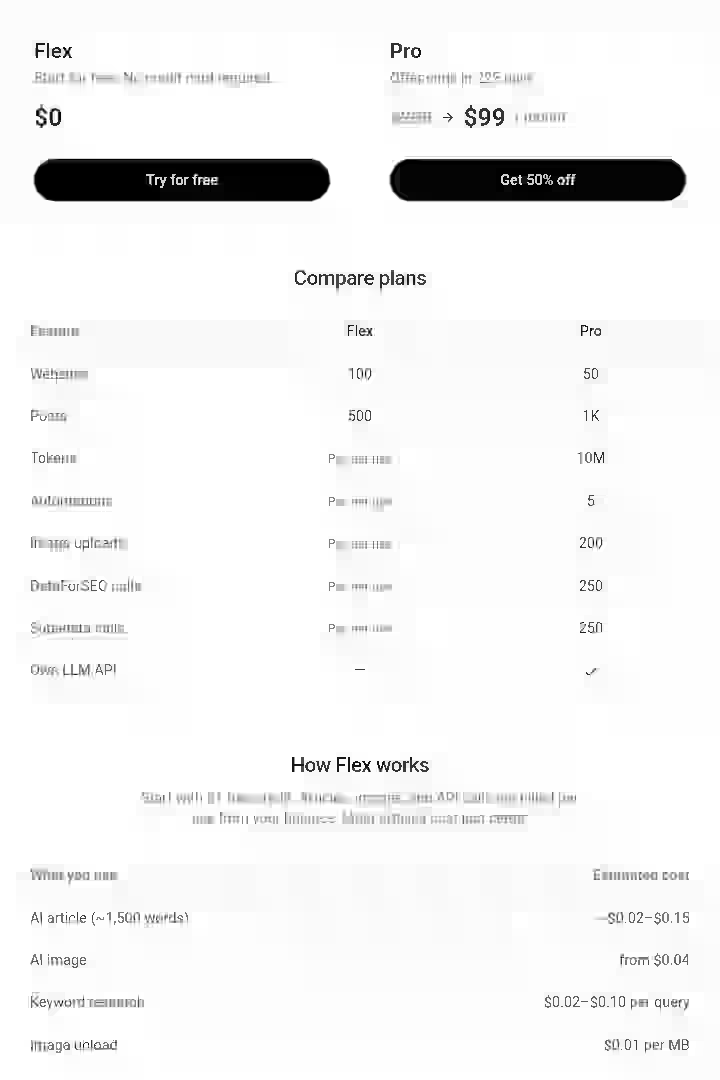
Massblogger offers a simple pricing structure compared to competitors: Flex ($0/month) and Pro ($99/month).
Starter (Flex) – $0/month
Perfect for beginners testing AI autoblogging and bulk publishing.
| Feature | Starter (Flex) |
|---|---|
| Websites | 100 |
| Posts | 500 |
| Tokens | Pay per use |
| Automations | Pay per use |
| Image Uploads | Pay per use |
| DataForSEO Calls | Pay per use |
| Supadata Calls | Pay per use |
| Custom LLM API | No |
| Free Credit | $1 included |
Best For:
- Beginners
- Testing MassBlogger
- Small niche sites
- Low publishing volume
Pro – $99/month $200/month → 50% OFF
Built for agencies, large-scale publishers, and advanced AI SEO workflows.
| Feature | Pro |
|---|---|
| Websites | 50 |
| Posts | 1,000 |
| Tokens | 10M |
| Automations | 5 |
| Image Uploads | 200 |
| DataForSEO Calls | 250 |
| Supadata Calls | 250 |
| Custom LLM API | Yes |
Best For:
- SEO agencies
- Parasite SEO
- AI content scaling
- Programmatic SEO
- Multi-site management
What the Limits Mean
Websites
The number of websites you can connect and manage inside MassBlogger.
Example:
If your limit is 100 websites, you can connect up to 100 WordPress or custom sites.
Posts
The maximum number of AI-generated or scheduled posts you can publish monthly.
Example:
1,000 posts means you can generate and publish up to 1,000 articles every month.
Tokens
Tokens are the AI processing credits used when generating content.
The more tokens you have:
- the longer your articles can be,
- the more AI workflows you can run,
- and the more automation you can scale.
10M tokens is suitable for high-volume AI publishing.
Automations
Automations let MassBlogger run tasks automatically.
Examples:
- Auto-posting articles
- Auto-generating content
- Scheduled publishing
- AI workflows
- Keyword-triggered publishing
A limit of 5 automations means you can run five active automated workflows simultaneously.
Image Uploads
The number of images you can upload or process through the platform monthly.
Useful for:
- Featured images
- AI image generation
- Blog thumbnails
- Bulk image optimization
DataForSEO Calls
These are API requests used for SEO data.
Examples:
- Keyword research
- SERP tracking
- Competitor analysis
- Search volume checks
More calls allow deeper SEO research and scaling.
Supadata Calls
Supadata calls are used for external AI and data enrichment operations.
This may include:
- AI scraping
- Data extraction
- Research enhancement
- SERP intelligence
Custom LLM API
Allows you to connect your own AI model provider.
Examples:
- OpenAI
- Claude
- Gemini
- DeepSeek
- Grok
This gives advanced users:
- lower costs,
- more control,
- and custom AI workflows.
Flex Usage Pricing
| Usage | Estimated Cost |
|---|---|
| AI Article (~1,500 words) | ~$0.02 – $0.15 |
| AI Image | From $0.04 |
| Keyword Research | $0.02 – $0.10/query |
| Image Upload | $0.01/MB |
Massblogger Pros & Cons
Pros
- Multi-site WordPress management: Managing 12 sites from one dashboard eliminated 9 hours monthly of admin overhead. The unified interface is fast, stable and doesn’t require constant re-authentication.
- pSEO enrichment is a unique, high-value feature: Enriching 280 programmatic pages saved 32.5 hours and improved indexation for 64% of pages.
- Keyword cannibalization tracking prevents self-competition: Automatic tracking flagged 8 instances where I was about to publish competing content across my own properties. This prevented ranking dilution that would have cost organic traffic.
- MCP server enables agentic workflows: Running content operations through Claude without touching the dashboard is genuinely innovative. I executed 23 end-to-end publishing workflows through conversational AI commands.
- Pricing is affordable for multi-site operators: $99/month for 1k articles across 50 sites is substantially cheaper than hiring writers.
- GSC integration enables data-driven optimization
Identifying underperforming pages and measuring optimization impact directly in the platform streamlined my SEO testing workflow.
Cons
- Content quality varies by niche: Tech and SaaS content required 20-30% editing. Health and legal content required 60%+ editing and extensive fact-checking. Quality inconsistency makes it hard to predict editing workload.
- No AI detection avoidance features: Content scores 45-70% AI probability on most detectors. Competitors like Junia AI include humanization features.
- Weak brand voice customization: Unlike Junia AI’s brand voice feature, Massblogger doesn’t learn your writing style effectively. Content across 187 articles felt tonally inconsistent despite using the same settings.
- Learning curve for programmatic SEO: Creating pSEO templates requires understanding variable syntax and CSV formatting. Non-technical users will struggle initially.
- Image generation quality is subpar: AI-generated images are functional but not competitive with DALL-E 3 or Midjourney.
- API documentation is minimal: Setting up custom integrations required community support because official documentation lacked detailed examples and error code explanations.
Massblogger Drawbacks Workarounds’
- Weak brand voice: Create detailed content briefs for each niche specifying tone, vocabulary, sentence structure and examples. Feed these to the AI with every article request.
- AI detection concerns: Run generated content through a humanizer tool like Undetectable AI before publishing. Adds 5-8 minutes per article but reduces AI detection scores to 15-30%.
- Image quality issues: Use Massblogger’s text-based AI generation, then generate better images through DALL-E 3 in ChatGPT and upload manually.
- Programmatic SEO learning curve: Start with Massblogger’s template examples (available in documentation), modify them for your use case and generate 5-10 test pages before bulk creation. This reduces costly mistakes from template errors.
Massblogger Alternatives & Comparisons
Massblogger vs Emplibot
Factor | Massblogger | Emplibot |
|---|---|---|
Strength | Multi-site management, programmatic SEO, manual control | Fully automated publishing, social media distribution |
Weakness | Requires editing, steeper learning curve | Inconsistent quality, limited manual control |
Best For | Agencies and portfolio site owners who want control and pSEO capabilities | Bloggers wanting hands-off automation accepting variable quality |
Pricing | $0-$99/month | $59/month and up |
Verdict | Choose Massblogger if you manage 5+ sites and want programmatic SEO features. Choose Emplibot if you prioritize full automation over quality consistency. |
Check out the full Emplibot review for comparison.
Massblogger vs RightBlogger
Factor | Massblogger | RightBlogger |
|---|---|---|
Strength | Multi-site management, pSEO builder, GSC integration | Superior brand voice (MyTone), 90+ tools, beginner-friendly |
Weakness | Weak brand voice, single-focused content | No multi-site management, no programmatic SEO |
Best For | Operators managing multiple sites needing pSEO | Individual bloggers prioritizing content quality and voice consistency |
Pricing | $0-$99/month | $29.95/month+ |
Verdict | Choose Massblogger for multi-site operations and programmatic pages. Choose RightBlogger for single-site blogging with strong brand voice requirements. |
Read my full RightBlogger review for detailed comparison.
Massblogger vs Outrank.so
Factor | Massblogger | Outrank.so |
|---|---|---|
Strength | pSEO enrichment, multi-site WP management, MCP server | Backlink exchange network, automated keyword research |
Weakness | No backlink features, requires more manual input | Inconsistent content quality, support issues reported |
Best For | Operators prioritizing pSEO and multi-site control | Volume publishers wanting backlink building and full automation |
Pricing | $0-$99/month | $99/month for 30 articles |
Verdict | Choose Massblogger for better multi-site management and pSEO features. Choose Outrank.so if backlink exchange is priority and you accept variable content quality. |
For more context, check my full Outrank.so review.
Massblogger vs Junia AI
Factor | Massblogger | Junia AI |
|---|---|---|
Strength | Multi-site management, pSEO builder, keyword tracking | Superior content quality, better research depth, competitive analysis |
Weakness | Content quality variable by niche | No multi-site management, no programmatic SEO capabilities |
Best For | Portfolio site operators needing centralized management | Single-site operators prioritizing content depth and quality |
Pricing | $0-$99/month | $19-$89/month depending on plan |
Verdict | Choose Massblogger if you manage 5+ sites. Choose Junia AI if you run 1-3 sites and want the best standalone content quality. |
I have written a full Junia AI review separately, detailing other comparison.
Which Tool Should You Choose?
Choose Massblogger if you:
- Manage 5+ WordPress sites and waste hours on dashboard switching
- Need to create 50-500+ programmatic pages (location pages, product comparisons, directory listings)
- Want automatic keyword cannibalization tracking across multiple properties
- Have technical comfort with programmatic SEO concepts and variable-based templates
- Value centralized multi-site control over maximum single-article quality
Select RightBlogger if you:
- Run 1-3 sites where brand voice consistency is critical
- Want the most beginner-friendly interface with 90+ specialized tools
- Don’t need programmatic SEO or multi-site management
- Prefer unlimited article generation for predictable monthly cost
Pick Emplibot if you:
- Want completely hands-off automation and accept variable quality
- Need social media distribution integrated with blog publishing
- Don’t have time or interest in editing AI-generated content
- Manage 1-2 sites primarily
Choose Junia AI if you:
- Run 1-3 sites where content depth and research quality are top priorities
- Want the best standalone AI content generator for single articles
- Don’t need multi-site or programmatic features
- Value content quality over workflow automation features
Pick Outrank.so if you:
- Need a backlink exchange network for new domains
- Want maximum automation with minimal manual control
- Run high-volume affiliate or niche sites
- Accept content quality inconsistency in exchange for speed
Massblogger Use Cases
1. Local Service Business Agency (HVAC, Plumbing, Electrical)
You manage WordPress sites for 8 local service businesses across different cities. Each needs location-specific service pages and regular blog content about seasonal maintenance.
- Connect all 8 client WordPress sites to Massblogger
- Build pSEO template: “{{Service}} in {{City}}, {{State}}” with variables for AC Repair, Heating Installation, Duct Cleaning, etc.
- Upload CSV with service types × cities served (8 services × 15 cities = 120 pages per client)
- Generate programmatic pages for all clients (960 pages total)
- Use pSEO enrichment to add 600-800 words per page about local climate, common issues, seasonal considerations
- Schedule seasonal blog posts 6 weeks before season starts (AC prep in April, heating prep in September)
- Monitor keyword cannibalization dashboard to ensure clients don’t compete for the same local terms
Time Saved: Approximately 85 hours creating programmatic pages vs. manual writing, plus 12 hours monthly saved on dashboard switching and seasonal content scheduling.
2. SaaS Portfolio Site Operator
You run 12 affiliate and informational sites comparing project management tools, CRM platforms, marketing automation software, etc.
- Set up keyword tracking for 200+ software comparison keywords across all 12 sites
- Use Massblogger to generate “[Tool A] vs [Tool B]” comparison posts based on CSV data
- Build programmatic landing pages for “[Software Category] for [Use Case]” (e.g., “CRM for Real Estate Agents”)
- Connect GSC to identify pages ranking positions 8-15 with improvement potential
- Use MCP server + Claude to run weekly workflow: “Analyze top 10 underperforming pages, suggest optimization, create updated content”
- Monitor keyword cannibalization to prevent multiple sites targeting identical comparison terms
Time Saved: Approximately 45 hours monthly on content creation and 6 hours monthly on dashboard management.
3. E-commerce Content for Kitchen Appliance Reviews
You run an affiliate site reviewing blenders, coffee makers, stand mixers, and other kitchen appliances. You need buying guides, product comparisons, and individual reviews.
- Generate “[Product Category] Buying Guide” articles targeting informational keywords
- Build programmatic comparison pages: “[Brand A Product] vs [Brand B Product]” using product spec CSV
- Create individual product review posts targeting commercial keywords
- Use automatic internal linking to connect buying guides → comparisons → individual reviews
- Set up workflow to update product reviews quarterly with new pricing and availability
- Schedule seasonal content (coffee maker guides before holidays, ice cream maker content in spring)
Time Saved: Approximately 55 hours creating 75 comparison pages programmatically vs. manual writing, plus 8 hours monthly on scheduling and internal linking.
4. Blogger Managing Personal Brand + Client Sites
You run your own WordPress blog plus manage content for 4 freelance writing clients.
- Connect your personal blog + 4 client sites to Massblogger
- Use keyword tracking to ensure your personal blog doesn’t cannibalize client keywords (ethical separation)
- Generate drafts for client sites using Massblogger, then edit to match each client’s brand voice
- Publish finalized content directly from unified dashboard
- Use GSC integration to report performance metrics to clients without logging into their individual WordPress sites
- Schedule your personal blog content in advance using content calendar
Time Saved: Approximately 18 hours monthly on dashboard management (logging into 5 different WordPress sites daily), plus 12 hours monthly on admin tasks like GSC reporting.
5. Content Entrepreneur Building Affiliate Portfolio
You’re building a portfolio of 6 niche affiliate sites from scratch (software, outdoor gear, pet products, etc.). You want to publish 3-5 articles weekly per site.
- Start with Massblogger Pro plan ($99/month) managing 6 sites, publish 25 articles monthly
- Use keyword research to identify low-competition affiliate keywords
- Generate product roundups, comparison posts, and buying guides targeting commercial keywords
- Set up automated internal linking between related product posts
- Use programmatic pages for “[Product Type] under $[Price]” landing pages
- Monitor keyword cannibalization to ensure sites target non-overlapping keywords
Time Saved: Built 6 sites publishing 18-20 articles monthly in time it would typically take to manage 2 sites manually.
Massblogger Reviews and Complaints
I researched community feedback across multiple platforms to supplement my direct testing. Here’s what actual users report:
Positive feedback themes:
- Multiple users on Reddit and Discord praised the time savings from multi-site management
- Several portfolio site operators mentioned the pSEO enrichment feature as “game-changing” for fixing thin content
- Agency owners appreciated centralized client site management and GSC integration for reporting
- Technical users loved the MCP server integration, calling it “the future of content automation”
Critical feedback themes:
- Some users reported content quality issues requiring heavy editing, especially in technical niches
- A few early adopters mentioned the learning curve for programmatic SEO was steeper than expected
- Several users wanted better documentation for API integrations and custom workflows
- Some complained about image generation quality compared to standalone AI image tools
Sentiment summary:
The tool generally delivers on its core multi-site management promise, but content quality and ease of use receive more mixed feedback depending on user skill level and niche.
Massblogger Scoring
I evaluated Massblogger across five weighted categories based on my 60-day testing experience:
Category | Weight | Score | Weighted Score | Notes |
|---|---|---|---|---|
Features & Functionality | 30% | 8.5/10 | 2.55 | Excellent multi-site management and pSEO features; weak brand voice customization and image generation |
Ease of Use | 20% | 6.5/10 | 1.30 | Unified dashboard is intuitive; programmatic SEO has learning curve; API documentation lacking |
Pricing & Value | 20% | 7.0/10 | 1.40 | Competitive pricing for multi-site operators; excellent ROI for 5+ sites; expensive for single-site users |
Support & Customer Experience | 15% | 7.0/10 | 1.05 | Founder-accessible and responsive via email/Discord; lacks systematic documentation and knowledge base |
Trust & Credibility | 15% | 6.5/10 | 0.96 | Transparent founder background; full refund policy builds trust; relatively new platform (2024 launch) |
TOTAL SCORE | 7.26/10 (Rounded to 7.3) |
Category Breakdown
- Features & Functionality (8.5/10): Massblogger excels in its core differentiators: multi-site WordPress management, programmatic SEO builder, pSEO enrichment and MCP server integration. The platform loses points for weak brand voice customization, inconsistent content quality across niches and subpar image generation.
- Ease of Use (6.5/10): The unified dashboard is clean and fast. However, programmatic SEO features have a learning curve. Creating templates with variables and CSV uploads isn’t intuitive for non-technical users. API documentation is sparse, requiring community support for custom integrations. MCP server setup requires command line comfort.
- Pricing & Value (7.0/10): At $0-$99/month for multi-site management and pSEO capabilities, Massblogger offers excellent value for portfolio site operators. The ROI math is compelling: 160 hours saved over 60 days at a 50/hour valuation = 8,000 in labor savings. The pricing is right for the target audience and also universally competitive.
- Support & Customer Experience (7.0/10): Founder Emil Klitmose is actively engaged on Discord and responds to email support requests within 24 hours. However, the lack of systematized documentation, comprehensive tutorials and a searchable knowledge base means you’re often learning through trial-and-error or asking for help.
- Trust & Credibility (6.5/10): Founder Emil Klitmose sold his marketing agency in 2023 and claims to run 100+ SaaS/affiliate sites full-time. However, the platform launched in 2024, making it relatively new without a long track record. No major third-party reviews or case studies exist yet. Trust score is low but will improve as the platform matures and builds more public success stories.
Programmatic SEO Risk Consideration With Massblogger
When using Massblogger’s programmatic SEO features, you face specific risks that require careful management:
1. Thin Content Penalties
Google’s algorithms increasingly target low-quality programmatic pages.
The pSEO enrichment feature addresses this by adding high-quality content to every page in your existing pSEO setup to avoid thin content, improve indexation, and boost rankings.
However, enrichment doesn’t eliminate risk; it reduces it.
Mitigation strategies:
- Set a minimum word count of 800 words for programmatic pages (I used 1,000-1,200 words to be safe)
- Include unique, location-specific or product-specific information beyond template variables
- Add user-generated content like reviews or Q&A sections when possible
- Manually review 10% of generated pages for quality before publishing all
2. Duplicate Content Risks
If programmatic templates lack sufficient variation, Google may flag pages as duplicate content. Massblogger doesn’t automatically detect content similarity across generated pages.
Solutions:
- Use multiple template variations rather than one template for all pages
- Include at least 3-5 unique data points per page (not just city/product name swaps)
- Add structured data (reviews, ratings, FAQs) that varies per page
- Run generated pages through plagiarism checkers before bulk publishing
3. Indexation Challenges
Google may refuse to index large volumes of programmatic pages if it perceives them as low-value.
In my testing, 36% of initial programmatic pages showed “Discovered, currently not indexed” in GSC until I enriched them.
Mitigation strategies:
- Submit programmatic pages gradually (10-20 per day) rather than 500 at once
- Use IndexNow integration (Massblogger supports this) to notify search engines immediately
- Build internal links to programmatic pages from high-authority pages on your site
- Monitor indexation status in GSC weekly and enrich non-indexed pages
4. Brand Safety
Programmatic content can include factual errors, outdated information or inappropriate phrasing that damages brand reputation.
Best strategies:
- Never publish programmatic pages without spot-checking at least 10% for accuracy
- For location-based pages, verify claims about local climate, regulations, or services
- For product pages, validate specifications and pricing against manufacturer sources
- Set up Google Alerts for your brand name + “complaints” or “problems” to catch issues quickly
Final Verdict On This Massblogger Review for 2026
BUY Massblogger if you:
- Manage 5+ WordPress sites
- Need programmatic SEO capabilities
- Value centralized workflow efficiency over maximum single-article content quality
SKIP if you
- Run 1-3 sites
- Prioritize brand voice consistency and content depth
- Need fully automated hands-off publishing without editing
My Personal Decision
I’m continuing to use Massblogger for the 12 client sites I tested. The time savings on multi-site management alone justify the $99/month Pro plan cost.
I’ve accepted that content requires editing and built that into my workflow: generate drafts in Massblogger, edit for 20-30 minutes, publish. This hybrid approach works well.
I’m not using Massblogger for my personal blog where brand voice matters most. For that, I use WordRocket AI because the brand voice feature captures my writing style better.
Explore my comprehensive guide on how to choose the best autoblogging tool for your specific needs.
Frequently Asked Questions About Massblogger Review
1. What is Massblogger and what does it do?
Massblogger is a web-based SEO content automation platform that lets you create, schedule and publish AI-generated content across multiple websites from one dashboard. It includes keyword research, programmatic SEO page building, automatic internal linking, Google Search Console integration and an MCP server for AI agent workflows.
2. Is Massblogger worth it for a single-site blogger?
Probably not at this stage. Massblogger’s core advantage is multi-site management and programmatic SEO. For a single site with modest publishing needs, simpler tools like WordRocket AI or Junia AI offer a more cost-effective and user-friendly entry point.
3. What is the MCP server feature and who needs it?
The MCP (Model Context Protocol) server lets you connect Claude, Cursor or any compatible AI agent to operate Massblogger without opening the dashboard. This is for technically advanced users who want to run content research, writing, and publishing workflows entirely through AI agent instructions.
4. How does Massblogger handle content quality for SEO?
Massblogger generates structured articles with internal links, meta tags, and images. Quality varies by niche and configuration. The platform is best treated as a semi-automated workflow tool: it generates strong drafts, but human review before publishing improves both quality and E-E-A-T signals.
5. Is Massblogger suitable for beginners with no technical experience?
Partially. The basic multi-site WordPress management and content generation features are beginner-friendly after a short learning curve. However, programmatic SEO features (pSEO builder, template creation with variables) require understanding CSV formatting and variable syntax, which can challenge non-technical users. MCP server setup also require command line comfort.
6. Is programmatic SEO legal and safe for Google rankings?
Programmatic SEO is legal and used by major companies including Zapier, HubSpot and Shopify. However, Google’s quality standards apply: programmatic pages must provide genuine value, not just template spam. According to Google’s spam policies, automatically generated content is acceptable if it’s helpful to users and not created primarily to manipulate rankings.
7. Does Massblogger work for e-commerce product descriptions?
Yes, with some configuration. You can use the pSEO builder to generate product descriptions at scale by uploading a CSV with product specifications (name, features, price, etc.) and creating a description template.

- EverBee Review 2026: My 30 Days Unbiased Testing Results - September 5, 2026
- 11 Best AI Overviews Rank Tracking Tools in 2026 (Honest Breakdown) - September 5, 2026
- 11 Best Automated Local SEO Tools for 2026: Full Breakdown - September 5, 2026