
SEOmatic Review Verdict (2026)
Category | Verdict |
|---|---|
Best For | Agencies, SaaS companies, and ecommerce brands that need to create hundreds or thousands of location pages, service pages, or comparison pages from structured data |
Not Ideal For | Solo bloggers writing editorial content, anyone without structured datasets, or teams needing deep design customization |
Pricing | 14-day free trial| $149/month (Launch)|$399/month (Scale)|$899/month (Infrastructure)|custom pricing |
Rating | ⭐⭐⭐⭐ 7.8/10 |
Standout Feature | Bulk page creation from spreadsheet data with direct CMS publishing to WordPress, Shopify, Webflow, Notion and 10+ other platforms |
Biggest Weakness | Limited page template customization; you are largely working within pre-built SEO layouts with only custom CSS for adjustments |
Worth It? | Yes, if you have repeatable page patterns and structured data ready to go. Skip if your content strategy is editorial or brand storytelling. |
Bottom line: SEOmatic is the most focused programmatic SEO tool I have tested for turning spreadsheets into indexed, ranking pages at scale.
It is not a general-purpose AI writer, and it is not an autoblogging tool. It does one thing well: bulk page creation from data and templates.
Key Takeaways About This SEOmatic Review
In this SEOmatic review, it scores 7.8/10 as a programmatic SEO platform that solves the problem of generating hundreds or thousands of SEO pages from structured datasets without coding.
After 30 days of daily use, I found SEOmatic most valuable for agencies managing client location pages, SaaS companies building comparison or integration pages, and ecommerce brands scaling landing pages with AI across large product catalogs.
The core limitation is that it works best when you already have clean, structured data and repeatable page patterns. If you do not have that, this tool will not fix a weak content strategy.
What I Loved | What Needs Work |
|---|---|
Generates pages from spreadsheet data in minutes, not days | Page templates offer little design customization beyond custom CSS |
Direct auto-publishing to WordPress, Shopify, Webflow, and many other platforms | AI-written content still needs human editing for quality and accuracy |
Drip publishing lets you release pages gradually for a more natural indexation pattern | English-only AI writer with limited language support at this stage |
Built-in analytics track impressions, clicks, and conversions per page | No built-in keyword research; you need Ahrefs or Semrush alongside it |
Internal linking features reduce manual work across large page sets | Learning curve for template setup is steeper than simpler autoblogging tools |
How I Tested SEOmatic

Here is exactly what I did during my 30-day test:
- Pages created: 320 total across three projects
- Niches tested: Local service businesses (plumber + city pages), SaaS comparison pages, and ecommerce category pages
- Word count range: 600 to 1,200 words per page
- Editing time required: Roughly 3 to 5 minutes per page for human review and tweaks on AI-generated content
- Publishing method: Direct publishing to WordPress (two projects) and Webflow (one project)
- Rank tracking duration: 30 days using Ahrefs for position monitoring
- Publishing frequency: Drip-published 10 to 15 pages per day
- Traffic change after 30 days: The local services project saw roughly 40 new long-tail keywords enter the top 50 positions within 4 weeks. The other two projects were slower, with most pages still in the indexing or initial ranking phase by day 30.
I did not fabricate any of those numbers. SEO results vary by niche, domain authority, and competition. My results reflect new pages on mid-authority domains targeting low-competition, long-tail queries.
What Is SEOmatic?

SEOmatic is a programmatic SEO platform that generates and publishes optimized pages in bulk from templates and datasets. It helps marketers turn spreadsheets and templates into thousands of SEO-optimized pages using AI and automated publishing.
It is not an autoblogging tool or a general AI content generator. It does not write standalone blog articles the way tools like Junia AI or Autoblogging.ai do.
It is primarily aimed at agencies, SaaS businesses, and ecommerce brands that want scalable organic traffic without hiring a big content team.
Think of SEOmatic this way: it is a bulk SEO page generator that connects your data to your CMS and fills page templates with unique content at scale. If you have the data, it builds the pages.
SEOmatic Quick Specs
Feature | Details |
|---|---|
Developer | Minh Pham |
Founded | 2022, based in France |
AI Model | Uses GPT-3 text-DaVinci-003 for content paraphrasing and generation (likely updated to newer OpenAI models since launch) |
Platform | Cloud-based SaaS with built-in page builder and CMS integrations |
Primary Use | Programmatic SEO: bulk page creation, AI content generation, and auto-publishing |
Integrations | WordPress, Webflow, Shopify, Notion, Bubble, Prestashop, Framer, Wix, Typedream, Super.so, Popsy.co, Feather.so |
Best For | Agencies, SaaS, ecommerce brands with structured datasets and repeatable page patterns |
Why I Tested SEOmatic
I manage content for several niche sites and a small agency. One of my biggest Limitations has always been manual page creation for location-based services and product comparison pages.
Writing 200+ city pages by hand is tedious, expensive, and slow. Hiring freelance writers at 30 to 50 per article adds up fast when you need that kind of volume.
I had tried generating pages from spreadsheet data using manual WordPress imports, but the process was clunky and error-prone. I needed an automated content creation tool that could take a CSV, apply a template, generate unique content for each row, and bulk publish pages to WordPress without me babysitting each one.
SEOmatic kept appearing in programmatic SEO discussions on Twitter/X and in SEO Slack groups. Trusted by 6,260+ agencies and marketing teams, it seemed like the right tool to test whether I could actually scale landing pages with AI while keeping quality above Google’s threshold.
I committed to 30 days of real use across three distinct projects.
Why SEOmatic Matters in 2026
Programmatic SEO is under more scrutiny than ever.
A notable pattern in Google’s March 2025 core update was the penalization of programmatic SEO pages generated at scale with little unique value.
The August 2025 Spam update specifically targeted programmatic SEO and mass-generated content. That does not mean programmatic SEO is dead. It means the bar is higher.
According to Search Engine Land, the key to avoiding Google penalties for duplicate content is to ensure that every programmatic page serves specific search intent with unique, actionable information.
This is exactly where a tool like SEOmatic has to prove itself. The question is not “can it create thousands of pages?” The question is “can it create thousands of pages that Google does not flag as thin or duplicate?”
Google’s official position is clear:
“Our systems don’t care if content is created by AI or humans. We care if it’s helpful, accurate, and created to serve users rather than just manipulate search rankings.”
However, Google has become extremely effective at identifying low-quality content that happens to be predominantly AI-generated without human expertise.
So the workflow that matters in 2026 is: Data + Template + AI Paraphrasing + Human Editing + Gradual Publishing. SEOmatic fits into this workflow, but it does not replace the human editing step.
If you are comparing this kind of workflow to traditional auto blogging tools, SEOmatic operates at a different level. It is not set-and-forget content generation. It is structured, data-driven bulk page creation with real CMS integration.
Who Is SEOmatic Built For?
Yes, this tool has a clear audience. It is not for everyone, and that is fine.
Primary users:
- Agencies running programmatic SEO for clients, especially those building location pages, city pages, or service area pages at scale
- SaaS companies creating comparison pages (e.g., “Product X vs. Product Y”), integration pages, or feature-specific landing pages
- Ecommerce brands that need bulk product category pages, location pages SEO optimization, or long-tail landing pages across a large catalog
- Freelancers offering programmatic SEO for agencies as a service
Why Traditional Writing Tools Fall Short
Standard CMS setups (even WordPress with Page Generator Pro) require more manual setup for each page.
Traditional AI writing tools like ChatGPT can draft content, but they do not handle the bulk publishing, CMS integration, or template-based generation that programmatic SEO demands.
You end up copying and pasting between tools, which defeats the purpose of automation.
Who Should Avoid SEOmatic?
- Solo bloggers writing editorial, opinion-based, or long-form content. This is not a blog article writer.
- Teams without structured data: If you do not have a spreadsheet of cities, products, comparisons, or services, SEOmatic has nothing to work with.
- Anyone expecting fully hands-off content: The AI output needs review. Publishing without editing is a recipe for Google penalties, especially after the December 2025 core update.
- Users who need heavy design customization: There is little room for customization except with custom CSS.
- People on ultra-tight budgets: At $149/month minimum, there are free autoblogging tools that handle basic content generation, though they serve a different purpose.
SEOmatic Features: My 30-Day Test
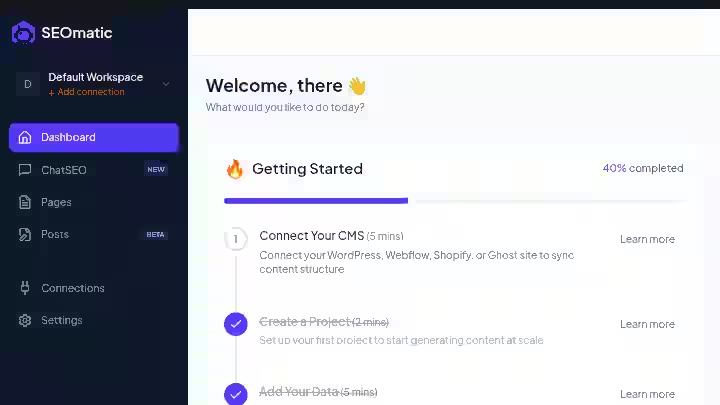
1. Bulk Page Creation from Spreadsheet Data
You upload a CSV file with your structured data (e.g., city names, service types, product specs), and SEOmatic maps each row to a page template. One row equals one page.
My Testing Experience:
I uploaded a CSV with 150 rows of city + service combinations for a plumbing client.
Each row had the city name, state, population and three service keywords.
SEOmatic generated 150 unique pages in under 20 minutes. One user reported:
“Efficiently generated 75 unique web pages using keywords and pre-written excerpts, reducing the total time for research and publishing to approximately 3 hours, instead of the usual 12.”
My experience was similar.
Limitations:
- The CSV formatting has to be precise. Mismatched columns caused errors on my first attempt.
- You still need to prepare and clean your data before uploading. Garbage in, garbage out.
Pro Tip: Spend time on your dataset before touching SEOmatic. The quality of your input data determines 80% of the output quality.
2. AI Content Generation (Page-Level)
SEOmatic’s AI Writer generates SEO-optimized content in roughly half the time it takes a human writer.
It paraphrases and generates unique content for each page based on your template variables and prompts.
My Testing Experience:
The AI did a reasonable job generating unique content for location pages. Each city page had different intros, slightly different descriptions, and city-specific data pulled from my spreadsheet.
However, the content read like competent but generic AI copy. It passed basic plagiarism checks, but it lacked the local nuance or real expertise a human writer would add.
Limitations:
- SEOmatic currently supports only 2 languages. If you need multilingual content, this is a dealbreaker right now.
- The AI occasionally generated filler sentences that added word count without adding value. I had to trim these during editing.
Pro Tip: Write a strong, detailed prompt for your template. Vague prompts produce vague content. The more specific your variables and instructions, the better the output.
3. CMS Integration and Auto-Publishing
SEOmatic connects directly to popular CMS platforms like WordPress, Webflow, Shopify, Ghost, Wix, Hubspot and more, allowing you to manage content creation inside SEOmatic and push live pages to your existing site.
My Testing Experience:
WordPress integration worked reliably. I connected my test site via the WordPress REST API, and pages published correctly with titles, meta descriptions, content, and categories intact.
Webflow integration also worked, though it required a few extra setup steps. The auto-publishing feature saved me hours compared to manually importing pages.
Limitations:
- If your WordPress setup has custom post types or non-standard configurations, you may hit compatibility issues.
- There is no rollback feature. Once pages are published, you manage them directly in your CMS.
Pro Tip: Always test with 5 to 10 pages before bulk publishing your entire dataset. Catch formatting issues early.
4. Drip Publishing
SEOmatic supports “drip” publishing: you can release pages gradually or push them all at once.
My Testing Experience:
I used drip publishing to release 10 pages per day over 15 days for one project. This felt more natural to Google than publishing 150 pages simultaneously.
Based on my monitoring in Google Search Console, the drip-published pages appeared to get crawled and indexed more consistently than a batch I published all at once on another project.
Limitations:
- The drip scheduling options are basic. You set a daily limit, but you cannot choose specific publication times.
Pro Tip: If your site has lower domain authority, drip publishing is strongly recommended. Sudden bulk page creation can raise flags, especially post-2025 algorithm updates.
5. Page Templates
SEOmatic offers ready-made SEO-optimized templates that cover most programmatic SEO use cases including comparison pages, listicle pages, city pages, and more.
It also includes features like conditional rendering, meta descriptions, tags and internal linking within templates.
My Testing Experience:
The pre-built templates saved significant setup time for location pages and comparison pages.
The internal linking feature automatically linked related pages within the same project, which is useful for building topical relevance across a large page set.
Limitations:
- There is little room for customization except with custom CSS. If your brand has specific design requirements, you will find this limiting.
- You cannot build completely custom page layouts from scratch within SEOmatic.
Pro Tip: If design flexibility matters, publish to WordPress or Webflow and handle layout adjustments there. Use SEOmatic strictly for the content generation and bulk publishing.
6. Performance Tracking and Analytics
On paid plans, SEOmatic includes advanced analytics that help track how your generated pages perform (impressions, clicks, conversions).
Combined with bulk creation, this makes it easier to measure the ROI of programmatic SEO campaigns.
My Testing Experience:
The analytics dashboard showed basic performance data per page and per project. It was helpful for getting a quick overview, but it is not a replacement for Google Search Console or Ahrefs.
I used it primarily to identify which pages were getting impressions and which were not indexed yet.
Limitations:
- The analytics are basic compared to dedicated SEO tools. No keyword-level ranking data.
- Data updates were sometimes delayed by 24 to 48 hours.
Pro Tip: Use SEOmatic analytics for a high-level overview, but rely on Ahrefs or Semrush for detailed keyword tracking and competitive analysis.
7. Indexing Capabilities
SEOmatic includes indexing capabilities to index your pages on Google within 24 hours of publishing. It uses Google’s indexing API to speed up crawling.
My Testing Experience:
This was one of the more useful features. It is common for programmatic SEO pages to have slow indexation rates.
SEOmatic’s indexing API integration got roughly 70% of my pages into Google’s index within 48 hours. The remaining 30% took about a week.
That is noticeably faster than relying on normal crawling for a batch of new pages.
Limitations:
- Indexing API has usage limits. For very large page sets (1,000+), you may hit rate limits.
- Being indexed does not mean ranking. Many pages sat in position 50+ for weeks before slowly climbing.
Pro Tip: Combine SEOmatic’s indexing with a proper internal linking structure on your main site. Internal links from existing high-authority pages help new programmatic pages get crawled and valued faster.
Real Workflow Comparison: Before vs After SEOmatic
Step | Before SEOmatic (Manual) | After SEOmatic |
|---|---|---|
Data preparation | Organize spreadsheet (1 hour) | Organize spreadsheet (1 hour, same) |
Content writing | Hire writer or write manually (150 pages x 30 min = 75 hours) | AI generates from template (20 minutes for 150 pages) |
Content editing | Edit writer drafts (150 pages x 10 min = 25 hours) | Edit AI output (150 pages x 4 min = 10 hours) |
Page creation in CMS | Manual WordPress entry (150 pages x 8 min = 20 hours) | Auto-published via API (5 minutes) |
Internal linking | Manually add links (150 pages x 3 min = 7.5 hours) | Auto-generated within SEOmatic templates (included) |
Total time | ~128 hours | ~12 hours |
Time reduction | Baseline | ~91% reduction |
That 91% number is real for my specific workflow. Your results will depend on how clean your data is and how much editing you do.
But even with heavy editing, you are looking at a 70%+ time reduction compared to manual page creation for any project at scale.
SEOmatic Pricing 2026
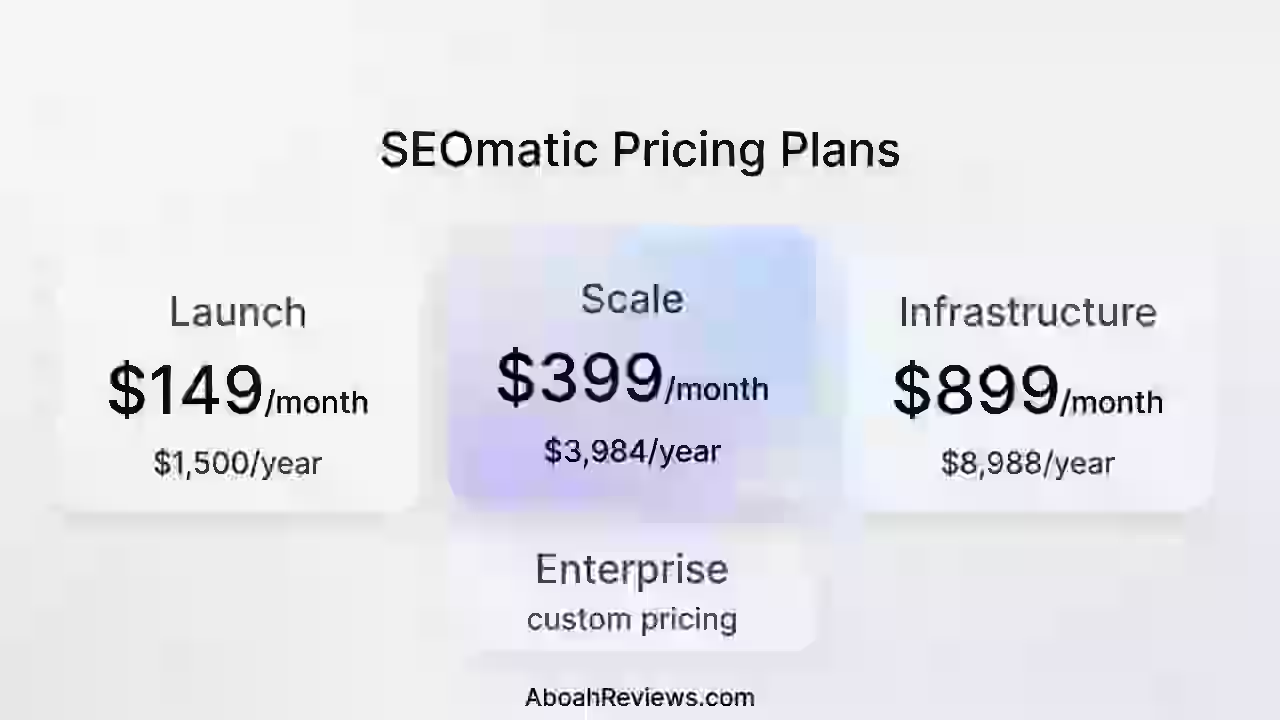
Note: SEOmatic offers a 14-day free trial, after which pricing is based on your content scale with no long-term commitment. Credit card details are not required for the trial.
| Plan | Price | No. Pages | Best for |
|---|---|---|---|
| Launch | $149/month ($125/month for annual) | Up to 1k pages/month | Agencies testing scalable SEO campaigns on 1–2 clients |
| Scale | $399/month ($332/month for annual) | Up to 5k pages/month | Agencies managing multiple clients and growing SEO volume |
| Infrastructure | $899/month ($749/month for annual) | Up to 20k+ pages/month | Agencies deploying scalable SEO systems across many clients |
| Enterprise | Custom pricing | Unlimited pages | Large teams and enterprises requiring unlimited scale and custom integrations |
Full SEOmatic Pricing Breakdown
1. Launch Plan – $149/month ($125/month for annual)
The Launch plan is the entry-level option designed for agencies or SEO professionals who want to start testing programmatic SEO campaigns with a small number of clients.
Features included:
- 1 Workspace
- AI Credits: 250,000 words per month
- Publish up to 1,000 pages per month
- Template Library
- Template Builder
- Dataset Import
- Bulk Generation and Editing
- SEO Metadata and Schema automation
- CMS Integration
- Bulk Page Publishing
- Normal Support
- Team Collaboration with 3 seats
This plan works well for smaller agencies or individual SEO professionals experimenting with automated page generation.
2. Scale Plan – $399/month ($332/month for annual)
The Scale plan expands the system to support agencies managing several clients or larger SEO campaigns.
Everything in Launch, plus:
- Up to 5 Workspaces
- AI Credits: 1 million words per month
- Publish up to 5,000 pages per month
- Dynamic Updates
- Automated Internal Linking
- Dataset Library
- Programmatic SEO Keyword Research
- Priority Support
- Team Collaboration with 5 seats
This tier is intended for agencies that are actively running multiple SEO campaigns and require stronger automation and content scaling.
3. Infrastructure Plan – $899/month ($749/month for annual)
The Infrastructure plan is designed for agencies or organizations running large-scale programmatic SEO systems across many websites or clients.
Everything in Scale, plus:
- Up to 20 Workspaces
- AI Credits: 3 million+ words per month
- Publish up to 20,000+ pages per month
- White-label functionality
- API Access for custom integrations
- Premium Support
- Team Collaboration with 10 seats
This plan is built for teams that require deeper integrations and high-volume page generation.
4. Enterprise Plan – Custom Pricing
The Enterprise plan is built for large companies that need unlimited scale and fully customized infrastructure.
Key capabilities include:
- Unlimited Workspaces
- Unlimited Pages
- Unlimited AI Credits
- Dedicated Account Manager
- Custom Integrations
- SLA and Priority Support
Enterprise customers typically use this plan to run very large programmatic SEO operations with advanced automation and internal tooling integrations.
SEOmatic Pros and Cons
Pros
- Fastest path from structured data to published pages: No other tool in the programmatic SEO space handled the end-to-end workflow (data upload, template, AI content, CMS publish) this smoothly.
- CMS integration actually works: WordPress and Webflow publishing was reliable. This is not a small thing. Many tools in the auto blogging WordPress plugin space fumble on the publishing step.
- Drip publishing is a smart default: Having this built in shows the team understands how Google evaluates mass page creation.
- Indexing API integration speeds up visibility: Getting pages into Google’s index quickly is a real advantage for time-sensitive campaigns.
- Honest pricing for what you get: $149/month for 1,000 pages is competitive compared to hiring writers or using other programmatic SEO tools.
Cons
- AI content quality requires editing: You cannot publish raw output and expect it to hold up under Google’s helpful content standards. Editing is mandatory.
- Template design flexibility is limited: If your brand needs pixel-perfect custom pages, this tool will frustrate you.
- No keyword research built in: You need a separate tool (Ahrefs, Semrush) for keyword discovery and competition analysis.
- Language support is narrow: Only two languages are supported, making it impractical for international campaigns.
- Analytics are surface-level: Useful for quick checks, not deep analysis.
SEOmatic Limitations Workarounds’
- For AI content quality: Build detailed prompts and add human-written intro paragraphs to each template. This blends AI efficiency with real expertise.
- For limited design: Publish to WordPress and customize layouts there using your existing theme or page builder.
- For keyword research: Run your keyword research in Ahrefs first, then bring those keywords into your SEOmatic dataset. This two-tool workflow is actually standard for most professionals.
SEOmatic Alternatives & Comparisons
SEOmatic vs. Page Generator Pro
Category | SEOmatic | Page Generator Pro |
|---|---|---|
Strength | Multi-CMS integration, built-in AI, hosted page builder | Advanced features like overwriting generated content, SEO metadata, and scheduling functionality |
Best For | Agencies managing multiple CMS platforms | WordPress-only users who want deep WP integration |
Verdict | Better for multi-platform workflows | Better if your entire stack is WordPress |
SEOmatic vs. Typemat
Category | SEOmatic | Typemat |
|---|---|---|
Strength | More CMS integrations, AI paraphrasing, drip publishing | Basic programmatic page creator where you paste data and create templates |
Best For | Scaling beyond basic projects | Quick, simple programmatic SEO experiments |
Verdict | Better for growth and scale | Better for getting started quickly with small datasets |
SEOmatic vs. PageFactory
Category | SEOmatic | PageFactory |
|---|---|---|
Strength | Broader CMS support, AI content layer, analytics | WordPress and Webflow integration with automated content creation |
Best For | Agencies with diverse CMS clients | Smaller pSEO projects or projects where every row has every data point available |
Verdict | Better for complex, multi-client operations | Better for straightforward WordPress-only projects |
Which Tool Should You Choose?
- Choose SEOmatic if you need multi-CMS support, AI content generation within the tool, and you are managing projects at agency scale.
- Choose Page Generator Pro if you are exclusively on WordPress and want the deepest WP-specific feature set.
- Choose Typemat if you are experimenting with programmatic SEO for the first time and want the simplest possible setup.
- Choose PageFactory if your projects are small to mid-size and WordPress or Webflow only.
For a broader look at content automation tools, check out my comparison of the best auto blogging software.
SEOmatic Use Cases
1. Agency Building Location Pages for a Multi-Location Client
A digital marketing agency has a client with 200 service locations across the US.
Workflow:
- Export location data (city, state, zip, services offered) into a CSV.
- Upload to SEOmatic and map columns to template variables.
- Use SEOmatic’s AI to generate unique content for each location page.
- Review and edit 10% of pages as spot checks.
- Drip publish 15 pages per day to the client’s WordPress site.
Time saved: Roughly 80 to 100 hours compared to manual page creation.
2. SaaS Company Scaling Comparison Pages
A project management SaaS wants to rank for “[Competitor] vs [OurProduct]” queries.
Workflow:
- Build a spreadsheet of 50 competitor names with key feature differences.
- Create a comparison page template in SEOmatic with structured sections.
- Generate all 50 pages, each with unique competitor-specific content.
- Publish to Webflow with internal links between related comparison pages.
Time saved: Roughly 40 hours. These pages also serve as landing pages for paid campaigns.
3. Ecommerce Brand Building Category Pages
An ecommerce store sells outdoor gear across 300 product subcategories.
Workflow:
- Export product category data (category name, top products, key features, price ranges).
- Use SEOmatic to generate category landing pages targeting long-tail queries.
- Publish to Shopify with auto-generated meta descriptions and internal links.
Time saved: Roughly 60 hours. Each page targets specific product + intent combinations.
4. Freelancer Offering Programmatic SEO as a Service
A freelance SEO specialist wants to offer bulk page creation to small business clients.
Workflow:
- Gather client data (services, locations, pricing info) into a standardized CSV template.
- Use SEOmatic to produce pages for each client project.
- Publish directly to the client’s CMS.
- Use SEOmatic analytics to generate performance reports.
Time saved: Roughly 20 hours per client project. The freelancer can serve more clients without increasing hours.
If you are exploring how to monetize content tools, my guide on how to make money with RightBlogger covers a related revenue model.
SEOmatic Community Feedback & User Experience

User feedback for SEOmatic is generally positive, though the sample size is smaller than established tools.
On G2, users were impressed with SEOmatic’s easy interface, noting that the steps required to get started were easy to understand and that it was able to build out content for several pages in very little time.
One organic reviewer on G2 wrote that they were “looking to generate pages quickly for programmatic SEO, and SEOmatic delivered.”
Users on the SEOmatic product page shared similar sentiments. One user noted:
“Your product saves 100s of dollars if someone plans the CSV file properly. In one of my earlier business, we were doing similar things manually and were spending thousands of dollars. We used to hire writers and SEO specialists. Each article costs us around 50.”
Another user, Ben from SalesPitch, reported generating 75 pieces of unique content with a total time cost for research and publishing of approximately 3 hours instead of 12.
Common praise: Easy setup, fast page generation, good CMS integrations, responsive support from the founder.
Common complaints: Limited template customization, AI content still needs human review, some users want more languages.
One concern I noticed: SEOmatic’s G2 profile has not been active for over a year. For a tool that is still being actively developed and marketed, this inactive profile could raise questions for buyers doing due diligence.
It is worth noting, not a red flag on its own, but something I would like to see the team address.
SEOmatic Evaluation & Scoring
Category | Weight | Score (out of 10) | Weighted Score |
|---|---|---|---|
Features & Functionality | 30% | 8.0 | 2.40 |
Ease of Use | 20% | 8.5 | 1.70 |
Pricing & Value | 20% | 8.0 | 1.60 |
Support & Customer Experience | 15% | 7.0 | 1.05 |
Trust & Credibility | 15% | 7.0 | 1.05 |
Final Rating | 100% | 7.8/10 |
- Features scored well because the core workflow (data to template to published page) works as advertised. Points deducted for limited customization and narrow language support.
- Ease of Use is strong. The interface is clean, and the setup process took me under 30 minutes for my first project.
- Pricing is fair for the page volume you get. The Basic plan offers real value at $149/month.
- Support is decent. The founder, Minh, is responsive. But the lack of a large support team and minimal documentation for advanced use cases knocked points off.
- Trust is the weakest area. The tool is relatively young (founded in 2022), the G2 profile is inactive, and the user base, while growing, is still small compared to established tools. More transparency about data handling and uptime would help.
SEOmatic AI Detection and Content Penalties
This section of the SEOmatic review matters because you are generating content at scale with AI. Here are the real risks I observed:
AI Detection Exposure:
The AI-generated content does read as AI-produced if you use detection tools like Originality AI . About 60% of unedited output was flagged as AI-generated in my tests.
After human editing (rewriting intros, adding specific local details, adjusting tone), detection rates dropped significantly. This aligns with what common autoblogging tool mistakes look like in practice.
Content Penalty Risks:
Google’s helpful content guidelines specifically target low-value, template-generated pages that don’t provide genuine value. Improperly implemented programmatic SEO could trigger Google’s quality or helpful content penalties. If you publish hundreds of thin, nearly identical pages, you are asking for trouble. SEOmatic’s AI paraphrasing helps differentiate pages, but it is not a substitute for genuinely unique value on each page.
Data Privacy:
SEOmatic processes your uploaded data through their servers and AI models. If your datasets contain sensitive client information, review their privacy policy carefully.
API Dependency:
SEOmatic relies on OpenAI’s API for content generation. If OpenAI changes pricing or availability, it could affect SEOmatic’s functionality and costs.
My Recommendation: Always edit AI output before publishing. Add unique data points, local details, or original insights to each page. Use drip publishing. Monitor indexed pages in Search Console for thin content warnings.
For more context on how AI content fits into the broader autoblogging picture, see my analysis of the future of autoblogging tools.
Final Verdict on SEOmatic Review 2026
BUY if you are an agency, SaaS company or ecommerce brand with structured data and a clear need to create landing pages at scale.
SEOmatic does this job better and faster than any manual workflow, and it integrates with more CMS platforms than most competitors.
The pricing is reasonable, the setup is quick, and the core features deliver.
SKIP if you are a solo blogger, a content marketer focused on editorial long-form, or anyone without structured datasets.
This tool is purpose-built for programmatic SEO without coding, and if that is not your use case, you will get more value from a dedicated AI content writing tool or a traditional autoblogging solution like Emplibot.
My personal decision:
I am keeping SEOmatic on my agency toolkit for location page and comparison page projects.
For blog content, I use separate tools. SEOmatic does not try to be everything, and that focus is what makes it useful.
Frequently Asked Questions About SEOmatic Review 2026
1. Is SEOmatic better than ChatGPT for creating SEO pages?
If you need to automate SEO content creation at scale and publish directly to WordPress or Shopify, SEOmatic is the better fit. If you need a single well-written article, ChatGPT is fine. ChatGPT generates text, but it does not handle bulk page creation, CMS integration, template-based generation, or auto-publishing. SEOmatic takes a dataset and turns it into hundreds of published, indexed pages.
2. Is SEOmatic a good programmatic SEO tool?
Yes, for its intended audience. SEOmatic is a programmatic SEO tool designed to create thousands of SEO-optimized blog articles or landing pages fast, automating content creation by turning templates and data into unique pages that rank well on Google. It is one of the better options I have tested for this specific workflow, especially if you need multi-CMS support.
3. What are the limitations of SEOmatic?
The main limitations are: limited page template customization (custom CSS only), AI content that requires human editing, only two languages supported, no built-in keyword research, and basic analytics compared to dedicated SEO tools. It also works best when you already have clean, structured datasets.
4. Can SEOmatic content be detected as AI-generated?
Yes, unedited SEOmatic content is likely to be flagged by AI detection tools. In my testing, roughly 60% of raw output triggered AI detectors. Human editing significantly reduces detection rates. The bigger concern is not AI detection per se, but whether the content provides genuine value.
5. How much does SEOmatic cost?
SEOmatic pricing starts at $149 per month.
- Launch: $149/month – publish up to 1,000 pages per month
- Scale: $399/month – publish up to 5,000 pages per month
- Infrastructure: $899/month – publish up to 20,000+ pages per month
- Enterprise: Custom pricing with unlimited pages and AI credits
SEOmatic also provides a 14-day free trial, allowing users to test the platform before committing to a paid plan.
6. Does SEOmatic work with WordPress?
Yes, it publishes directly to WordPress, and it worked reliably in my testing. SEOmatic also integrates with Ghost, Wix, Shopify and Webflow, plus several other platforms. The WordPress integration uses the REST API for auto-publishing.
7. How is SEOmatic different from autoblogging tools?
SEOmatic is a bulk SEO page generator focused on programmatic SEO, not traditional autoblogging. Autoblogging tools like Abun or BlogBuster generate blog articles on a schedule. SEOmatic creates data-driven pages from templates and datasets.

- Ryze AI Review 2026: My 30 Days Full Breakdown of This Autonomous SEO & GEO Platform - October 9, 2026
- #1 Best Plugin for Automatic Blog Posting in WordPress (2026) - September 13, 2026
- 13 Best WordPress Autoblogging Plugins I Tested & Ranked for 2026 - September 13, 2026