TL;DR: Free autoblogging tools let you automatically publish content to your WordPress site using RSS feeds, AI generation, or automation workflows. They work best for testing automation concepts, building niche sites, or aggregating news content.
But free plans come with serious limitations: usage caps, weak SEO controls, and content quality issues that can hurt your rankings. This guide covers the best free autoblogging tools, their real limitations, and how to use them without damaging your site.
Introduction to Free Autoblogging Tools
If you’ve spent any time searching for ways to scale content production, you’ve probably come across the idea of autoblogging. The promise is simple: set up a system once, and watch content appear on your site automatically.
Free autoblogging tools take this a step further by offering entry-level access to automated content generation and publishing without upfront costs.
I first tested autoblogging software back in 2019 when I was trying to build a news aggregation site. I set up an RSS-based WordPress autoblogging plugin, pointed it at five tech news feeds, and let it run for two weeks.
The result? A site full of duplicate content that Google refused to index, and a valuable lesson about what automation can and cannot do.
This guide explains exactly what free autoblogging tools are, which ones actually work in 2026, and how to use them without torpedoing your SEO. Whether you’re exploring AI blogging tools for the first time or looking to test automated publishing on a side project, you’ll find practical advice based on real testing, not marketing claims.
What Are Free Autoblogging Tools?

Free autoblogging tools are software applications or plugins that automatically publish content to a website without manual intervention. They pull content from external sources, generate new articles using AI, or combine both approaches.
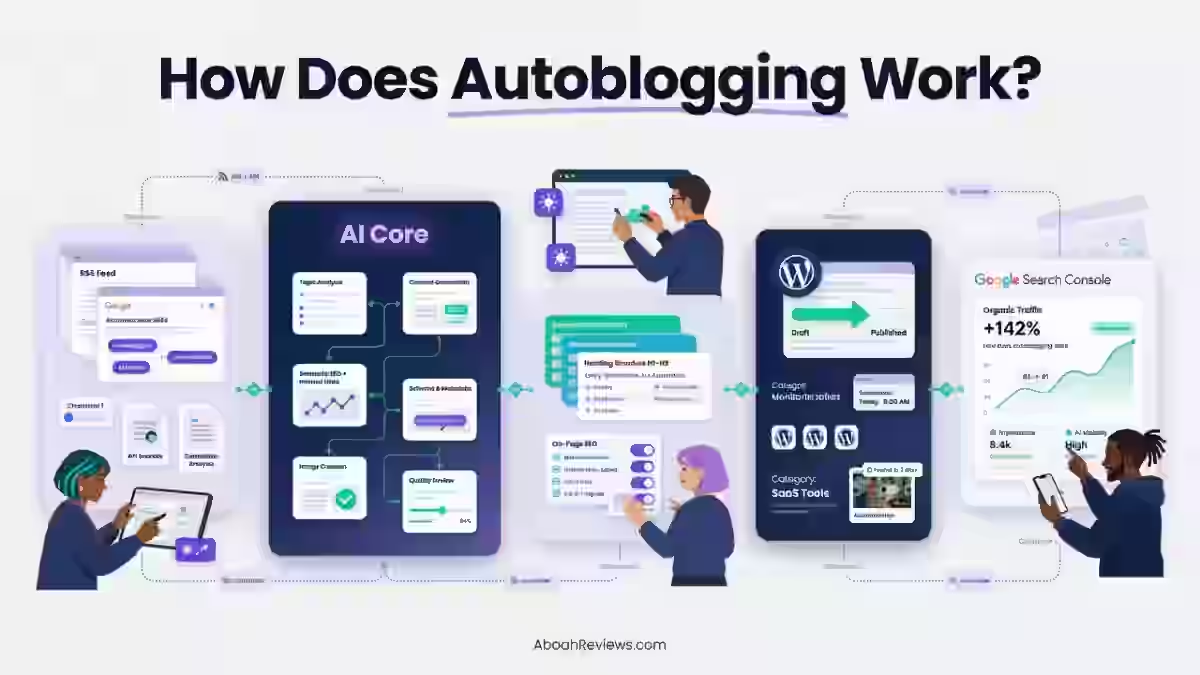
How Autoblogging Works
Autoblogging tools work by automatically publish content to a website using:
- RSS feeds that pull articles from other sites
- APIs that connect to content sources or AI services
- AI-generated articles created from prompts or keywords
- Automation workflows that trigger publishing based on conditions
The goal is simple: reduce the time between content creation and publication. But the execution varies wildly depending on the tool type and your configuration.
For in-depth look at how auto blogging tools work, you can check out my full guide to automated content creation.
Types of Autoblogging Automation
- RSS Autoblogging pulls content from feeds and republishes it on your site. This is the oldest form of autoblogging and remains popular for news aggregation. The problem is that you’re publishing someone else’s content, which creates duplicate content issues unless you add significant original value.
- AI Autoblogging generates original articles using artificial intelligence. These tools use prompts, keywords, or topic inputs to create new content. The quality ranges from barely readable to surprisingly good, depending on the tool and your editing process.
- Hybrid Automation combines RSS feeds with AI rewriting or enrichment. You pull content from feeds, then use an AI writing assistant to rewrite, expand, or add original commentary. This approach can produce better results than pure RSS autoblogging, but it requires more setup.
What “Free” Really Means
When autoblogging tools advertise free plans, they almost always include significant restrictions:
- Usage caps on feeds, posts, or AI credits per month
- Feature restrictions that lock useful options behind paid tiers
- Limited SEO controls for things like schema, internal linking, and meta optimization
- Scalability walls that make the free tier unsuitable for serious projects
I’ve tested several free AI content generators that offered 5 articles per month on the free plan. That’s enough to test the output quality, but nowhere near enough for actual content production. Treat free tiers as evaluation periods, not long-term solutions.
Important SEO Warning Before Choosing a Free Autoblogging Tool
Before you install any autoblogging plugin or sign up for an AI article writer, you need to understand the SEO risks. I’ve seen sites lose organic traffic within weeks of implementing poorly configured autoblogging systems.
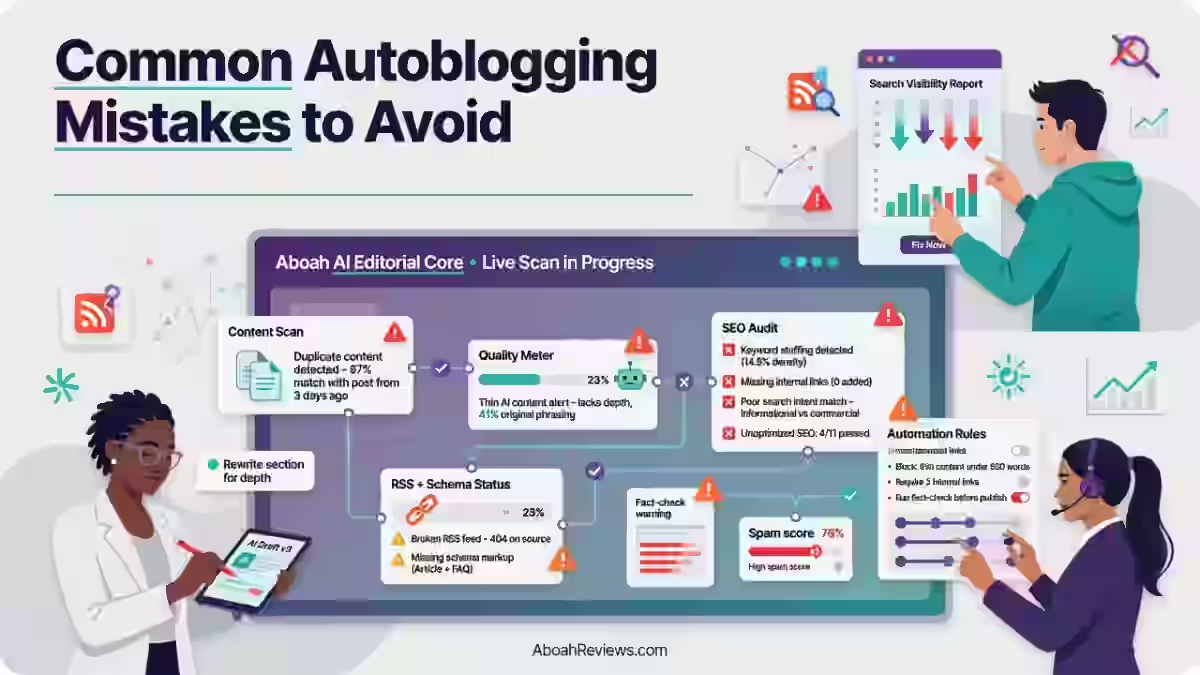
Common SEO Problems with Autoblogging
- Duplicate content issues are the most common problem with RSS-based autoblogging. If you’re republishing content that exists elsewhere, Google will typically index the original source and ignore your version. According to Google’s documentation on duplicate content, search engines try to show the version they think is most appropriate for searchers, which usually isn’t the automated copy.
- Thin or low-value pages often result from AI-generated content that lacks depth. Google’s Helpful Content system specifically targets pages that “don’t provide substantial value. Following Google’s 2023–2024 algorithm updates, industry analyses from Semrush highlighted that thin content was a primary driver for significant ranking drops, aligning with Google’s public goal to reduce low-quality search results by 40%.
- AI hallucinations create factual errors that damage your credibility. I’ve seen AI blogging tools confidently state incorrect statistics, invent quotes from real people, and cite sources that don’t exist. If you’re publishing automatically without review, these errors go live.
- Index bloat happens when you create too many low-quality pages. Every page on your site consumes crawl budget. If most of your pages offer little value, Google may reduce how frequently it crawls your site overall.
The Real Risk
Free autoblogging tools typically offer less control over these issues than paid versions. You might not have access to noindex settings, canonical tag configuration, or content quality filters. This makes the SEO risks higher, not lower.
How Free Autoblogging Tools Work

Understanding the workflow helps you configure these tools properly and avoid common mistakes.
1. Content Sourcing
Every autoblogging system needs a content source. The four main approaches are:
- RSS feeds from news sites, blogs, or content aggregators
- APIs that connect to content databases or AI services
- Keyword-based scraping that finds content matching target terms
- AI prompt-driven generation that creates articles from scratch
RSS-based sourcing is fastest to set up but creates duplicate content. AI generation takes longer to configure properly but produces original content. Keyword-based scraping often violates terms of service and can result in legal issues, so I avoid it entirely.
2. Content Processing
Between sourcing and publishing, most tools include processing steps:
- Rewriting or paraphrasing to make RSS content more original
- AI expansion to add depth to thin articles
- Image insertion from stock libraries or AI image generators
- Basic internal linking to other posts on your site
The quality of these processing steps determines whether your automated content helps or hurts your site. Free tools typically offer basic versions of these features, while paid tiers include more sophisticated SEO optimization options.
3. Auto-Publishing
The final step pushes content to your site:
- WordPress auto-posting through plugins or API connections
- Scheduling to spread posts across days or weeks
- Category and tag assignment based on rules you define
I learnt that scheduling matters more than you might think. When I first tested automated publishing, I set a tool to post immediately whenever new content was ready. I ended up with 47 posts in one day, which looked spammy and triggered a manual review from my ad network.
Best Free and Freemium Autoblogging Tools (2026)

After testing dozens of content creation tools over the past three years, here are the ones that actually work on free or freemium plans.
AI-Based Autoblogging (Limited Free Access)
1. Emplibot
Emplibot offers fully automated AI blogging with WordPress publishing. The free tier is extremely limited, essentially a trial, but it’s useful for evaluating output quality before committing.
Pros:
- End-to-end automation from keyword to published post
- Includes image sourcing and internal linking
- SEO-optimized content structure
Cons:
- Free tier barely exists (usually 1-3 test posts)
- Expensive at scale
- Limited control over AI prompts
Best for: Niche site builders who want hands-off content production and have budget for paid plans.
2. RightBlogger
RightBlogger positions itself as an AI writing assistant for bloggers, with over 80 tools including article generators, outline creators, and content planning tools.
Pros:
- Multiple AI tools beyond just article generation
- Blog post workflow covers research through publishing
- Active development with regular new features
Cons:
- Free tier has strict usage limits
- Quality varies significantly by topic
- Still requires editing for best results
Best for: Bloggers who want AI assistance across the entire content workflow, not just article generation.
For more on how RightBlogger compares to other blogging tools, see my RightBlogger review and testing results.
3. AutoBlogging.ai
AutoBlogging.ai focuses specifically on SEO-optimized content and offers direct WordPress publishing. It has become one of the more popular AI content generators for affiliate sites.
Pros:
- Produces relatively clean, readable content
- Multiple article modes including Amazon reviews
- Direct WordPress integration
Cons:
- Free credits are minimal
- Can produce generic content without careful prompting
- Needs human review for accuracy
Best for: Affiliate marketers testing AI-generated product content.
RSS Autoblogging Tools (Auto-Publish)
4. WP RSS Aggregator
WP RSS Aggregator is the most established WordPress autoblogging plugin for RSS feeds. The free version handles basic feed importing, while premium add-ons enable full auto-posting.
Pros:
- Reliable, well-maintained plugin
- Large user community for support
- Handles multiple feeds easily
Cons:
- Auto-posting requires premium add-ons
- Free version is feed display only
- No content rewriting included
Best for: News sites and content curators who want reliable feed aggregation.
5. RSS Aggregator by Feedzy
Feedzy offers RSS aggregation with a free tier that includes basic import and display features. The pro version adds auto-posting and content manipulation.
Pros:
- Clean interface
- Good performance with large feeds
- Freemium model with useful free features
Cons:
- Full automation requires paid upgrade
- Limited customization on free tier
- No AI rewriting built in
Best for: WordPress users who need simple feed display before committing to full autoblogging.
6. Content Pilot
Content Pilot handles multiple content sources including RSS feeds, article directories, and social media. It offers more flexibility than pure RSS tools.
Pros:
- Multiple content source types
- Content spinner integration
- Scheduling and campaign management
Cons:
- Free version has significant limits
- Spinner quality varies
- More complex setup than simpler tools
Best for: Users who want to pull content from diverse sources.
7. Arvow AI SEO Writer
Arvow combines AI content generation with SEO optimization features. It’s newer to the market but has shown promise in testing.
Pros:
- SEO focus built into generation process
- Competitive analysis features
- Keyword optimization tools
Cons:
- Smaller user base means less community support
- Free tier is restrictive
- Still developing compared to established tools
Best for: SEO-focused content creators who want integrated keyword research.
8. WPeMatico RSS Feed Fetcher
WPeMatico is a mature autoblogging plugin with a reasonable free feature set. It handles automatic posting from RSS feeds with more control than most free options.
Pros:
- Fully functional free version
- Extensive customization options
- Active development and updates
Cons:
- Interface feels dated
- Some features require add-on purchases
- Learning curve for advanced configuration
Best for: Technical users comfortable with WordPress who want a free blog automation solution.
Automation Bridges (Not True Autobloggers)
These tools don’t create content, but they can connect content sources to WordPress publishing.
9. IFTTT (Free Plan)
IFTTT can trigger WordPress posts based on external events, like new items in an RSS feed or social media updates. It’s not an autoblogging software in the traditional sense, but it enables automated blogging workflows.
Pros:
- Connects thousands of services
- Simple automation logic
- True free tier with real functionality
Cons:
- Not designed for content production
- Limited actions on free plan
- Basic WordPress integration
Best for: Users who want to cross-post content from other platforms.
10. Zapier (Free Tier)
Zapier offers more sophisticated automation than IFTTT, with better WordPress integration. The free tier allows 100 tasks per month.
Pros:
- More reliable than IFTTT in my testing
- Better error handling
- Stronger WordPress actions
Cons:
- 100 tasks/month limit is restrictive
- More complex to configure
- Paid tiers get expensive
Best for: Users who need reliable automation with more control than IFTTT offers.
For a complete breakdown of content automation options, read my comparison of the best autoblogging software for 2026.
Free Autoblogging Tools Comparison Table
Tool | Type | Free Tier Limits | WordPress Integration | SEO Features | Best For |
|---|---|---|---|---|---|
Emplibot | AI Generation | 1-3 test posts | Direct plugin | Advanced | Testing before paid commitment |
RightBlogger | AI Assistant | Limited credits | Via export | Moderate | Multi-tool content workflow |
AutoBlogging.ai | AI Generation | Minimal credits | Direct | Moderate | Affiliate content testing |
WP RSS Aggregator | RSS | Display only | Native plugin | Basic | Feed aggregation |
Feedzy | RSS | Import/display | Native plugin | Basic | Simple feed needs |
Content Pilot | Multi-source | Post limits | Native plugin | Basic | Diverse source autoblogging |
Arvow | AI + SEO | Restrictive | Via integration | Strong | SEO-focused generation |
WPeMatico | RSS | Full function | Native plugin | Basic | Free RSS autoblogging |
IFTTT | Automation | Limited applets | Basic | None | Cross-posting workflows |
Zapier | Automation | 100 tasks/month | Good | None | Reliable automation bridges |
Free vs Paid Autoblogging Tools
The gap between free and paid autoblogging tools is wider than with most software categories. Understanding these differences helps you decide when upgrading makes sense.
Key Differences
- Feature depth varies significantly. Free tools typically offer basic content import or generation. Paid versions add content enrichment, advanced scheduling, quality filtering, and multi-site management. If you need features like automated internal linking or schema markup, expect to pay.
- Content quality control is limited on free tiers. Paid tools often include AI quality scoring, plagiarism checking, and content filtering that blocks low-quality outputs from publishing. Without these controls, more junk reaches your site.
- Scalability hits walls quickly on free plans. Most free tiers cap you at 5-20 posts per month. Paid plans typically offer hundreds or unlimited posts. If you’re building a content-heavy site, free plans won’t sustain your automated publishing needs.
- SEO safeguards are usually premium features. Canonical tag management, noindex rules for thin content, and crawl optimization settings typically require paid upgrades. These are exactly the features you need to avoid SEO damage from autoblogging.
When to Upgrade
Based on my experience testing these tools, here are the signals that indicate you’ve outgrown free autoblogging tools:
- Consistent indexing issues where Google ignores your automated content
- Traffic growth beyond testing phase where real visitors arrive
- Monetization goals that require quality content and user trust
- Editorial workflow bottlenecks where free tier limits slow production
I typically recommend staying on free plans for 2-4 weeks of testing. Once you’ve validated that autoblogging fits your workflow and you understand the configuration options, upgrading usually makes sense.
SEO Risks of Using Free Autoblogging Tools
Let me be direct: free autoblogging tools carry higher SEO risks than paid versions. Here’s what I’ve seen go wrong and how to protect yourself.
Common SEO Problems
- Duplicate content remains the biggest risk with RSS autoblogging. When you republish content from other sites, you’re competing against the original for ranking. According to Search Engine Journal, syndicated content rarely outranks the source unless you add substantial original value.
- AI hallucinations create factual errors that can damage user trust and potentially trigger quality rater concerns. In one test, I had an AI article writer confidently state that a free tool had features that only existed in the paid version. Publishing that error would have hurt my credibility.
- Thin content penalties affect sites that publish many low-value pages. Google’s Search Quality Evaluator Guidelines specifically mention that pages should provide “a satisfying amount of content.” Autoblogged content often fails this test without human enrichment.
- Crawl budget waste matters for larger sites. If Google spends its crawl budget on low-quality autoblogged pages, it may crawl your high-value pages less frequently. Ahrefs research suggests that crawl budget optimization becomes important once sites exceed a few thousand pages.
How to Reduce SEO Risk
- Manual review workflows catch problems before publishing. I never let autoblogged content go live without human review. Even 5 minutes of editing catches obvious errors and improves quality significantly.
- Content enrichment adds original value to aggregated or AI-generated content. Add your own commentary, examples, data, or analysis. This transforms thin content into something worth indexing.
- Canonical tags tell Google which version of duplicate content to index. If you’re syndicating content legitimately, proper canonical setup prevents duplicate content issues.
- Noindex low-value pages that you can’t improve. Sometimes the best SEO decision is preventing a page from entering Google’s index at all. Most paid autoblogging tools include noindex options; free tools often don’t.
Best Practices for Using Free Autoblogging Tools Safely
After years of testing autoblogging setups, these practices consistently produce better results than running tools with default settings.
1. Start with Low-Competition Keywords
Free autoblogging tools work better for content targeting keywords where competition is low. You’re unlikely to rank autoblogged content against established sites publishing expert human content. Pick topics where thin content can still rank, then improve pages that show potential.
I tested this by running an autoblogging campaign targeting keywords with under 100 monthly searches. About 30% of pages gained some rankings within 3 months. When I tried the same approach with higher-volume keywords, almost nothing ranked.
2. Use Autoblogging as Content Assistance, Not Replacement
The most successful autoblogging workflows I’ve seen treat automated content as a starting point, not a finished product. Use AI to generate drafts, then edit them into something publishable. Use RSS feeds for research and inspiration, not direct republishing.
This shifts autoblogging from a “set and forget” model to a content acceleration model. You still do the editorial work, but you start with a foundation instead of a blank page.
3. Always Edit Before Publishing
I cannot stress this enough: publishing autoblogged content without review damages your site. Even with the best AI writing tools, outputs contain errors, awkward phrasing, and missing context.
My minimum editing checklist:
- Verify all factual claims
- Add at least one original example or insight
- Check that the content actually answers the target query
- Remove obvious AI patterns and generic filler
- Add internal links to relevant content
4. Track Indexing and Performance in Search Console
Google Search Console shows you exactly what’s happening with your autoblogged content. Check the Coverage report for indexing issues and the Performance report for actual traffic.
I review Search Console weekly for autoblogging projects. Pages that don’t get indexed within 2-3 weeks usually need significant improvement or removal. Pages that get indexed but show no impressions after a month are candidates for consolidation or deletion.
Who Should Use Free Autoblogging Tools?
Free autoblogging tools make sense for specific use cases. For others, they create more problems than they solve.
Good Fits
- Beginners testing automation benefit from free tools because they can learn without financial commitment. If you’ve never used autoblogging software, spending a few weeks with free tools teaches you what features matter before you invest in paid plans.
- Niche site builders often start with autoblogging to test topic viability. Before committing to a niche, you can generate test content and see how it performs. If the niche shows promise, upgrade to better tools for production content.
- News aggregators use RSS autoblogging legitimately when they add curation value, commentary, or specialized filtering. A site that aggregates news about a specific industry can provide value even with syndicated content.
- Content researchers use autoblogging to collect information without intending to publish it directly. The automated collection serves research purposes, and final content is created separately.
- AI SEO experimenters testing how search engines handle AI-generated content need low-risk environments for testing. Free tools on throwaway domains let you experiment without risking established sites.
Poor Fits
- Authority websites should never use unedited autoblogged content. Your reputation depends on content quality, and automation shortcuts undermine trust.
- YMYL niches (health, finance, legal) require expert content that AI and RSS feeds cannot provide. The stakes are too high for automated content production.
- Brand-driven blogs where voice and perspective matter don’t work with generic autoblogged content. Readers follow these sites for unique perspectives, not recycled information.
- Monetized affiliate sites risk their revenue by publishing low-quality content. Ad networks and affiliate programs increasingly penalize sites with thin or AI-generated content.
When Free Autoblogging Tools Are Not Enough
Recognizing when you’ve outgrown free tools saves you from hitting walls that hurt your site.
Signs You Need to Upgrade
- Your content consistently fails to index despite technical correctness. Free tools often produce content that Google evaluates as low-value. Paid tools with better quality controls produce more indexable content.
- Your workflow involves more editing than original writing would require. If you spend an hour fixing every autoblogged article, you’re not saving time. Better tools produce cleaner output that requires less cleanup.
- You need features that don’t exist on free tiers. SEO controls, quality filtering, multi-site management, and advanced scheduling typically require paid plans.
- Your site has outgrown testing phase. Free tools work for experiments. Production sites need production tools.
How to Choose the Best Free Autoblogging Tool
Follow this process to select the right autoblogging tool for your situation:
- Define your autoblogging goal. Are you aggregating news, generating original content, or automating cross-posting? Different goals require different tools.
- Identify the automation type you need. RSS autoblogging, AI generation, and workflow automation serve different purposes. Pick the category first.
- Review free plan limits. Check posts per month, feeds allowed, AI credits included, and feature restrictions. Make sure the free tier actually lets you evaluate the tool properly.
- Check SEO control features. Can you set noindex on specific posts? Configure canonical URLs? Control internal linking? These features prevent SEO damage.
- Confirm WordPress compatibility and updates. Outdated plugins create security risks. Check that the plugin is actively maintained and compatible with current WordPress versions.
- Evaluate content quality and customization options. Generate test content and assess quality honestly. Can you customize prompts, templates, or output formats?
- Assess SEO risk level. Based on your site’s current authority and traffic, how much risk can you tolerate? New sites can experiment more freely than established properties.
- Ensure a clear upgrade/scalability path. If the tool works, you’ll want to expand. Understand paid pricing before committing to a free tool you might outgrow.
- Test with a small batch of posts before scaling. Never point autoblogging tools at your main site without testing. Use a staging site or throwaway domain first.
You can also get more insights on how to choose the best SEO tool for higher rankings.
Future of Free Autoblogging Tools (2026 and Beyond)
Having watched this space evolve over several years, here’s where I see free autoblogging tools heading:
- AI and human hybrid workflows are becoming standard. The fully autonomous dream of set-and-forget autoblogging is dying because Google keeps getting better at identifying low-quality automated content. Tools that combine AI generation with human editing checkpoints produce better results.
- Assistive automation over full autonomy reflects this shift. Future tools will focus on accelerating human content creation rather than replacing it entirely. Expect better draft generation, research assistance, and editing support instead of complete automation.
- Smarter duplication detection is already appearing in premium tools and will filter down to free tiers. These features prevent you from publishing content that’s too similar to existing pages, reducing duplicate content risks.
- Increased emphasis on editorial signals means autoblogging tools will push users toward adding human value. Features that prompt for original commentary, fact-checking, and content enrichment will become standard.
The bottom line: free autoblogging tools will remain useful for testing and small-scale projects, but the gap between free and paid options will widen as paid tools incorporate more advanced quality controls.
Final Thoughts On Free Autoblogging Tools for 2026
Free autoblogging tools offer a legitimate way to test content automation without financial commitment. The best options in 2026, including WPeMatico for RSS and RightBlogger for AI assistance, let you evaluate autoblogging workflows before investing in paid solutions.
But “free” comes with real costs: usage limits, missing features, and higher SEO risks. The tools work best for testing concepts, building small niche sites, or supplementing manual content creation. They rarely work well as primary content engines for serious sites.
My recommendation: start with free autoblogging tools to learn how automation fits your workflow. Test thoroughly on staging sites or low-risk domains. Track everything in Search Console. And plan to upgrade once you’ve validated that autoblogging serves your goals.
The sites I’ve seen succeed with autoblogging treat it as content assistance, not content replacement. They edit everything, add original value, and use automation to accelerate production rather than eliminate human involvement.
What’s your experience with autoblogging tools? If you’ve tested any of the options covered here, share what worked and what didn’t in the comments. Real user experiences help everyone make better tool decisions.
Frequently Asked Questions About Free Autoblogging Tools
1. What is the best free platform for a blog?
WordPress.org with free hosting or WordPress.com‘s free tier are the most practical options for starting a blog without cost. Both support autoblogging plugins and integrate with most free blogging tools. Blogger from Google is another completely free option, though it has fewer plugin options for automation.
2. Is autoblogging legal?
Autoblogging itself is legal, but how you use it matters. Republishing copyrighted content from RSS feeds without permission may violate copyright law. AI-generated original content is generally legal to publish. Always check the terms of service for content sources you aggregate and add original value to syndicated content.
3. What is the best free autoblogging software?
WPeMatico offers the most functional free tier for RSS autoblogging on WordPress. For AI-generated content, RightBlogger and AutoBlogging.ai provide limited free credits worth testing. The “best” choice depends on whether you need RSS aggregation or AI generation, so test both types to see which fits your workflow.
4. Can you make $1000 a month with a blog?
Yes, but rarely through autoblogged content alone. Most blogs earning $1000+ monthly combine quality content with monetization through ads, affiliate marketing, or products. Autoblogging can supplement content production, but human-created content typically performs better for monetization. Expect 6-12 months of consistent effort before reaching significant income.
5. Is Blogger 100% free?
Blogger from Google is completely free with no paid tiers. You get free hosting, a free subdomain, and basic customization without paying anything. However, it has limited support for autoblogging plugins compared to WordPress, so it’s less suitable for automated publishing workflows.

- #1 Best Plugin for Automatic Blog Posting in WordPress (2026) - September 13, 2026
- 13 Best WordPress Autoblogging Plugins I Tested & Ranked for 2026 - September 13, 2026
- 13 Best Google AI Overview Checking Tools in 2026 (Tested & Ranked) - September 9, 2026