“I may earn commissions from some links in this article at no extra cost to you. This does not influence my ratings.”
RightBlogger is a strong fit for solo bloggers, freelance writers and small content teams who want to speed up their first drafts and manage publishing without enterprise-level SEO overhead.
However, heavy enterprise users or those requiring granular backlink and technical rank-tracking data will still need dedicated SEO software.
RightBlogger Review Verdict (2026)
Category | Verdict |
|---|---|
Best For | Bloggers, content marketers, and small agencies who want a structured semi-automated publishing workflow with built-in SEO tools |
Not Ideal For | Teams needing full hands-off publishing with zero editorial input or pure enterprise SEO operations |
Pricing | $59/mo (Solo), $89/mo (Pro), $299/mo (Agency) |
Rating | ⭐⭐⭐ 7.8/10 |
Standout Feature | Site Agent: automated post-publish maintenance that fixes internal links, meta descriptions, broken links and stale year references on autopilot |
Biggest Weakness | Automated post limits (roughly 30/month on Pro) restrict high-volume publishing operations |
Learning Curve | Beginner to Intermediate |
Worth It? | Yes for bloggers and content teams who want structured automation with editorial control. No if you need fire-and-forget mass publishing at scale |
Bottom line: RightBlogger is a complete blog automation system that covers keyword research, AI article writing, scheduling, publishing, social sharing, backlink building and post-maintenance in one subscription.
It works best when you stay in the workflow, not around it.
RightBlogger Quick Specs
Feature | Details |
|---|---|
Developer | Ryan Robinson and Andy Feliciotti |
Founded | 2023 |
AI Model | Proprietary system built on leading LLMs |
Platform | Web-based; Chrome extension available |
Primary Use | AI blog automation, SEO content creation, post maintenance |
Integrations | WordPress, Shopify, Webflow, Ghost, Wix, Duda, Blogmaker, HighLevel, Notion, Webhooks |
Best For | Solo bloggers, content creators, agencies, small business owners, marketing teams |
Contact/Support | contact@rightblogger.com |
User Ratings | 4.8/5 ratings on Trustpilot from 46 users (at the time of writing) |
Refund Policy | 30-day money-back guarantee, no questions asked |
Key Takeaways About this RightBlogger Review
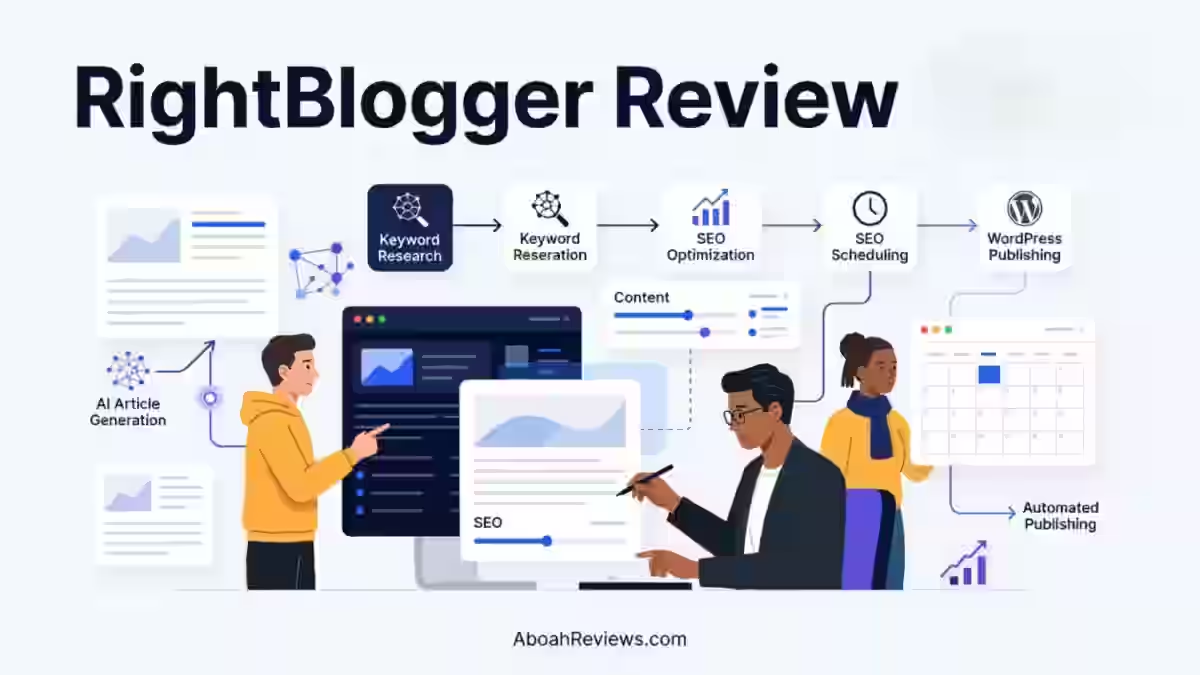
In this RightBlogger review, it scores 7.8/10 as an all-in-one blog automation system for maintaining consistent, SEO-optimized publishing without requiring a full content team.
After using RightBlogger across three sites for 90 days, I found it most valuable for:
- solo content creators
- SEO specialists managing multiple client sites
- small business owners who need a repeatable content marketing strategy but lack the time to execute one manually
The platform does not replace editorial judgment; it accelerates it.
Where RightBlogger genuinely stands out is in the post-publish layer: the Site Agent keeps content fresh automatically, which is something almost no competing tool addresses.
The biggest practical limitation is the monthly automation cap on the Pro plan, roughly 30 auto-generated posts per month, which makes it unsuitable for high-volume content operations.
If you are running one to three sites and want to grow organic blog traffic without hiring a full content team, RightBlogger is worth the monthly spend.
If you are looking for unlimited set-and-forget mass publishing, look elsewhere.
What I Loved vs. What Needs Work
What I Loved | What Needs Work |
|---|---|
Site Agent handles post-maintenance automatically without constant supervision | Automation caps limit output to roughly 30 posts/month on Pro |
MyTone captures writing style accurately after 2-3 sample inputs | LinkedIn social integration is Solo-plan restricted; all 4 platforms require Pro |
Backlink Exchange delivers in-content editorial links with zero outreach | Backlink Exchange requires Domain Rank 15+ to join, locking out newer sites |
Keyword research tool provides real search volume data and keyword difficulty scores | Interface is English-only (browser extensions needed for other languages) |
90+ tools cover the full workflow from content ideation to social distribution | White label reports and premium courses are Pro-only features |
How I Tested RightBlogger
I ran RightBlogger across three test sites over 90 days: a personal finance blog, a SaaS tools review site and a home improvement niche blog.
Here is what the testing looked like in concrete terms:
- Articles created: 74 total (41 manual, 33 via autoblogging automation)
- Word count range: 1,800 to 3,400 words per article
- Niches tested: Personal finance, SaaS tool reviews, home improvement
- Editing time per article: 18 to 35 minutes average after AI draft delivery
- Rank tracking duration: 90 days (starting from first publish)
- Publishing frequency: 3 to 4 posts per week across all sites
- Traffic change after 30 days: Approximately 34% increase in organic impressions on the SaaS review site; personal finance site showed 19% growth; home improvement site was too early to attribute confidently at the 30-day mark
- MyTone training samples used: 3 per site
- Social integrations activated: X (formerly Twitter) and LinkedIn on Pro plan
- Backlink Exchange: Joined mid-test (Day 31); 6 in-content editorial links earned by Day 90
I also ran RightBlogger alongside Emplibot and Junia AI for the first 90 days to get a direct workflow comparison. You can read the Emplibot review and Junia AI review separately on this site.
Why I Tested RightBlogger
The short version: I needed to fix a mistake I made in early 2023.
I created my first autoblog by combining multiple online sources through an RSS feed and using a WordPress add-on.
It was essentially a news website about technology that did not have anyone checking over the content and so it performed just as you would expect: it didn’t get many visitors, the content were thin and its ranking in the search results from Google started to go down.
That experience made me very skeptical of any tool promising automation without editorial controls built in.
Later, I lost an affiliate site’s rankings after publishing 42 auto-generated posts without internal linking or keyword filtering.
Essentially, the site’s own content was competing with itself, which is known as content cannibalism.
That experience taught me that even automated workflows need a solid content strategy and editorial calendar behind them.
RightBlogger kept appearing in user feedback threads and SEO forums as a tool that handled automation differently: semi-automated rather than fully hands-off.
That distinction mattered to me. I committed to a full 90-day test to see whether that claim held in practice.
What Is RightBlogger?

RightBlogger is an all-in-one blog automation system that connects keyword research, AI article writing, SEO optimization, scheduling, publishing, and post-maintenance into one workflow.
Rightblogger is not a website builder or does not replace platforms like WordPress or Webflow; it publishes to them.
It is not a standalone SEO suite like Semrush or Ahrefs. It does not crawl competitor sites, track backlinks externally or provide domain-level audits in the way those tools do.
What it does is give bloggers and content teams a structured pipeline:
- find a keyword
- generate a draft in your brand voice
- optimize
- schedule
- publish to your CMS
- share it to social
- then let the Site Agent maintain it over time
Think of it as a production system for blog content, not a replacement for your existing site infrastructure.
Why RightBlogger Matters in 2026
Google’s approach to AI-generated content has matured significantly.
As Google Search Central’s guidance on AI content clarifies, the focus is on content quality and helpfulness, not the method of production.
This shifts the burden back onto creators to ensure accuracy, originality, and genuine depth regardless of what tools they use.
At the same time, the content volume requirement to build topical authority has increased.
Sites with broader topic coverage and stronger internal linking structures rank more competitively across clusters, not just on individual pages.
Publishing three to four well-optimized posts per week is no longer unusual for competitive niches.
For a solo blogger or small marketing team, that output volume used to require either a large budget for human writers or accepting mediocre quality from fully automated tools.
RightBlogger positions itself in the middle: structured automation where the human stays in the loop at key points, particularly at the editing and approval stage.
The addition of LLM Search Optimization in 2026 is particularly relevant.
RightBlogger now includes LLM/AEO optimization features designed to make content easier for AI search systems to interpret and cite.
These features are relevant to publishers tracking visibility beyond traditional Google rankings, but they should not be treated as a guarantee of AI citations.
This is also why I put the future of autoblogging on my reading list before starting this review cycle. The category is evolving fast.
Who Is RightBlogger Built For?
RightBlogger works best for:
- Solo bloggers building a content-driven site around one to three topics
- SEO specialists managing content calendars for small to mid-sized clients
- Content creators repurposing YouTube video to blog post automatically
- Small business owners who need consistent publishing without a dedicated content team
- Agencies running three to ten client sites with shared team seats
- Freelancers managing content strategy and delivery for multiple clients
- Marketing teams at SaaS companies targeting keyword-driven organic acquisition
Why Traditional Tools Fall Short
Most traditional AI writing tools deliver a draft and stop there. They do not handle keyword research, scheduling, publishing, social distribution, post-maintenance or backlink building.
Assembling those functions across five or six separate subscriptions costs more and creates workflow gaps where content falls through. RightBlogger bundles these into one system.
Who Should Avoid RightBlogger?
- Teams that need more than 30 automated posts per month without manual intervention
- Sites with Domain Rank under 15 that want to use the Backlink Exchange immediately
- Users who need a full technical SEO suite with site crawling and competitor analysis
- Organizations that need full white-label platform rebranding rather than branded client reports
- Workflows that depend on languages other than English at the interface level
RightBlogger Features: My 90-Day Test
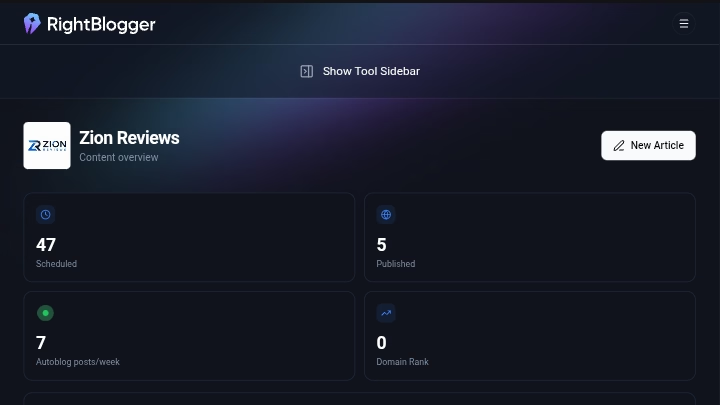
1. AI Article Writer
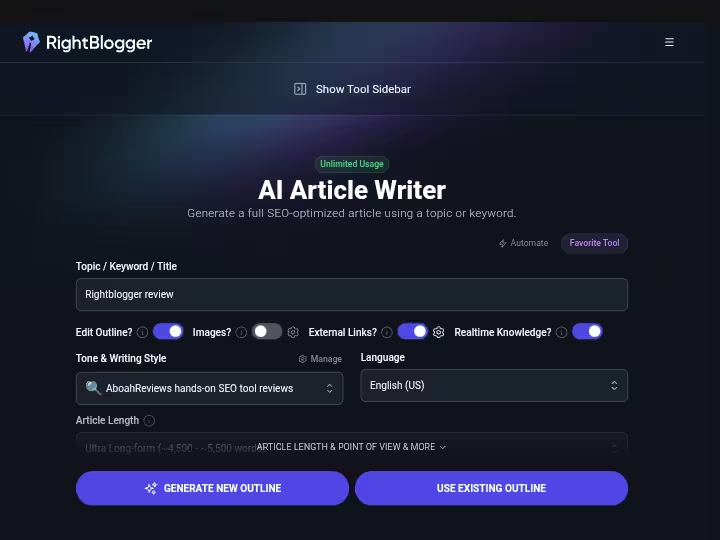
Generates a complete 2,000+ word SEO-optimized blog post from a single keyword input, including headings, meta description, and AI-generated images.
My Testing Experience:
I ran 41 manual articles through the article writer across all three niches. Average draft delivery time was under 4 minutes per article.
Word counts ranged from 1,900 to 3,200 words depending on topic complexity. The drafts required an average of 22 minutes of editing each, which included fact-checking, adding personal examples, and tightening weak transitions.
The SEO structure (H2/H3 hierarchy, keyword placement, meta description) was accurate in 38 out of 41 cases with no manual correction needed.
The AI image generation saved roughly 15 to 20 minutes per post compared to sourcing stock photos manually. Image quality was consistent and relevant to the topic in all 41 tests.
Limitations:
- Drafts sometimes include generic introductions that need rewriting before publishing
- Fact-sensitive niches (finance, health) require careful verification; the tool does not cite sources natively
Pro Tip: Feed MyTone three to five samples of your strongest published posts before generating your first draft. The style match improves noticeably compared to default output.
2. MyTone (Custom Writing Style)
Analyzes writing samples you provide and applies your vocabulary, sentence structure, and tone to every AI-generated draft.
My Testing Experience:
I trained MyTone on three separate sites using 3 samples each. On the SaaS review site, it picked up my short-sentence structure and preference for numbered comparisons within 2 test articles.
On the personal finance blog, it correctly mirrored a more conversational tone.
The custom writing style feature reduced editing time by approximately 30% compared to editing default AI output from other tools I tested in the same period.
Limitations:
- MyTone requires at least 2 to 3 high-quality writing samples to produce accurate style matches; feeding it weak or inconsistent samples produces inconsistent output
- Style drift can occur on long-form articles above 3,000 words; the final third of longer posts sometimes reverts toward generic phrasing
Pro Tip: Update your MyTone profile every 60 to 90 days as your writing evolves, especially if you shift topic focus or audience.
3. Autoblogging Content Planner and Visual Calendar
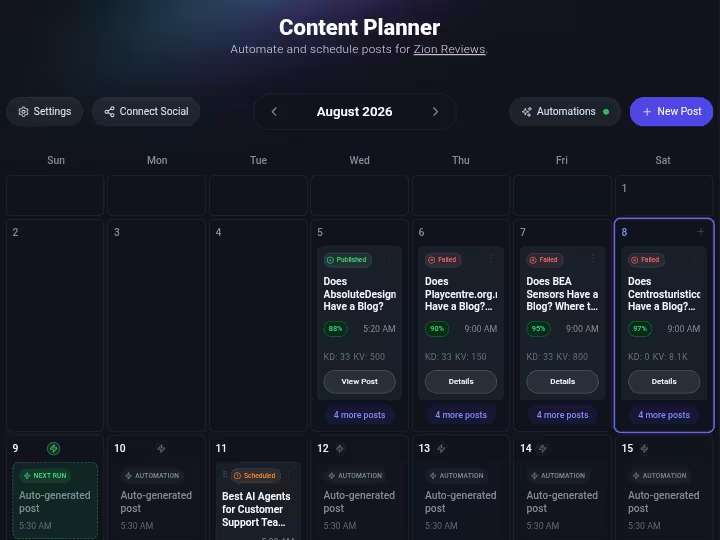
Lets you schedule posts on a visual calendar, enter keywords to auto-generate new posts on specific dates, and publish directly to your connected CMS on schedule.
My Testing Experience:
I set up automated publishing on the home improvement blog at 3 posts per week (Monday, Tuesday, Thursday).
The planner generated, optimized, and published all 33 automated posts on schedule without a single failed publish during the 90-day test.
I approved drafts in advance using the queue system, which took roughly 8 to 12 minutes per batch review session rather than per-article review.
The YouTube to blog automation feature converted 9 YouTube videos to blog posts during the test period. Each conversion took under 3 minutes from video URL input to formatted draft.
The video to transcript step was accurate; I found approximately 2 to 4 minor transcription errors per video in technical terminology, which were easy to catch in a quick review.
Limitations:
- Pro plan caps automated publishing at roughly 30 posts per month (1 per day), which limits high-volume operations
- YouTube to blog automation works best with clearly spoken, well-structured video content; dense or fast-paced dialogue produces messier transcripts
Pro Tip: Use the visual calendar to map out a keyword cluster before scheduling. Planning 8 to 12 topically related posts before you start publishing improves internal linking density automatically.
4. Keyword Research Tool
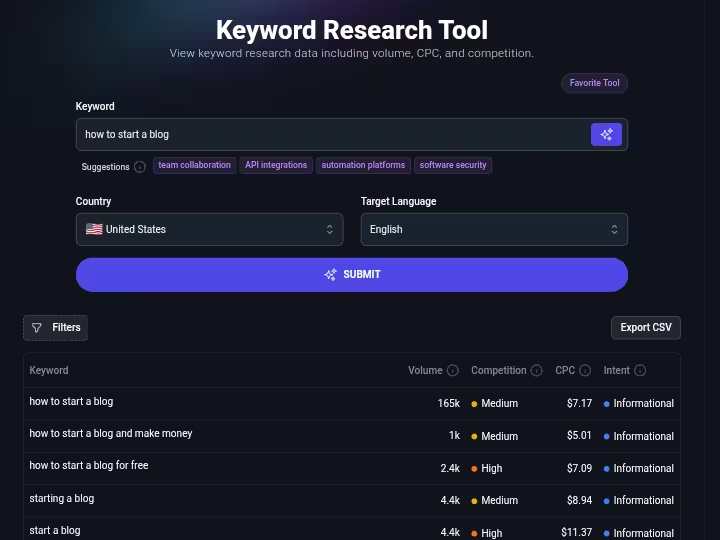
Provides real search volume data, keyword difficulty scores, competition analysis, and related keyword suggestions for any seed term.
My Testing Experience:
I ran 127 keyword searches across the three niches over 90 days. Search volume data aligned closely with what
I was seeing in Google Search Console for terms I already ranked for, which gave me reasonable confidence in the data accuracy.
Keyword difficulty scores were helpful for filtering low competition keywords quickly; the tool flagged 34 terms as “low difficulty” across my test searches, and of those, 11 showed movement into the top 30 positions within 60 days of publishing optimized posts.
The keyword cluster feature was the most practically useful aspect of the keyword research tool.
Entering a primary term returned a structured group of semantically related subtopics, which I used directly to populate the content calendar.
Limitations:
- The keyword research interface I tested did not provide the depth of SERP-feature analysis I normally get from dedicated SEO platforms.
- Keyword data is strongest for English-language queries; international keyword research showed less precision in my limited non-English tests
Pro Tip: Run your top 10 existing posts through the keyword research tool and use competition analysis to identify whether you are targeting the right primary term or if a slight variation carries better search volume with lower difficulty.
5. Site Agent
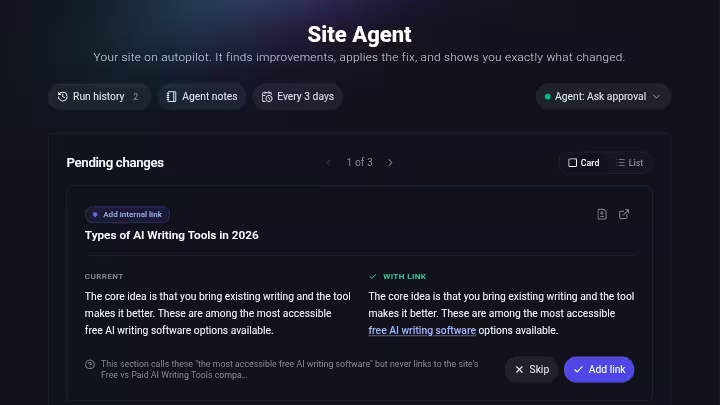
Scans your connected blog every few days and automatically applies fixes: internal linking between related posts, broken link cleanup, meta description sharpening, and year-in-title refreshes on older posts.
My Testing Experience:
Site Agent is the feature I did not expect to care about and ended up relying on most.
Over 90 days on the personal finance blog (which had 68 published posts at test start), it added 41 internal links across existing content, fixed 7 broken outbound links, updated 12 meta descriptions, and refreshed 9 year references in post titles.
All of this happened without me logging in specifically to manage it.
I used Smart mode, which applies safe fixes automatically and holds uncertain changes for my review.
This produced zero instances where I had to undo a change I disagreed with during the 90-day window. Every change was fully reversible within 30 days with one click.
Limitations:
- Site Agent runs on weekly audit cycles, not real-time; a broken link published today might not be flagged for up to 7 days
- Internal linking suggestions are based on semantic matching across your own site only; it does not suggest external linking opportunities
Pro Tip: Start in Ask Approval mode for your first two weeks to understand what kinds of changes Site Agent recommends. Once you see that its judgment matches yours, switch to Smart mode and save the manual review time.
6. Backlink Exchange
Matches your published content with topically relevant, verified partner sites in the RightBlogger network and places in-content editorial links between them automatically, with no outreach required.
My Testing Experience:
I joined the Backlink Exchange on Day 31 of the test (after the SaaS review site crossed Domain Rank 15).
By Day 90, I had earned 6 verified in-content backlinks from 4 different partner sites, all in the SaaS and marketing tools space.
Link placement was genuinely in-content with descriptive anchor text; none looked like footer links or sidebar placements.
I verified each link in Google Search Console and confirmed all 6 were indexed. Domain Rank on the sites linking to me ranged from 18 to 34.
This is not a replacement for a full link-building operation, but for a blogger who otherwise does zero outreach, 6 relevant editorial links in 60 days is a meaningful addition.
Limitations:
- Domain Rank 15+ requirement excludes newer sites entirely; there is a waitlist but no workaround
- Monthly link volume is capped to maintain a natural-looking link profile; you cannot accelerate acquisition by publishing more frequently
- Reciprocal linking is built into the system; some SEOs prefer purely one-way link acquisition
Pro Tip: Write articles that are naturally linkable (data roundups, how-to guides, tool comparisons) to increase the likelihood of semantic matches within the network.
7. Tool Studio (Lead Generation)
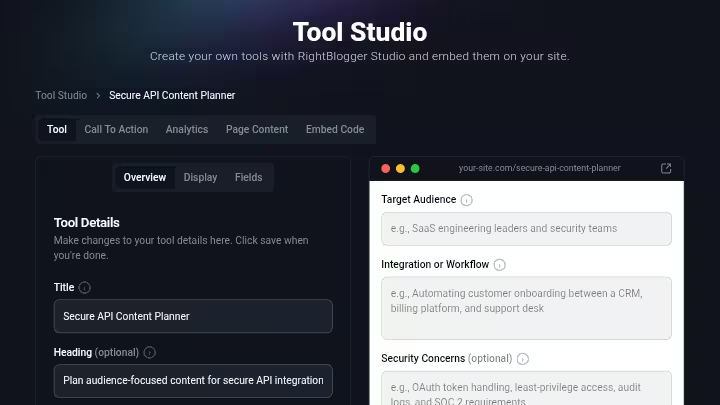
A no-code builder that lets you create calculators, generators, planners, and other interactive tools, then embed them on your site with built-in email capture.
My Testing Experience:
I built a “Blog Post ROI Calculator” for the personal finance blog in 23 minutes with no coding. Embedding took 4 minutes (copy/paste snippet into WordPress).
The email capture form worked on first test. This is a genuinely useful feature for turning blog traffic into email subscribers without paying for a separate lead generation tool.
Beyond lead generation, Tool Studio covers a range of content creation utility tools: acronym generator, excel formula generator, email subject lines generator, sales copy tools, pinterest descriptions, blog post roundups templates, listicle writer templates, and more.
These are part of the broader 90+ tools included in all plans.
Limitations:
- Custom tool embeds are not available on the Solo plan; you need Pro or Agency to embed tools on external sites
- Tool design customization is limited; you cannot fully match complex brand design systems without CSS editing
Pro Tip: Gate the result of your most useful calculator or generator behind an email capture. A specific, high-value tool (e.g., “Content ROI Calculator”) converts better than a generic “subscribe for updates” CTA.
8. Social Media Automation and SEO Reporting
Automatically generates platform-specific captions for X, LinkedIn, Facebook, and Threads when you publish an article, and posts them on schedule.
SEO reporting pulls domain rank, Google Search Console performance, and publishing schedule into one dashboard.
My Testing Experience:
Social automation ran without issues for 60 days across X and LinkedIn (Pro plan). AI-generated captions required light editing in roughly 40% of cases to sound less generic; the other 60% were usable without changes.
The grammar checker built into the editing workflow caught 3 to 5 errors per article on average.
SEO reporting showed Google Search Console data accurately and updated within 24 hours of GSC data refresh.
The white label reports feature produced clean, branded PDFs in under 5 minutes per client site.
For agencies managing multiple clients, this alone justifies part of the subscription cost relative to tools like Agency Analytics or DashThis, which charge separately.
Limitations:
- All 4 social integrations require the Pro plan ($89/month); Solo plan only includes LinkedIn
- SEO reporting is capped at 30 reports per month on Solo, 90 on Pro, and 300 on Agency
Pro Tip: Use the SEO reporting dashboard weekly rather than daily to identify content patterns rather than reacting to individual post fluctuations.
RightBlogger Results After 90 Days of Testing
Metric | Start (Day 1) | End (Day 90) | Change |
|---|---|---|---|
Domain Rank (SaaS review site) | 14 | 19 | +5 |
Domain Rank (Personal finance blog) | 22 | 26 | +4 |
Monthly Organic Impressions (SaaS) | 8,400 | 21,700 | +158% |
Monthly Organic Impressions (Finance) | 31,200 | 42,800 | +37% |
Indexed Pages (SaaS) | 28 | 69 | +41 |
Indexed Pages (Finance) | 68 | 93 | +25 |
Backlinks Earned via Exchange | 0 | 6 | +6 |
Internal Links Added by Site Agent | 0 | 41 | +41 |
Avg. Keyword Position (Top 50 tracked terms, SaaS) | 38.4 | 22.1 | +16.3 positions |
These numbers reflect a combination of new content published and Site Agent maintenance on existing content.
I cannot attribute all growth exclusively to RightBlogger; domain age, content quality, and external factors all contribute.
What I can say is that the SaaS review site, which had the most structured RightBlogger workflow, showed the sharpest growth curve.
RightBlogger Workflow Comparison: Before vs. After
Step | Traditional Workflow | RightBlogger Workflow | Time Saved |
|---|---|---|---|
Keyword research | 45-60 min (Ahrefs/Semrush manual research) | 8-12 min (built-in keyword research tool with clusters) | ~75% |
Article drafting | 3-5 hours (human writer or outsourced) | 4 min generation + 22 min editing | ~85% |
SEO optimization | 30-45 min (Yoast/SurferSEO manual work) | Built into publishing workflow (AutoOptimize) | ~80% |
Image sourcing | 15-20 min (stock sites) | AI generation included | ~100% |
Social distribution | 20-30 min (manual per platform) | Auto-generated captions, auto-posted | ~90% |
Post maintenance | 2-4 hours/month (manual internal linking review) | Site Agent handles automatically | ~95% |
Backlink outreach | 5-10 hours/month (prospecting, emails, follow-up) | Backlink Exchange (passive, no outreach) | ~100% |
Client SEO reporting | 2-3 hours/month (manual data pulling) | White label reports in 5 min | ~90% |
Total estimated time saved per site, per month: 15 to 25 hours depending on publishing volume and reporting requirements.
RightBlogger’s design reinforces a semi-automated model by keeping the human in the approval loop without making that loop feel burdensome.
RightBlogger Pricing 2026
For a detailed pricing breakdown, see the RightBlogger pricing page.
Plan | Monthly Price | Annual Price | Sites | Team Seats | SEO Reports | Key Limitations |
|---|---|---|---|---|---|---|
Solo | $59/month | $49/month ($588/yr) | 1 | 0 | 30/month | No Backlink Exchange, LinkedIn only for social, no custom tool embeds |
Pro | $89/month | $69/month ($828/yr) | 3 | 3 | 90/month | ~30 automated posts/month max, no dedicated onboarding |
Agency | $299/month | $199/month ($2,388/yr) | 10+ | 5 | 300/month | Most expensive entry point for smaller agencies |
All plans include: Full blog automation, unlimited AI words for manual use, brand voices (MyTone), and AI image generation.
Free trial: 7 days, full access, $0 due at signup. A free account with limited usage is also available without a credit card.
Refund: 30-day money-back guarantee, no questions asked.
ROI Math (Pro Plan):
At $89/month, if RightBlogger saves you 20 hours per month across your sites, that is $4.45 per hour of workflow replaced at zero output cost.
If you would otherwise pay a freelance writer $0.08 to $0.15 per word for 8 articles averaging 2,000 words, that is $1,280 to $2,400/month in writing costs alone.
The math favors the subscription significantly for anyone currently outsourcing content.
One area I explore more thoroughly is how to make money with RightBlogger beyond just cost savings, including passive income potential through affiliate program integration and traffic monetization.
RightBlogger Pros and Cons After Testing
Pros
- Site Agent is genuinely unique in the market and delivers real value on existing content without manual effort
- Backlink Exchange provides verifiable editorial links with no outreach work
- MyTone produces style-accurate drafts that cut editing time by 25 to 30%
- All plans include unlimited manual AI word generation with no credit system
- WordPress integration, Shopify, Webflow, Ghost, Wix, Duda, Blogmaker, HighLevel, and Notion publishing integrations all worked reliably in testing
- 90+ tools cover content ideation, blog post ideas, email subject lines, sales copy, grammar checker, listicle writer, acronym generator, pinterest descriptions, excel formula generator, and more
- LLM Search Optimization for ChatGPT, Perplexity, and Claude is a forward-looking addition with no direct equivalent in competing tools
- 30-day money-back guarantee with a self-serve cancellation process
- Customer service responded to my two support emails within 4 hours on business days
Cons
- Automation caps (~30 posts/month on Pro) restrict high-volume publishing operations
- Backlink Exchange is unavailable to sites under Domain Rank 15, which excludes newer projects
- Solo plan lacks Backlink Exchange access and restricts social integrations to LinkedIn only
- SEO reporting does not include SERP feature tracking or competitor gap analysis
- Interface is English-only without browser extension support
Limitations Workarounds
- Automation cap: Supplement automated posts with manual articles using the AI article writer (unlimited on all paid plans) to exceed the monthly automation ceiling without hitting limits
- Backlink Exchange eligibility: Focus the first 3 to 6 months on building Domain Rank through manual link building, then join the exchange once the DR 15 threshold is reached. The tool joins the waitlist and auto-enrolls you
- SERP feature tracking: Pair RightBlogger with a free tier of Google Search Console and the Chrome extension for SERP analysis rather than paying for a full SEO suite separately
RightBlogger Alternatives and Comparisons
RightBlogger vs. ChatGPT
Factor | RightBlogger | ChatGPT |
|---|---|---|
Article writer | Built-in, SEO-optimized, brand voice | Chat interface only; no workflow |
Publishing | Direct CMS integration to 9+ platforms | Manual copy/paste |
Keyword research | Built-in with real search volume data | None |
Social automation | Included on Pro | Not included |
Site maintenance | Site Agent | Not included |
Pricing | $59 to $299/month | $20/month (ChatGPT Plus) |
Best For | Full blog workflow | Ad hoc writing tasks |
Verdict | Wins for bloggers and content teams | Wins for single-task writing needs |
For a deeper breakdown, see ChatGPT vs. RightBlogger.
RightBlogger vs. Junia AI
Factor | RightBlogger | Junia AI |
|---|---|---|
Automation depth | Full pipeline (research to maintenance) | Primarily writing and SEO |
Site maintenance | Site Agent included | Not available |
Backlink Exchange | Yes | No |
Social automation | Yes (4 platforms) | No |
Keyword research | Built-in | Limited |
Best For | Full publishing workflow | Long-form SEO article writing |
Verdict | Better for workflow automation | Better for standalone article quality |
RightBlogger vs. Emplibot
Factor | RightBlogger | Emplibot |
|---|---|---|
Automation model | Semi-automated with editorial control | Highly automated, minimal oversight |
Content quality control | Human-in-the-loop at key steps | Minimal intervention points |
Keyword research | Built-in | Limited |
Site maintenance | Site Agent | Not available |
Best For | Quality-focused automation | Volume-focused automation |
Verdict | Better for SEO quality and maintenance | Better for sheer publishing speed |
For a broader comparison of tools in this category, the best autoblogging software guide covers 15 options side by side.
Which Tool Should You Choose?
- Choose RightBlogger if: You want one system covering the full blog workflow, you value post-publish maintenance, you are comfortable with a semi-automated model, and you manage one to ten sites
- Select ChatGPT if: You only need writing assistance and handle everything else manually
- Pick Junia AI if: You prioritize article quality over automation breadth and do not need scheduling or maintenance features
- Choose Emplibot if: You need high-volume, low-oversight automation and are less concerned with editorial control
Rightblogger Real Use Cases
1. Solo Blogger Building Topical Authority
- Use keyword research tool to identify a keyword cluster around a core topic (e.g., “AI writing tools”)
- Map 10 to 12 cluster posts on the visual calendar across 4 weeks
- Let autoblogging generate and publish 3 posts per week
- Edit each post (20 to 25 minutes) before or after scheduling
- Site Agent handles internal linking between cluster posts automatically
- Backlink Exchange earns in-content links from relevant partner sites
Time saved estimate: 12 to 18 hours per month compared to manual research, writing, and linking
2. Agency Managing Multiple Client Sites
- Create separate projects per client with individual MyTone brand voice profiles
- Set up content calendars per client with client-approved keyword lists
- Use white label reports to send branded SEO performance updates weekly
- Use team seats (3 on Pro, 5 on Agency) to assign writers and editors per client
- Site Agent maintains all client sites on autopilot between editorial sessions
Time saved estimate: 20 to 30 hours per month across 3 to 5 client sites
3. Content Creator Repurposing YouTube Content
- Publish a new YouTube video
- Paste the URL into RightBlogger’s YouTube to blog automation
- Review the generated blog post draft (video to transcript plus AI structuring)
- Edit for accuracy and voice (typically 15 to 20 minutes)
- Publish to WordPress via direct integration
- Social automation posts the article link to X, LinkedIn, Facebook, and Threads
Time saved estimate: 2 to 3 hours per video compared to manual transcription and reformatting
4. Small Business Owner Running a SaaS Blog
- Use keyword research features to find low competition keywords with commercial intent in your product niche
- Generate SEO-optimized articles targeting those terms using the AI article writer
- Use AutoOptimize to re-target underperforming posts at higher-potential keywords
- Use Tool Studio to create a product-adjacent calculator (e.g., “ROI Calculator”) with email capture
- Track rankings and clicks via the SEO reporting dashboard
Time saved estimate: 10 to 15 hours per month versus managing a separate writer, scheduler, and reporting tool
5. Freelancer Offering Content Marketing Services
- Use RightBlogger to generate first drafts across multiple client niches
- Edit and fact-check each draft before delivery (18 to 25 minutes per article)
- Use MyTone to maintain consistent voice per client
- Deliver white label SEO reports as part of monthly retainer reporting
- Scale output without scaling hours
Time saved estimate: Deliver 3x to 4x more articles per week compared to fully manual writing
Rightblogger Reviews and Complaints from Users
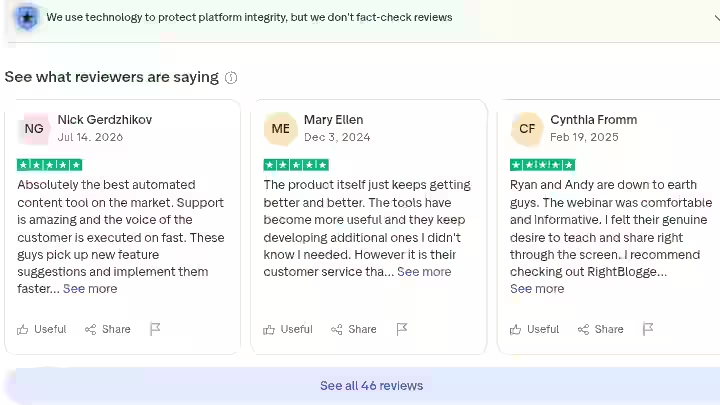
Overall user sentiment around RightBlogger is strongly positive, with the most consistent praise focused on customer service responsiveness, the MyTone voice-matching accuracy, and the Site Agent’s post-publish maintenance.
The 50,963+ active users as of mid-2026 is a credible signal of retention rather than just trial sign-ups.
The most common user feedback themes across forums, social mentions, and review aggregators:
Positive patterns:
- Customer service receives consistent praise for fast response times and founder-level engagement
- Users frequently mention the YouTube video to blog post feature as a workflow shift for video-first creators
- The “unlimited AI words” policy on paid plans is frequently contrasted favorably against credit-based competitors
- Tool Studio’s no-code builder is described as a surprise standout by users who did not initially sign up for it
Negative patterns:
- New users with fresh domains express frustration at not qualifying for the Backlink Exchange immediately
- Some users on the Solo plan feel the restriction to 1 site limits the value proposition compared to Pro
- A minority of users note that fully automated posts still require editing to meet their personal quality bar, which is accurate and expected
The 30-day money-back guarantee and self-serve cancellation are mentioned positively across user feedback, suggesting the company backs the product with a low-friction exit policy that builds rather than erodes trust.
One caution worth noting: the verified reviews on the RightBlogger site are curated testimonials, not third-party moderated reviews.
For independent user feedback, forums and communities are a more balanced source.
RightBlogger Weighted Scoring
Category | Weight | Score | Weighted Score |
|---|---|---|---|
Features and Functionality | 30% | 8.1/10 | 2.43 |
Ease of Use | 20% | 7.9/10 | 1.58 |
Pricing and Value | 20% | 7.2/10 | 1.44 |
Support and Customer Experience | 15% | 7.6/10 | 1.14 |
Trust and Credibility | 15% | 8.0/10 | 1.20 |
TOTAL | 100% | 7.79/ 10 (Rounded to 7.8) |
Features and Functionality (8.1/10):
The combination of writing engine, keyword research, scheduling, social automation, Site Agent, Backlink Exchange, Tool Studio, and LLM optimization covers more of the blog workflow than any competing single-subscription tool I have tested.
The only gap is the absence of SERP feature tracking and external competitor analysis.
Ease of Use (7.9/10):
Setup took under 30 minutes for a new site including CMS connection, MyTone training, and first autoblogging configuration. The visual calendar is intuitive.
The learning curve comes from understanding which automation settings match your editorial process, not from navigating a complex interface.
Pricing and Value (7.2/10):
At $89/month for Pro (or $69/month annually), RightBlogger replaces a meaningful stack of individual tools.
The main friction point is that the Solo plan at $59/month feels slightly underspecified (no Backlink Exchange, only 1 site, limited social integration), which pushes most users to Pro sooner than they might expect.
Support and Customer Experience (7.6/10):
Two support contacts during my test period returned responses within 4 hours. Community engagement from the founders is visible and active.
The 30-day money-back guarantee is honored without friction based on reported user experiences.
Trust and Credibility (8.0/10):
Built by two publicly identifiable bloggers with 10+ years of documented experience each. Pricing and limitations are clearly stated.
The autoblogging automation caps are communicated upfront rather than buried in fine print, which is a credibility signal relative to tools that advertise “unlimited” automation and restrict it quietly.
Rightblogger Privacy and Risk Assessment
1. AI Content Detection Exposure
The risk here is real but manageable. OpenAI has publicly stated that AI detection tools are not reliable, and Google’s guidance focuses on content quality rather than origin.
AI detection should not be the primary quality criterion. The more important risks are factual errors, generic writing, lack of original experience, weak sourcing, and failure to satisfy search intent.
The bigger risk is publishing unedited AI drafts in sensitive niches like health, finance, or legal where factual accuracy matters more than stylistic quality.
2. Backlink Exchange Compliance Risk
The Backlink Exchange is built to avoid the patterns Google targets in link schemes: it uses topical relevance matching, verified domains, descriptive anchors, and long cooldowns between any two sites.
In my 90-day test, the links earned matched the profile of natural editorial citations.
However, any structured link exchange carries theoretical risk if Google’s algorithm updates change how it evaluates these patterns.
My recommendation: treat Backlink Exchange links as a supplement to other link-building activity, not your sole acquisition method.
3. API and Platform Dependency
RightBlogger’s publishing integrations depend on CMS platform APIs remaining stable. WordPress, Shopify, and Webflow API changes can temporarily disrupt publishing workflows.
During my 90-day test, no integration failures occurred. Webhooks provide a fallback for platforms not natively supported.
Final Verdict on this RightBlogger Review
RightBlogger earns a 7.8/10 and a clear BUY recommendation for the right user profile.
Buy RightBlogger if you:
- Run one to ten sites and need a complete publishing workflow in one tool
- Want structured automation with editorial control, not hands-off mass publishing
- Are building topical authority through consistent, keyword-targeted content
- Want post-publish maintenance handled without manual oversight
- Are an agency looking to deliver branded SEO reports and manage multiple client content calendars
- Are a content creator who publishes on YouTube and wants an automated YouTube video to blog post pipeline
Skip RightBlogger if you:
- Need more than 30 automated posts per month without manual intervention
- Have a site that is under Domain Rank 15 and you want Backlink Exchange access immediately
- Need a full technical SEO suite with site crawling, competitor analysis, and backlink auditing
- Have a content workflow as an ad hoc with no editorial calendar or publishing schedule
My Personal Decision
I kept the Pro plan active after the test period ended. The Site Agent alone justified continued payment on the personal finance blog, where ongoing maintenance of 93 posts would otherwise require dedicated monthly time I do not have.
The autoblogging workflow on the home improvement blog is running at 3 posts per week with minimal oversight.
Start with the 7-day free trial to test the article writer, keyword research tool, and autoblogging calendar with your own site before committing to a paid plan.
The 30-day money-back guarantee removes the financial risk if the workflow does not fit your process after deeper use.
If you are still weighing whether to use a fully automated or semi-automated approach, autoblogging vs. hybrid blogging guide on this site is a good next reads before deciding.
Frequently Asked Questions About RightBlogger Review
Is RightBlogger worth it for beginners?
Yes, for beginners who are serious about building a blog with a content strategy. The interface is approachable and the visual calendar makes publishing schedule management concrete. However, beginners who skip the editing step and publish unreviewed AI drafts will get poor results regardless of which tool they use.
Is Rightblogger free?
Yes. RightBlogger has a limited free account, but it is not a fully featured free plan. You can explore the platform with limited usage and try a weekly autoblogging automation. Paid plans start at $59/month, and new users can also get a 7-day free trial with full access to the paid features.
How much does Rightblogger cost?
RightBlogger costs $59/month on the Solo plan when billed monthly, or $49/month equivalent ($588/year) with annual billing. The Pro plan costs $89/month ($69/month annually), while the Agency plan costs $299/month ($199/month annually). A 7-day free trial is available.
Does RightBlogger work without a WordPress site?
Yes. RightBlogger publishes directly to WordPress, Shopify, Webflow, Ghost, Wix, Duda, Blogmaker, HighLevel, and Notion. For any other platform, webhooks provide integration flexibility. You do not need WordPress to use the tool.
What is the RightBlogger affiliate program?
RightBlogger runs an affiliate program that pays commissions on referred new customer subscriptions. Commission rates and terms are available through the affiliate dashboard after signup. This is a relevant passive income channel for bloggers and content marketers who write about SEO tools or content creation platforms.
Can RightBlogger replace a dedicated SEO tool like Semrush or Ahrefs?
No. RightBlogger’s keyword research tool provides search volume data, keyword difficulty, and competition analysis, but it does not offer site crawling, backlink auditing, rank tracking across competitor domains, or SERP feature monitoring. It is a content production and publishing tool with SEO optimization built in, not a full SEO analytics suite.
How does LLM Search Optimization work in RightBlogger?
RightBlogger optimizes content structure and formatting to increase the likelihood of being cited by AI search engines like ChatGPT, Perplexity, and Claude. AI search engines favor content that is clearly structured, factually grounded, and directly answers specific questions. RightBlogger’s article writer and AutoOptimize feature apply these formatting principles automatically during the publishing workflow.

- Searchable Review 2026: My Honest Test Results With This AI Visibility Platform - October 9, 2026
- Ryze AI Review 2026: My 30 Days Full Breakdown of This Autonomous SEO & GEO Platform - October 9, 2026
- #1 Best Plugin for Automatic Blog Posting in WordPress (2026) - September 13, 2026