Key Takeaways About Blogify Review
In this Blogify review, it scores 7.8/10 as a video-to-blog conversion tool that solves the time-consuming process of writing blog posts from existing video and audio content.
After 30 days of daily use, I found Blogify most valuable for content creators, YouTubers, and small marketing teams struggling with repurposing content across multiple platforms.
Blogify can repurpose content like YouTube Video, Podcast, e-Commerce Products and almost any audio, video, image, webpage, documents from up to 40+ sources into a blog. This makes it genuinely useful for anyone who already has video or audio files sitting unused.
Blogify does what it claims: you paste a YouTube video link, and it generates a ready-to-publish blog post within minutes. But the real question is whether that output is good enough to publish without heavy editing.
After converting 32 videos into blog content during my testing period, my answer is: mostly yes, with limitations.
What I Loved | What Needs Work |
|---|---|
Quickly converts videos into well-structured, SEO-friendly articles, complete with images and monetization options | User feedback consistently indicates that AI output requires significant human editing. Many report needing 15-20% edits to match brand voice and ensure accuracy. |
It can do YouTube chapters, create shorts from my videos, and so much more. Plus the integrations with WordPress, LinkedIn, Medium, and Blogger is great! | While Blogify generates content quickly, quality remains inconsistent. Some users describe output as “shockingly poor” with repetitive sections or factual inaccuracies. The AI can “hallucinate” information or create articles with multiple conclusions. |
Direct publishing to multiple platforms saves posting time | Blogify’s AI output is best suited for short to medium-length posts (300-700 words) |
Blogify.ai equips you with the capability to craft blog posts in over 70 languages | Dashboard design feels dated compared to newer tools |
Automated affiliate link insertion for monetization | No API available for custom integrations |
Quick Facts
Category | Details |
|---|---|
Best For | YouTubers, podcasters, content creators who want to convert video or audio content into blog posts |
Pricing | Lite $4.99/month, Basic $19.99/month, Premium $39.99/month, Business $49.99/month, Enterprise $99.99/month, Unlimited $199.99/month |
Rating | ⭐⭐⭐⭐ (7.8/10) |
What Is Blogify?
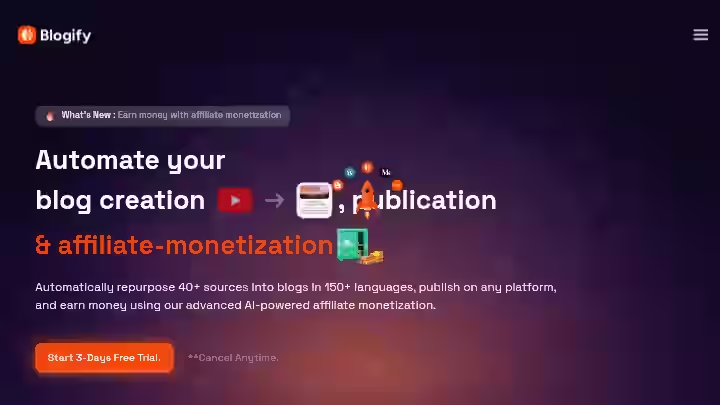
Blogify is an AI-powered platform that transforms videos, audios, and texts into engaging and SEO-friendly blog content. Unlike traditional AI writing tools, Blogify focuses specifically on the content repurposing workflow.
Different from blank-page tools, Blogify pulls content from what you’ve already made, then optimizes it for SEO and readability in one flow. This is a key distinction.
You’re not asking an AI to write from scratch. You’re giving it your ideas in video or audio format and having it structure those ideas into written content.
The platform accepts input from a video link (like YouTube, Vimeo, Dailymotion, TED, other social media platforms or even upload your own mp4), blogs, news articles, documents and converts them into blog posts you can publish directly to WordPress, Medium, Blogger or LinkedIn.
Most successful users treat Blogify as a drafting tool rather than a complete content solution.
Think of it this way: Blogify is not another AI tool that writes generic content. It’s a transcription and restructuring engine that turns your spoken words into readable blog posts.
Why I Tested Blogify
My content production problem was simple but frustrating. I run a YouTube channel alongside AboahReviews.com.
I noticed the same pattern every week: I’d spend 3-4 hours recording a video, another hour editing it, then look at my blog and realize I had no time left to write companion articles.
The videos sat on YouTube. The blog stayed quiet. My SEO strategy was falling apart because I couldn’t keep up with both formats.
I tried the manual approach first. I’d transcribe videos using Otter.ai, then paste that transcript into ChatGPT and ask it to write a blog post. The result?
Another 70 minutes per article, minimum. The process of writing blog posts from transcripts was just as tedious as writing from scratch.
When I discovered Blogify positioned as “the best 1-click YouTube to Blog software”, I committed to testing it properly. Not a quick weekend trial. A full 30 days of using it in my real content creation workflow.
I wanted to answer one question: Can this tool actually help me repurpose content without sacrificing content quality?
If you’re exploring auto blogging tools for similar reasons, this review will show you what to realistically expect.
Why Blogify Matters in 2026

The content creation workflow has shifted. According to Google’s helpful content guidelines, sites that publish thin, low-value content face ranking penalties.
At the same time, Google has stated that AI-generated content is acceptable when it provides genuine value to readers.
This creates an interesting situation for content creators. You can’t just churn out AI articles. But you also can’t ignore the efficiency gains from AI tools.
AI blog writers are incredible for scaling content creation and overcoming writer’s block. But when it comes to deep storytelling, nuanced arguments, or unique brand tone, human writers still win.
That said, combining human creativity with AI speed is the real magic.
This is exactly where Blogify fits. Here’s the content repurposing framework I developed during testing:
The IPO Model (Input, Process, Output) for Blogify
Stage | Traditional Workflow | Blogify Workflow |
|---|---|---|
Input | Record video → Transcribe → Outline manually | Record video → Paste YouTube link |
Process | Write blog post from scratch (2-3 hours) | Generate draft in 2-3 minutes |
Output | Publish after editing | Edit 15-20%, then publish |
The reason older tools fail is that they start from a blank page. You’re asking AI to generate ideas it doesn’t have.
Blogify starts from your existing content, which means the core ideas, examples, and structure already come from you.
According to Semrush research, repurposed content often performs as well or better than original content because it’s been validated once already.
Your video already resonated with an audience. Now you’re just reaching a different audience who prefers reading.
For anyone building an autoblogging strategy, this approach is more sustainable than pure AI generation.
Who Is Blogify Built For?
Based on my testing and community feedback, Blogify works best for these primary users:
- YouTubers and video creators who want to transform YouTube videos into blog posts without rewriting everything
- Podcasters looking to convert episodes into show notes or full articles
- Content marketers managing multiple channels who need to repurpose video or audio content quickly
- Affiliate marketers who want automated affiliate link insertion
- Small agencies handling content production for multiple clients
- Freelancers, marketers, or anyone serious about blogging
Why Traditional AI Writing Tools Fall Short
If you’ve tried other AI writing tools, you’ve probably noticed the same limitation: they generate generic content that sounds like everyone else.
I have tried other AI tools before, like Jasper and Followr, but Blogify give more quality. The text is closer to ready already when it comes out, and most important is how it adds sources and links.
That gives more trust for the readers and looks more professional. Jasper creates text fast but it feels often too generic and I need to re-write much.
Traditional AI writers ask you to input a topic. Blogify asks you to input your content. That’s the fundamental difference that makes it useful for content creators who already have material to work with.
Blogify Features: My 30-Day Test
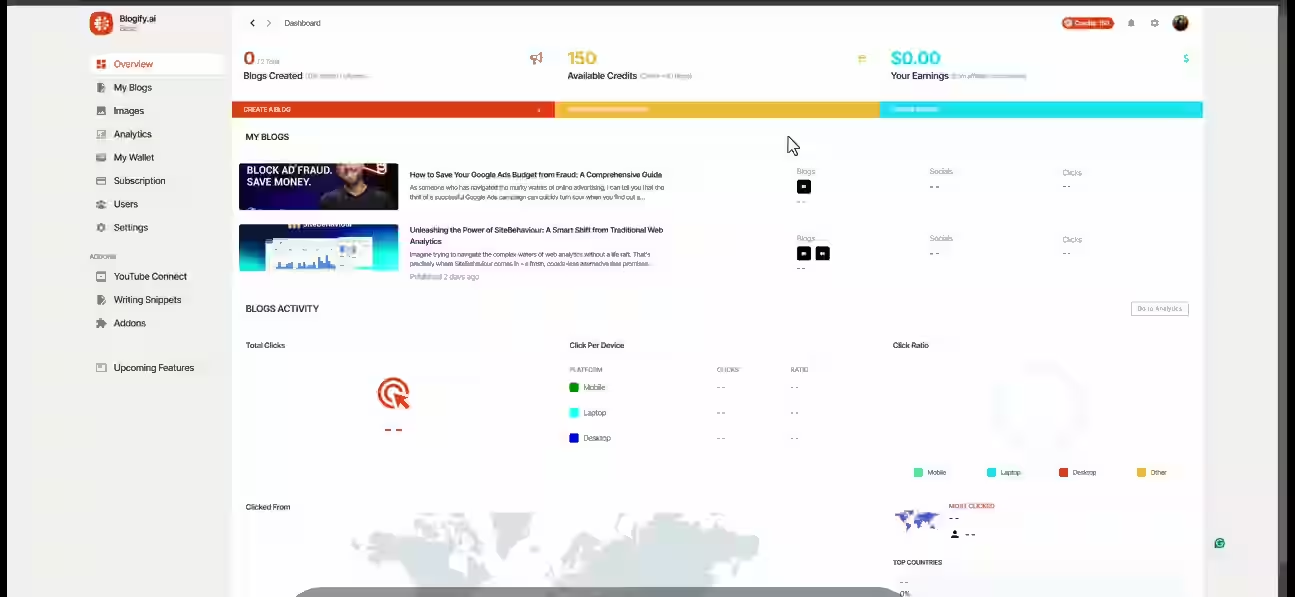
1. YouTube Video to Blog Conversion
Blogify.ai takes a YouTube video link and converts it into a well-structured, SEO-optimized blog post. You paste the URL, select some preferences, and the tool generates a complete article.
My Testing Experience
I converted 32 YouTube videos ranging from 8 minutes to 45 minutes in length. I’ve taken 3-hour-long videos and Blogify has churned out articles around 5,000 words long.
In my testing, a 20-minute video typically produced 1,500-2,000 words in about 2-3 minutes of processing time.
The accuracy of the transcript-to-article conversion was around 85% for clearly spoken content. Videos with heavy background music or multiple speakers had more errors.
Limitations
- Importing content from YouTube is unreliable. It errors out on private URLs.
- I also noticed that very technical content sometimes got simplified incorrectly.
Pro Tip: Always use public YouTube URLs. If your video is unlisted, make it public temporarily or upload the video file directly instead.
2. Podcast and Audio File Conversion
Blogify AI also supports audio sources such as Google Podcasts, Apple Podcasts, Podbean, SoundCloud, and more. You can even upload your own audio files.
My Testing Experience
I tested this with 8 podcast episodes from various shows. The conversion worked similarly to video content, except there’s no image extraction.
Processing time was slightly faster since there’s no video component to analyze.
For a 45-minute podcast episode, I received a 2,800-word article in under 4 minutes.
Limitations
- Audio quality matters significantly. Podcasts with clear audio converted well.
- Interview-style podcasts with crosstalk produced choppy articles that needed more editing.
Pro Tip: For podcasts, use the Co-Pilot mode instead of Auto-Pilot. This lets you set your own heading structure rather than relying on the AI’s interpretation.
3. SEO Optimization Tools
One of the standout features of the SEO Metrics Tool is its speedometer-style score which shows Blog SEO Score, ranging from 1 to 100, that gives users an instant snapshot of their blog’s SEO performance.
My Testing Experience
Blogify analyzes key areas such as headings, content, links, and meta tags, offering precise suggestions to improve every aspect of your blog.
I found the keyword density tracking helpful. The tool suggests keywords and tracks whether you’ve used them enough without overdoing it.
Most generated articles scored between 65-80 on the SEO scale before editing, and I could push them to 85+ with 10 minutes of adjustments.
Limitations
- The SEO suggestions are basic compared to dedicated tools like Surfer SEO or Clearscope.
- Don’t expect NLP optimization or competitor analysis.
Pro Tip: Use Blogify for initial SEO structure, then run the article through dedicated SEO tools for deeper optimization if you’re targeting competitive keywords.
4. WordPress and Multi-Platform Publishing
Seamlessly publish your AI-generated blog posts directly from Blogify.ai to your WordPress site.
This plugin enables effortless integration, allowing users to automate content transfer with just a few clicks.
My Testing Experience
The WordPress integration via their plugin worked reliably. I connected two test sites and published 15 articles directly from Blogify’s dashboard.
Categories, featured images, and scheduling all functioned as expected.
Users appreciate its intuitive interface, seamless integration with platforms like WordPress and Medium.
Limitations
- Yes, the Blogify.ai WordPress plugin allows you to customize the format of your blog posts before publishing.
- You can adjust headings, images, links, and other elements to ensure consistency with your website’s style and branding.
- However, the formatting sometimes doesn’t match your theme perfectly, requiring minor CSS adjustments.
Pro Tip: Always preview posts in WordPress before publishing. The formatting in Blogify’s editor doesn’t always match how it renders in your theme.
4. Auto-Affiliate Link Generation
Blogify takes this a step further by offering automated affiliate marketing integration.
With its advanced blog writing AI tools, Blogify can scan your content for relevant affiliate links and seamlessly insert them into your blog posts.
My Testing Experience
I tested this on 10 product-related blog posts. The tool identified relevant keywords and suggested affiliate links from major programs.
However, the feature is still in beta, and Blogify is an incredible app that streamlines content creation and sharing.
While it currently doesn’t support affiliate marketing in Thailand, withdrawals are only available for users in the USA.
Limitations
- Geographic restrictions limit usefulness for international users.
- The link suggestions aren’t always the highest-paying options.
Pro Tip: Use the auto-affiliate feature as a starting point, but manually review and replace links with your preferred affiliate programs for better commission rates.
6. Content Tone and Style Customization
My favourite feature is the ability to switch up the tone and length so I can repurpose the content on different channels.
My Testing Experience
The tone adjustment worked moderately well. “Professional” and “Casual” tones produced noticeably different outputs.
However, capturing a specific brand voice still requires manual editing.
Limitations
- It lacks a personal touch.
- The AI can’t perfectly replicate your writing style even with tone settings.
Pro Tip: Generate your draft in a neutral tone, then edit to match your voice. Trying to force personality through settings rarely works as well as editing afterward.
7. Writing Snippets and Templates
Use 50+ Writing Snippets by simply entering prompts or keywords, you can leverage the AI to produce relevant and coherent text snippets.
My Testing Experience
These snippets helped with introductions, conclusions, and CTAs.
I used them to standardize certain elements across multiple blog posts, which saved time on repetitive writing tasks.
Limitations
- The templates are generic.
- They work as starting points but need customization for any serious brand work.
Pro Tip: Create your own snippet library based on templates that perform well, rather than relying solely on the built-in options.
Blogify Workflow Comparison: Before vs After
Here’s my actual time tracking from 30 days of content production:
Step | Traditional Workflow | Blogify Workflow | Time Saved |
|---|---|---|---|
Record 20-min video | 45 min (including setup) | 45 min | 0% |
Transcribe video | 30 min (manual cleanup) | 0 min (automatic) | 100% |
Outline blog post | 20 min | 0 min (auto-generated) | 100% |
Write first draft | 90 min | 3 min (AI generation) | 97% |
Edit and polish | 30 min | 45 min (more editing needed) | -50% |
Add images/formatting | 15 min | 10 min | 33% |
SEO optimization | 20 min | 10 min | 50% |
Total | 250 min (4+ hours) | 113 min (~2 hours) | 55% |
My overall experience with Blogify has been extremely positive. It’s more than just a writing tool. I’ve gone from spending hours on a single blog post to completing high-quality articles in under an hour.
The key insight: You trade writing time for editing time. The overall time savings are real, but expect to spend more time in the editing phase than you would with traditional SEO writing tools.
For comparison, check out my guide on how auto blogging tools work to understand where Blogify fits in the broader category.
Blogify Pricing Breakdown & ROI
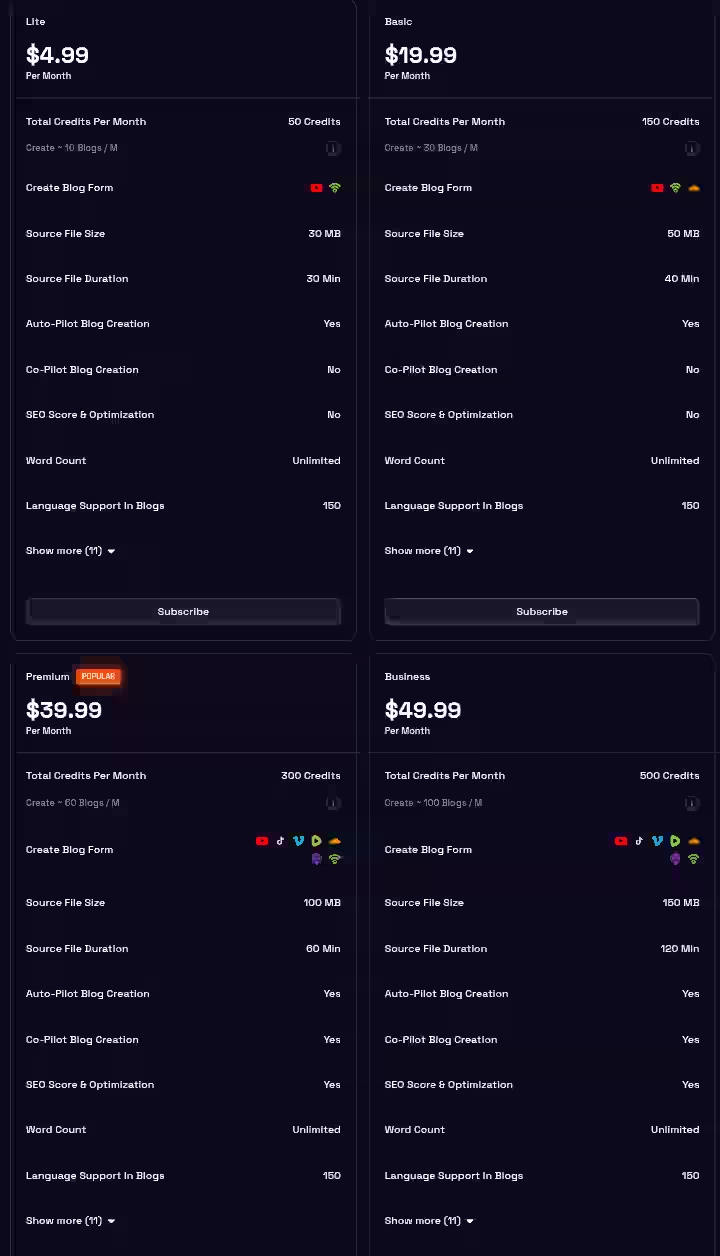
| Plan | Monthly Price | Annual Price | Credits | Best For |
|---|---|---|---|---|
| Lite | $4.99 | $3.99 | 50 | Personal bloggers |
| Basic | $19.99 | $15.99 | 150 | Growing content creators |
| Premium | $39.99 | $31.99 | 300 | Active YouTubers |
| Business | $49.99 | $39.99 | 500 | Small agencies |
| Enterprise | $99.99 | $79.99 | 1000 | Large teams & agencies |
| Unlimited | $199.99/mo | $1999.99/year | Unlimited | Heavy users |
Note: Lifetime pricing ($3999.99) applies only to the Unlimited plan
Blogify Full Pricing Breakdown
1. Lite Plan – $4.99/month ($3.99/month with annual billing)
- Total Credits per Month: 50
- Create approximately 10 blogs per month
- Supported Sources: YouTube, PodBean
- Maximum Source File Size: 30 MB
- Maximum Source File Duration: 30 minutes
- Auto-Pilot Blog Creation: Yes
- Co-Pilot Blog Creation: No
- SEO Score & Optimization: No
- Word Count: Unlimited
- Language Support: 150+
- Publish on Custom Domain: No
- Custom Domain Traffic: N/A
- Schedule Blog Post: No
- Affiliate Monetization with AI: Yes
- Analytics: Yes
- Team Seats: 1
- Writing Snippet Addon: No
- YouTube Connect Addon: No
- YouTube Connect Pro Addon: No
- 24/7 Email & Chat Support: No
- Blogify Blog Sites Allowed: 2
2. Basic Plan – $19.99/month ($15.99/month with annual billing)
- Total Credits per Month: 150
- Create approximately 30 blogs per month
- Supported Sources: YouTube, PodBean, SoundCloud
- Maximum Source File Size: 50 MB
- Maximum Source File Duration: 40 minutes
- Auto-Pilot Blog Creation: Yes
- Co-Pilot Blog Creation: No
- SEO Score & Optimization: No
- Word Count: Unlimited
- Language Support: 150+
- Publish on Custom Domain: No
- Custom Domain Traffic: N/A
- Schedule Blog Post: Yes
- Affiliate Monetization with AI: Yes
- Analytics: Yes
- Team Seats: 2
- Writing Snippet Addon: No
- YouTube Connect Addon: No
- YouTube Connect Pro Addon: No
- 24/7 Email & Chat Support: No
- Blogify Blog Sites Allowed: 5
3. Premium Plan (Popular) – $39.99/month ($31.99/month with annual billing)
- Total Credits per Month: 300
- Create approximately 60 blogs per month
- Supported Sources: YouTube, TikTok, Vimeo, Rumble, SoundCloud, Apple Podcasts, PodBean
- Maximum Source File Size: 100 MB
- Maximum Source File Duration: 60 minutes
- Auto-Pilot Blog Creation: Yes
- Co-Pilot Blog Creation: Yes
- SEO Score & Optimization: Yes
- Word Count: Unlimited
- Language Support: 150+
- Publish on Custom Domain: No
- Custom Domain Traffic: N/A
- Schedule Blog Post: Yes
- Affiliate Monetization with AI: Yes
- Analytics: Yes
- Team Seats: 3
- Writing Snippet Addon: No
- YouTube Connect Addon: No
- YouTube Connect Pro Addon: No
- 24/7 Email & Chat Support: Yes
- Blogify Blog Sites Allowed: 10
4. Business Plan – $49.99/month ($39.99/month with annual billing)
- Total Credits per Month: 500
- Create approximately 100 blogs per month
- Supported Sources: YouTube, TikTok, Vimeo, Rumble, SoundCloud, Apple Podcasts, PodBean
- Maximum Source File Size: 150 MB
- Maximum Source File Duration: 120 minutes
- Auto-Pilot Blog Creation: Yes
- Co-Pilot Blog Creation: Yes
- SEO Score & Optimization: Yes
- Word Count: Unlimited
- Language Support: 150+
- Publish on Custom Domain: Yes
- Custom Domain Traffic: N/A
- Schedule Blog Post: Yes
- Affiliate Monetization with AI: Yes
- Analytics: Yes
- Team Seats: 5
- Writing Snippet Addon: Yes
- YouTube Connect Addon: Yes
- YouTube Connect Pro Addon: No
- 24/7 Email & Chat Support: Yes
- Blogify Blog Sites Allowed: 15
5. Enterprise Plan – $79.99/month ($63.99/month with annual billing)
- Total Credits per Month: 1000
- Create approximately 200 blogs per month
- Supported Sources: YouTube, TikTok, Vimeo, Rumble, SoundCloud, Apple Podcasts, PodBean
- Maximum Source File Size: 200 MB
- Maximum Source File Duration: 180 minutes
- Auto-Pilot Blog Creation: Yes
- Co-Pilot Blog Creation: Yes
- SEO Score & Optimization: Yes
- Word Count: Unlimited
- Language Support: 150+
- Publish on Custom Domain: Yes
- Custom Domain Traffic: N/A
- Schedule Blog Post: Yes
- Affiliate Monetization with AI: Yes
- Analytics: Yes
- Team Seats: 10
- Writing Snippet Addon: Yes
- YouTube Connect Addon: Yes
- YouTube Connect Pro Addon: Yes
- 24/7 Email & Chat Support: Yes
- Blogify Blog Sites Allowed: 20
6. Unlimited Plan – $199.99/month ($1,999.90/year)| $3,999.99 Lifetime
- Unlimited blog generation credits
- Unlimited file size and duration
- All features included: Auto-Pilot, Co-Pilot, SEO Optimization, Affiliate Monetization, Analytics
- All Addons included: Writing Snippets, YouTube Connect, YouTube Connect Pro
- Unlimited team seats and blog sites
- Publish on custom domains with unlimited traffic
- 24/7 Email & Chat Support
What Credits Actually Mean:
Blogify operates on a credit-based system, charging credits for each blog generated.
One credit = one blog post.
My ROI Calculation:
At the Premium plan ($31.99/month), I generated approximately 32 blog posts over 30 days using about 300 credits.
- Cost per blog post: $0.68
- Time saved per post: ~2.3 hours
- Equivalent hourly value (at 50/hr freelance rate): 115 saved per post
- Total monthly value: 115 × 47 = 5,405 worth of time saved
- Net ROI: 5,405 – 31.99 = $5,373+
Even accounting for increased editing time, the ROI is strongly positive if you have the content volume to justify it.
For more perspective on free vs paid autoblogging tools, see my comparison guide.
Blogify Pros and Cons After Testing for 30 Days
Pros
- Significant time savings on video transcripts into blog posts – The 55% reduction in total production time is real and measurable
- Multi-source input flexibility – YouTube, podcasts, audio files, documents all work
- Direct publishing to WordPress – Eliminates copy-paste workflow
- Multilingual support: Blogify.ai equips you with the capability to craft blog posts in over 150 languages.
- Affordable entry point – $4.99/month makes it accessible for testing
Cons
- User feedback suggests 15-20% human editing is typically needed to match brand voice and ensure accuracy
- Occasionally, the system can freeze, requiring a refresh
- Perhaps the most critical failing is the quality of the generated content itself. The AI output is consistently, shockingly poor: “very, very, veeeery low quality” is not an exaggeration according to some users. Frankly, many free AI writing tools produce significantly better results. (Note: This was one negative experience; my testing showed more moderate results)
- Blogify does not provide API
- Several of my blogs were created as two versions within the same blog. Very few or no standard or specific SEO keywords were added to the finished project.
Workarounds
- For the inconsistent content quality: Always use Co-Pilot mode instead of Auto-Pilot for important content. This gives you control over structure.
- For the editing requirement: Build editing time into your workflow planning. Don’t expect “ready-to-publish” content.
- For the system freezes: Save your work frequently. The dashboard auto-saves, but manual saves before major actions prevent frustration.
To avoid common mistakes, read my guide on common autoblogging tool mistakes.
Blogify Alternatives and Comparisons
Blogify vs Jasper AI
Factor | Blogify | Jasper AI |
|---|---|---|
Primary Strength | Video/audio to blog conversion | Brand voice training, long-form content |
Best For | Content repurposing | Original content creation |
Pricing | $4.99-$199.99/month | $69+/month |
Verdict | Better for creators with existing video content | Better for agencies needing consistent brand voice |
Jasper: Known for its high-quality AI writing, Jasper is a strong contender. It’s a good option for longer-form content.
Blogify vs VideoToBlog
Factor | Blogify | VideoToBlog |
|---|---|---|
Primary Strength | Multi-source input, affiliate integration | Rewrites your video transcript to a post, not adding any made up content. Custom instructions, and screenshots |
Best For | All-in-one content repurposing | Accuracy-focused video conversion |
Pricing | $4.99-$199.99/month | $19-$99+/month |
Verdict | Better feature set overall | Better for strict transcript accuracy |
Blogify vs Copy.ai
Factor | Blogify | Copy.ai |
|---|---|---|
Primary Strength | Content repurposing | Marketing copy, templates |
Best For | YouTubers, podcasters | Marketers, ad copywriters |
Pricing | $4.99-$199.99/month | $29+/month |
Verdict | Better for video content | Better for marketing materials |
Which Tool Should You Choose?
- Choose Blogify if: You have existing video or audio content and want to repurpose content into blog posts quickly
- Choose Jasper if: You need original content with strong brand voice consistency
- Choose VideoToBlog if: Transcript accuracy is your top priority and you don’t need extra features
- Choose Copy.ai if: You primarily need marketing copy and occasional blog content
For a broader comparison, see my best auto blogging software roundup.
Blogify Use Cases
1. YouTuber Expanding to Blogging
You publish 2 YouTube videos per week and want to create blog posts without doubling your workload.
Process:
- Record and publish YouTube video as normal
- Copy the public YouTube URL
- Paste into Blogify, select Co-Pilot mode
- Review generated structure, adjust headings if needed
- Edit 15-20% of content for voice and accuracy
- Publish directly to WordPress
Time Saved: ~2.5 hours per video
2. Podcast Show Notes Creation
Weekly podcast needs companion blog posts for each episode.
Process:
- Upload podcast audio file to Blogify
- Generate initial draft in Auto-Pilot mode
- Add guest bio and episode-specific CTAs manually
- Schedule post to coincide with episode release
- Share via integrated social publishing
Time Saved: ~2 hours per episode
3. Agency Content Production
Managing content for 5+ clients who have video content that needs blog repurposing.
Process:
- Set up separate Blogify workspaces per client
- Batch process client videos weekly
- Assign editing tasks to junior team members
- Review and approve before scheduled publishing
- Use analytics dashboard to track performance
Time Saved: With Blogify, one person from our digital marketing team can pull off what usually takes at least 4 people.
4. Affiliate Blogger Building Content Library
Building a niche affiliate site with product review videos.
Process:
- Create product review video
- Convert to blog post via Blogify
- Use auto-affiliate feature to insert relevant links
- Optimize SEO score using built-in tools
- Schedule across multiple affiliate sites
Time Saved: ~3 hours per review post
5. Student or Researcher Documentation
Convert lecture recordings or interview audio into written notes.
Process:
- Upload lecture/interview audio
- Generate structured summary
- Edit for accuracy (academic content needs more review)
- Export or publish to personal blog/portfolio
Time Saved: ~1.5 hours per recording
Learn more about how to choose the best autoblogging tool for your specific use case.
Blogify User Experience and Community Feedback
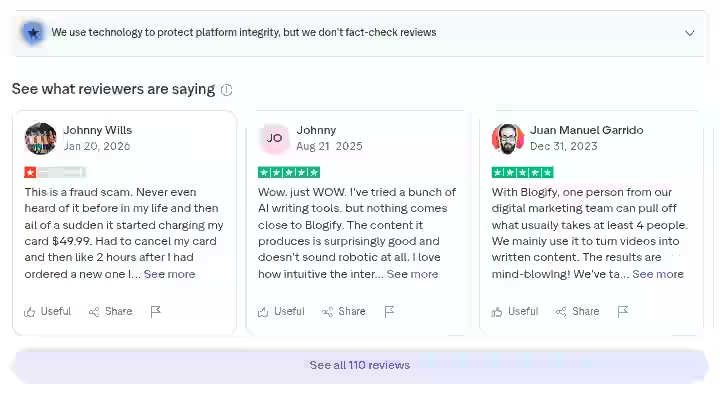
Based on verified reviews across platforms like G2, Capterra, and Product Hunt, Blogify has received generally positive feedback with an average rating of approximately 4.4 out of 5 stars.
110 customers have already shared their experiences on Trustpilot.
What Users Praise
- Customers appreciate the platform for simplifying content creation and blog management.
- They highlight the user-friendly interface and the ability to easily customize their blogs.
- The SEO tools are also a significant advantage, with reviewers reporting a noticeable increase in site visibility and engagement.
- Consumers find the platform intuitive and efficient, allowing them to turn podcasts and videos into blog posts with ease.
- The quality of the generated content is high, often requiring minimal editing.
- The responsive customer support team is also a plus.
Common Complaints
- The SEO tool for writing (Copilot and Auto Pilot) needs significant attention.
- Several of my blogs were created as two versions within the same blog.
- I would have posted long, repetitive content if I had not reviewed those articles. That’s not a good look. Very few or no standard or specific SEO keywords were added to the finished project.
- Sometimes you have to wait for the app to refresh but it is not a big deal and it is updated regularly.
Overall Sentiment
The community feedback splits into two camps:
- Satisfied users: Content creators who understand they’re getting a drafting tool, not a publishing solution
- Dissatisfied users: Those expecting ready-to-publish content without editing
As a marketer and content creator, I am always in search of apps that can streamline my workflow. Blogify has reduced the time I spend in creating my newsletter and blog content 5X!
Blogify Evaluation Framework & Scoring
I evaluated Blogify using a weighted scoring system based on what matters most for content creators and SEO professionals:
Category | Weight | Score (1-10) | Weighted Score |
|---|---|---|---|
Features & Functionality | 30% | 8.0 | 2.40 |
Ease of Use | 20% | 8.5 | 1.70 |
Pricing & Value | 20% | 8.0 | 1.60 |
Support & Customer Experience | 15% | 7.0 | 1.05 |
Trust & Credibility | 15% | 7.0 | 1.05 |
Final Rating | 100% | 7.80/10 |
Breakdown:
- Features & Functionality (8.0): Strong video-to-blog conversion, good integrations, but SEO tools are basic
- Ease of Use (8.5): New users consistently rate Blogify as the easiest to learn and use
- Pricing & Value (8.0): At $4.99/month for the Lite plan, Blogify offers incredible value for budget-conscious creators
- Support & Customer Experience (7.0): Technical support is available for all Blogify.ai users round the clock but response quality varies
- Trust & Credibility (7.0): Established platform with real user base, but some inconsistency reports
Compare this with other autoblogging tools in my RightBlogger review.
Final Verdict On Blogify Review for 2026
Buy if:
- You have existing video or audio content that isn’t being repurposed
- You want to convert YouTube videos into blog articles quickly
- You’re comfortable editing AI-generated content
- You need WordPress integration for direct publishing
- You want to explore affiliate marketing integration
- Your budget allows $15-40/month for content tools
Skip if:
- You need completely ready-to-publish blog posts with no editing
- You don’t have video or audio content to repurpose
- You need advanced SEO optimization features
- You require an API for custom integrations
- You expect the AI to capture your exact writing voice
Blogify has received high praise for its seamless content creation, AI-powered efficiency, and multi-platform posting capabilities.
Customers appreciate its ability to handle long videos for blog conversion, its unique functionality, and the capability to create blog articles from various sources.
My Personal Decision After Testing Blogify for 30 Days
I’m keeping my Blogify subscription. For my use case of repurposing YouTube content, the time savings justify the cost several times over.
But I treat it as a drafting assistant, not a replacement for editing and quality control.
The benefits of auto blogging tools are real, but they require realistic expectations about the human involvement still needed.
Ready to try it yourself?
Blogify offers a 3-day free trial. Test it with your actual content before committing to a paid plan.
Frequently Asked Questions About Blogify Review for 2026
1. Is Blogify good?
Blogify successfully delivers on its core promise: automating the blogging process while maintaining quality and optimization. The most compelling aspect of Blogify is its ability to transform existing content from various sources into polished, SEO-optimized blog posts. For content creators with video or audio libraries, it’s a solid productivity tool.
2. What is the 80/20 rule in blogging?
The 80/20 rule in blogging suggests that 80% of your results come from 20% of your content. Applied to Blogify: focus your best editing efforts on high-potential articles while using faster workflows for supporting content.
3. What platform is best for blogging?
WordPress remains the most flexible platform for SEO-focused blogging. Blogify integrates directly with WordPress via their plugin, making it a natural combination. Manage and publish content to multiple sites directly from the Blogify.ai dashboard. Medium is good for audience building; WordPress is better for monetization and SEO control.
4. Is the Shopify blog any good?
Shopify’s built-in blog is basic compared to WordPress. It works for simple product announcements but lacks advanced SEO features. If you’re serious about content marketing, consider using WordPress alongside Shopify, with Blogify handling the content production workflow.
5. Can Blogify replace human writers?
No. When it comes to deep storytelling, nuanced arguments, or unique brand tone, human writers still win. Blogify accelerates content production but doesn’t eliminate the need for human editing, fact-checking, and voice refinement.
6. Does Blogify work with languages other than English?
Yes. Blogify.ai equips you with the capability to craft blog posts in over 150 languages. I was surprised how good it handles Swedish language, even if it is a small market. However, quality may vary by language.
7. How does Blogify handle video quality issues?
Videos with clear audio convert better. Background music, multiple speakers, or poor microphone quality result in more transcription errors that carry through to the blog post. For best results, use videos with clean, single-speaker audio.
For more information on the future of autoblogging tools, check my industry analysis.

- Searchable Review 2026: My Honest Test Results With This AI Visibility Platform - October 9, 2026
- Ryze AI Review 2026: My 30 Days Full Breakdown of This Autonomous SEO & GEO Platform - October 9, 2026
- #1 Best Plugin for Automatic Blog Posting in WordPress (2026) - September 13, 2026