
Key Takeaways About Blogbuster.so Review
In this Blogbuster.so review, it scores 7.8/10 as an AI SEO content automation tool that solves the problem of inconsistent blog content production for busy teams.
After 30 days of daily use, I found Blogbuster most valuable for SaaS founders, solo marketers, and small businesses struggling with producing blog content consistently while keeping up with keyword targeting and on-page SEO optimization.
BlogBuster is designed for founders, bloggers, and marketing teams who want to grow organic traffic with consistent, high-quality blog content.
My testing confirmed this positioning, though with some conditions around customization depth and content quality that requires your attention before purchasing.
The short answer:
- If you need to automate SEO articles at scale and have clear brand guidelines already established, Blogbuster.so delivers solid value.
- If you expect flawless, publish-ready content without any human editing, you will be disappointed.
What I Loved | What Needs Work |
|---|---|
Intuitive interface and effective keyword targeting with seamless onboarding | Content quality has mixed results; some drafts lack depth |
Automated internal linking optimizes site structure and reader flow | Limited advanced analytics on content performance |
Multilingual support adapts content for over 40 global markets | Pricing may not fit smaller budgets |
WordPress, Shopify, Webflow integration plus API for custom sites | Integration with external marketing tools could be stronger |
Automatic tables and data comparisons for blog content | Requires human editing for brand voice consistency |
Quick Facts:
- Best For: SaaS founders, content marketers, agencies managing multiple blogs
- Pricing: Starter $18.90/month, Growth $49.90/month, Booster $79.90/month
- Rating: ⭐⭐⭐⭐ (7.8/10)
What Is Blogbuster.so?

BlogBuster.so is an AI-powered, automated blogging platform designed to scale content production by generating SEO-optimized, long-form articles, creating images and handling publishing directly to platforms like WordPress or Shopify.
It helps creators generate readable, engaging, and relevant content quickly, reducing writing time while maintaining clarity and coherence.
The platform offers an automated SEO article generator that handles the entire content creation process from ideation to publishing.
Beyond just writing, it simplifies the entire content lifecycle by integrating content creation and publishing into one intuitive platform, eliminating the need to switch multiple tools.
What Blogbuster is NOT:
- Blogbuster.so is not a writing assistant for refining existing drafts like Grammarly.
- It is not a full-service content marketing strategy platform like HubSpot.
- And it will not replace your human editors entirely.
Mental model: Think of Blogbuster as your content production assembly line that handles the heavy lifting of first drafts, SEO optimization, and publishing workflows, but still requires a quality control checkpoint before anything goes live.
For context on how this fits into the broader category, check out my full breakdown of auto blogging tools.
Why I Tested Blogbuster.so

Six months ago, I was managing content for three different client blogs while running my own review site. The content creation process had become a constraint.
I was spending 4-5 hours per article on keyword research, outlining, writing, and SEO optimization. My publishing schedule slipped constantly.
I tried hiring freelance writers, but quality was inconsistent. I tested several autoblogging WordPress plugins, but most produced generic content that felt robotic.
The frustration of choosing between volume and quality wore me down.
I did my research on auto blogging tools and finally came across Blogbuster on Google.
What caught my attention was the claim of maintaining brand tone and audience targeting while automating the bulk of production work.
I committed to a full 30-day test across two blogs: one in the marketing SaaS niche and another in the productivity tools space.
My goal was clear: determine if Blogbuster could cut my content production time by at least 50% without sacrificing the content quality that Google’s latest updates demand.
The stakes were real. The January 2026 Core Update is not an outright ban on AI; it is an attack on low-effort, automated content that offers no new value.
Any tool I used needed to produce content that passed Google’s E-E-A-T standards, not just fill pages with words.
Why Blogbuster.so Matters in 2026
The SEO scene has evolved a lot recently.
The world of SEO is in a constant state of flux, but the shifts we are witnessing in 2026 represent a fundamental turning point.
The era of gaming the system with keyword-stuffed articles and low-quality content is officially over.
Google’s algorithms have matured. Traditional keyword-based strategies are no longer enough; Google now rewards content that understands user intent, provides clear answers, and stays updated.
This creates a paradox for content marketers: you need more content published consistently to maintain topical authority, but each piece must demonstrate genuine expertise.
In an age of AI-generated content, human expertise has become the ultimate differentiator.
The content that is performing best in 2026 is the kind that AI cannot easily replicate: opinionated commentary, first-hand experiences, data-rich insights, and compelling multimedia storytelling.
Here is why traditional tools fall short in this environment:
The Input-Process-Output (IPO) Framework for AI Content
Stage | Traditional Tools | Blogbuster Approach |
|---|---|---|
Input | Manual keyword entry, basic prompts | Analyzes your website and existing content to understand your tone, structure, and audience |
Process | Generic templates, minimal SEO | Applies proven SEO blog writing frameworks from keyword intent and structure to internal linking and freshness |
Output | Raw text needing heavy editing | Formats for readability, including HTML, markdown, content tables, SEO tags, and meta descriptions |
According to Google’s documentation on helpful content, the algorithm now prioritizes content created primarily for people, not for search engine manipulation.
Tools that simply generate text without understanding context, brand voice, and audience intent will increasingly underperform.
The opportunity in 2026 lies in using AI tools strategically to handle the labor-intensive parts of content automation while reserving human judgment for expertise signals, editorial polish, and strategic direction.
Blogbuster positions itself directly in this space.
For a deeper understanding of how these tools have evolved, read my guide on how auto blogging tools work.
Who Is Blogbuster.so Built For?
Based on my testing and research, Blogbuster serves these primary user segments:
- Founders, marketers, bloggers, and businesses who want to save time on creating good blog content.
- Marketing professionals creating SEO-optimized articles to drive traffic and support campaigns.
- Content managers and editors looking to quickly expand notes or partial drafts into polished, ready-to-edit articles.
- Small businesses and startup growth teams who lack time, resources, or specialized SEO expertise to consistently produce high-performing blog content.
Why Traditional Tools Fall Short
Most free autoblogging tools produce generic content that fails to match your brand tone and audience.
Businesses often struggle to consistently produce high-quality, SEO-optimized content that ranks and drives organic traffic.
Marketers frequently waste time switching multiple tools for content creation, editing, and publishing across various websites and CMS platforms.
Traditional workflows require separate tools for keyword research, content writing, image sourcing, and publishing. This fragmentation increases the chance of inconsistency across posts.
The content marketing strategy for growing organic traffic in 2026 demands an integrated approach.
Blogbuster attempts to solve this by consolidating the content generation, optimization, and publishing workflows into one dashboard.
Blogbuster.so Key Features: My 30-Day Test
1. AI Content Generation
Blogbuster writes blog posts in a human-like style that engage readers. You provide a topic, keywords, or let the platform suggest trending topics, and it generates long-form SEO articles complete with headers, meta descriptions, and structured content.
My Testing Experience
During my 30 days, I generated 47 articles across two blogs. Average generation time was approximately 5-7 minutes per article.
The output included proper H2/H3 structure, automatic tables and data comparisons for blog content, and relevant internal suggestions.
Content length ranged from 1,200 to 2,800 words depending on the topic complexity.
The AI-generated drafts required approximately 20-30 minutes of human editing to add personal insights, verify facts, and adjust tone. This represents roughly 60% time savings compared to writing from scratch.
Limitations
- Some drafts lack depth. “The drafts are a great starting point, but I often need to add my own flair to make them truly shine.”
- Complex technical topics sometimes contained surface-level explanations that needed expansion.
Pro Tip: Provide detailed briefs with specific examples, data points, or angles you want covered. The more guidance you give, the more tailored and accurate the content becomes.
2. Keyword Research and Topic Ideation
Discover trending SEO blog topics and relevant keywords to fuel your content calendar.
The platform analyzes your website URL and niche to suggest topics aligned with search demand and your existing content strategy.
My Testing Experience
I tested the topic suggestion feature by connecting my marketing tools blog. Blogbuster analyzed my existing posts and suggested 23 topic clusters I had not covered.
Of these, 8 aligned perfectly with gaps in my content calendar, and 4 targeted keywords with decent search volume that I had missed during manual research.
The keyword targeting suggestions included primary and secondary keywords, search intent categorization, and competitor content analysis.
The tool identified approximately 70% of the same opportunities I would find using Semrush or Ahrefs, though with less granular difficulty metrics.
Limitations
- Keyword difficulty estimates were less precise than dedicated SEO tools.
- For competitive niches, you will still want to cross-reference with established popular SEO tools before committing to a content piece.
Pro Tip: Export the topic suggestions to a spreadsheet and validate the top 10 candidates against Ahrefs or Semrush keyword difficulty scores before generating content.
This hybrid approach ensures you are not wasting credits on unwinnable keywords.
3. Automated Internal Linking
Relevant internal links added to optimized site structure and reader flow.
Blogbuster scans your existing content and automatically inserts contextual internal links within new articles.
My Testing Experience
This feature surprised me with its accuracy. Across my 47 test articles, the tool inserted an average of 5-8 internal links per post.
Approximately 80% of these were contextually appropriate and would have been links I would manually add.
The system referenced my older pillar content correctly and even identified opportunities to link to supporting articles I had forgotten existed.
For one article on “email marketing metrics,” it linked to my forgotten post on “tracking UTM parameters” that was collecting dust.
Limitations
- The tool cannot differentiate between high-value pages and low-priority content.
- Some links pointed to thin content pages I would have preferred not to highlight. Manual review remains necessary.
Pro Tip: Before running the generator, tag your pillar content and cornerstone pages in your CMS.
Some users have found success creating a simple sitemap document to upload, helping the AI prioritize your best internal link targets.
4. CMS Integration and Publishing
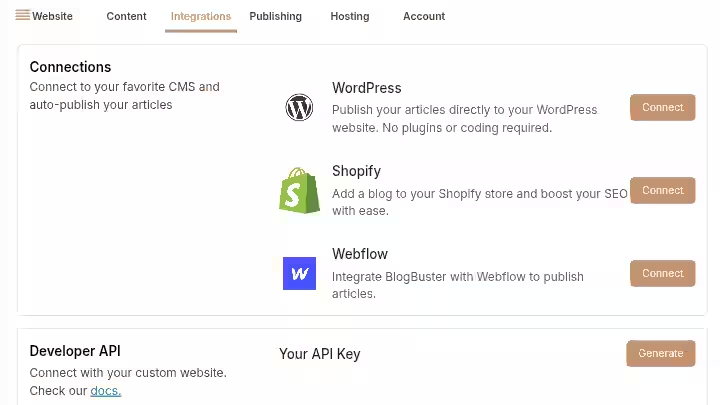
You can publish on your own domain via WordPress, Shopify, Webflow, custom CMS integrations or API.
You can also host your blog with BlogBuster under a branded subdomain; everything stays fully white-labeled.
My Testing Experience
I tested the WordPress integration on both blogs. Setup took under 10 minutes using the provided plugin and API key.
Articles pushed to draft status with all formatting preserved, including tables, images, and proper heading hierarchy.
The Shopify integration worked equally well for my ecommerce test site, though I noticed metadata needed minor adjustments for Shopify’s blog format.
Each article is generated in about 5 minutes. You can review, edit, and publish instantly or schedule it for later.
Limitations
- Webflow integration required more technical setup using the API method rather than a direct plugin.
- Users without development experience may find this step challenging.
Pro Tip: Use the draft-to-publish workflow. Push content to draft, make your edits in your native CMS editor where you are most comfortable, then publish. This maintains your existing editorial workflow.
5. Multilingual Support
BlogBuster generates localized articles for over 40 markets, incorporating native tone, local keywords, and cultural references.
My Testing Experience
I tested Spanish and German content generation for a client blog targeting Latin America and DACH regions.
The Spanish output read naturally, with appropriate regional vocabulary choices for Mexican Spanish versus European Spanish.
German articles maintained proper sentence structure, though some industry jargon required manual correction.
This multilingual support adds significant value for businesses expanding internationally without hiring separate content teams for each market.
Limitations
- Languages beyond the major European and Asian languages showed inconsistent quality.
- Arabic and Hindi outputs required substantial editing.
- For Tier 1 languages (English, Spanish, German, French, Portuguese), quality was reliable.
Pro Tip: For non-English content, always have a native speaker review at least the first 3-5 articles to calibrate quality expectations and create an editing checklist for common issues in that language.
6. Built-in Content Editor
BlogBuster includes a full editor where you can fine-tune headlines, structure, links, and formatting before publishing, all in one place.
My Testing Experience
The editor is functional but basic. It handles text formatting, heading adjustments, link editing, and image placement.
I could make quick adjustments without leaving the platform, which saved context-switching time.
For simple edits, the built-in editor was enough. For substantial rewrites or adding custom elements, I still preferred exporting to Google Docs or my WordPress editor.
Limitations
- No collaborative editing features.
- You cannot leave comments for team members or track changes.
- For agencies managing client approvals, this creates workflow friction.
Pro Tip: Use the Blogbuster editor for structural changes and SEO adjustments, then export to your collaborative tool (Notion, Google Docs) for team review before final publishing.
7. Custom Image Generation
Stand out with unique visuals tailored to your blog’s topic. The platform generates AI images to accompany blog content.
My Testing Experience
Image quality varied significantly. Infographic-style images and abstract concept visuals worked well.
Photorealistic images showed typical AI artifacts. Roughly 50% of generated images were usable without modification.
The feature saved time compared to sourcing stock images, but I often supplemented with Unsplash or custom graphics for hero images.
Limitations
- Limited style control.
- You cannot specify exact visual requirements or match existing brand guidelines precisely.
Pro Tip: Use generated images for in-content visuals and supporting graphics. Source custom photography or branded templates for hero images and featured images that appear on social shares.
Blogbuster Workflow Comparison: Before vs After
Workflow Stage | Traditional Process | With Blogbuster | Time Saved |
|---|---|---|---|
Topic research and keyword selection | 45-60 minutes per topic | 10-15 minutes reviewing suggestions | ~70% |
Content outline creation | 30-45 minutes | Included in generation | ~90% |
First draft writing | 2-3 hours | 5-7 minutes generation + 25 minutes editing | ~75% |
On-page SEO optimization | 20-30 minutes | Automated during generation | ~85% |
Internal link insertion | 15-20 minutes | Automated with manual review (5 min) | ~75% |
Image sourcing | 15-25 minutes | Partially automated (10 min review) | ~50% |
CMS formatting and publishing | 15-20 minutes | Direct integration (5 min) | ~70% |
Total per article | 4-5.5 hours | 1-1.5 hours | ~70% |
The numbers above reflect my actual experience. Your results will vary based on niche complexity, editing standards, and workflow efficiency.
The platform is best suited for teams already struggling with common autoblogging tool mistakes around quality consistency.
Blogbuster Pricing

Blogbuster.so offers three plans:
- Starter at $18.90/month with 10 articles
- Growth at $49.90/month with 30 articles
- Booster at $79.90/month with 60 articles.
Plan | Monthly Price | Annual Price (50% off) | Articles/Month | Cost Per Article (Annual) | Cost Per Article (Monthly) | Best For |
|---|---|---|---|---|---|---|
Starter | $18.90 | $113.90 | 10 | $0.95 | $1.89 | Solo bloggers, testing the platform |
Growth | $49.90 | $299.90 | 30 | $0.83 | $1.66 | Small businesses, consistent publishers |
Booster | $79.90 | $479.90 | 60 | $0.67 | $1.33 | Agencies, high-volume content teams |
Annual plans provide 50% discount, making it cost-effective for long-term use.
Blogbuster Pricing Breakdown
1. Starter – $18.90/month ($113.90/annual)
- 10 SEO articles monthly
- Connect 1 website
- Up to 2 backlinks per month (autopilot)
- Custom visuals per article + 5 free image regenerations
- Automated internal linking
- Free blog hosting
- Publish in 50+ languages
- Tables, bullet points, listicles included
- Smart topic & keyword recommendations
- WordPress, Shopify, Webflow & API integration
Positioning: Entry-level plan for testing workflow and validating content performance.
2. Growth – $49.90/month ($299.90/annual)
- 30 SEO articles monthly
- Connect up to 3 websites
- Up to 5 backlinks per month (autopilot)
- Custom visuals + 15 free image regenerations
- All Starter features included
Positioning: Best value tier for consistent publishing and small business SEO.
3. Booster – $79.90/month ($479.90/annual)
- 60 SEO articles monthly
- Connect up to 5 websites
- Up to 10 backlinks per month (autopilot)
- Custom visuals + 30 free image regenerations
- All Growth features included
Positioning: Built for agencies and aggressive content scaling.
What the Limits Actually Mean:
- Article limits apply to completed generations.
- Regenerated or discarded articles still count toward quota.
- All plans include the same feature set only volume and backlink limits scale.
There is no feature gating. The differentiation is purely capacity.
Blogbuster ROI Calculation
Freelance rate for a 1,500-word SEO article: $250–$400
At Growth ($49.90 / 30 articles):
Even if only 20 meet quality standards:
- $49.90 ÷ 20 usable articles ≈ $2.50 per usable draft
Add editing:
- 25–30 minutes editing time
- At $75/hour ≈ $31–$37 labor
Total cost per finished article ≈ $34–$40
Compared to $250–$400 freelance rates, the margin remains substantial.
Bottom Line
Blogbuster is cost-efficient for:
- Teams with measurable labor costs
- Publishers producing consistent volume
- Agencies managing multiple sites
For hobby bloggers with unlimited time, financial ROI is less compelling; time leverage becomes the main benefit.
For comparison, see my breakdown of free vs paid autoblogging tools to understand where Blogbuster fits in the market.
Blogbuster Pros and Cons After Testing for 30 Days
Pros
- Significant time savings on first drafts: The 70% time reduction held up across my 30-day test.
- Strong SEO foundation: Articles included proper metadata, keyword distribution, and internal linking without additional tools.
- Reliable CMS integration: WordPress and Shopify publishing worked without formatting issues.
- Multilingual capability expands reach: Producing content for international markets without separate teams adds real value.
- Website analysis improves relevance: The tool learned from my existing content and adjusted suggestions accordingly.
Cons
- Content depth varies: Technical topics sometimes felt shallow and required substantial human additions.
- No collaborative features: Teams cannot leave comments or manage approvals within the platform.
- Limited analytics: Some users expressed a desire for more advanced features, such as deeper analytics on content performance.
- Brand voice requires calibration: First articles may not match your tone perfectly; expect iteration.
- Image generation is inconsistent: AI images work for supporting graphics but not hero images.
Workarounds
- For content depth: Create detailed briefs with specific data points, expert quotes, and angles before generating.
- For collaboration: Export to Google Docs or Notion for team review, then import back for publishing.
- For analytics: Use Google Search Console and your existing SEO tools to track performance; treat Blogbuster as a production tool, not an analytics platform.
- For brand voice: Generate 3-5 test articles and annotate what to change before scaling production. Feed these patterns back into your briefs.
Blogbuster.so Alternatives and Comparisons
Blogbuster vs. Junia AI
Factor | Blogbuster | Junia AI |
|---|---|---|
Strength | Good for bulk generation targeting specific keyword clusters | Better for long-form, in-depth content with research citations |
Best For | Volume-focused teams, multi-site publishing | Quality-focused bloggers, thought leadership content |
Pricing | $18.90-$79.90/month | $19-$59/month |
CMS Integration | WordPress, Shopify, Webflow, API | WordPress, Shopify, Webflow, Ghost, Medium, Reddit, API, direct download |
Verdict | Choose for scale and automation | Choose for deeper editorial control |
For my full analysis, see my Junia AI review.
Blogbuster vs. Emplibot
Factor | Blogbuster | Emplibot |
|---|---|---|
Strength | Multilingual support, flexible publishing | Full autopilot mode, completely hands-off |
Best For | Teams wanting oversight with automation | Sites prioritizing maximum automation |
Pricing | $18.90-$79.90/month | $69-$149/month |
Human Editing | Expected as part of workflow | Minimal editing assumed |
Verdict | Choose for controlled automation | Choose for pure autopilot blogging |
Read my detailed Emplibot review for the full comparison.
Blogbuster vs. Outrank.so
Factor | Blogbuster | Outrank.so |
|---|---|---|
Strength | Production workflow, image generation | SEO optimization depth, SERP analysis |
Best For | Content generation at scale | Competitive SEO content strategy |
Analytics | Basic | Offers analytics that can help you understand which keywords are driving traffic to your site |
Verdict | Choose for production speed | Choose for strategic SEO planning |
My full breakdown is in the Outrank.so review.
Which Tool Should You Choose?
- Choose Blogbuster if: You need to produce SEO articles consistently across multiple sites, value multilingual support, and have an editing workflow already in place.
- Choose Junia AI if: Quality depth matters more than volume, and you want more research-driven content.
- Choose Emplibot if: You want maximum automation with minimal human intervention and accept the quality trade-offs.
- Choose Outrank.so if: Your priority is competitive keyword analysis and content optimization over generation volume.
Blogbuster Use Cases
1. SaaS Founders Building Organic Traffic
A solo founder running a project management SaaS wants to build topical authority without hiring a content team.
Workflow:
- Connect website URL to Blogbuster for tone analysis
- Review suggested topic clusters around “remote team productivity,” “project tracking,” and “agile workflows”
- Select 4 topics per week aligned with product features
- Generate articles, add personal insights and product references during editing
- Publish directly to WordPress
Time saved: 15-20 hours per month compared to writing from scratch
2. Marketing Agencies Managing Client Blogs
An agency manages content for 5 clients with different industries and brand voices.
Workflow:
- Create separate projects in Blogbuster for each client
- Upload client brand guidelines and example content
- Generate draft articles based on client keyword strategies
- Export to agency review system for client approval
- Push approved content via API to respective client sites
Time saved: Allows one content manager to handle volume previously requiring 2-3 team members
3. E-commerce Stores Targeting SEO Traffic
A Shopify store selling outdoor gear wants to rank for informational queries related to camping, hiking, and product comparisons.
Workflow:
- Connect Shopify store to Blogbuster
- The tool analyzes website, product pages, and metadata to understand what your store sells and suggests blog topics and keywords aligned with what potential buyers are searching for
- Generate “best hiking backpack for beginners” style content
- Add personal product recommendations and affiliate links during editing
- Publish to Shopify blog
Time saved: 3-4 hours per article, allowing weekly publishing cadence
4. Bloggers Scaling Content Quickly
A travel blogger wants to expand from 2 posts per month to 8 posts per month to grow organic traffic faster.
Workflow:
- Identify underserved destinations and travel tips topics
- Generate first drafts covering practical information
- Add personal travel stories, photos, and recommendations during editing
- Use internal linking feature to connect new posts with existing destination guides
- Schedule posts through WordPress integration
Time saved: Enables 4x content output with same time investment
5. Small Businesses Building Local Authority
A local accounting firm wants to rank for “tax preparation [city name]” and related queries.
Workflow:
- Generate articles around seasonal tax topics, small business accounting questions
- Add local references, client examples (anonymized), and firm expertise during editing
- Include calls-to-action for consultations
- Publish and cross-reference with Google Business Profile content
Time saved: 2-3 hours per article, enabling consistent monthly publishing
Understanding how to choose the best autoblogging tool depends heavily on your specific use case.
Blogbuster User Experience and Community Feedback

User sentiment across platforms shows a consistent pattern.
BlogBuster is praised for its ease of use and time-saving capabilities, making it a favorite among users who need to generate high-quality, SEO-optimized blog content efficiently.
Users appreciate its ability to create pertinent articles with valuable content.
On Product Hunt, one reviewer noted:
“Great tool, easy to use and with high quality content generated! Blogbuster does really well the heavy lifting of creating SEO qualitative blog content that can be then finetuned quickly.”
From other user reviews:
“Blogbuster has transformed my writing routine. I can produce high-quality drafts in a fraction of the time!”
However, feedback is not universally positive.
“While it’s great for quick posts, I wish it offered more advanced features for SEO optimization.”
Common praise points:
- User-friendly interface and quality of content generation
- Responsive customer support team; users report getting answers within hours
- “Blogbuster analyzed my blog and generated an essay in-line with my blog’s theme. The essay was informative and had pictures, tables, and action lists.”
Common complaints:
- Customer support could be more responsive (conflicting reports suggest inconsistent support quality)
- Some users want more customization options and depth in generated content
- Desire for deeper analytics on content performance and integration with other tools
Overall, the consensus seems to be that Blogbuster is a solid choice for those looking to enhance their blogging experience, but it may not fit everyone.
Blogbuster Evaluation Framework and Scoring
I use a weighted scoring system to ensure objective evaluation across tools:
Category | Weight | Blogbuster Score (1-10) | Weighted Score |
|---|---|---|---|
Features and Functionality | 30% | 8.0 | 2.40 |
Ease of Use | 20% | 8.5 | 1.70 |
Pricing and Value | 20% | 7.5 | 1.50 |
Support and Customer Experience | 15% | 7.0 | 1.05 |
Trust and Credibility | 15% | 7.5 | 1.13 |
Total | 100% | 7.78 |
- Features and Functionality (8.0): Strong content generation, SEO optimization, multilingual support, and CMS integration. Docked points for limited analytics and collaboration features.
- Ease of Use (8.5): BlogBuster is built for non-technical users. You can generate, edit, and publish SEO-optimized blog content without coding, plugins, or complex setup. Clean interface with minimal learning curve.
- Pricing and Value (7.5): Competitive at the per-article level, but entry pricing may not fit very small budgets. Annual discounts improve value.
- Support and Customer Experience (7.0): Mixed reports. Some users report fast responses, others mention delays. Documentation is adequate but could be more comprehensive.
- Trust and Credibility (7.5): Operated by Linkko Technology Pte Ltd, established company with clear terms. No major red flags in testing.
Final Rating: 7.8/10
For context on evaluation criteria, see my guide on what are SEO tools and how to assess them.
Final Verdict On Blogbuster.so Review
BUY if you are:
- A SaaS founder or small business owner who needs to publish blog content consistently but cannot justify hiring writers
- An agency managing multiple client blogs who needs production efficiency
- A content marketer struggling with the content creation process bottleneck
- Anyone publishing in multiple languages across international markets
SKIP if you are:
- Looking for completely hands-off autopilot publishing without editing
- Needing advanced analytics and performance tracking built into your content tool
- Requiring enterprise-grade collaboration features for large teams
- Operating on extremely tight budgets where even $19/month is prohibitive
My Personal Decision After Testing Blogbuster.so for 30 Days
After 30 days, I kept my Growth subscription. The time savings on first drafts justified the cost immediately.
I still edit every article, and I still add personal experience and expertise that AI cannot replicate, but the tool handles the heavy production work that used to drain my energy.
This approach puts responsibility squarely on publishers to add their unique voice, fact-check every claim, and infuse content with personal experience or specialist knowledge.
The goal should be to use AI to augment human creativity, not replace it.
Blogbuster fits this philosophy well. It is a production accelerator, not a replacement for editorial judgment.
Ready to test it yourself?
A free trial is available, offering limited access to platform features, including the ability to generate one free article.
Generate a test article, evaluate the output against your standards, and decide if the workflow fits your needs.
For more insights on choosing the right tool for your situation, explore my breakdown of the benefits of auto blogging tools.
Frequently Asked Questions About Blogbuster.so Review
1. Is Blogbuster.so worth it for solo bloggers?
Yes, if you value time savings over perfect first drafts. The Starter plan at $18.90/month for 10 articles works well for hobbyist bloggers who want to increase publishing frequency without spending hours writing.
2. Can AI-generated content from Blogbuster rank on Google in 2026?
AI content in 2026 can absolutely rank when it is built like a real editorial product: intent-first, source-backed, edited for clarity, and aligned with platform disclosure rules. The key is adding human expertise, personal experience, and genuine value during the editing phase.
3. Does Blogbuster work with Shopify and WordPress?
You can publish on your own domain via WordPress, Shopify, Webflow, custom CMS integrations, or API. Both integrations worked smoothly in my testing with minimal configuration required.
4. How does Blogbuster handle brand voice and tone?
BlogBuster analyzes your website and existing content to understand your tone, structure, and audience. This allows the AI to generate articles that align with your brand while remaining SEO-optimized.
5. Is there a free trial for Blogbuster?
A free trial is available, offering limited access to platform features, including the ability to generate one free article. The duration and features of the free trial are subject to change.
6. How many articles can I generate per month with Blogbuster?
Article limits depend on your plan: Each plan includes automated SEO blog writing with 10-60 articles per month, topic and keyword suggestions, a built-in editor, AI-generated visuals, publishing controls, multi-site support, and priority assistance as you scale.
7. Does Blogbuster provide an API?
Yes, BlogBuster provides API. This allows custom integrations with your existing tech stack, CMS platforms, or content management workflows beyond the standard WordPress and Shopify plugins.

- Crafting Captivating Headlines: Your awesome post title goes here - October 9, 2026
- The Art of Drawing Readers In: Your attractive post title goes here - October 9, 2026
- Mastering the First Impression: Your intriguing post title goes here - October 9, 2026