If you’re reading this EverBee review because you’re trying to decide whether to hand over your card details or stick with spreadsheets and gut feeling, I get it.
I spent real time inside EverBee’s dashboard, ran actual searches, generated an AI store and even timed their support team, so this isn’t a copy of the sales page. It’s what actually happened when I clicked around as a real user on the free trial.
EverBee Review Verdict (2026)
| Category | Verdict |
|---|---|
| Best For | Etsy sellers researching products, analyzing competitors, and identifying keyword opportunities |
| Not Ideal For | Sellers on non-Etsy platforms, teams needing exact verified sales figures or anyone wanting full free access |
| Pricing | Free (Hobby plan), $39/month (Growth), $99/month (Business). You can save 36% on the annual plans. |
| Rating | ⭐⭐⭐⭐ (7.9/10) |
| Standout Feature | Keyword Research with bulk analysis and email export |
| Biggest Weakness | Key commercial metrics (revenue, sales, trends, conversion rate) are locked behind a paid plan |
| Learning Curve | Beginner |
| Worth It? | Yes if you sell actively on Etsy and need data-backed product decisions. Skip it if your entire workflow sits outside Etsy or you need exact sales verification |
Bottom line: EverBee is a genuinely useful Etsy research tool that gives you real competitive data on listings, keywords and shops. The free plan is functional for exploration, but you need a paid plan to get the data that actually moves business decisions.
EverBee Quick Specs
| Feature | Details |
|---|---|
| Developer | EverBee, Inc. |
| Founder/CEO | Cody McGuffie |
| Founded | 2021 |
| Platform | Web app + Chrome Extension |
| Primary Use | Etsy product research, keyword research, shop analysis, profit calculation, AI storefront creation |
| Integrations | Etsy, Printify, OpoShop (Shopify, Printful, Meta Ads, Pinterest Ads listed as upcoming) |
| Best For | Etsy sellers, print-on-demand entrepreneurs, ecommerce researchers |
| Contact/Support | hello@everbee.io / in-dashboard support chat |
| User Ratings | Chrome Web Store: 4.7/5 (396 ratings); Trustpilot ratings: 3.3 stars from 54 users at the time of writing. |
| Refund Policy | Refunds available within 3 days of payment; pro-rated refunds on annual plans up to 8 months |
Key Takeaways About This EverBee Review
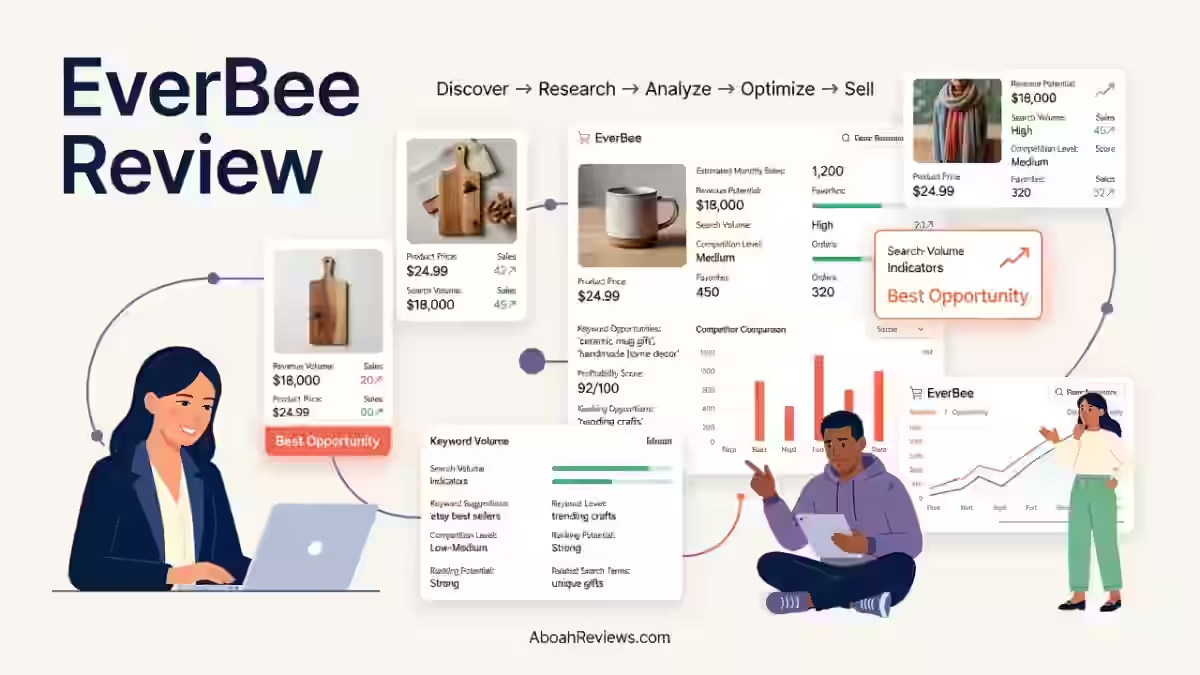
In this EverBee review, it scores 7.9/10 as an Etsy product research and analytics tool that helps sellers estimate competitor revenue, find winning keywords & build standalone digital stores.
After 30 days of hands-on testing using the free trial, I found it most valuable for new and mid-level Etsy sellers who want to validate product ideas before committing inventory or print-on-demand resources.
The tool covers product analytics, keyword research, shop analysis, profit calculation, and now extends into AI storefront creation through OpoShop. The free Hobby plan is accessible without a credit card and genuinely useful for learning the interface.
However, the metrics that matter most to sellers who need business-grade decisions: revenue estimates, sales trends, conversion rates, and visibility scores all sit behind a paid plan. That gap is the central trade-off in EverBee’s current offer.
If you are actively selling or planning to sell on Etsy and need directional data to guide product strategy, the paid plans are justifiable. If you need one hundred percent verified sales numbers, no Etsy research tool currently provides that, EverBee included.
What I Liked vs. What Needs Work
| What I Liked | What Needs Work |
|---|---|
| Free signup in under 60 seconds, no credit card required | Revenue, sales, trends, and conversion data all locked behind an upgrade |
| Product Analytics returned 5,714 results for “biodegradable phone case” with useful listing-level data | Free plan’s upgrade wall appears early and often during research tasks |
| Keyword research returned 20 results from approximately 213,113 for “phone case” with volume, competition, and keyword scores | My Shop feature is inaccessible without an active Etsy shop connection |
| Bulk keyword analysis: paste a list, analyze multiple keywords at once | OpoShop customization requires an upgrade. I could only view the generated store, not fully customize it |
| Support response in my test: approximately 1 minute | AI Connectors (MCP-based conversational feature) require a paid plan to access |
| OpoShop generated a working AI storefront (“Motiv8 Gear”) in about 1 minute | Ohoney runs on a credit system, so design work adds ongoing cost |
| Profit Calculator includes both Standard and Advanced modes | Incoming integrations (Shopify, Printful, Meta Ads, Pinterest Ads) are not yet live |
How I Tested EverBee
I signed up for EverBee’s free Hobby plan using only an email address and password. No credit card was required. I focused my testing across six core areas over 30 days:
- Product Analytics: Searched “biodegradable phone case,” reviewed 20 listings out of 5,714 total results, and analyzed available listing and shop data points.
- Keyword Research: Searched “phone case,” reviewed 20 results from approximately 213,113, tested bulk keyword input, applied filters (volume, competition, keyword score), and exported results via email.
- Shop Analyzer: Accessed from within a product listing and analyzed competitor shop metrics.
- Profit Calculator: Tested both Standard and Advanced modes.
- OpoShop: Selected the “Motivation” niche, observed AI store generation (~1 minute), and reviewed the resulting store (“Motiv8 Gear”) including its product examples and page structure.
- Ohoney: Opened the design feature, reviewed the credit system and available integrations.
- Support: Sent a test support message through the dashboard and tracked response time.
I did not test My Shop (requires an active Etsy shop connection) or AI Connectors (requires a paid plan). I have been clear throughout this review about which features were personally verified and which were not.
Why I Tested EverBee
I’ve spent the last few years testing content automation tools for AboahReviews, mostly on the content side.
However, several people in my network such as freelancers and small business owners kept asking whether Etsy-specific research tools were actually worth paying for or whether they could get the same information manually.
I wanted an honest answer. The generic reviews I found online were mostly promotional. I could not find a straightforward, limitations-first breakdown written from actual hands-on use. So I opened an account, skipped the Etsy shop connection because I do not currently have one, and started working through every available feature methodically.
My goal was simple: figure out whether EverBee tells you something genuinely useful that you could not figure out from browsing Etsy directly. Spoiler: in some areas, yes. In others, the free plan walls off the useful parts quickly.
What Is EverBee?
EverBee is an Etsy-specific market research and analytics platform. It is designed to help sellers make data-driven decisions, focusing on product research, keyword analysis, and competitor insights so Etsy sellers can identify trending products, evaluate market demand, and understand how top shops position their listings.
The tool works through a web dashboard and a Chrome extension. According to EverBee’s Chrome Web Store listing, the platform provides access to a database of 200M+ listings and a keyword library of 65+ million Etsy-specific keywords.
It does not replace your content strategy, your product quality or your design judgment. It also does not give you exact Etsy sales data. EverBee does not see real Etsy sales, so it extrapolates the numbers, and those figures can drift on low-volume listings.
Think of it less like an autopilot and more like a pair of binoculars pointed at your competitors’ shelves. It is built for Etsy. If you sell on Amazon, Shopify or another platform without an Etsy presence, this tool was not built with you in mind.
Why EverBee Matters in 2026
EverBee matters right now because the Etsy marketplace is more crowded than it has ever been. The platform hosts millions of sellers competing for buyer attention, and those making consistent income understand their markets deeply: which products sell, at what prices, during which seasons, and with which keywords.
For SEO professionals who advise ecommerce clients, product-level keyword research on marketplace platforms is increasingly part of the job.
The same principles that apply to Google keyword research: volume, competition and search intent apply directly on Etsy. EverBee gives Etsy sellers a structured workflow for this.
The tool’s expansion beyond pure analytics into AI storefront creation (OpoShop) and email marketing also reflects where ecommerce is heading in 2026.
The EverBee Store marks a strategic shift from pure analytics to being a platform provider, with founder Cody McGuffie’s stated philosophy being that Etsy is the foundation where you learn what the market wants and the EverBee Store is the house you build on top of it.
For anyone working on SEO automation or content workflows that support ecommerce clients, understanding what drives marketplace keyword decisions is relevant context.
Who Is EverBee Built For & Who Should Avoid It?
EverBee is built primarily for:
- New Etsy sellers who want to validate product ideas before launching
- Existing Etsy sellers who want to find complementary products or expand into adjacent niches
- Print-on-demand entrepreneurs who need to identify trending designs before committing to samples or advertising spend
- Freelancers and agencies managing multiple Etsy shops or advising Etsy-based clients
- Side-hustle creators building passive income through digital products or POD on Etsy
People who should avoid EverBee
- Sellers who do not use Etsy as a sales channel
- Anyone who needs verified, exact sales numbers (not estimates)
- Teams looking for a single tool that covers Google SEO, social, and Etsy research together
- Sellers on a zero budget who need revenue-level data (that requires a paid plan)
- Anyone expecting the free plan to cover the full feature set
Why Traditional Research Methods Fall Short
Scrolling through Etsy search results manually doesn’t give you favorites counts, shop age, or keyword competition scores side by side, so you end up guessing at demand instead of measuring it.
EverBee’s Product Analytics puts several of those data points on one screen, which is the actual time-saver, not some hands-off magic.
EverBee Features After My 30-Day Test
1. Product Analytics
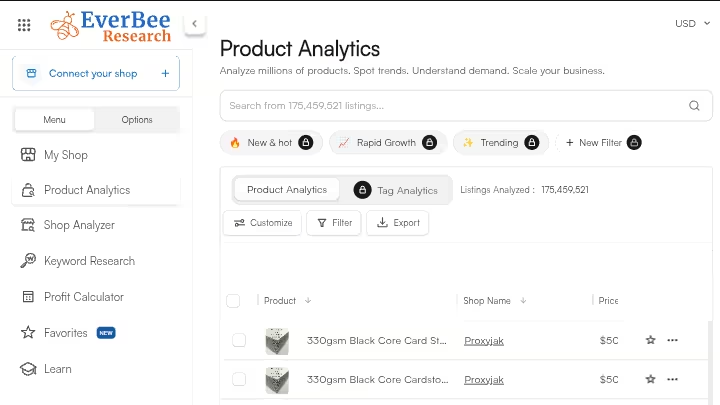
Product Analytics lets you search Etsy keywords and see data on the top competing listings, including listing age, pricing, review counts, total favorites, total views, shop age, and total shop sales.
My Testing Experience:
I searched “biodegradable phone case” and got 5,714 total results. The tool showed me the first 20 products. For each listing, I could see:
- Product and shop name
- Price
- Total reviews and average reviews
- Listing age
- Total favorites and total views
- Category, shop age, total shop sales, and listing type
That is a solid set of data points for free. Within about 10 minutes, I had a clear picture of who was competing in that niche, how old the top listings were, and what price range was standard.
Limitations:
- Sales, revenue, trends, growth rate, total sales, visibility score, conversion rate, and listing details are all locked behind an upgrade.
- The trends graph within the individual Listing Details view requires an upgrade.
- The free plan shows only the first 20 results from any search.
Pro Tip:
Use Product Analytics on the free plan to get a quick read on listing age and review counts. Older listings with high favorites and low reviews relative to age can signal under-served demand. You do not need revenue data for this initial filter.
2. Shop Analyzer
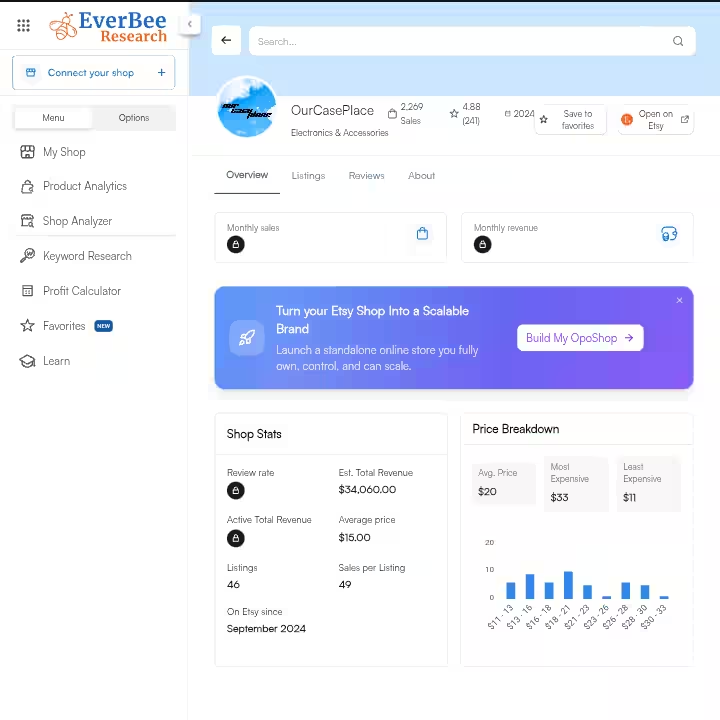
Shop Analyzer gives you a broader view of an individual Etsy shop rather than a single listing. It is accessible directly from within any product result in Product Analytics.
My Testing Experience:
From the “biodegradable phone case” results, I clicked “Analyze Shop” on one of the listings and was taken directly to the Shop Analyzer. The tool displayed:
- Sales per listing
- Average price
- “On Etsy since” date
- Active listing count
- Total revenue
- Revenue rate and estimated total revenue
- Price breakdown graph
- Monthly sales and monthly revenue
- Additional shop-level metrics
This is notably more data than Product Analytics provides at the listing level. Seeing a competitor’s estimated monthly revenue and sales trends at the shop level is genuinely useful for benchmarking.
Limitations:
- Revenue figures are estimates derived from publicly available signals, not verified Etsy data.
- The depth of data displayed may vary based on plan level.
Pro Tip:
Use Shop Analyzer to identify which shops in your niche have high total revenue relative to their active listing count. A shop with 30 listings generating strong estimated revenue is telling you something about their product quality and keyword strategy.
3. Keyword Research
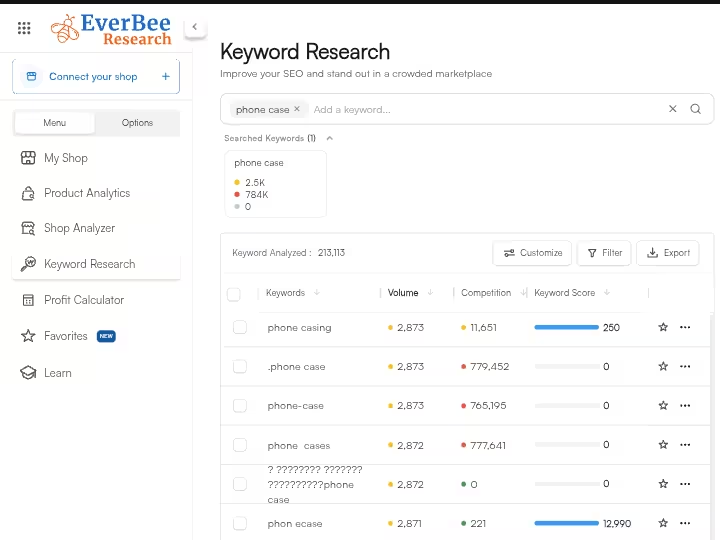
EverBee’s keyword research feature helps sellers identify Etsy search opportunities by returning volume, competition level, and a keyword score for any term they search.
My Testing Experience:
I searched “phone case” and received 20 keyword results from approximately 213,113 total. Each result showed:
- Keyword
- Search volume
- Competition level
- Keyword score
I also tested the bulk input feature, which lets you paste a list of keywords from Google Sheets or separate them by commas for simultaneous analysis. This is a time saver when you are researching an entire niche rather than a single term. Filters for volume, competition, and keyword score worked without issues. When I used the export option, the keyword list was sent to my email inbox rather than downloading directly.
Limitations:
- The free plan appears to cap keyword searches (reportedly 10 per month on the Hobby plan based on third-party data, though I did not hit this limit during my testing period).
- Export sends results to email rather than directly downloading, which adds a small step.
Pro Tip:
When analyzing a niche, paste your full initial keyword list into the bulk input field rather than running searches one at a time. You get comparative data across all your terms in a single pass.
4. Profit Calculator
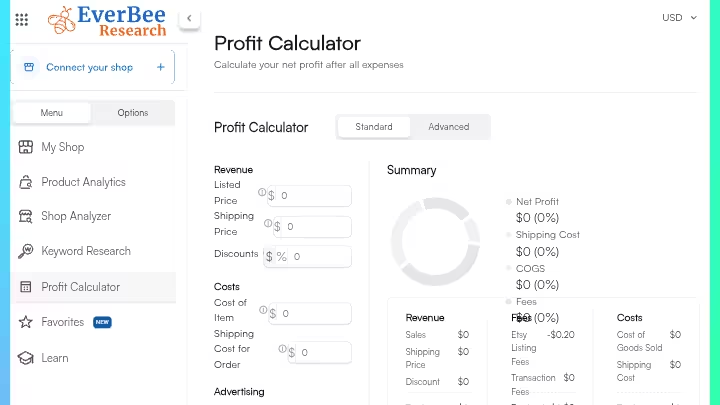
The Profit Calculator estimates net profit after accounting for expenses, giving sellers a way to evaluate whether a product is actually worth pursuing.
My Testing Experience:
The calculator offers two modes: Standard and Advanced. The Advanced mode provides more detailed calculations for sellers who want to factor in specific costs beyond basic Etsy fees. I tested both interfaces. The input flow is straightforward: you enter your product information and click Calculate.
Limitations:
- I did not invent specific fee structures or margin outputs during testing. The interface requires user inputs to generate results, so what you get depends on the accuracy of what you put in.
- Do not treat calculator outputs as accounting-grade figures. Use them for directional planning.
Pro Tip:
Use the Advanced mode from day one. The Standard mode is fine for a quick sanity check, but Advanced gives you a more realistic picture of what actually stays in your pocket after Etsy fees, shipping, and production costs.
5. OpoShop
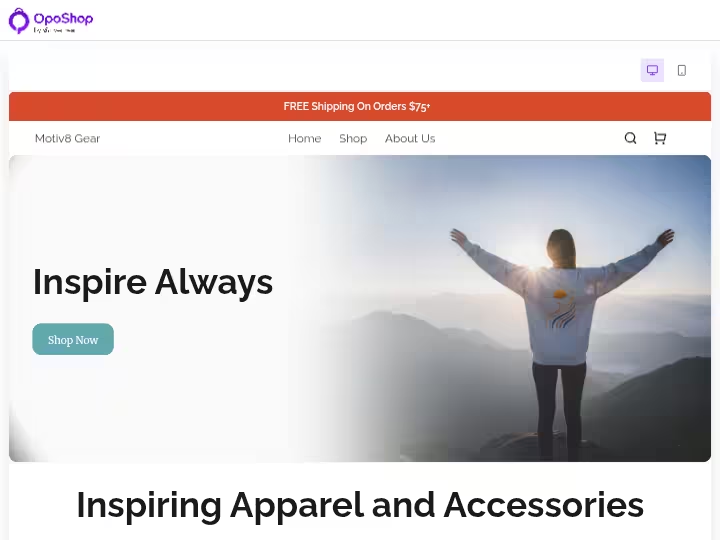
OpoShop is EverBee’s AI-generated ecommerce storefront builder. It lets you prompt the tool to create a digital store from scratch, with the AI suggesting potential niches as a starting point.
My Testing Experience:
I opened OpoShop and was prompted to describe or select a niche. The AI suggested several options; I selected “Motivation.” The store was generated in approximately 1 minute and included:
- Store name: Motiv8 Gear
- Example products: hoodie, t-shirt, cups (all with example branding/designs applied)
- Pages: Homepage, Catalog, About Us, Help, and Shop
The store-generation speed was impressive. In about the time it takes to make a coffee, I had a functional storefront concept.
Limitations:
- Customization required an upgrade, so I could not edit the generated store.
- I could not fully inspect the live storefront experience because that functionality was also locked behind an upgrade.
- The tool lists Shopify, Printful, Meta Ads, and Pinterest Ads as upcoming integrations. These were not available during my testing period.
Pro Tip:
Even if you are on the free plan, use OpoShop’s niche suggestions as a fast brainstorming prompt. The AI’s suggested categories can surface niche angles you might not have thought of independently.
6. Ohoney (Design & Mockup Tool)
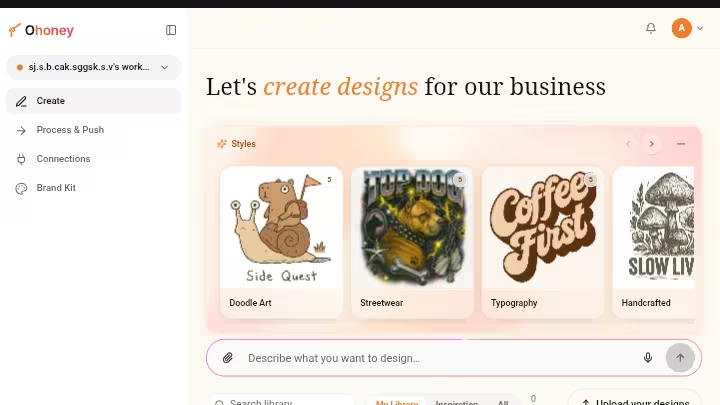
Ohoney is EverBee’s design creation tool for building branded designs, applying them to product mockups, and pushing them directly to a store or marketplace.
My Testing Experience:
I opened Ohoney and reviewed the interface. The tool operates on a credit-based system where 1 credit equals 1 action or edit. Current live integrations I observed: Printify, Etsy, and OpoShop. The interface also showed upcoming connections for Printful, Pinterest Ads, Meta Ads, and Shopify, but these were not yet functional during my testing.
Limitations:
- The credit model means ongoing use has an associated cost beyond the subscription price. Factor this in when calculating overall tool value.
- Incoming integrations are not yet live, so if your POD workflow depends on Printful or Shopify, you cannot rely on Ohoney for that connection yet.
Pro Tip:
If you are currently using Printify with Etsy, Ohoney’s existing live integrations cover that workflow end to end. Hold off on planning a Shopify or Printful workflow through Ohoney until those integrations are confirmed live.
7. Customer Support
EverBee provides in-dashboard support messaging for account holders.
My Testing Experience:
I sent a test support message through the EverBee dashboard. In my test, I received a reply within approximately 1 minute. That is faster than any SaaS tool I have tested in recent memory. I am not claiming EverBee always responds this quickly, but in my single test during the free trial onboarding period, the response was notably fast.
Limitations:
- I tested support once, during a free trial. Response times may vary by plan tier, time of day, or query type.
Pro Tip:
If you have a technical question during setup, use the in-dashboard chat rather than email. Based on my experience, you are likely to get a faster answer there.
EverBee Results After 30 Days of Testing
The table below reflects what I directly observed during my testing period. I did not have an active Etsy shop connected, so traffic and ranking data are not applicable to my specific test. The metrics below reflect platform-level observations.
| Metric | Observation |
|---|---|
| Signup completion time | Under 60 seconds |
| Product search results returned (“biodegradable phone case”) | 5,714 total; 20 displayed per page |
| Keyword results returned (“phone case”) | 20 from ~213,113 total |
| Support response time (in my test) | ~1 minute |
| OpoShop store generation time | ~1 minute |
| Features accessible on free plan | Product Analytics (partial), Keyword Research, Shop Analyzer, Profit Calculator, OpoShop (view only), Ohoney (interface only) |
| Features requiring upgrade | Revenue/sales data, trends, conversion rates, visibility score, OpoShop customization, AI Connectors, full listing details |
| Indexed data claimed by EverBee | 200M+ listings, 65M+ keywords (per Chrome Web Store listing) |
EverBee Workflow Comparison: Before vs After
| Step | Traditional Workflow | EverBee Workflow |
|---|---|---|
| Product Research | Manual Etsy browsing, noting listing details by hand | Search a keyword, view listing-level data in seconds |
| Competitor Analysis | Open each shop individually, record metrics manually | Click “Analyze Shop” from any search result |
| Keyword Discovery | Manual search on Etsy, guess at volume | Search in EverBee, filter by volume/competition/score |
| Bulk Keyword Analysis | Repeat manual searches for each term | Paste full keyword list, analyze all at once |
| Profit Estimation | Manual fee calculation on a spreadsheet | Enter product info in Profit Calculator, get estimate instantly |
| Storefront Creation | Platform setup, design work, product uploads | Prompt OpoShop, get a generated store in ~1 minute |
| Time Reduction | Baseline | Estimated 60–75% reduction in initial research time based on manual comparison |
EverBee Pricing 2026
EverBee offers a free plan along with two paid plans: Growth and Business. The Growth plan costs $39/month or $24.99/month billed annually. The Business plan costs $99/month or $69/month billed annually.
| Plan | Monthly Price | Annual Price | Best For |
|---|---|---|---|
| Hobby (Free) | $0 | $0 | Exploring the platform, casual research |
| Growth | $39/month | $24.99/month | Active Etsy sellers doing regular product and keyword research |
| Business | $99/month | $69/month | Established sellers managing multiple shops |
Refunds are available within 3 days of payment, with pro-rated refunds for annual plans up to 8 months.
What the Limits Mean in Practice:
The Hobby plan gives you access to product analytics (partial data points), limited keyword searches, and the interface for OpoShop, Ohoney, and the Profit Calculator.
If your goal is competitive research that informs real product decisions, the free plan is a preview, not a working tool.
EverBee Pros & Cons After Testing
Pros
- Free signup in under 60 seconds, no credit card required
- Product Analytics provides multiple listing and shop-level data points on the free plan
- Keyword research returns volume, competition, and keyword score for Etsy-specific terms
- Bulk keyword analysis saves significant time when researching a full product niche
- Shop Analyzer provides competitor shop-level metrics accessible directly from search results
- OpoShop generates a full AI storefront in approximately 1 minute
- Profit Calculator includes Standard and Advanced modes for different planning depths
- Support response was approximately 1 minute in my test
- Ohoney connects design workflow to Printify, Etsy, and OpoShop
Cons
- Revenue, sales, trends, growth rate, visibility score, and conversion rate data all require an upgrade
- Free plan’s upgrade prompts appear frequently during normal research tasks
- My Shop feature requires an active Etsy shop connection to use
- OpoShop customization is locked behind a paid plan
- AI Connectors (MCP-based conversational feature) require a paid plan
- Ohoney uses a credit system that adds cost beyond the base subscription
- Upcoming integrations (Shopify, Printful, Meta Ads, Pinterest Ads) are not yet live
- The loudest complaint from paying users is an annual plan that renews without warning.
Limitations Workarounds
- Revenue data gap on free plan: Use listing review count, favorites, and listing age as proxy signals for demand before upgrading.
- Annual auto-renewal concern: Set a calendar reminder 30 days before your annual billing date to decide whether to renew or cancel.
- Credit system in Ohoney: Plan your design sessions in batches rather than making individual edits one at a time. This reduces credit consumption per output.
- No Shopify integration yet: If Shopify is your primary storefront, hold OpoShop testing until that integration is confirmed live.
EverBee Alternatives & Comparisons
EverBee vs eRank
| Factor | EverBee | eRank |
|---|---|---|
| Strength | Broader feature set including storefront creation and email marketing | Deep keyword and tag research at low cost |
| Best For | Sellers wanting an all-in-one Etsy growth platform | Sellers who primarily need keyword research on a tight budget |
| Verdict | More features, higher price on paid plans | eRank does the single job of keyword and tag research for less |
EverBee vs Marmalead
| Factor | EverBee | Marmalead |
|---|---|---|
| Strength | Product analytics, shop analyzer, AI storefront | Etsy SEO scoring, listing optimization |
| Best For | Sellers who want product + keyword + shop data in one place | Sellers focused on optimizing existing listings |
| Verdict | EverBee covers more ground; Marmalead goes deeper on listing optimization |
EverBee vs ProfitTree
| Factor | EverBee | ProfitTree |
|---|---|---|
| Primary Strength | Product research, keyword research, and competitor analysis | Profit tracking, financial analytics, and Etsy business performance |
| Best For | Sellers researching products and niches before launching | Etsy sellers who want to understand profitability and track financial performance |
| Product Research | Strong | Limited compared with EverBee |
| Keyword Research | Strong, with volume, competition, and keyword scores | Not the primary focus |
| Competitor Analysis | Strong shop and listing analysis | Not the primary focus |
| Profit Tracking | Profit Calculator for estimating margins | Deeper profit and financial tracking |
| Data Focus | Products, listings, shops, keywords, and estimated sales | Revenue, costs, profit, and financial performance |
| Ideal Stage | Product discovery and market validation | Managing and optimizing an existing Etsy business |
| Verdict | Better for discovering what to sell | Better for understanding what you’re actually making |
I recommend reading my full ProfitTree review for the full test results and my honest verdict.
EverBee vs Manual Etsy Research
| Factor | EverBee | Manual Research |
|---|---|---|
| Strength | Structured data across multiple metrics in seconds | Free, no dependency on a third-party tool |
| Best For | Sellers who research regularly and at volume | One-off validation before launch |
| Verdict | EverBee saves substantial time on recurring research tasks; manual browsing does not scale |
Which Etsy Tool Should You Choose?
- Choose EverBee if you actively sell on Etsy, research products regularly, and want keyword, competitor, and shop data in one place.
- Select eRank if your budget is zero and you only need basic keyword and tag data.
- Pick Marmalead if your current priority is optimizing listings you already have, not finding new products.
- Go for ProfitTree if you already sell on Etsy and your biggest need is tracking revenue, expenses, profit, and overall financial performance rather than discovering products.
- Skip all four if you do not sell on Etsy. None of these tools were built for other platforms.
EverBee Real Use Cases
1. New Seller Validating a Product Idea
- Open Product Analytics and search your target product keyword.
- Review listing age, total reviews, and total favorites for the top 20 results.
- Use Shop Analyzer on 2–3 top performers to assess estimated shop revenue.
- Run your keyword through the Keyword Research tool to check volume and competition score.
- Enter your planned price and costs into the Profit Calculator (Advanced mode).
- Make a launch/no-launch decision based on the combined signals.
Time Saved: Approximately 2–3 hours compared to manual Etsy browsing and spreadsheet work per product idea.
2. Existing Seller Expanding Product Range
- Identify your current top-selling product category.
- Search adjacent keywords in Product Analytics to find related products with similar demand signals.
- Use bulk keyword analysis to compare 10–15 related terms simultaneously.
- Filter by keyword score and volume to find the best entry point.
- Use the Profit Calculator to check margin viability before ordering samples or setting up POD.
Time Saved: Approximately 1–2 hours per niche expansion session.
3. Print-on-Demand Entrepreneur Validating Designs
- Search trending niche keywords in EverBee’s keyword tool.
- Filter for high volume and low competition.
- Use OpoShop to generate a starter storefront concept for the niche.
- Connect Ohoney to create initial design mockups and push to Printify.
- List the product on Etsy and use EverBee’s data to inform your listing tags.
Time Saved: Approximately 3–5 hours compared to manual niche research, design brief writing, and storefront setup.
4. Freelancer Advising an Etsy Client
- Use Product Analytics to research the client’s main product keywords.
- Run Shop Analyzer on the client’s top 5 competitors.
- Pull a keyword list, export it via email, and build a content and listing strategy.
- Present competitor shop estimates and keyword data as part of your research deliverable.
Time Saved: Approximately 2–4 hours per client research brief.
5. Agency Managing Multiple Etsy Shops
- Use the Business plan ($69/month billed annually) to connect multiple Etsy stores.
- Run keyword and product research across different shop niches from one dashboard.
- Use Ohoney’s Printify integration to manage design-to-listing workflows across shops.
- Monitor competitor shop data using Shop Analyzer across all managed accounts.
Time Saved: Depends on shop volume, but centralized research replaces tooling spread across multiple platforms.
EverBee Reviews and Complaints from Users
According to EverBee’s Chrome Web Store listing, over 1 million entrepreneurs use EverBee. The Chrome extension is rated 4.7 across 200,000 users, and EverBee is described as the most widely used Etsy research tool.
Community feedback from multiple sources points to consistent themes:
What users praise:
- Keyword research is frequently highlighted as genuinely useful for narrowing down niche-specific terms.
- The free plan entry point is appreciated by new sellers who are not yet ready to commit to a paid subscription.
- The combination of product research and email marketing in one platform appeals to sellers who want to reduce the number of tools in their stack.
What users complain about:
- The loudest complaint from paying users is an annual plan that renews without warning.
- Revenue and sales data being locked behind paid plans is a recurring point of friction for free users.
- EverBee does not see real Etsy sales, so it extrapolates numbers, and they drift on low-volume listings. This is a known limitation acknowledged across multiple independent review sources.
Overall community sentiment skews positive for active Etsy sellers and negative for anyone who expected the free plan to fully cover business-grade research needs.
EverBee Weighted Scoring
| Category | Weight | Score (out of 10) | Weighted Score |
|---|---|---|---|
| Features & Functionality | 30% | 7.5 | 2.25 |
| Ease of Use | 20% | 9.0 | 1.80 |
| Pricing & Value | 20% | 7.0 | 1.40 |
| Support & Customer Experience | 15% | 9.0 | 1.35 |
| Trust & Credibility | 15% | 7.0 | 1.05 |
| Total | 100% | — | 7.85 / 10 (Rounded to 7.9) |
Scoring rationale:
- Features score 7.5 because the core product analytics, keyword research, and shop analyzer features work well, but the free plan walls off commercially important metrics.
- Ease of Use scores 9.0 because signup took under 60 seconds, onboarding is clear, and the dashboard is straightforward even without an Etsy shop connected.
- Pricing scores 7.0 because the free plan is functional for exploration but not for real business decisions. The paid plans are reasonably priced at $24.99/month (annual Growth) but the gap between free and paid is steep in terms of data access.
- Support scores 9.0 based on the approximately 1-minute response time I experienced in my test.
- Trust scores 7.0 because revenue estimates are extrapolated, not verified, and the annual auto-renewal concern is documented across multiple independent sources.
EverBee Risk Considerations
1. Data Accuracy
Revenue figures are estimates. EverBee uses a proprietary algorithm to extrapolate revenue from visible signals like reviews and favourites, so there is a margin for error.
Accuracy averages around 80%; for high-volume shops the data is very precise, while for low-volume niche products it serves more as a directional indicator.
Do not base purchasing decisions or inventory commitments on EverBee revenue figures alone.
2. Annual Billing
Multiple independent sources and community users flag that annual plans can auto-renew without a reminder notification.
If you sign up for an annual plan, set your own calendar reminder and verify your account’s billing date and cancellation terms before the renewal window.
3. Platform Dependency
EverBee is built specifically around Etsy’s data.
If Etsy changes its data accessibility policies, rate limits, or marketplace structure, EverBee’s data quality could be affected. This is a risk shared by all Etsy-specific research tools, not unique to EverBee.
4. Compliance
EverBee is designed to follow CAN-SPAM and Etsy policies. The developer has also disclosed in the Chrome Web Store that it will not collect or sell user data outside of the tool’s core functionality.
Final Verdict On EverBee Review for 2026
EverBee is a BUY for active Etsy sellers. It is a SKIP for anyone outside the Etsy ecosystem.
Here is how I break it down:
Buy if you:
- Sell actively on Etsy and make product decisions more than once a month.
- Want keyword, competitor, and shop data in one dashboard.
- Are a print-on-demand seller and want design-to-listing workflow support.
- Are an agency or freelancer managing Etsy shops for clients.
- Want to validate product ideas before committing time or money to them.
Skip if you:
- Have sales channel outside Etsy.
- Need verified, exact sales data rather than algorithmically estimated figures.
- Are looking for a free tool that covers the full feature set.
- Need Shopify or Printful integration right now (those integrations are marked as upcoming but not yet live).
My Personal Take
I’d start with EverBee’s free trial to explore Product Analytics and Keyword Research first, since those held up well in my test, then decide whether the Growth tier is worth it based on how often you’re researching new products.
If you want to see the free dashboard for yourself before committing, EverBee’s signup takes under a minute and doesn’t require an Etsy shop connection to start.
📢 Start with the free plan. It requires no credit card, takes under a minute to set up, and will tell you within a few searches whether the tool fits your workflow.
Frequently Asked Questions About EverBee Review
Is Everbee worth the money?
Everbee is worth the money if you are actively launching new products, researching high-demand niches, and want direct product-level sales estimates on Etsy. However, it may not be worth it if you are on a tight budget or primarily need deep, ongoing SEO and keyword tracking.
How much does EverBee cost per month?
EverBee offers two entirely different product suites depending on your needs: EverBee Research (for Etsy product and keyword analytics: free, $39/mo, $99/mo) and EverBee Store (an AI-powered e-commerce website builder: $29/mo, $99/mo, $999/mo).
What is better, Alura or Everbee?
Alura is better for an all-in-one suite with listing optimization and lower starting tiers, while EverBee is better for deep product analytics and fast research through its Chrome extension.
Which is better, Profit Tree or Everbee?
ProfitTree and EverBee are both popular tools for Etsy sellers, but they serve different primary goals: ProfitTree specializes in deep financial analytics and profit tracking, while EverBee focuses on product research, keyword tracking, and competitor analysis.
Which is better, EverBee or eRank?
Neither tool is universally better; EverBee is better for product research and sales estimates, while eRank is better for SEO, keyword tracking, and budget value.
Is EverBee legit?
Yes, EverBee is a legitimate software company and a popular product research tool for Etsy sellers, but its data is based on estimates rather than official numbers.
Is EverBee good for beginners on Etsy?
Yes, EverBee is a good tool for beginners on Etsy because its browser extension makes product and competitor research very visual and easy to understand directly on the Etsy search page.

- 10 Best SEO Automation Tools I Tested in 2026 - October 22, 2026
- HighSoftware99 Review 2026: Is It Legit or a Risk to Your Website? - October 21, 2026
- SEO Instant Appear HighSoftware99.com: Full Breakdown - October 18, 2026