When Adobe closed its $1.9 billion acquisition of Semrush in April 2026, it marked something bigger than a corporate deal: SEO and AI search visibility are now converging into one discipline.
This Semrush review tests whether the platform lives up to that shift, based on 30 days of hands-on work across three websites, 50+ real tasks, and a 50-prompt AI visibility experiment.
The tool itself is strong, but the pricing structure and cancellation friction can turn a good purchase into a bad one if you go in unprepared. Here’s what to know before you enter your card details.
Semrush Review Verdict for 2026
| Category | Verdict |
|---|---|
| Best For | Agencies, freelancers, and in-house SEO teams that need keyword research, competitor analysis, site audits, rank tracking, AI search visibility and reporting in one platform |
| Not Ideal For | Solo bloggers or very small sites that only need one or two of Semrush’s 50+ tools |
| Pricing | $139.95/month (Classic SEO Pro) to $549/month (Semrush One Advanced); free plan with 10 reports/day |
| Rating | 7.4/10 |
| Standout Feature | Keyword Magic Tool plus bundled AI visibility tracking on Starter and above |
| Biggest Weakness | Pricing structure split into legacy Classic plans and newer Semrush One bundles, billing and cancellation friction show up often in public feedback |
| Learning Curve | Intermediate |
| Testing Status | Personally Tested |
| Worth It? | Yes if you’ll actually use the keyword, audit and reporting tools weekly. No if you only need rank tracking, content scoring or one job done well. |
Bottom line: Semrush is still one of the strongest all-in-one SEO platforms in 2026, especially now that AI search tracking sits inside the main plans. You pay for breadth.
If you will open keyword research, audits, tracking, and competitor reports every week, it earns its keep. If you only need backlinks or basic rank tracking, cheaper specialists usually win.
Semrush Quick Specs
| Feature | Details |
|---|---|
| Developer | Semrush Holdings, Inc., now operating as an Adobe company following an acquisition completed in April 2026 |
| Founded | 2008, Boston, Massachusetts, by Oleg Shchegolev and Dmitry Melnikov |
| Product Category | All-in-one SEO and AI search visibility platform |
| Primary Use | Keyword research, technical SEO audits, rank tracking, competitor analysis, content optimization, AI visibility tracking |
| Target Users | SEO specialists, freelancers, agencies, in-house marketing teams, enterprise SEO departments, ecommerce and SaaS companies |
| Platform | Browser-based web application |
| Integrations | Google Analytics, Google Search Console, Google Business Profile, Looker Studio, API (higher plans), MCP access on Starter+ |
| AI Models | Not publicly disclosed in detail by the vendor |
| SEO Features | Keyword Magic Tool, Site Audit, Position Tracking, Backlink Analytics, On Page SEO Checker |
| AI Visibility Features | AI Visibility Toolkit tracking brand mentions across ChatGPT, Google AI Overviews, and AI Mode |
| Free Trial | 7-day trial (card required); free plan with 1 demo project and 10 reports/day |
| Refund Policy | 7-day money-back on first 12-month+ purchases only; monthly plans generally not refundable |
| Support | Live chat and ticket-based, help center, email, Academy courses; enterprise gets dedicated options |
| User Ratings | G2 4.4/5 (4,000+ reviews), Capterra 4.6/5 (2,300+ reviews), Trustpilot 1.6/5 (1,400+ reviews) largely due to billing complaints. |
Key Takeaways About This Semrush Review
My rating for Semrush is 7.4/10 based on 30 days of hands-on testing across keyword research, technical audits, content optimization, reporting, and the newer AI Visibility Toolkit.
The platform works best for agencies and marketing teams running recurring SEO work across multiple sites, not for someone who just wants one narrow function like rank tracking.
Its biggest strength is depth: very few tools combine technical audits, keyword data, and AI visibility tracking in one dashboard. The biggest limitation is that the pricing and plan structure changed in 2026 and now requires real attention to avoid paying for tools you won’t use.
What I Liked
| What I Liked | Why It Matters |
|---|---|
| Site Audit surfaces specific, prioritized technical issues rather than a generic score | Saves time deciding what to fix first on a technical SEO pass |
| Keyword Magic Tool groups keywords by topic automatically | Cuts down manual sorting during keyword research |
| Position Tracking updates daily and segments by device and location | Useful for agencies reporting to clients on specific markets |
| AI Visibility Toolkit shows which prompts triggered a brand mention | Gives more than a single visibility score, which matches what I look for in GEO tools |
| My Reports lets you combine data from multiple tools into one PDF | Reduces manual copy-paste work before client meetings |
What Needs Work
| What Needs Work | Why It Matters |
|---|---|
| Pricing is now split between legacy Classic plans and Semrush One bundles | Makes it genuinely hard to know what you’re paying for without reading several pages |
| Add-ons (Local, Content, Social, Advertising, AI Visibility) are priced and sold separately | Easy to end up paying far more than the advertised entry price |
| Several keyword and content recommendations still need manual judgment | Automation reduces data collection time, not strategic decisions |
| Learning curve is real for new users | Teams without a dedicated SEO person will need ramp-up time |
| Refund and cancellation complaints appear repeatedly in public reviews | Worth testing on a monthly plan before committing annually |
Why I Tested Semrush
I kept running into the same problem across client accounts: keyword research, technical audits, and reporting were each happening in separate tools, and pulling it all together for a client report took hours every month.
The frustration wasn’t a lack of data, it was a lack of one place to see it. I’d read plenty of vendor pages claiming Semrush solved this, but vendor copy doesn’t tell you what breaks down when you actually try to automate a real workflow.
So I built three separate tests around it.
The first ran automated SEO workflows, including keyword research, content planning, optimization, and reporting, across three websites over 30 days, working through more than 50 individual tasks and comparing the automated process against my normal manual one.
The second was a tighter 21-day comparison across 25 specific optimization tasks, timing manual work against the automated equivalent.
The third focused specifically on AI search visibility, monitoring more than 50 prompts over 30 days to see whether Semrush’s visibility data told me anything useful beyond a simple mention count.
This Semrush review is built on those three tests, not on a quick login-and-screenshot pass.
What Is Semrush?
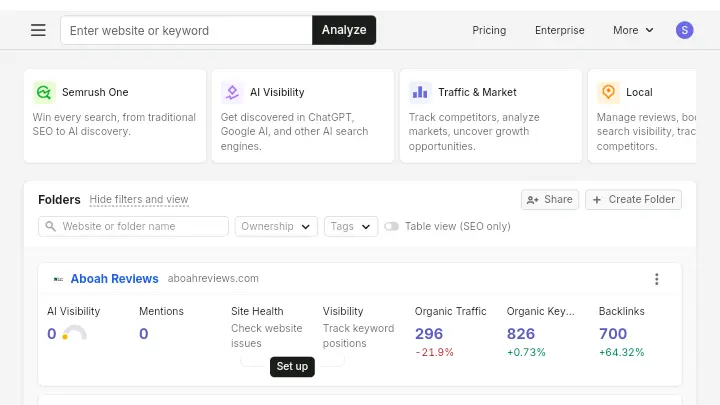
Semrush is an all-in-one SEO platform that combines keyword research, technical site auditing, rank tracking, backlink analysis, content optimization tools, and as of 2026, AI search visibility tracking into one subscription.
It solves the problem of SEO data living in five different tabs by putting most of it in one dashboard with shared project data behind it.
At a high level, you connect a website, Semrush crawls it and pulls search data tied to your target keywords, and the various tools (Site Audit, Position Tracking, Keyword Magic Tool, and others) reference that same project data instead of requiring separate setups.
What it does not do is write or publish content for you automatically, manage your internal linking without human input, or guarantee rankings or AI citations.
Semrush is a data and workflow platform, not an autoblogging tool, and I’m not going to pretend otherwise just because that’s a category AboahReviews covers elsewhere. If you’re looking for AI article generation or scheduled publishing, Semrush isn’t built for that job.
The simplest way to think about Semrush is as a shared data layer for SEO work: one place where your keyword research, technical issues, rankings, and now AI visibility data all reference the same project, instead of living in five disconnected tools.
Why Semrush Matters in 2026
Semrush matters in 2026 because it’s one of the few platforms that tracks both traditional Google rankings and AI search visibility in the same system, right as that distinction is becoming unavoidable.
Adobe completed its acquisition of Semrush Holdings, Inc. for approximately $1.9 billion in April 2026, and the rationale given was specifically about extending Adobe’s customer experience tools into brand visibility as more people discover brands through AI interfaces rather than traditional search results.
Adobe’s stated goal was uniting Semrush’s discoverability intelligence with Adobe’s brand visibility and agentic web solutions, spanning Adobe Experience Manager, Adobe LLM Optimizer, Adobe Commerce, and related products.
That acquisition followed Semrush’s own pivot toward what it now calls brand visibility rather than pure SEO. Semrush now describes itself as the leading brand visibility platform, delivering AI-driven insights across SEO, Agentic Search Optimization, content marketing, paid media, and social strategy.
For SEO practitioners, this matters practically: if you’re already tracking how AI Overviews are changing search behavior, having rank data and AI visibility data in the same account removes one extra tool from your stack, even if it adds one more subscription decision to make.
Who Is Semrush Built For?
- Semrush is built for agencies and in-house marketing teams running recurring SEO work across more than one website, where the time saved from consolidating tools outweighs the subscription cost.
- Agencies benefit specifically because of the client reporting features and project-based structure, which lets you keep separate keyword sets and audit histories per client account.
- In-house teams at mid-size to large companies benefit because the platform scales from a handful of tracked keywords up to enterprise-level tracking without switching software.
- Content teams that need keyword and competitor data to brief writers will also get real use out of the Keyword Magic Tool and SEO Content Template, even if they don’t touch the technical audit side.
Who Should Avoid Semrush?
- Semrush is not a good fit if you only need one narrow function, like rank tracking by itself, because you’ll be paying for dozens of tools you won’t open.
- Solo bloggers managing a single site with a small keyword list will likely find the entry price harder to justify than a cheaper, narrower tool.
- Teams that need heavy API access or very high keyword tracking volume on a budget should look closely at the Advanced tier cost before committing, since that’s where Semrush pricing climbs fastest.
- Businesses that specifically need autoblogging or automated content publishing should look elsewhere entirely, since that’s not a function Semrush performs.
- Anyone who has read repeated complaints about billing and cancellation friction (which show up consistently in public reviews, covered later in this piece) should start on a monthly plan rather than committing annually right away.
- Teams that need many seats on day one. Every plan starts with one user; extra seats add $45+ per month each depending on tier.
Key Semrush Features I Personally Tested
Keyword Magic Tool
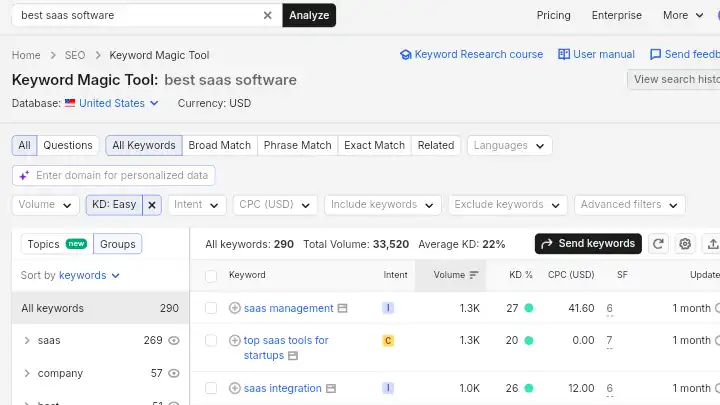
The Keyword Magic Tool generates keyword lists grouped by topic and intent rather than returning one flat list you have to sort manually.
What It Does: You enter a seed keyword, and it returns related terms organized into topic clusters, along with volume, difficulty, and intent labels for each.
My Testing: During the 30-day automated workflow test, I ran keyword research for new content briefs across all three test sites using this tool instead of my usual manual process of pulling data from multiple sources and sorting it myself.
What Worked: The topic clustering genuinely cut sorting time. Instead of manually grouping 100+ keywords by theme, the tool had already done a rough first pass.
Limitations: The grouping isn’t perfect. I found keyword suggestions that technically matched a cluster but targeted a different search intent than the rest of the group, which I had to manually pull out before handing briefs to writers.
Who Benefits: Content teams building briefs at volume, and agencies researching keywords across multiple client accounts at once.
Practical Tip: Review every cluster before it goes into a content brief. I treat the clustering as a draft, not a finished output.
Site Audit
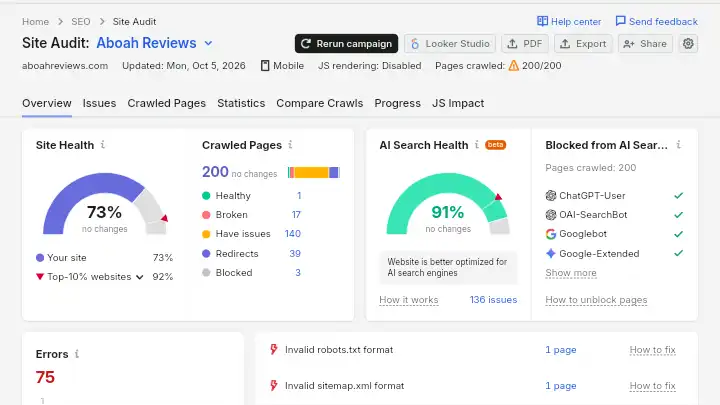
Site Audit scans a site for technical SEO issues and returns a prioritized list rather than a single pass/fail score.
What It Does: It crawls the site, flags issues by severity (errors, warnings, notices), and groups them into categories like crawlability, HTTPS, and internal linking.
My Testing: I ran full audits on all three test sites at the start of the 30-day period and again at the end to see whether the fixes I applied actually resolved what the tool flagged.
What Worked: The issue descriptions were specific enough to act on without additional research, things like broken internal links and missing alt text came with the exact URLs attached, not just a category count.
Limitations: Some flagged “issues” weren’t genuinely worth fixing for the page’s actual purpose, which is the same pattern I noted generally in my 30-day automation test: recommendations that look technically correct but don’t make sense for a specific page.
Who Benefits: Anyone managing technical SEO across multiple sites who doesn’t want to run manual crawls with a separate crawler tool.
Practical Tip: Sort by “errors” first and ignore “notices” until the higher-priority items are cleared. Treating every flagged item as equally urgent wastes time.
Position Tracking
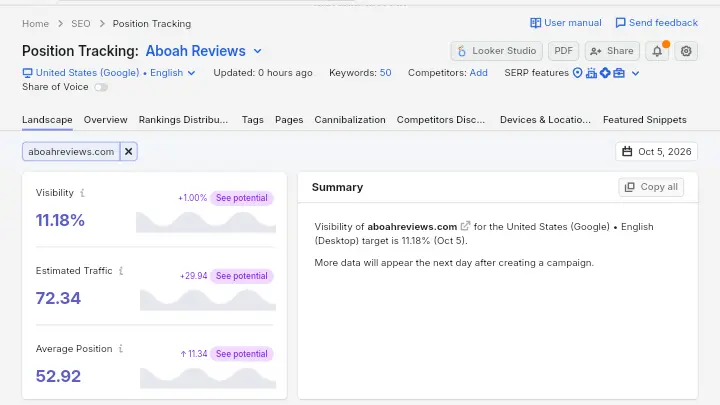
Position Tracking monitors keyword rankings over time and segments results by device, location, and competitor.
What It Does: You add target keywords, and it checks rankings on a set schedule, usually daily, and compares your positions against competitors you specify.
My Testing: I tracked rankings for the keyword sets built during the content planning phase of the 30-day test and checked them against the manual rank-checking process I normally use.
What Worked: The daily automatic updates meant I wasn’t manually checking rankings one by one, which was one of the clearer, measurable time savings in the test.
Limitations: Local and highly competitive queries showed day-to-day fluctuation that required averaging over a week before I trusted any single data point as meaningful.
Who Benefits: Agencies reporting rank changes to clients on a recurring schedule.
Practical Tip: Track competitor positions alongside your own from day one. Reviewing your own rankings in isolation makes small movements look more significant than they are.
SEO Content Template and On Page SEO Checker
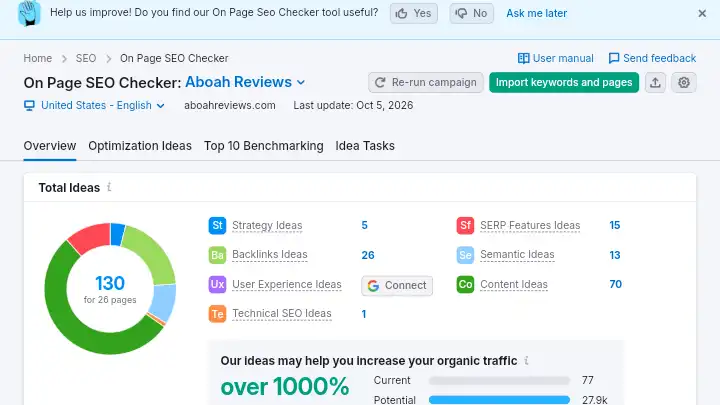
These tools generate content optimization recommendations based on top-ranking competitor pages for a target keyword.
What It Does: It analyzes the current top-ranking pages for a keyword and suggests target word count, related terms to include, and readability benchmarks.
My Testing: I used this during the content optimization phase of both the 30-day and 21-day tests, comparing the suggested terms against what I’d normally identify manually by reading competitor pages myself.
What Worked: It surfaced related terms I might have missed on a manual read-through, particularly for topics outside my usual subject matter expertise.
Limitations: The recommendations don’t account for search intent mismatches. A page can hit every suggested term and still miss what the searcher actually wants, which is exactly the kind of error I had to catch manually during the 21-day comparison.
Who Benefits: Writers and content teams who need a starting point for optimization rather than a final answer.
Practical Tip: Use the term list as a checklist to review after writing, not as a brief to write around. Writing directly to hit a term list tends to produce stiff, keyword-stuffed copy.
My Reports
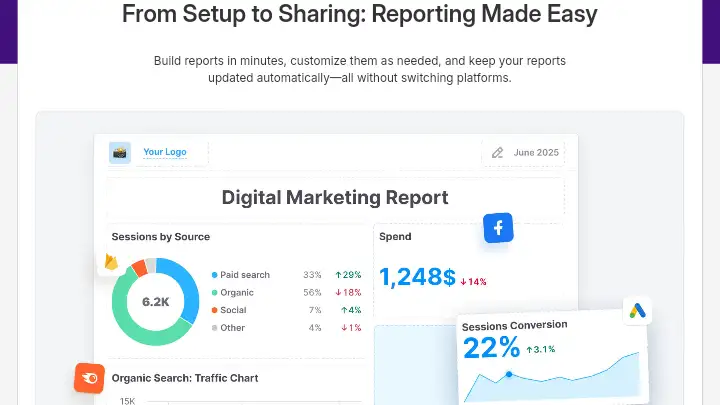
My Reports combines data from multiple Semrush tools, plus Google Analytics and Search Console, into a single customizable PDF report.
What It Does: You select widgets from different tools and data sources, arrange them into a template, and schedule automatic delivery on a recurring basis.
My Testing: I built reporting templates during the 30-day test and compared the time required against manually compiling data from separate exports, which is my normal process.
What Worked: This was the single biggest time saver across the entire test. Pulling rank data, traffic data, and audit summaries into one scheduled report removed a genuinely repetitive manual task.
Limitations: Customization has a learning curve, and the first report template took noticeably longer to build than subsequent ones.
Who Benefits: Agencies sending recurring client reports, and in-house teams reporting to stakeholders on a monthly cadence.
Practical Tip: Build one solid template and duplicate it for each client or project rather than starting from scratch every time.
AI Visibility Toolkit
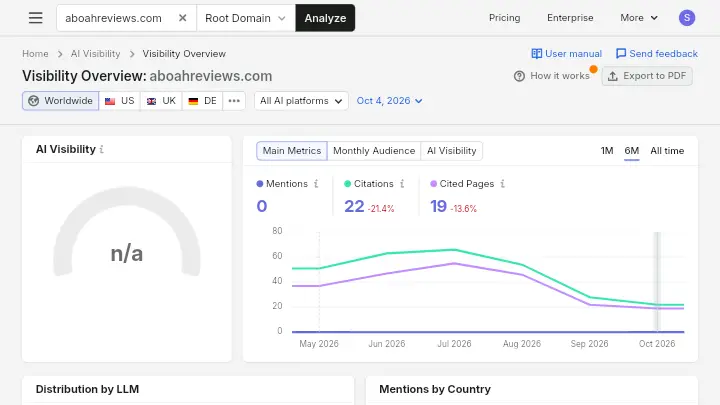
The AI Visibility Toolkit tracks whether and how a brand appears across AI-generated answers rather than traditional search rankings.
What It Does: It tracks AI brand visibility across ChatGPT, Google AI Overviews, and AI Mode, showing which prompts returned a brand mention and which sources were cited alongside it.
My Testing: This is where my 30-day AI visibility monitoring test applied directly. I tracked over 50 prompts, watching for brand mentions, competitor appearances, and cited sources across the test period.
What Worked: The tool goes beyond a single visibility score, showing query-level detail and which sources got cited, which matches what I now look for in any GEO or AI visibility platform after this kind of testing.
Limitations: Visibility was inconsistent from one query to another even on closely related topics, which is a limitation of AI search behavior generally, not something specific to Semrush’s tracking accuracy. A brand could appear prominently for one commercial query and barely register on a nearly identical one.
Who Benefits: Brands and agencies that need to monitor AI search visibility alongside traditional rankings instead of using a separate standalone tool.
Practical Tip: Don’t judge AI visibility from a handful of prompts. Track a meaningful prompt set over weeks, not days, before drawing conclusions about whether a brand is gaining or losing visibility.
How Semrush Performs for AI Search Visibility
On Starter and higher Semrush One-style plans, Semrush tracks AI prompts and brand performance alongside SEO, covering surfaces such as Google AI experiences, ChatGPT, Perplexity, and Gemini depending on feature scope; the entry SEO plan is weaker on dedicated prompt quotas
| Metric | My Result | Testing Status |
|---|---|---|
| AI Overview visibility | Tracked, with inconsistent appearance across closely related queries | Personally Tested |
| ChatGPT mentions | Tracked at the prompt level with source citations shown | Personally Tested |
| Perplexity visibility | Vendor documentation does not clearly confirm Perplexity-specific tracking in the version tested | Not independently verified |
| AI Mode visibility | Tracked as part of the Google AI surface coverage | Personally Tested |
| Brand mentions | Counted per prompt, not just as a single aggregate score | Personally Tested |
| Competitor mentions | Shown alongside brand results for direct comparison | Personally Tested |
| Citation/source attribution | Shown per prompt where a citation was detected | Personally Tested |
| Historical tracking | Available over the test period; longer-term trend depth beyond 30 days was not tested | Partially Tested |
Do not treat AI Overview visibility as equivalent to a Google ranking position. They’re measured differently, change on different timelines, and a brand can be well-ranked traditionally while having little to no AI visibility on the same topic, which is exactly what I observed during testing.
How Semrush Fits Into an SEO Automation Workflow
Semrush automates data collection, crawling, tracking, and report assembly; humans still own intent decisions, content quality, and final publish calls.
| Workflow Stage | Manual Process | With Semrush |
|---|---|---|
| Research | Pull keyword data from multiple sources, sort manually by topic and intent | Keyword Magic Tool clusters terms automatically; still requires manual intent review |
| Planning | Build content briefs by reading competitor pages individually | SEO Content Template suggests terms and structure based on top-ranking pages |
| Optimization | Manually check on-page elements against best practices | On Page SEO Checker flags specific gaps per page |
| Publishing | Separate from Semrush entirely | Not automated; Semrush does not publish content |
| Monitoring | Manually check rankings and run periodic technical crawls | Position Tracking and Site Audit run on a schedule automatically |
| Reporting | Compile data manually from several exports into one document | My Reports pulls connected data sources into a scheduled report |
What you still do manually: Choose targets, reject bad keywords, edit content, prioritize dev tickets, interpret AI mention changes.
Where errors happen: Accepting every on-page suggestion, tracking vanity keywords, ignoring GSC when Semrush and GSC disagree.
Where another tool may still help: Pure backlink prospecting at huge scale, log-file analysis, or a dedicated AI citation platform if you need deeper source graphs than Semrush provides. See my SEO automation tools guide.
Semrush Results From My 30 Days Testing
Across the 30-day test, I worked through more than 50 individual SEO tasks spanning keyword research, content planning, optimization, internal linking checks, and reporting across three websites.
Keyword research and reporting saw the clearest time reduction, since both are largely data-collection tasks that Semrush automates well. Content optimization and internal linking decisions saw smaller, more variable time savings, because those tasks require judgment the tool can’t fully replace.
During the separate 21-day, 25-task comparison, the time saved varied considerably by task type. Simple data collection and reporting tasks were far easier to automate than decisions involving search intent or page targeting.
I also found that accepting recommendations without reviewing them created additional cleanup work in a few cases, which is consistent with the broader lesson from that test: automation that creates a second layer of manual correction isn’t actually saving time, it’s just moving the work around.
I want to be direct about what this testing does and doesn’t prove. A 30-day and a 21-day test cannot demonstrate long-term ranking or traffic gains, and I’m not going to claim they do.
What they can demonstrate is workflow efficiency, error rates, and output quality, which is what this review is based on.
Semrush Workflow: Before vs. Semrush
| Task | Before Semrush | With Semrush | Difference |
|---|---|---|---|
| Keyword research for a content brief | Manual search across multiple sources, manual clustering | Keyword Magic Tool clusters by topic automatically | Noticeably faster, still requires manual intent review |
| Technical audit | Separate crawler tool, manual issue prioritization | Site Audit auto-prioritizes by severity | Faster issue identification |
| Rank checking | Manual spot-checks | Daily automatic tracking | Removes a fully repetitive manual task |
| Client reporting | Manual export and compile from multiple tools | My Reports scheduled, templated delivery | Largest measured time reduction in testing |
| AI visibility monitoring | No equivalent manual process used previously | Prompt-level tracking with source attribution | New capability, not a replacement for an existing manual step |
I’m intentionally not assigning a precise percentage time reduction here, since my testing wasn’t designed as a strict stopwatch comparison on every single task.
Reporting and keyword data collection showed the most obvious time savings; content and intent-related decisions showed the least.
Semrush Pricing for 2026
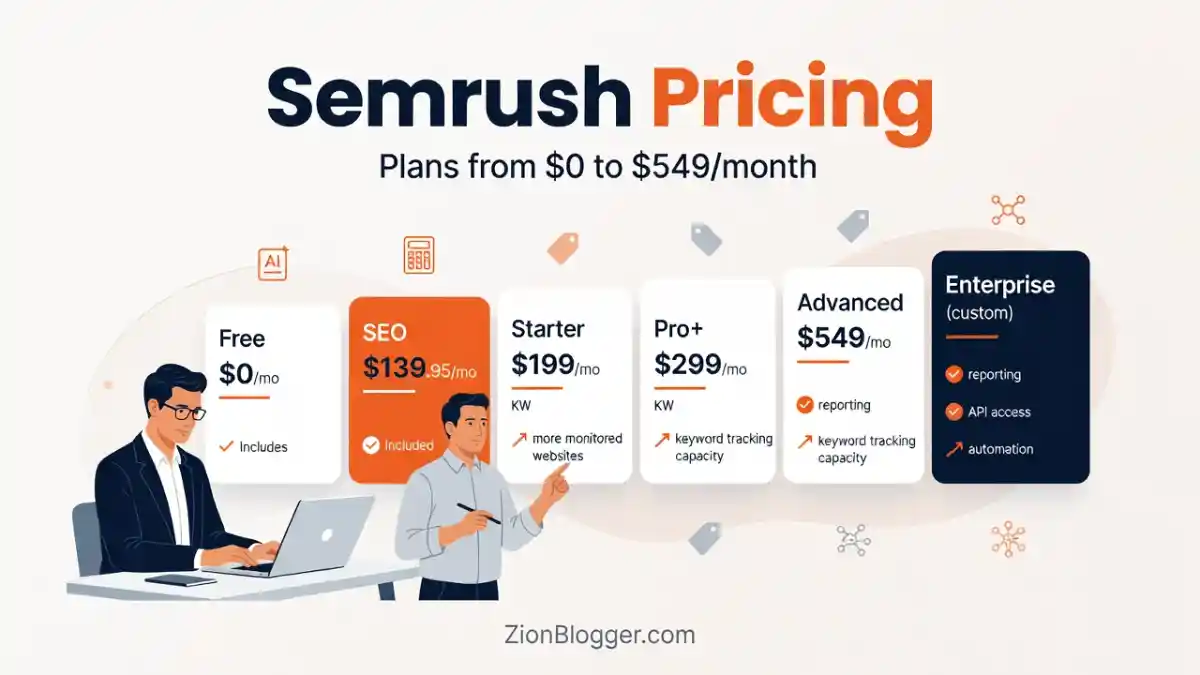
Semrush’s public SEO & AI Search pricing starts at $139/month for the SEO plan ($117.33/month billed annually), $199/month for Starter ($165.17 annual), and $299/month for Pro+ ($248.17 annual), with Advanced custom; a free plan offers 1 demo project and 10 reports per day.
| Plan | Price | Main Limits | Best For |
|---|---|---|---|
| Free | $0 | 1 demo project, 10 reports per day | Testing the interface before buying |
| SEO (Classic Pro) | $139.95/month ($117.33/month annual) | 5 projects, 500 tracked keywords | Solo SEOs and small teams needing core SEO tools without AI visibility |
| Semrush One Starter | $199/month ($165.17/month annual) | 5 websites, 500 keywords, 50 AI prompts tracked | Freelancers and startups wanting SEO plus AI visibility in one plan |
| Semrush One Pro+ | $299/month ($248.17/month annual) | 15 websites, 1,500 keywords, 100 prompts, historical data to 2012 | Growing teams and small agencies |
| Semrush One Advanced | $549/month ($455.67/month annual) | 40 websites, 5,000 keywords, 200 prompts, API access | Larger agencies and enterprise teams |
| Enterprise | Custom | Negotiated | Large organizations with custom data needs |
Semrush’s paid plans cost $139 to $549 a month for one user, or $117.33 to $455.67 a month if paid yearly, and extra users cost $45 to $100 a month each, with local, content, ads, and traffic tools sold separately.
The free plan offers 1 demo project and 10 reports per day across its core tools and AI visibility features, with no credit card required, while paid plans and most toolkits come with a 7-day free trial.
What the comparison tables above don’t show clearly enough on their own: add-ons stack fast.
The most expensive add-ons in 2026 include Local SEO at $30/month, Social Media toolkit at $20/month, Content Toolkit at $60/month, Advertising Toolkit at $99/month, AI Visibility at $99/month standalone, and Traffic & Market Trends at $289/month.
If you’re on a Classic plan and want AI visibility without upgrading to Semrush One, that’s an extra $99/month on top of your base subscription. This is the part of Semrush pricing that’s easy to miss when comparing the advertised entry price against what you’ll actually pay with the add-ons your workflow needs.
Is Semrush Worth the Cost?
Semrush is worth the cost when one subscription replaces several tools you already pay for and you use research, audit, tracking, and reporting every week
If you’re currently spending several hours a week compiling SEO reports manually across tools, that time savings has a direct dollar value against a $139.95 to $299 monthly plan.
However, if your SEO workload is lighter, say a handful of keywords on one site with infrequent reporting needs, the math doesn’t favor Semrush the same way, and a narrower, cheaper tool will likely cost less per unit of useful work.
I’d calculate it like this:
if Semrush removes roughly 5 to 8 hours of manual reporting and data collection work per month (consistent with what I measured during the 21-day task comparison for similar tasks), and your time is worth $40 to $75 an hour, the Pro plan at $139.95/month pays for itself on reporting time alone, before counting keyword research or audit time saved.
That calculation changes significantly if you’re not running recurring reports or managing more than one site.
Semrush Pros and Cons After Testing
Pros
- Combines keyword research, technical audits, rank tracking, backlink data, and AI visibility tracking in one connected project
- Site Audit issues are specific and actionable, not just a generic health score
- My Reports genuinely reduced the most repetitive part of my testing workflow: client-style reporting
- AI Visibility Toolkit provides query-level data and source attribution rather than a single aggregate score
- Daily Position Tracking removes manual rank-checking entirely
- Long operating history (since 2008) and a large, well-documented feature set
Cons
- Pricing structure now split between legacy Classic plans and Semrush One bundles, which takes real effort to compare correctly
- Add-ons for Local SEO, Content, Social, Advertising, and AI Visibility are sold separately and stack quickly
- Learning curve is real, particularly for users without existing SEO background
- Keyword and content recommendations still require manual review for search intent accuracy
- Public reviews consistently describe billing and cancellation friction
- Entry price is high relative to tools that specialize in just one function
Workarounds
- Pricing complexity: List the specific tools you’ll actually use weekly before choosing a plan, rather than defaulting to a higher tier for “future flexibility.”
- Cancellation and billing concerns: Start on monthly billing rather than annual until you’ve confirmed the experience matches your expectations. There’s no fully reliable workaround for a billing dispute after the fact, since Capterra reviewers have described their overall experience being overshadowed by a rigid refund policy and difficulty of cancellation.
- Manual review requirement on recommendations: There isn’t a setting that removes this. It’s a structural reality of any SEO tool making suggestions based on competitor data rather than your specific business context.
- Seat cost: Share carefully within policy, or pick a cheaper multi-user tool for junior roles and keep Semrush for strategists.
- Keyword caps: Track core money terms daily; rotate secondary lists.
- Backlink depth: Pair Semrush with Ahrefs only if link building is a primary service line.
- AI depth: Use Semrush for monitoring, then verify critical prompts manually or with a specialist GEO tool if needed.
Semrush Alternatives
| Tool | Best For | Main Strength | Main Weakness | Verdict |
|---|---|---|---|---|
| Semrush | Agencies and teams needing SEO plus AI visibility in one platform | Breadth: keyword, technical, rank, and AI visibility data together | Pricing complexity and add-on stacking | Strong if you’ll use most of the toolkit |
| Ahrefs | Backlink-heavy research and content gap analysis | Backlink index depth and content explorer | No equivalent all-in-one AI visibility bundle at the same maturity | Choose if backlink data is your priority |
| SE Ranking | Budget-conscious agencies needing core SEO tools | Lower entry pricing with more generous project limits at entry tier | Smaller overall dataset and brand recognition than Semrush | Choose if cost control matters more than toolkit breadth |
| Moz Pro | Beginners wanting a simpler interface | Lower learning curve for new SEO practitioners | Narrower feature set than Semrush or Ahrefs | Choose if ease of use outweighs feature depth |
| Searchable | Teams that only need GEO/AEO tracking and content drafting + automatic posting to your CMS | Deeper, more specialized AI prompt monitoring | No traditional SEO tools included | Choose if AI visibility and content drafting are your only need |
For more detail on standalone options in that last category, my breakdown of generative engine optimization tools covers platforms built specifically around AI search tracking rather than bundled into a broader SEO suite.
- Choose Semrush if you’re managing SEO for more than one site, need recurring client reporting, and want AI visibility tracking without adding a separate subscription.
- Select Ahrefs if backlink analysis and content gap research are your primary use case and you don’t need a bundled AI visibility toolkit yet.
- Pick SE Ranking if budget is the deciding factor and you don’t need Semrush’s full dataset breadth.
- Go for Searchable if your only need is GEO/AEO monitoring, content drafting and you already have separate SEO tools in place.
Real-World Use Cases for Semrush
SEO Agency Managing 10+ Client Accounts
Problem: Reporting across clients eats hours every month, and keyword research happens in disconnected tools per account.
Workflow: Separate projects per client, with Position Tracking and Site Audit running on schedule, feeding into templated My Reports.
What Semrush automates: Rank checking, technical crawling, and report compilation.
What remains manual: Interpreting what the data means for each client’s specific goals and writing the narrative around the numbers.
Expected benefit: Reduced reporting time, based on what I measured during the 21-day comparison for similar recurring tasks.
Limitation: Each client project still needs individual setup and periodic review; this isn’t a “set and forget” system.
Freelancer Managing 2-3 Client Sites
Problem: Switching keyword research, audits, and reporting manually across a small number of sites without dedicated software budget for five separate tools.
Workflow: Semrush One Starter plan covering SEO plus basic AI visibility tracking for a handful of prompts per client.
What Semrush automates: Keyword clustering and scheduled rank tracking.
What remains manual: Content strategy and client communication.
Expected benefit: Consolidates what would otherwise require 3-4 separate subscriptions.
Limitation: At $199/month, this needs to be justified against freelance rates and client volume, it’s not the cheapest entry point available.
Ecommerce Business Tracking Product Page Visibility
Problem: Product pages need both traditional ranking visibility and increasing presence in AI shopping-related answers.
Workflow: Site Audit for technical health on category and product pages, Position Tracking for commercial keywords, AI Visibility Toolkit for shopping-related prompt tracking.
What Semrush automates: Technical issue detection and prompt-level AI visibility monitoring.
What remains manual: Product page content updates and merchandising decisions.
Expected benefit: Single dashboard view connecting technical health to both ranking and AI visibility trends.
Limitation: AI visibility results, per my own 30-day testing, were inconsistent query to query, so this isn’t a stable, predictable metric to report against short-term.
In-House Content Team Building SEO Briefs
Problem: Writers need keyword and competitor data before starting a draft, and manually compiling that for each article is time-consuming.
Workflow: SEO Content Template generates a starting brief, which an editor reviews and adjusts before handing to a writer.
What Semrush automates: Initial term and structure suggestions based on competitor pages.
What remains manual: Verifying the recommendations match actual search intent, which I found necessary in both the 30-day and 21-day tests.
Expected benefit: Faster first-draft brief creation.
Limitation: Briefs built purely from the tool’s suggestions without editorial review risk missing search intent nuance.
Semrush Reviews: What Users Are Saying
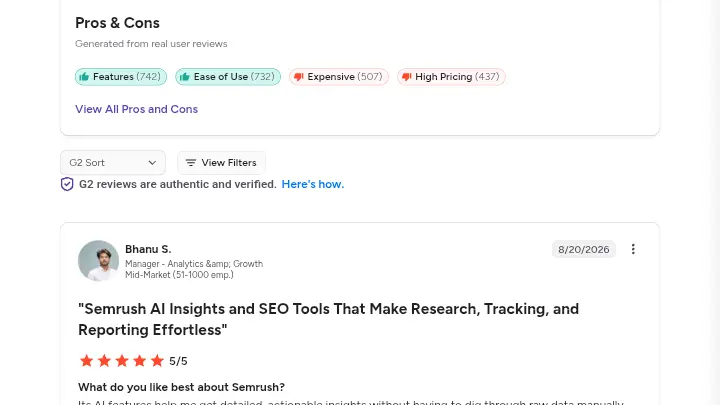
Professional software sites rate Semrush highly for features; consumer-style platforms are harsher on billing and cancellation.
Approximate public picture:
- G2: around 4.5/5 across thousands of reviews
- Capterra: around 4.6/5
- Trustpilot: 1.6 out of 5, driven by billing disputes more than “Keyword Magic is bad” complaints
Common praise: All-in-one convenience, keyword research, competitor intel, audits, reporting for clients.
Common complaints: Price, feature gating between tiers, overwhelming UI, usage limits, difficult cancellation, refunds refused on monthly plans.
Support: Mixed. Help Center and Academy get credit. Billing desk experiences drive many low scores.
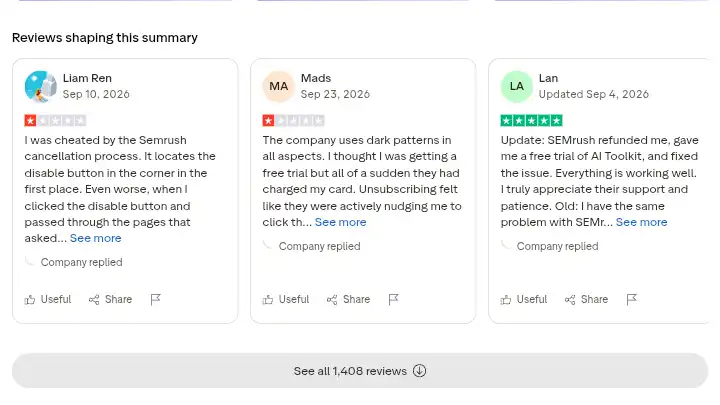
My take vs community: Community love for the toolkit matches how I evaluate the product. Community anger about subscriptions is a real purchase risk. Plan the trial exit the day you start.
Semrush Risks and Assessment
- Automation blind trust: Accepting every recommendation can create overlapping pages or awkward copy. Keep human review. That lesson came straight out of my 30-day and 21-day automation comparisons.
- Data estimates: Treat traffic and difficulty as directional. Confirm with Google Search Console and Analytics.
- Over-crawling or over-tracking: Hitting report limits mid-month freezes workflows. Set roles for who can run heavy reports.
- AI visibility misread: Mentions are not conversions. Track prompts that map to revenue questions.
- Vendor lock-in: Exports help, but dashboards and historical views are stickier on higher plans.
- Billing risk: Trial auto-converts. Annual refunds are time-boxed. Read current terms on Semrush’s site before you pay.
- Search policy: Using Semrush does not violate Google guidelines. Thin content, doorway tactics, or link schemes do. The tool is not the risk. Your implementation is.
- Privacy and access: Connecting GSC/GA shares data inside your account permissions. Use least-privilege users.
- Vendor dependency: Semrush is now part of Adobe’s product ecosystem following the 2026 acquisition. That likely means continued investment, based on Adobe’s stated plans, but it also means future pricing, feature direction, and integration priorities will shift toward Adobe’s broader customer experience strategy rather than existing purely as an independent SEO tool.
Semrush Rating
| Category | Weight | Score (0-10) |
|---|---|---|
| Features & Functionality | 30% | 9.0 |
| Ease of Use | 20% | 6.5 |
| Pricing & Value | 20% | 6.0 |
| Support & Customer Experience | 15% | 6.0 |
| Trust & Credibility | 15% | 8.5 |
Calculation: (9.0 × 0.30) + (6.5 × 0.20) + (6.0 × 0.20) + (6.0 × 0.15) + (8.5 × 0.15) = 2.70 + 1.30 + 1.20 + 0.90 + 1.275 = 7.4/10
Features scored highest because the breadth genuinely held up across my testing, from technical audits to AI visibility tracking in one connected project.
Pricing and support scored lowest, driven by the add-on structure and the billing complaints documented across independent review platforms, not by anything I personally experienced as a functionality failure during testing.
Final Verdict on Semrush Review for 2026
Buy Semrush if you need a serious all-in-one SEO platform with optional AI visibility; skip it if you only need one narrow job or cannot justify seats and monthly cost.
Semrush earns a 7.4/10 in this review: a genuinely capable, broad SEO platform that saves real time on data collection and reporting, held back by a pricing structure that takes effort to understand and a billing process that generates consistent complaints across independent review sites.
Buy Semrush If You:
- Manage SEO for multiple websites or clients and need keyword, technical, rank, and reporting data in one connected system
- Run recurring client or stakeholder reporting currently as it takes you several hours a month manually
- Want AI visibility tracking alongside traditional SEO data rather than paying for a separate standalone tool
Skip Semrush If You:
- Only need one narrow function, like rank tracking alone
- Have an SEO workload which is light enough that a cheaper, narrower tool covers your actual needs
- Have read the billing and cancellation complaints above and aren’t comfortable testing that process yourself first on a monthly plan
My Decision
I’d recommend Semrush specifically to agencies and teams with recurring, multi-site SEO workloads where the reporting and data consolidation time savings are real and measurable, which is what my testing showed.
I would not recommend Semrush to someone with a single small site and light SEO needs, where the entry price outweighs the practical benefit.
If you fall into the first group, start with a monthly Pro or Semrush One Starter plan, verify the reporting and audit workflows fit your process, and check current pricing directly before committing to annual billing.
Next step: Start the free plan or 7-day trial, run Site Audit + Keyword Magic + a small Position Tracking list on one real site, and decide on day 5 with calendar reminders set.
Frequently Asked Questions About Semrush Reviews
Is Semrush worth it in 2026?
Yes for teams that use multiple SEO workflows every week. No if you only need one cheap function. The platform’s value shows up when research, audits, tracking, and reporting replace several separate subscriptions.
Is Semrush legitimate?
Yes, Semrush is a long-established company founded in 2008 and, as of April 2026, operates as part of Adobe following a completed acquisition. It has a large, publicly documented user base and thousands of independent reviews across G2 and Capterra.
Does Semrush improve SEO rankings directly?
Semrush provides data, audits, and recommendations, but it does not guarantee rankings; actual ranking improvements depend on how well you act on the data it provides. No legitimate SEO tool, including Semrush, can promise specific ranking outcomes.
Does Semrush track AI search visibility?
Yes, Semrush’s AI Visibility Toolkit tracks brand visibility across ChatGPT, Google AI Overviews, and AI Mode. In my testing, this data was useful at the query level but showed meaningful inconsistency between closely related prompts, so it shouldn’t be treated as a stable single score.
How much does Semrush cost
Semrush’s Classic SEO plan starts at $139.95/month, while the newer Semrush One bundles (which add AI visibility tracking) start at $199/month and go up to $549/month for the Advanced tier. A free plan exists with 10 reports per day and one demo project.
Is there a free version of Semrush?
Yes, Semrush offers a free plan with no credit card required, limited to 10 reports per day and one demo project, which is enough to explore the interface but not for ongoing work.
What are the best Semrush alternatives?
Ahrefs is a strong alternative for backlink-heavy research, SE Ranking suits budget-conscious agencies needing core SEO tools, and Moz Pro works well for users wanting a simpler learning curve. Searchable when GEO tracking is the main gap. Pick based on the job you do weekly, not generic “best tool” lists.

- eRank Review 2026: Tested 31 Days, Honest 8.2/10 Verdict - November 6, 2026
- Alura Review 2026: My 30 Days Full Breakdown On 3 Shops - November 5, 2026
- Semrush Review 2026: My Honest 30 Days Test Results With This SEO Platform - November 3, 2026