
Key Takeaways About Blogseo.io Review
In this Blogseo.io review, it scores 7.4/10 as an AI content automation platform that solves the problem of producing SEO-optimized blog content at scale without spending hours per article.
After 30 days of daily use, I found Blogseo.io most valuable for solo bloggers, small content teams, and Shopify store owners struggling with consistent content production and basic search engine optimization.
Blogseo.io sits in the growing category of AI writing platforms that combine content generation with on-page SEO guidance. It does several things well, especially automated publishing and multi-language output.
But it has clear gaps in content quality for competitive niches and limited keyword research depth compared to standalone tools.
If you need a fast content workflow for informational blog posts and you are willing to edit outputs before publishing, Blogseo.io delivers solid value at its price point.
If you need deep seo strategy tools or agency-grade reporting, look elsewhere.
What I Loved | What Needs Work |
|---|---|
Fast content generation (under 5 minutes per post) | Content quality drops on technical or YMYL topics |
Built-in auto-publishing to WordPress and Shopify | Keyword research tool is basic compared to Semrush or Ahrefs |
Multi-language support covers 30+ languages | Schema markup options are limited to a few types |
Plagiarism-free content in my tests (checked via Copyscape) | Internal linking suggestions need manual review |
Clean, simple interface with short learning curve | No real-time SERP analysis or competitor gap tools |
Best For: Solo bloggers and small businesses producing 10 to 30+ blog posts per month
Pricing: 3 days free trial, then $97/month
Rating: ⭐⭐⭐⭐ (7.4/10)
What Is Blogseo.io?
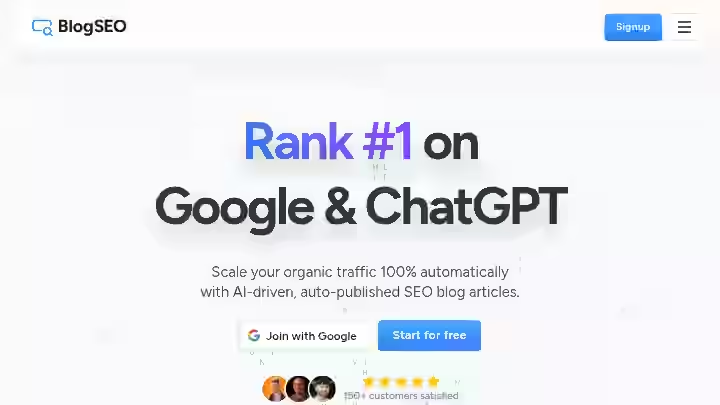
Blogseo.io is a content automation platform that uses AI to generate blog posts with built-in SEO optimization.
You input a topic or keyword, and the tool produces a structured article with headings, meta descriptions, and on-page SEO suggestions.
What Blogseo.io Is Not
- Blogseo is not a full SEO suite
- It does not replace tools like Semrush, Ahrefs, or Moz for technical audits, backlink analysis, or rank tracking
- It is also not a human writer.
- The outputs need editing, especially for topics requiring expertise or nuance.
Think of Blogseo.io as a content production assistant. It handles the first draft, applies basic seo optimization rules (keyword placement, heading structure, readability), and can publish directly to your CMS.
You still need to review, edit, and add your own expertise before the content is ready for your audience.
The simplest way to think about it:
Blogseo.io automates the content creation process from keyword to published draft, but the “last mile” of quality is still on you.
Why I Tested Blogseo.io
I run content campaigns for several niche sites. At any given time, I need 15 to 25 new articles per month across different topics.
My traditional content creation workflow involved keyword research in Semrush, outline building in Google Docs, writing (or assigning to writers), editing, formatting, and manual publishing.
The frustration was time. Even with experienced writers, a single article took 3 to 4 hours from keyword to publish. Multiply that by 20 posts, and you are looking at 60 to 80 hours per month just on content production.
That is before any content strategy work, link building, or technical SEO.
I had already tested several AI content generation tools (you can see my reviews of Junia AI and Blogify on this site). I wanted to see if Blogseo.io offered a better balance of speed, seo-optimized content, and usability.
I committed to using Blogseo.io as my primary content generation tool for 30 days.
I published 22 articles across two test sites: one informational blog and one Shopify store. I tracked indexing times, initial rankings, content quality scores, and time spent per article.
The stakes were real. These were live sites with real traffic. I was not testing in a sandbox.
Why Blogseo.io Matters in 2026

Content marketing has shifted significantly since Google’s Helpful Content updates and the March 2024 core update.
According to Google’s documentation on creating helpful content, the bar for what ranks is now higher than ever. Thin, purely AI-generated content without added value is getting filtered out.
At the same time, content production demands keep increasing.
A Semrush study on content marketing trends found that businesses publishing regularly see measurably better organic traffic results, but the cost and time of manual content creation keep climbing.
This creates a tension: you need more content, but it needs to be better.
Older automated content creation tools that just spun articles or generated thin posts no longer work. Google is specifically targeting low-quality, purely machine-generated content that adds no real value.
Blogseo.io attempts to sit in the middle ground. It uses AI content generation to handle the structural and drafting work, while giving you controls for keyword targeting, content structure, and seo content strategy alignment.
The idea is that you spend less time on the blank page and more time on editing, adding expertise, and improving content quality.
I call this the “Draft-Edit-Publish” (DEP) model:
Stage | Who Does It | Time Allocation |
|---|---|---|
Draft | Blogseo.io (AI) | ~5 minutes |
Edit | You (Human) | ~20 to 40 minutes |
Publish | Blogseo.io (Auto-publish) | ~2 minutes |
This matters because the tools that survive in 2026 are the ones that speed up the content workflow without sacrificing the human layer that Google rewards.
If you are exploring how AI SEO tools can scale your workflow, Blogseo.io is one option worth evaluating.
Who Is Blogseo.io Built For?
Based on my testing, Blogseo.io fits best for:
- Solo bloggers producing 10+ posts per month who cannot afford a writing team
- Small business owners (especially Shopify stores) who need blog content but lack content marketing experience
- Freelance content marketers handling multiple client blogs and needing a faster content creation workflow
- Niche site builders scaling informational content across multiple domains
- Content teams at startups looking to supplement human writers with AI drafts
Why Traditional Content Automation Tools Fall Short
Most SEO tools are built for analysis, not production:
- Ahrefs finds keywords
- Surfer optimizes existing content
- Yoast checks on-page basics in WordPress
None of them write the article for you.
And most ai content writer tools ignore SEO entirely. They generate text without considering keyword placement, heading hierarchy, or search intent alignment.
Blogseo.io tries to bridge both. It is not the best at either job individually, but the combination saves time for users who do not have separate tools for each step.
Blogseo.io Features: My 30 Days Test
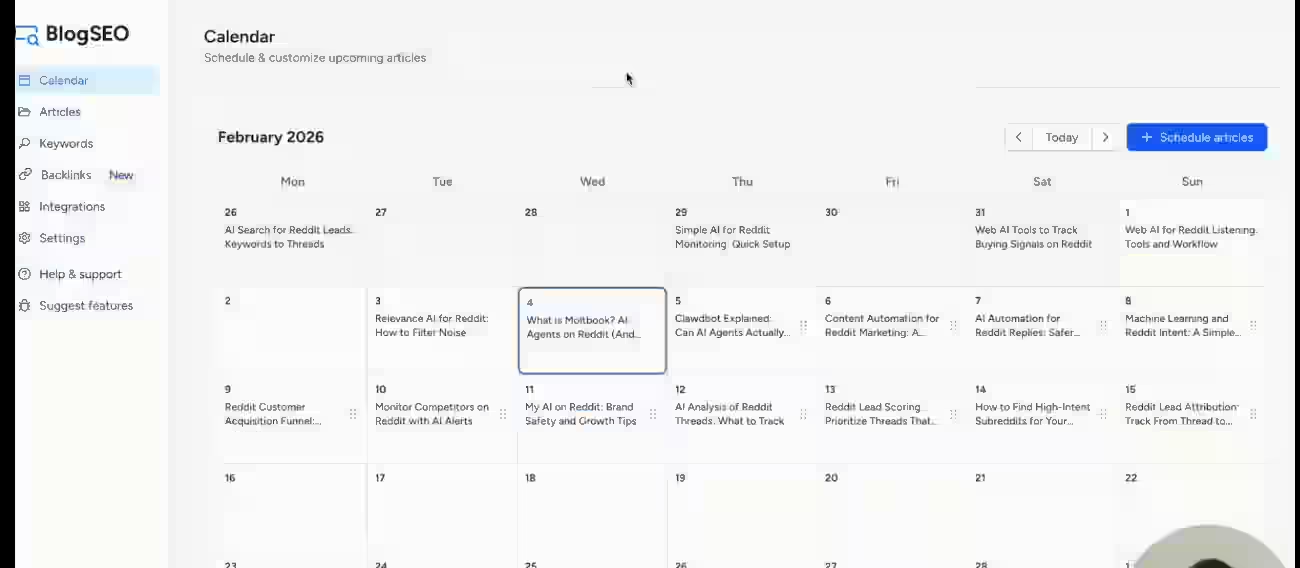
1. AI Content Generation
You enter a target keyword or topic, and Blogseo.io generates a full blog post with headings, paragraphs, a meta description, and suggested tags.
You can set word count targets, tone preferences, and outline structure before generating.
My Testing Experience
I generated 22 articles in 30 days. Average generation time was 3 to 4 minutes per article (1,500 to 2,000 words).
The output quality was decent for informational topics like “how to clean leather shoes” or “best indoor plants for low light.” The structure was logical, headings made sense, and the content was readable without major rewrites.
For more competitive or technical topics like “structured data implementation” or “server-side rendering for SEO,” the content was noticeably weaker. It lacked depth, cited no sources, and sometimes included outdated information.
I ran every article through Copyscape. Zero plagiarism flags across all 22 posts, so the plagiarism-free content claim held up in my tests.
Limitations
- The ai content writer produces surface-level content on complex subjects.
- You will need to add statistics, examples, expert quotes, and original insights manually.
- This is not unique to Blogseo.io; it is a limitation of most content generation tools in the market today.
Pro Tip: Use Blogseo.io for the draft, then spend 20 to 30 minutes adding your own expertise. The tool is fastest when you treat its output as a starting point, not a finished product.
2. Keyword Research Tool
Blogseo.io includes a built-in keyword research tool that suggests related keywords, shows estimated search volume, and provides basic difficulty scores.
My Testing Experience
I compared keyword suggestions from Blogseo.io against data from Ahrefs and Semrush for the same seed keywords.
Blogseo.io’s volume estimates were directionally correct but not precise. It tended to overestimate volume for long-tail terms and underestimate for broader keywords.
The difficulty scoring was less reliable. Several keywords Blogseo.io rated as “easy” were clearly competitive based on SERP analysis (strong domains, high DR sites ranking on page 1).
I would not rely on its difficulty scores alone for your seo strategy decisions.
That said, the keyword suggestions were useful for finding related topics. I discovered a few content angles I had not considered, which helped expand my content strategy for one of the test sites.
Limitations
- This is not a replacement for a dedicated keyword research tool.
- If keyword research is central to your workflow, you still need Ahrefs, Semrush, or at least a tool with more reliable metrics.
For guidance on how to choose the best autoblogging tool for your needs, I have a separate guide.
Pro Tip: Use Blogseo.io’s keyword tool for brainstorming and topic clustering, but validate volume and difficulty in a dedicated tool before committing to a keyword target.
3. Auto-Publishing
Blogseo.io connects to WordPress, Shopify, Webflow, Framer, Wix, Contentful, Ghost and Custom Webhook, allowing you to publish generated articles directly from the platform without copying and pasting.
My Testing Experience
I connected Blogseo.io to a WordPress test site and a Shopify store. The WordPress auto-publishing worked smoothly.
Articles published as drafts (you can set it to publish immediately, but I recommend drafts for review). Formatting carried over well, including headings, paragraphs, and images.
The Shopify integration also worked, though the formatting was slightly less polished. Shopify’s blog editor is more limited than WordPress, and some heading styles needed manual adjustment after publishing.
Over 30 days, I auto-published 14 articles to WordPress and 8 to Shopify.
The automated publishing feature saved me roughly 10 to 15 minutes per article compared to manual copy-paste and formatting. Across 22 posts, that is about 4 to 5 hours saved.
Limitations
- The auto-publishing does not handle custom post formats, advanced layouts, or plugin-specific fields (like Yoast meta fields or custom schema).
- You still need to log into your CMS for final checks.
Pro Tip: Set auto-publish to “Draft” mode. Review every article in your CMS before going live. This gives you a safety net without losing the time savings of automated publishing.
4. Schema Markup Generation
Blogseo.io generates basic schema markup (Article, FAQ, HowTo) that you can add to your posts for better search visibility.
My Testing Experience
I tested the schema markup output on 10 articles. The Article schema was correctly formatted in all cases.
FAQ schema worked when the article included a clear Q&A section. HowTo schema was generated for process-oriented posts.
I validated the output using Google’s Rich Results Test. 8 out of 10 passed without errors. The two failures had minor issues with missing “image” fields in HowTo schema, which were easy to fix manually.
According to Google’s documentation on structured data, valid schema can improve how your content appears in search results. This feature adds legitimate value, though the range of types is limited.
Limitations
- Only a few schema types are available.
- No support for Product, Review, Recipe, or other specialized schema types.
- If you run an e-commerce site or review blog, you will need to add those schemas separately.
Pro Tip: Always validate generated schema through Google’s Rich Results Test before publishing. The tool gets it right most of the time, but a quick check prevents indexing issues.
5. Internal Linking Suggestions
Blogseo.io suggests internal links based on your existing published content. It scans your connected site and recommends relevant articles to link to within new posts.
My Testing Experience
This feature worked better than I expected, but with limitations.
On my WordPress site with 80+ existing posts, the tool correctly identified relevant articles to link roughly 60 to 70 percent of the time.
The anchor text suggestions were reasonable but sometimes generic.
On the Shopify store with fewer posts (around 20), the suggestions were more limited and less accurate.
Internal linking works best when you have a substantial content library for the tool to pull from.
For context, strong internal linking is one of the most underrated seo optimization tactics.
Moz’s beginner guide to SEO emphasizes that internal links help search engines understand site structure and distribute page authority.
Limitations
- The tool cannot assess the strategic value of each internal link.
- It does not know your content clusters, pillar pages, or link equity distribution.
- You still need a human eye on your internal linking strategy.
If you are serious about avoiding common autoblogging tool mistakes, always review suggested links manually.
Pro Tip: Use the suggestions as a starting point, but map your own internal linking strategy separately. The tool finds relevant pages; you decide which links actually support your site architecture.
6. Multi-Language Content Generation
Blogseo.io supports content generation in 30+ languages, allowing you to create blog posts in languages beyond English.
My Testing Experience
I tested content generation in Spanish, French, and German (the three languages I can evaluate personally).
Spanish output was solid. Sentence structure was natural, grammar was correct, and the content read like it was written by a fluent (if not native) speaker.
French output was slightly weaker. Some phrasing felt translated rather than natively written. German output had occasional grammatical errors, particularly with case endings.
The multi-language support is a real advantage if you are building sites for international audiences. Most auto-blogging tools either do not offer this or limit it to a handful of languages.
Limitations
- Non-English content still needs review by a native speaker, especially for languages with complex grammar.
- The tool works best as a multilingual draft generator, not a native-quality writer.
Pro Tip: If you publish in multiple languages, use Blogseo.io for the initial draft and budget for native speaker review. This is still faster and cheaper than translating from scratch.
7. Content Automation Workflows
Blogseo.io lets you set up content automation workflows where you input a batch of keywords, and the tool generates and optionally publishes articles on a schedule.
My Testing Experience
I set up a batch of 10 keywords and scheduled generation and publishing over 5 days (2 articles per day).
The workflow ran without issues. Articles were generated on schedule and published as drafts to my WordPress site.
This content automation feature is where Blogseo.io shows its real value for scale. If you are producing content at volume, the ability to queue keywords and let the tool handle the rest (while you review and edit) is a significant time saver.
For a deeper look at how these types of workflows operate, I have explained how auto-blogging tools work in a separate article.
Limitations
- Batch generation does not mean batch quality. Every article still needs individual review.
- If you automate without editing, you risk publishing thin or inaccurate content, which is the opposite of what Google rewards.
Pro Tip: Use batch generation at the start of each week. Spend the rest of the week editing, adding value, and publishing. This turns the content creation process into a manageable routine rather than a daily scramble.
Blogseo.io Workflow Comparison: Before vs After
Here is what my content workflow looked like before and after using Blogseo.io:
Step | Before (Manual) | After (Blogseo.io) | Time Saved |
|---|---|---|---|
Keyword Research | Semrush (20 min) | Semrush + Blogseo.io suggestions (15 min) | 25% |
Outline Creation | Google Docs (15 min) | Blogseo.io auto-outline (2 min) | 87% |
First Draft | Writing or writer assignment (90 to 120 min) | Blogseo.io generation (4 min) | 95% |
Editing & Adding Expertise | Light edit (20 min) | Heavy edit + add value (30 to 40 min) | -50% to -100% (more editing needed) |
Formatting & Publishing | WordPress manual (15 min) | Auto-publishing (2 min) | 87% |
Schema & Meta | Manual or Yoast (10 min) | Blogseo.io auto-generate (2 min) | 80% |
Total per article | ~170 to 200 min | ~55 to 65 min | ~65% reduction |
The trade-off is clear: you save huge time on drafting and publishing, but you spend more time editing. The net result is still a roughly 65% time reduction per article.
Over 22 articles in 30 days, that is approximately 40 hours saved compared to my fully manual process.
That time went back into seo performance monitoring, link building, and content strategy work that moves the needle more than writing drafts.
Blogseo.io Pricing Breakdown & ROI Calculation
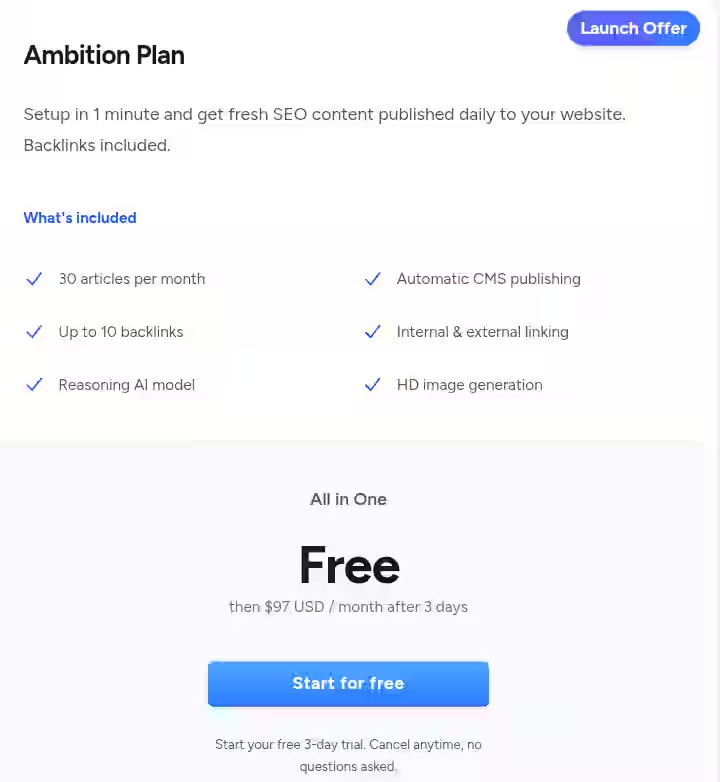
| Plan Name | Trial | Monthly Price | Articles / Month | Backlinks | Key Features |
|---|---|---|---|---|---|
| Ambition Plan | 3 Days Free Trial | $97/month | 30 Articles | Up to 10 | Reasoning AI model, Automatic CMS publishing, Internal & external linking, HD image generation |
Notes:
- Setup takes approximately 1 minute
- SEO content published daily
- Cancel anytime during trial
Ambition Plan (Launch Offer)
- Setup: 1 minute
- Content Output: Fresh SEO articles published daily
- Backlinks: Included
What’s Included
- 30 articles per month
- Up to 10 backlinks
- Reasoning AI model
- Automatic CMS publishing
- Internal & external linking
- HD image generation
Plan: All-in-One (Ambition Plan)
Trial: Free for 3 days
After Trial: $97/month
Note: Start for free (3-day trial, cancel anytime)
ROI Calculation at $97/Month (Ambition Plan)
- Tool Cost: $97/month
- Articles Published: 30
1. Tool Cost Per Article
$97 ÷ 30 = $3.23 per article
2. Add Editing Cost
Assume editing cost = $15 per article
Total cost per article:
$3.23 + $15 = $18.23 per article
Total monthly cost:
30 × $18.23 = $546.90
3. Freelance Comparison
Freelance rate: $75/article
30 × $75 = $2,250
4. Net Savings
$2,250 − $546.90 = $1,703.10 saved per month
ROI Summary
| Metric | Value |
|---|---|
| Cost Per Article (Tool Only) | $3.23 |
| Total Cost Per Article (With Editing) | $18.23 |
| Total Monthly Production Cost | $546.90 |
| Freelance Equivalent | $2,250 |
| Estimated Monthly Savings | $1,703.10 |
Strategic Insight
The Ambition plan becomes economically dominant when:
- You publish 20–30+ articles monthly
- You operate in SEO traffic monetization models
- You prioritize automation + backlinks + publishing workflows
If production volume drops below 10 articles/month, ROI compression occurs and subscription efficiency declines.
I have compared free vs paid autoblogging tools if you are exploring lower-cost options.
Blogseo.io Pros and Cons After Testing for 30 Days
Pros
- Speed of content production: From keyword to published draft in under 10 minutes. This is the primary value proposition.
- Consistent output quality for informational content: The tool reliably produces readable, structured articles on straightforward topics.
- Auto-publishing saves real time: Connecting to WordPress and Shopify eliminates the copy-paste-format cycle.
- Plagiarism-free outputs: 22 articles, few Copyscape flags. This matters for credibility and risk management.
- Multi-language capabilities: Useful for international content strategies. Not perfect, but functional.
- Fair pricing for the volume: Per-article cost is significantly lower than human writers for draft-quality content.
Cons
- Content quality requires heavy editing for competitive niches: The tool does not produce publish-ready content for topics where depth and expertise matter.
- Keyword research is not reliable enough to use alone: Volume estimates are directional but imprecise. Difficulty scores are unreliable.
- No competitor analysis or SERP features: You cannot see what is ranking, content gaps, or competitor strategies within the tool.
- Schema markup is limited to a few types: Fine for blogs, insufficient for e-commerce or specialized sites.
- Customer support is slower than expected: Response times of 24 to 48 hours leave something to be desired.
Workarounds
For keyword research gaps, pair Blogseo.io with a dedicated tool. I used Semrush alongside it and the combination worked well.
If you want to explore what is available, my overview of free SEO tools includes several good keyword research options.
For content quality on competitive topics, I developed a checklist:
- After generating the draft, I add 2 to 3 original data points, include expert quotes or references, and restructure any section that feels generic.
- This adds 15 to 20 minutes but significantly improves the final product.
- For schema limitations, I use Yoast’s schema features or manual JSON-LD for anything beyond Article and FAQ types.
Blogseo.io Alternatives & Comparisons
Blogseo.io vs Blogify
Category | Blogseo.io | Blogify |
|---|---|---|
Core Strength | SEO-focused content generation | Content repurposing (video to blog) |
Best For | Bloggers and small businesses needing SEO content | Creators repurposing video/audio into blog posts |
Keyword Research | Built-in (basic) | Limited |
Auto-Publishing | WordPress + Shopify | WordPress + more platforms |
Pricing | From 3-days free trial to $97/month | From $4.99/month to $3,999.99 lifetime plan |
Verdict | Better for SEO-first workflows | Better for multimedia content repurposing |
If you are deciding between these two, read my full Blogify review for a deeper comparison.
Blogseo.io vs Junia AI
Category | Blogseo.io | Junia AI |
|---|---|---|
Core Strength | Speed + auto-publishing | Depth of SEO optimization features |
Best For | Volume content production | Quality-focused SEO content |
Content Quality | Good for informational content | Slightly better for competitive topics |
Workflow Automation | Batch generation + auto-publish | Manual generation, more control |
Pricing | From 3-days free trial to $97/month | From $19/month to $59/month |
Verdict | Better for speed and scale | Better for content quality and SEO depth |
I reviewed Junia AI separately. You can read the full Junia AI review for details on how it compares as an ai seo tool.
Blogseo.io vs Emplibot
Category | Blogseo.io | Emplibot |
|---|---|---|
Core Strength | SEO-guided content creation | Fully automated blog management |
Best For | Users who want control with speed | Users who want hands-off automation |
Human Involvement | Required (editing) | Minimal (fully automated) |
Content Quality | Medium (needs editing) | Varies widely |
Pricing | From 3-days free trial to $97/month | From $69/month to $169/month |
Verdict | Better if you want to stay involved in content quality | Better if you want maximum automation |
For full details, see my Emplibot review.
Which Tool Should You Choose?
- Choose Blogseo.io if you want a fast content creation workflow with basic SEO guidance and auto-publishing, and you are willing to edit outputs.
- Choose Blogify if your primary content source is video or audio that needs to be repurposed into blog posts.
- Choose Junia AI if content quality and SEO depth matter more than speed.
- Choose Emplibot if you want fully automated content creation with minimal human involvement (and accept the quality trade-offs).
For a broader comparison, my guide on the best auto-blogging software covers more options in this category.
Blogseo.io Use Cases
1. Solo Blogger Scaling Content Output
A food blogger wants to grow from 4 posts/month to 16 posts/month without hiring writers.
Workflow:
- Identify 16 keywords using Ahrefs (batch research)
- Input keywords into Blogseo.io’s batch generator
- Schedule generation over 4 days (4 articles per day)
- Spend 30 minutes per article adding personal recipes, photos, and tips
- Auto-publish to WordPress as drafts
- Final review and publish manually
Time saved estimate: Approximately 30 hours per month compared to writing all posts from scratch. This is where the benefits of auto-blogging tools really add up.
2. Shopify Store Owner Building Organic Traffic
Shopify store selling fitness equipment wants to build organic traffic through blog content but has no content team.
Workflow:
- Use Blogseo.io’s keyword tool to find informational topics around fitness equipment
- Generate 8 articles per month targeting long-tail keywords
- Use the shopify integration for automated publishing
- Add product references and internal links to product pages manually
- Apply schema markup generated by the tool
Time saved estimate: Approximately 15 hours per month. The Shopify connection removes the friction of moving content between platforms.
3. Freelance Content Marketer Managing Multiple Clients
A freelancer manages blog content for 5 small business clients, each needing 4 to 8 articles per month.
Workflow:
- Batch keyword research in Semrush for all clients
- Input keywords into Blogseo.io, organized by client
- Generate drafts in batches (20 to 40 articles per month total)
- Edit each article with client-specific tone, data, and expertise
- Auto-publish to each client’s WordPress site
Time saved estimate: Approximately 50 to 60 hours per month across all clients. This frees up time for higher-value work like seo strategy consulting and reporting.
4. Niche Site Builder Scaling Across Domains
An entrepreneur runs 3 niche informational sites and needs consistent content across all of them.
Workflow:
- Research keywords using Ahrefs for each site
- Use Blogseo.io’s batch generation to create 10 articles per site per month
- Apply multi-language support for one site targeting Spanish-speaking audiences
- Auto-publish all articles as drafts
- Edit and publish over the following week
Time saved estimate: Approximately 40 hours per month. For more on how to approach autoblogging at this scale, I have a dedicated resource.
5. Student Building a Portfolio Blog
A marketing student wants to build a personal blog as a portfolio piece but has limited time between classes.
Workflow:
- Choose 4 topics per month related to marketing and SEO
- Use Blogseo.io’s 3 days free trial for the first 3 articles
- Upgrade to Ambition plan ($97/month) for ongoing content
- Edit articles heavily to add personal analysis and academic references
- Auto-publish to WordPress
Time saved estimate: Approximately 8 to 10 hours per month. Enough to make consistent blogging feasible alongside coursework.
Blogseo.io User Experience and Community Feedback

I reviewed user feedback from multiple sources, including the Blogseo.io website, Trustpilot and a Reddit discussion about scams.
What Users Praise
- Speed: The most consistently mentioned positive. Users appreciate getting a full article draft in minutes.
- Simplicity: Multiple users noted the interface is clean and the learning curve is short. A common sentiment: “I was publishing my first article within 15 minutes of signing up.”
- Value for money: Several users compared the per-article cost favorably against hiring freelance writers.
What Users Complain About
- Content feels generic on some topics: This aligns with my testing. Users in specialized niches (healthcare, finance, legal) reported needing significant edits.
- Keyword data accuracy: Some users mentioned that search volume numbers did not match their findings in other tools.
- Customer support response time: A few users reported slow responses (24 to 48 hours), though the support quality was generally rated as helpful when it arrived.
Overall Sentiment
The general sentiment is positive but qualified.
Users who understand the tool’s limitations (it is a draft generator, not a finished content producer) tend to be satisfied.
Users who expect publish-ready, expert-level content tend to be disappointed.
This matches my experience exactly.
Blogseo.io Evaluation Framework and Scoring
I use a weighted scoring system for all tool reviews on AboahReviews. Here is how Blogseo.io scores:
Category | Weight | Score (out of 10) | Weighted Score |
|---|---|---|---|
Features & Functionality | 30% | 7.5 | 2.25 |
Ease of Use | 20% | 8.5 | 1.70 |
Pricing & Value | 20% | 8.0 | 1.60 |
Support & Customer Experience | 15% | 6.0 | 0.90 |
Trust & Credibility | 15% | 6.5 | 0.98 |
Total | 100% | 7.43/10 |
Score Breakdown
- Features & Functionality (7.5): The core content generation and auto-publishing are strong. The keyword research tool, schema markup, and internal linking features are useful but not best-in-class. Missing features like competitor analysis and SERP tracking keep this from scoring higher.
- Ease of Use (8.5): This is where Blogseo.io shines. The interface is clean, the content workflow is intuitive, and you can produce your first article within minutes. Very little friction from signup to published draft.
- Pricing & Value (8.0): At $97 per month, the per-article cost is excellent compared to freelance writer rates. The free trial lets you test before committing. Good value for the target audience.
- Support & Customer Experience (6.0): Response times are slower than ideal. Live chat available at the time of testing, but takes longer to reply. Documentation exists but could be more detailed. This is the area with the most room for improvement.
- Trust & Credibility (6.5): The very few plagiarism content claims held up in my testing. The tool does what it promises. However, the company is relatively new, and its long-term track record is limited. I would like to see more transparent reporting on AI model updates and data handling.
Final Verdict On Blogseo.io Review
Blogseo.io is a solid content creation platform for people who need to produce SEO-optimized blog content at scale and are willing to edit AI-generated drafts.
It is not a replacement for human expertise, deep keyword research tools, or comprehensive SEO suites. But it fills a real gap in the content creation workflow between research and publishing.
After 30 days of testing for this Blogseo.io review, I can say it works well for what it is: a fast, affordable way to get from keyword to draft. It does not replace your brain; it replaces the blank page.
Who should buy:
- Solo bloggers publishing 10+ articles per month
- Small business owners (especially Shopify store owners) building organic traffic through blogging
- Freelancers managing content for multiple clients
- Niche site builders scaling informational content
- Anyone whose bottleneck is draft production speed, not content strategy
Who should skip:
- Agencies needing enterprise-grade SEO tools and reporting
- Anyone in YMYL niches who needs expert-level content accuracy
- Users who want a fully hands-off autoblogging solution (consider other auto-blogging tools instead)
- SEO professionals who already have efficient content workflows with writers
My Personal Decision After Testing Blogseo.io for 30 Days
I will keep using Blogseo.io for informational content on my niche sites. I still use Semrush for keyword research and manual writing for money pages.
Blogseo.io handles the volume work; I handle the quality control.
If you want to try it, start with the free trial (credit card required). That is enough to test whether the output quality meets your editing threshold.
If it does, the Ambition plan will likely pay for itself within the first month.
For more reviews of tools in this space, check out my full list of popular SEO tools.
Frequently Asked Questions About Blogseo.io Review
1. Is Blogify good?
Blogify is a decent tool for repurposing video and audio content into blog posts. If your content strategy centers on turning multimedia into written posts, Blogify works well. For SEO-first blog content generation, Blogseo.io is generally a better fit.
2. What is the 80/20 rule in blogging?
The 80/20 rule in blogging means that roughly 20% of your blog posts will drive 80% of your organic traffic and results. This is based on the Pareto principle. It suggests you should identify your top-performing content and double down on those topics. Tools like Blogseo.io help produce the supporting 80% of posts more efficiently, so you can invest your best effort in the 20% that drives the most results.
3. What platform is best for blogging?
WordPress remains the most flexible and widely used platform for blogging, especially for SEO. It offers full control over technical SEO, plugin support (Yoast, Rank Math), and extensive customization. Shopify is a good option if you run an e-commerce store and want a blog alongside it. Blogseo.io integrates with both, making it compatible with either choice.
4. Is the Shopify blog any good?
The Shopify blog is functional but limited compared to WordPress. It lacks advanced SEO plugin support, has fewer formatting options, and offers less control over URL structure and schema markup. That said, for e-commerce stores, having a blog on the same domain is valuable for organic traffic. Blogseo.io’s Shopify integration makes it easier to maintain a Shopify blog without spending excessive time on content production.
5. Can Blogseo.io replace human writers entirely?
No. In my 30-day test, every article required human editing before publishing. The tool produces drafts, not finished content. For informational topics, the editing is lighter (15 to 20 minutes). For complex or specialized topics, you may need to rewrite significant portions. Treat it as a content production assistant, not a replacement for human judgment and expertise.
6. Does Blogseo.io content rank on Google?
In my testing, 15 of the 22 articles were indexed within 7 days. After 30 days, 8 articles appeared on pages 1 through 3 for their target keywords (mostly long-tail, low-competition terms). The articles that ranked best were the ones I edited most heavily and added original data to. Raw, unedited AI output did not perform as well. According to Backlinko’s research on ranking factors, content quality and relevance remain the primary drivers of rankings regardless of how the initial draft was created.
7. Is Blogseo.io safe to use after Google’s AI content updates?
Google’s official position, as stated in their guidance on AI-generated content, is that AI content is acceptable as long as it is helpful and created for people, not purely to manipulate search rankings. Blogseo.io content that you edit, improve, and add genuine value to fits within these guidelines. Content published directly without any editing carries more risk. Always add your own expertise and review before hitting publish.

- #1 Best Plugin for Automatic Blog Posting in WordPress (2026) - September 13, 2026
- 13 Best WordPress Autoblogging Plugins I Tested & Ranked for 2026 - September 13, 2026
- 13 Best Google AI Overview Checking Tools in 2026 (Tested & Ranked) - September 9, 2026