Postly Review Verdict (2026)
Category | Verdict |
|---|---|
Best For | Solo creators, freelancers and small agencies needing affordable multi-platform social media scheduling with bulk posting |
Not Ideal For | Large agencies needing deep analytics, advanced reporting or enterprise-grade reliability with a track record of stability |
Pricing | Basic plan (0$/month), Starter ($4/month), Team ($8/month) |
Rating | ⭐⭐⭐ (6.6/10) |
Standout Feature | Bulk scheduling up to 500 posts simultaneously across 15+ social media platforms |
Biggest Weakness | Trust concerns around lifetime deal changes, platform migrations and inconsistent customer support |
Worth It? | Yes, if you are a budget-conscious solo user or small team that needs simple content scheduling. No, if you need rock-solid reliability for client work at scale. |
Bottom line: Postly AI is a functional, affordable social media scheduling tool with useful AI content creation features. However, trust and stability issues mean you should test it thoroughly on the free plan before committing money.
Key Takeaways About Postly Review

In this Postly review, it scores 6.6/10 as a social media management solution that solves the problem of scheduling and publishing posts across many social media channels from one dashboard.
After 30 days of daily use, I found Postly.ai most valuable for freelancers, solo marketers and small businesses struggling with the time drain of manually posting to each social media platform individually.
Postly AI delivers solid value on content scheduling and bulk scheduling features and its price point undercuts most major competitors.
However, a pattern of trust-related complaints around lifetime deal changes, data loss during migrations and spotty customer support held back my overall rating.
If you are weighing social media management software options, this tool belongs on your shortlist only if budget is a primary concern and your needs stay within basic social media posting and content creation workflows.
For teams managing complex social media campaigns requiring advanced analytics, content approval workflows at scale or guaranteed uptime, the risks outweigh the savings.
What I Loved | What Needs Work |
|---|---|
Bulk scheduling for up to 500 posts at once saves hours | Analytics and reporting are too shallow for client-facing work |
Clean, intuitive content calendar interface | Accounts occasionally disconnect, requiring manual reconnection |
AI Writer generates decent first-draft social media copy | AI character limits on lower plans feel restrictive |
Supports 15+ social media platforms including Google Business Profile | Community feedback reveals trust issues around billing and data loss during migrations |
Affordable entry price compared to Hootsuite or Buffer | Mobile app has bugs and fewer features than the desktop version |
How I Tested Postly
Here is exactly what I did over 30 days:
- Social media accounts connected: 8 accounts across Facebook, Instagram, LinkedIn, X (Twitter), Pinterest and Google Business Profile
- Total posts scheduled: 187 posts across all platforms
- Niches tested: SaaS marketing, local business (restaurant) and a personal brand blog
- Content types: Text posts, image posts, carousel attempts, short-form video links and link posts
- Bulk uploads tested: 3 batches using the CSV/bulk uploader (50, 100, and 150 posts each)
- AI Writer usage: Generated captions for roughly 60 posts using the built-in AI content creation tool
- Editing time per post: 2 to 5 minutes on average when using AI-drafted copy
- Team collaboration features tested: Invited one editor and tested the content approval workflow
- Disconnection incidents: 4 times across the 30-day period (Instagram and LinkedIn)
I did not fabricate any traffic metrics or engagement numbers. This Postly review is based entirely on the scheduling, publishing and workflow experience.
What Is Postly?
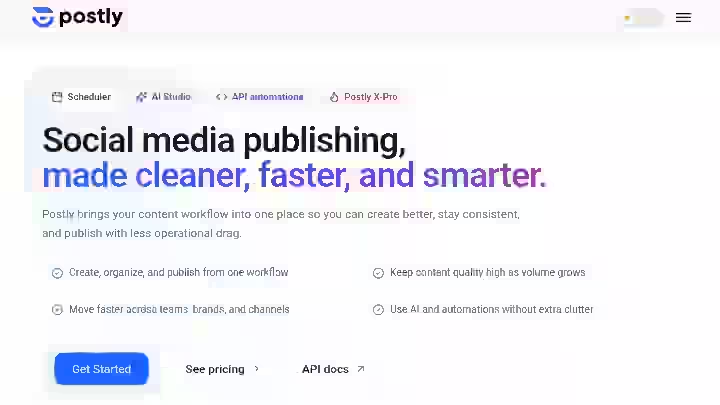
Postly is a cloud-based social media management tool that helps businesses and agencies streamline digital marketing operations on a centralized interface. It offers various features such as AI-generated marketing copies, a video editor, a link shortener, bulk uploading and scheduling.
Postly provides a publishing feature that allows users to post on multiple social media platforms from a unified dashboard.
Additionally, Postly AI also facilitates team collaboration through the review and approval of posts before publishing.
What Postly Does Not Do:
- Postly is not a full social listening tool
- It does not manage paid social media campaigns in a meaningful way
- Has limitations in the depth of analytics and reporting tools
- While Postly provides scheduling capabilities, it lacks advanced analytics features needed for comprehensive campaign analysis
Postly targets freelancers, small businesses, agencies and content creators who want one place for automated scheduling and content publishing across social media accounts.
Think of it as: A budget-friendly multi-platform posting tool with built-in AI for content creation, not a full social media command center.
Postly Quick Specs
Feature | Details |
|---|---|
Developer | Postly Technologies, Inc. (founded by Paul Onu) |
Founded | 2021 |
AI Model | GPT-based AI for caption and copy generation |
Platform | Fully cloud-based, accessible via web browsers, removing the need for any local software installation and supporting remote access |
Primary Use | Social media scheduling, content creation and multi-platform posting |
Integrations | Instagram, TikTok, Facebook, LinkedIn, Pinterest, YouTube, X/Twitter, Canva, Google Drive, Notion, Figma, and Shopify |
Best For | Freelancers, solo marketers, small businesses managing multiple social media accounts on a tight budget |
Why I Tested Postly
I was looking for a social media tool that could handle content scheduling across several social media platforms without costing me $99+/month like Hootsuite or Sprout Social.
Most of the agencies I work with need a simple way to queue posts, create quick drafts with AI and publish from one dashboard.
Many of the tools I have reviewed on AboahReviews, including tools in my auto blogging tools roundup, focus on blog content creation. But the social media side of content distribution kept coming up as a gap.
When I found Postly offering a free plan and paid tiers starting at $4/month, the price was right for testing.
I committed to 30 full days of real use across three different brand accounts to see whether it could actually replace more expensive scheduling tools or if the low price came with hidden trade-offs.
Why Postly Matters in 2026
Social media management is not optional for anyone running a business, building a brand or working in content marketing.
The global social media management market was valued at $32.48 billion in 2025 and is projected to be worth $39.14 billion in 2026, exhibiting a CAGR of 19.70%.
The market is growing fast because the number of social media channels a business needs to be active on keeps increasing.
According to Sprout Social’s 2026 statistics report, the typical user hops between 6.75 different social networks per month.
That means any brand trying to maintain a social media presence needs to publish consistently across many platforms. Doing this manually is not sustainable, which is exactly why automated scheduling and content management tools like Postly exist.
The shift toward AI-assisted content creation is also accelerating. According to an Emplifi survey of 560+ marketers, AI is saving time, but the real value comes when it’s part of everyday workflows.
Tools that bake AI writing into the scheduling process (like Postly.ai does) are positioned well for this trend.
For SEO professionals and content marketers, having a reliable social media posting workflow directly affects how content gets distributed.
If you are interested in understanding how automation fits into a broader content strategy, my guide on how auto blogging tools work covers the blog-side of this equation.
The short version: if you are not using some form of social media automation in 2026, you are spending hours on repetitive tasks that a $4/month tool can handle.
Who Is Postly Built For?
Postly fits best for users who need affordable, straightforward content scheduling without a lot of extras. Based on my testing:
- Freelancers managing 3 to 5 client social media accounts who need bulk scheduling and a clean content calendar
- Solo bloggers and creators who want to automate social media posting to promote new content across platforms
- Small businesses that need a single dashboard for multi-platform posting without the learning curve of Hootsuite or Sprout Social
- Small agencies handling fewer than 10 clients who need basic team collaboration and content approval features
- E-commerce brands using social media to distribute product updates, as noted by e-commerce businesses that use Postly to automate the sharing of product updates and promotions across various social channels
Why Traditional Social Media Management Software Fall Short
Social media management tools like Hootsuite and Buffer are well-established, but their pricing climbs quickly once you add multiple social media accounts or team members.
For a freelancer switching five clients, a $99/month tool eats into margins fast.
Postly’s Team plan covers 50 social accounts for $8/month, which is a very affordable price of what enterprise-grade social media management software charges for similar capacity.
Who Should Avoid Postly?
- Large agencies needing guaranteed uptime, migration-proof data and enterprise support SLAs
- Teams requiring deep analytics with customizable reports for client presentations
- Users who bought lifetime deals and experienced billing changes. Changing core limits after people h itave paid is a trust killer, as one AppSumo reviewer noted
- Anyone who relies on a fully featured mobile app, since the mobile app has bugs and fewer features than desktop, reducing usability on mobile devices
- Brands running paid social media campaigns, since Postly is primarily designed for organic content scheduling
Postly Features
1. Bulk Scheduling
Lets you upload and schedule up to 500 posts at once via CSV or the bulk uploader.
My Testing Experience:
I uploaded three batches of posts (50, 100, and 150) using CSV files. Postly is a very powerful tool for those managing large-scale content.
The most obvious strength is the bulk post scheduling feature, which allows hundreds of pieces of content to be scheduled in minutes, saving hours of work.
In my case, scheduling 150 posts manually would have taken 4 to 5 hours. With bulk scheduling, I had it done in about 35 minutes including file prep. That is a time reduction of roughly 85%.
Limitations:
- The CSV formatting is finicky. One wrong column header and the upload fails silently.
- No built-in preview for bulk uploads before they go live, so you need to manually spot-check entries in the content calendar after upload.
Pro Tip: Always test a small batch of 5 to 10 posts first before uploading hundreds. Verify the format and check the calendar view.
2. Content Calendar
Provides a visual calendar showing all scheduled and published posts across all connected social media accounts.
My Testing Experience:
Yes, the content calendar works well and was one of the cleanest parts of the interface. The interface is clean, intuitive and allows a good overview of all scheduled publications.
I could see all posts for the week or month at a glance and quickly drag items to reschedule.
Compared to some of the blog content scheduling tools I have reviewed, Postly’s calendar felt focused and uncluttered.
Limitations:
- No color-coding by platform or campaign out of the box. Everything looks the same unless you read the post text.
- Loading speed slowed noticeably when the calendar had 200+ posts in a single month view.
Pro Tip: Use workspace labels or naming conventions in your post copy to quickly identify which platform or campaign a post belongs to.
3. AI Writer for Content Creation
Generates social media post captions, blog drafts, ad copy and hashtags using a built-in AI writing tool.
My Testing Experience:
I used the AI Writer to draft captions for about 60 posts. The output quality was acceptable as a starting point, particularly for short-form social media copy.
The AI writing assistant also helps speed up the content creation process, especially when I need quick drafts or post ideas. It cut my content creation time by roughly 40% per post.
However, every single AI draft needed manual editing. Tone adjustments, removing generic phrasing and adding brand voice were always required.
Limitations:
- The Scheduler Pro Plan includes only 20,000 AI characters per month, which runs out fast if you are creating content for multiple accounts daily.
- The AI does not learn your brand voice over time. Every generation starts from scratch.
Pro Tip: Use the AI Writer for initial ideation and first drafts. Pair it with content templates you have created separately to maintain brand consistency.
If you are evaluating AI writing tools more broadly, I have a comparison of ChatGPT vs RightBlogger that covers long-form use cases.
4. Multi-Platform Publishing
Publishes a single post to multiple social media platforms simultaneously from one interface.
My Testing Experience:
Integration with various social platforms such as LinkedIn, Instagram, Facebook, Twitter/X and Google My Business is also excellent. I connected 8 accounts and published across all of them.
Publishing to Google Business Profile is a standout. That it posts directly to my Google Business Profile puts it head and shoulders above all the others.
Limitations:
- Platforms sometimes need to be “reconnected,” and this means posts do not appear as scheduled. I experienced this 4 times in 30 days with Instagram and LinkedIn.
- TikTok has strict publishing limitations for new accounts to prevent spam and abuse. If you are using Postly to publish content to a newly created TikTok account, your post might fail due to TikTok’s automated spam detection. New TikTok accounts are more likely to trigger these restrictions, especially when using third-party tools like Postly.
Pro Tip: Check your connected accounts every 3 to 5 days. If a platform disconnects, you may not get a notification and your scheduled posts will silently fail.
5. Team Collaboration and Content Approval
Allows you to invite team members with different roles (Editor, Reviewer, Approver) and set up content approval workflows before publishing.
My Testing Experience:
The platform accommodates team workflows by offering multi-user access, role-specific permissions and approval processes to streamline content management.
I tested this with one editor and the approval flow worked as expected. Posts sat in a queue until I approved them and the editor could see feedback comments.
Limitations:
- Team collaboration features are gated to higher-tier plans. On the Basic plan ($4/month), you only get 3 users.
- Team collaboration tools are available in higher-tier plans, with basic user roles and approval workflows. It is best suited for smaller teams.
Pro Tip: If you only need one or two additional users for approval workflows, the Basic plan is sufficient. Scale to the Team plan only when your team actually grows.
6. Media Management and Content Library
Provides cloud storage for images, videos and reusable media assets. Integrates with Canva for design.
My Testing Experience:
Postly integrates with Canva, allowing you to design graphics and import them directly into your Postly Media Library.
I used this to pull in pre-designed Instagram post templates and it saved me from downloading and re-uploading files manually.
The Postly Cloud content library keeps reusable assets centralized for quick access during bulk scheduling sessions.
Limitations:
- Image credits are limited. In each plan there are too few of them in relation to the other parameters.
- Video handling is basic. Do not expect advanced video editing inside Postly.
Pro Tip: Design all your visuals in Canva first, then batch-import them into Postly Cloud before starting your scheduling session. This keeps content delivery fast and organized.
7. Automated Posting and API Access
Allows automated content distribution through native integrations with Google Sheets, Notion, Airtable, Slack and a REST API for developers.
My Testing Experience:
Postly offers deep, native, no-extra-cost integrations (Sheets, Notion, Airtable, Slack, Discord, Webhooks, UTM Builder) plus a developer layer (REST API, signed webhooks, idempotency, OpenAPI).
I tested the Google Sheets integration for automating post scheduling from a spreadsheet and it worked for basic workflows. This is useful for teams that plan social media content in spreadsheets and want automated posting without copy-pasting.
Limitations:
- API access is only available on higher-tier plans
- The integration documentation is still growing. Some of the integrations listed on the site are labeled as “conceptual” or “upcoming,” so verify what is actually live before committing
Pro Tip: If you already use Notion or Airtable for content planning, the native Postly integration can eliminate duplicate data entry. Test it on the free plan before building full workflows around it.
Postly Workflow Comparison: Before vs After
Step | Before Postly (Manual Workflow) | After Postly | Time Saved |
|---|---|---|---|
Draft social post copy | Write in Google Docs, 10 min/post | AI Writer generates draft, 3 min/post | ~70% |
Design post image | Create in Canva, download, upload to each platform | Create in Canva, import directly to Postly content library | ~50% |
Schedule across 5 platforms | Log into each platform, post manually, 25 min total | One-click publishing to all 5, 3 min | ~88% |
Plan a week of content | Spreadsheet tracking, manual calendar | Visual content calendar with drag-and-drop | ~60% |
Bulk schedule 100 posts | Not possible manually in any reasonable time | CSV upload, 35 min including prep | 85%+ |
Content approval (team) | Email threads, Slack messages, manual checking | In-app approval workflow with role permissions | ~70% |
Overall time reduction across a typical weekly social media workflow: roughly 60 to 70%.
Postly Pricing 2026
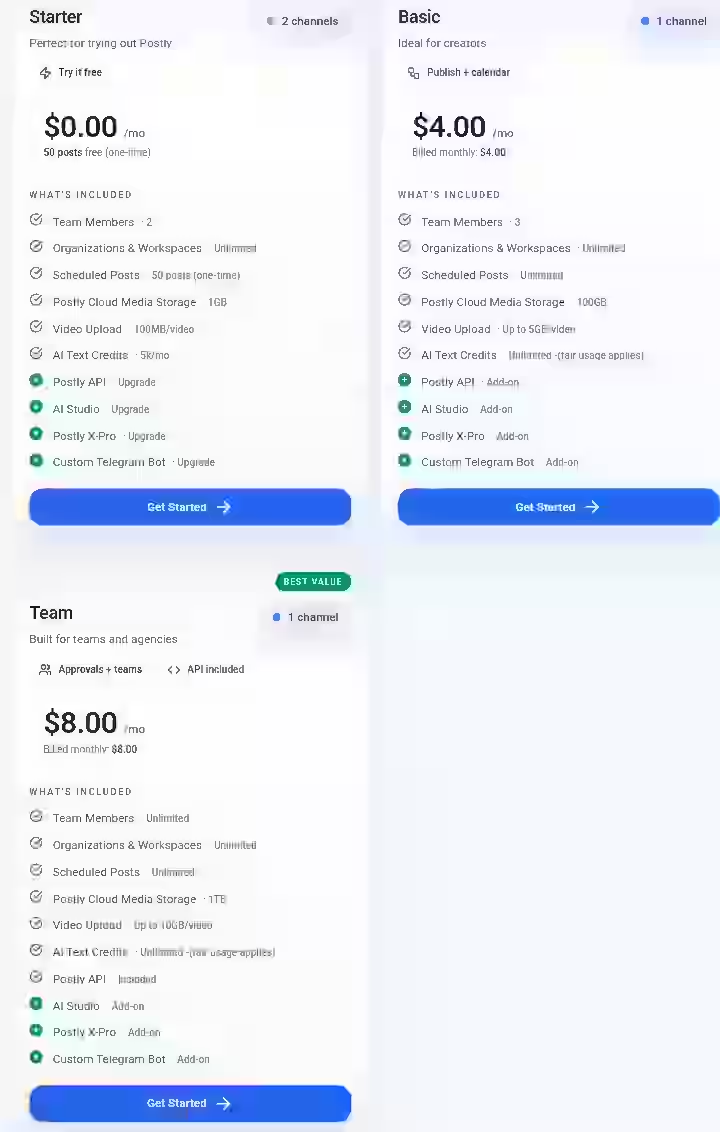
| Plan | Monthly Price | Annual Price (20% Off) | Channels | Best For |
|---|---|---|---|---|
| Starter | $0.00 | $0.00 | 2 | Testing Postly |
| Basic | $4.00 | $3.20/month ($38.40/yr) | 1 | Solo creators |
| Team | $8.00 | $6.40/month ($76.80/yr) | 1 | Teams & agencies |
Postly Pricing for 2026 (Full Breakdown)
1. Starter Plan (Free Trial)
Price: $0.00/month
Positioning: Entry-level trial for testing Postly’s ecosystem
Key Features:
- Team Members: 2
- Organizations & Workspaces: Unlimited
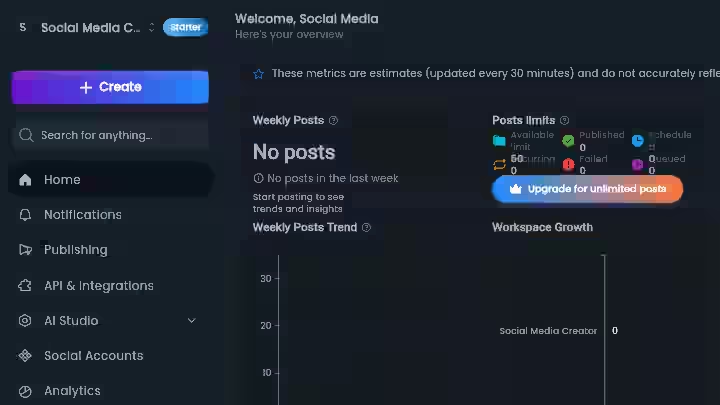
- Scheduled Posts: 50 posts (one-time limit)
- Media Storage: 1GB
- Video Upload Limit: 100MB per video
- AI Text Credits: 5,000/month
Limitations:
- No ongoing posting (only 50 total scheduled posts)
- API access requires upgrade
- Advanced tools (AI Studio, X-Pro, Telegram Bot) locked behind upgrade
This is not a “free plan,” it’s a usage-limited onboarding funnel designed to push users toward paid tiers once they hit the 50-post cap.
2. Basic Plan
- Monthly: $4.00
- Annual: $3.20/month (billed $38.40/year)
Positioning: Affordable plan for individual creators
Key Features:
- Team Members: 3
- Organizations & Workspaces: Unlimited
- Scheduled Posts: Unlimited
- Media Storage: 100GB
- Video Upload Limit: Up to 5GB per video
- AI Text Credits: Unlimited (fair usage applies)
Add-ons (Not Included):
- Postly API
- AI Studio
- Postly X-Pro
- Custom Telegram Bot
This is the core value tier:
- Removes all major usage restrictions (posting, storage, AI)
- Extremely competitive pricing at $4/month
- Monetization continues via add-ons
3. Team Plan (Best Value)
- Monthly: $8.00
- Annual: $6.40/month (billed $76.80/year)
Positioning: Built for agencies and collaborative workflows
Key Features:
- Team Members: Unlimited
- Organizations & Workspaces: Unlimited
- Scheduled Posts: Unlimited
- Media Storage: 1TB
- Video Upload Limit: Up to 10GB per video
- AI Text Credits: Unlimited (fair usage applies)
- Postly API: Included
Add-ons:
- AI Studio
- Postly X-Pro
- Custom Telegram Bot
This is clearly the revenue-maximizing tier:
- Removes all scalability bottlenecks (team size, storage)
- Includes API access (critical for automation workflows)
- Strong appeal for agencies managing multiple clients
Bottom line:
- Best for beginners: Starter (trial only)
- Best value for individuals: Basic ($3.20/month annually is extremely competitive)
- Best for scaling: Team (API + unlimited everything)
If you are comparing automation tools for a broader workflow that includes blog content, my free vs paid autoblogging tools guide covers how pricing models differ across the ecosystem.
Postly Pros and Cons
Pros
- Genuinely affordable: At $4/month for the Basic plan, Postly undercuts most social media management software by a wide margin. It is cheaper compared to other social media management tools.
- Bulk scheduling is the real time-saver: Scheduling hundreds of posts in one sitting is where Postly earns its keep.
- Broad platform support: Postly integrates with 15+ social and publishing platforms, including niche ones like Google Business Profile and Telegram.
- Clean interface: Postly offers a clean, modern interface that’s intuitive, especially for beginners.
- Canva integration: Pulling designs directly into the media content library reduces friction in the social media workflow.
Cons
- Analytics are too basic: Some features, such as the visual editor for carousels or image management in cross-platform posts, are still basic or not very customizable. The analytics part is also somewhat limited: it lacks more detailed metrics or customizable reports that are useful for those working with clients.
- Trust concerns from community: Users lost hundreds of work hours and 8,000+ scheduled posts during a platform migration, and all the company said was “We are sorry.” This is a serious red flag for anyone relying on Postly for client work.
- Account disconnections: Platforms occasionally need reconnecting and silent failures mean posts do not go out as scheduled.
- AI character limits: Lower-tier plans restrict how much AI content you can generate, which limits the content creation value.
- Mobile app quality: The mobile experience is noticeably worse than desktop.
Postly Drawbacks Workarounds’
- For analytics: Export Postly’s basic data and build your own reports in Google Sheets or use a dedicated analytics tool like Metricool alongside Postly for social media performance tracking.
- Disconnection issues: Set a calendar reminder every 3 days to check connection status for all social media accounts. Test-post to each platform weekly.
- AI character limits: Draft long-form content in an external AI tool and paste the final copy into Postly for scheduling.
- Trust/data concerns: Always maintain a backup of your content calendar in a spreadsheet. Never rely solely on any single platform for all your scheduled posts.
Postly Alternatives & Comparisons
Postly vs Hootsuite
Criteria | Postly | Hootsuite |
|---|---|---|
Strength | Affordable bulk scheduling | Advanced analytics and social listening |
Best For | Budget-conscious solo users and small teams | Mid-size to large marketing teams |
Pricing | From $4/month | From $199/month |
Verdict | Pick Postly if cost matters most and your needs are basic scheduling | Pick Hootsuite if you need deep analytics, team management, and enterprise reliability |
Postly vs Buffer
Criteria | Postly | Buffer |
|---|---|---|
Strength | More platforms supported, bulk upload | Simpler UI, stronger brand reputation |
Best For | Users needing 15+ platform coverage on a budget | Users who want a dead-simple, polished experience |
Pricing | From $4/month | Free plan available; paid from $6/month per channel |
Verdict | Pick Postly if you manage many platforms and want AI features included | Pick Buffer if you want fewer features done very reliably |
Postly vs Social Champ
Criteria | Postly | Social Champ |
|---|---|---|
Strength | AI content creation built-in | Advanced features like social inbox, best time to post, and social listening |
Best For | Solo creators needing AI-assisted content | Agencies and growing businesses needing scalable collaboration, deeper analytics, and advanced reporting |
Pricing | From $4/month | From $5/month per channel |
Verdict | Nearly identical price; pick Postly for AI content creation, Social Champ for team features |
Which Tool Should You Choose?
- Tight budget, basic scheduling needs: Postly
- Need advanced analytics and enterprise support: Hootsuite
- Want the simplest possible experience: Buffer
- Growing agency with multiple clients: Social Champ or Hootsuite
- Need AI blog content alongside social scheduling: Consider a dedicated autoblogging tool from my best auto blogging software list paired with a scheduler
Postly Use Cases
1. Freelance Social Media Manager
- Create a content plan in Google Sheets for 5 client accounts
- Generate AI captions in Postly for each platform
- Design visuals in Canva and import into Postly Cloud
- Bulk schedule a full month of posts using CSV upload
- Review the content calendar, make adjustments, and set content approval for client sign-off
Time saved: Roughly 12 to 15 hours per month compared to manual posting on each platform.
2. Small E-Commerce Brand
- Connect Instagram, Facebook, Pinterest, and TikTok accounts
- Use AI Writer to generate product description captions and promotional post copy
- Schedule daily product posts with automated posting at optimal times
- Use the hashtag generator for reach optimization
- Monitor basic engagement analytics weekly
Time saved: Roughly 6 to 8 hours per month. Consistent social media presence maintained without a dedicated social media hire.
3. Local Business Owner
- Connect Google Business Profile, Facebook, and Instagram
- Schedule weekly updates about specials, events, and customer testimonials
- Use content templates for recurring post types
- Batch schedule 2 weeks of content in one sitting
Time saved: Roughly 3 to 4 hours per month. Most local businesses do this work in 15-minute daily sessions instead.
4. Marketing Agency (Small)
- Set up workspaces for each client
- Assign editors and approvers using team collaboration features
- Use bulk scheduling for clients with high-volume social media campaigns
- Maintain a shared content library with reusable brand assets
- Generate first-draft copy with AI, then refine before sending for approval
Time saved: Roughly 20 to 25 hours per month across 5 to 8 client accounts.
For agencies exploring AI-powered content workflows beyond social, my Emplibot review and Blogify review cover tools that automate the blog content side.
Postly Reviews and Complaints from Users
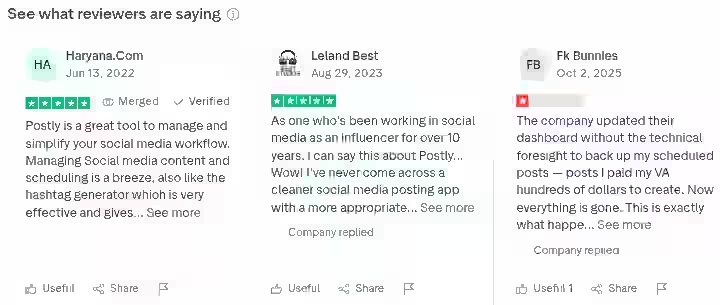
Community sentiment around Postly is split. The product itself gets consistent praise for ease of use and scheduling, but trust-related issues drag down overall satisfaction.
Positive signals:
- G2 shows a 4.5/5 average rating with 33 reviews.
- Users consistently praise Postly for its ease of use and bulk post scheduling capabilities.
- One Capterra reviewer noted: “The scheduling interface is so smooth and intuitive. After trying nearly every tool out there, this is the first one that actually makes content creation feel effortless.”
Negative signals:
- Trustpilot is much more mixed, showing approximately a 3.3 TrustScore with 140+ reviews.
- AppSumo shows 3.8/5 with 65+ ratings.
- Users who bought lifetime deals or lived through platform changes/migrations are much more likely to report frustration, especially around trust, retention of scheduled posts, and “bait-and-switch” perceptions on LTD terms.
- One Product Hunt reviewer called it “full of bugs and just not ready for market.”
Summary: The product can be great, but support and lifecycle events (billing changes, migrations, outages) shape the overall sentiment.
If you are using Postly on a month-to-month subscription without relying on a lifetime deal, your experience is likely to be better than the loudest complaints suggest.
Postly Scoring & Evaluation
Category | Weight | Score (out of 10) | Weighted Score |
|---|---|---|---|
Features and Functionality | 30% | 7.0 | 2.10 |
Ease of Use | 20% | 8.0 | 1.60 |
Pricing and Value | 20% | 8.5 | 1.70 |
Support and Customer Experience | 15% | 4.5 | 0.68 |
Trust and Credibility | 15% | 4.0 | 0.60 |
Final Weighted Rating | 100% | 6.68 |
The scoring reflects a tool that performs well on daily scheduling tasks and pricing, but takes a significant hit on trust and support.
Postly Trust and Reliability Risks
This section of the Postly review exists because the community feedback warrants it.
- Data loss risk: Postly moved their platform to another back-end with no warning and apparently no testing. Users lost hundreds of work hours and 8,000+ scheduled posts. This happened in late 2025 and is documented in multiple AppSumo reviews.
- Lifetime deal changes: One user bought a Postly lifetime deal via AppSumo with clear terms including up to 30 social accounts, then overnight, the company walked it back and limited them to 2 social networks.
- Feature removal without notice: A Capterra reviewer reported that Postly “sold me a feature that didn’t exist, took my payment, and quietly shut it down.” No refund, no explanation, no support.
- API dependency: Postly relies on official APIs from each social media platform. Postly uses only official APIs from each platform, which means the platform itself determines what accounts, pages or channels appear when you connect. Postly cannot modify or override what the API returns. This means any platform API change can affect publishing without Postly being at fault, which is standard for all social media scheduling tools.
My recommendation: If you use Postly for client work, always keep a local backup of your content calendar and scheduled posts. Do not treat any SaaS tool as your only copy of important content.
This applies to all tools in the social media automation space, but the documented incidents with Postly make the advice especially relevant here.
For context on how to evaluate reliability in automation tools, my common autoblogging tool mistakes guide covers related pitfalls.
Final Verdict On Postly Review 2026
BUY if:
- You are a solo creator, freelancer or small team on a tight budget who needs basic social media scheduling with bulk posting, AI content creation assistance and 15+ platform support.
- Start with the free plan. Upgrade to Basic ($4/month) only after you have confirmed the tool works for your specific workflow.
SKIP if:
- You are an agency managing high-value clients who expect zero downtime, detailed analytics reports and enterprise-grade customer support.
- The trust issues documented by the community are too significant to ignore for mission-critical work.
- You need advanced social media performance reporting or a polished mobile app experience.
If you are building a broader content automation stack that includes blog publishing alongside social distribution, exploring the benefits of auto blogging tools and reviewing my PressMaster AI review may help you find the right combination.
Frequently Asked Questions About Postly Review
1. What is Postly?
Postly is an AI-powered social media publishing and automation platform for creating, scheduling, and distributing content at scale. It supports 15+ social media platforms and includes features like bulk scheduling, AI content creation, a content calendar, team collaboration, and a media content library.
2. Which AI is best for post making?
It depends on your needs. Postly’s built-in AI Writer is adequate for generating quick social media captions and hashtags. For longer-form content like blog posts or detailed marketing copy, standalone AI tools typically produce better results. The key is using AI as a starting point and always editing the output to match your brand voice.
3. How does Postly compare to Hootsuite?
Postly is significantly cheaper (starting at $4/month vs. $199/month for Hootsuite) and offers broader platform support for basic scheduling. Hootsuite wins on analytics, reporting, social listening, and enterprise reliability. Choose Postly for budget multi-platform posting. Choose Hootsuite when you need deep social media performance data and team management at scale.
4. Is Postly easy to use for beginners?
Yes. Postly’s intuitive design ensures ease of use, even for those new to social media management tools. The dashboard is clean, the content calendar is straightforward, and basic scheduling can be learned in under 30 minutes. Bulk features and API integrations take more time to learn, but the core posting experience is beginner-friendly.
5. Is Postly legit?
Postly is a real, functioning social media tool used by thousands of users. Founded with a goal to simplify content operations, Postly now serves marketers in over 50 countries and supports industries like e-commerce and SaaS. However, there are documented trust issues around lifetime deal changes and data loss during platform migrations.
6. Can Postly replace Hootsuite for small businesses?
For basic content scheduling, automated posting, and multi-platform publishing, yes. Postly handles these tasks at a fraction of the cost. Where it falls short is in analytics depth, reporting customization and customer support responsiveness. If your small business only needs to schedule posts and maintain a consistent social media presence, Postly is a viable, much cheaper alternative.
7. Does Postly support team collaboration?
Yes. Collaboration features in Postly enable multiple users to contribute to content creation and approval workflows, improving coordination within marketing teams. Role-based permissions ensure secure access and maintain brand consistency by controlling who can publish or edit.

- 10 Best SEO Automation Tools I Tested in 2026 - October 22, 2026
- HighSoftware99 Review 2026: Is It Legit or a Risk to Your Website? - October 21, 2026
- SEO Instant Appear HighSoftware99.com: Full Breakdown - October 18, 2026