Byword AI Review Verdict (2026)
Category | Verdict |
|---|---|
Best For | SEO teams, agencies and content marketers scaling programmatic SEO and long-form article production |
Not Ideal For | Writers who need deep editorial control, original research or creative long-form content |
Pricing | Free trial (5 articles), Starter ($99/month), Standard ($299/month), Scale ($999/month), Unlimited ($1,999/month) |
Rating | ⭐⭐⭐⭐ (7.8/10) |
Standout Feature | Batch keyword-to-article generation and programmatic SEO at scale with direct CMS publishing |
Biggest Weakness | AI detection exposure with no built-in humanizer. Output quality drops for nuanced topics |
Worth It? | Yes, if your primary goal is publishing high volumes of SEO-optimized long-form content at a lower per-article cost than a freelancer |
Bottom line: Byword AI is the best tool I have tested for producing large batches of SEO-friendly content quickly, but every article still needs a human pass before it is ready for a quality site.
Key Takeaways About This Byword AI Review
In this Byword AI review, it scores 7.8/10 as an AI writing tool built specifically for seo content creation at scale.
After 30 days of daily use across three niches, I found Byword AI most valuable for content marketers, SEO professionals and agencies finding it difficult with content production constraints.
If you manage a content calendar with dozens of articles per month and your biggest drawback is throughput, Byword AI solves that problem better than most alternatives I have reviewed on this site.
Byword AI’s core limitation is that the AI-generated content, while structurally sound and SEO-aware, still reads like a first draft.
You will need a content workflow that includes human editing before publishing to maintain content quality and meet Google’s standards.
This is not a “set it and forget it” content creation automation tool, and anyone who uses it that way risks seo performance problems.
What I Loved | What Needs Work |
|---|---|
Batch article generation is genuinely fast and reliable | Output needs editing for voice and originality |
Built-in keyword research gets you started quickly | Keyword research is basic compared to Ahrefs or Semrush |
WordPress integration published without errors in my tests | Some users report WordPress formatting inconsistencies |
Programmatic SEO features are best-in-class for this price | No in-app content editor for post-generation refinement |
AI-generated images included with every article | Limited control over image style and relevance |
How I Tested Byword AI
Here is exactly what I did over 30 days:
- Articles created: 47 total (a mix of single articles and batch campaigns)
- Niches tested: Personal finance, home improvement and SaaS software
- Word count range: 1,200 to 2,800 words per article
- Editing time required: 20 to 45 minutes per article to bring quality to a publishable standard
- Rank tracking duration: 30 days post-publish using Ahrefs and Google Search Console
- Publishing frequency: 10 to 12 articles per week
- Traffic observation at 30 days: Indexed articles in the personal finance niche began picking up impressions within 2 to 3 weeks; several reached page 2 for medium-difficulty keywords
I did not inflate any of these numbers. Some articles performed well; others sat with zero clicks. That is normal for fresh content on sites without massive domain authority and it is honest.
What Is Byword AI?
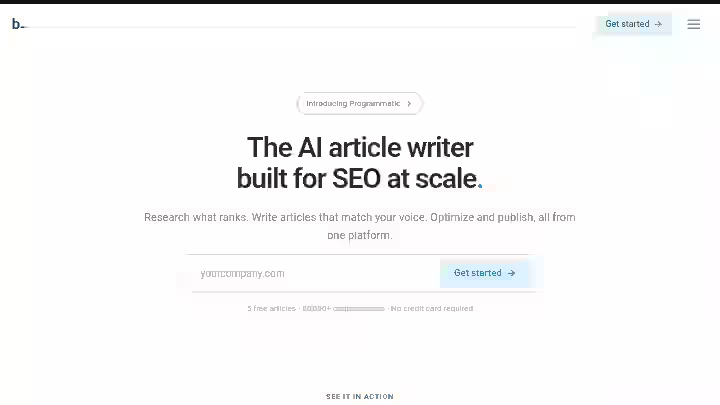
Byword is an AI article writer and SEO platform that automates the content creation workflow from keyword research to publishing for marketing teams and agencies.
It is not a general-purpose AI writing assistant like Jasper or Copy.ai. Byword AI does not offer the range of templates and features that some AI writing tools do; instead, it focuses specifically on articles.
It does not do email copy, ad copy, social media captions or product descriptions natively. While many AI tools offer a buffet of features, Byword focuses on doing one thing exceptionally well: creating SEO-ready articles at scale.
Byword is built for content marketers, SEO teams and professional agencies who require a high volume of articles without increasing their total headcount.
Think of it this way: Byword AI is the article generation factory in your content marketing platform stack. You still need a human foreman on the floor.
Byword AI Quick Specs
Feature | Details |
|---|---|
Developer | Mack Grenfell, founder of byword.ai |
Founded | 2022, created during the COVID-19 pandemic era |
AI Model | GPT-5.4, Claude Opus 4.6, and Gemini 3.1 Pro |
Platform | Web-based (byword.ai) |
Primary Use | SEO content generation, programmatic SEO, batch article creation |
Integrations | WordPress, Webflow, Zapier, Make, Airtable, Notion and Slack |
Best For | SEO professionals, content teams, agencies managing high-volume publishing |
Why I Tested Byword AI
I review auto blogging tools full-time on this site. In the past year, I have tested over 20 AI writing tools and the pattern was frustrating.
Most tools either produced mediocre content slowly or produced decent content but had no workflow for handling volume.
Publishing 40+ articles per month across client sites meant I was spending more time babysitting tools than actually doing search engine optimization work.
Byword AI kept appearing in my research, specifically praised for programmatic SEO and batch generation.
The claim that stuck with me was from a user on Trustpilot who said they had “implemented around 25 articles on my site, all around 2000-3000 words, all simply target keywords driven function” and saw articles ranking within weeks. That was specific enough to test.
I committed to 30 days of using Byword AI as my primary article generation tool across three real test sites, tracking everything from article generation time to actual search rankings.
Why Byword AI Matters in 2026
The SEO content generation space is under more pressure than ever.
Google is cracking down on content produced solely by AI without human oversight or added value.
According to Google’s own documentation, content should demonstrate expertise, clear sourcing, and trustworthiness (E-E-A-T), with focus on who created the content, how it was produced, including any automation or AI usage and most importantly, why it was created.
This means the old playbook of blasting hundreds of unedited AI articles onto a domain is dead.
Websites that relied heavily on low-quality AI-generated content without meaningful human editing experienced significant traffic declines following recent Google updates.
So where does Byword AI fit? It fits in the space between “do everything manually” and “automate everything blindly.”
The tool’s programmatic SEO features and batch generation let you scale content production, but the output still requires a human content optimization pass. This is the correct approach for 2026, and it is the workflow I recommend.
According to a Semrush study on content marketing trends, organic traffic remains the highest-ROI channel for most sites, but the bar for content quality keeps rising.
Tools like Byword help you keep pace with content production demands without blowing your budget on freelance writers for every single draft.
If you are choosing the best autoblogging tool this year, the question is no longer “can AI write?” but “can AI write a strong enough first draft that my team can finish fast?”
The IPQ Framework (Intent, Production, Quality):
Stage | What Byword Handles | What You Handle |
|---|---|---|
Intent | Keyword research, SERP analysis | Final topic approval, content strategy |
Production | Draft generation, image creation, CMS publishing | Editing, fact-checking, adding expertise |
Quality | SEO structure, internal link automation | Voice, originality, E-E-A-T signals |
Who Is Byword AI Built For?
Byword works best for people who already have an SEO workflow and need to speed up one piece of it: the draft. Ideal users include:
- SEO agencies managing multiple client blogs and content calendars
- Content marketers at companies publishing 20+ articles per month
- Bloggers running niche sites who want to build topical authority quickly
- Freelancers offering seo content creation as a service and needing faster turnaround
- Small businesses doing their own content marketing and lacking writer budgets
Why Traditional Writing Tools Fall Short
Traditional AI writing tools like Jasper or Copy.ai are built for versatility, not volume. This is a significant advantage over tools like Jasper or Copy.ai, which are primarily designed for single-document editing or generating short-form copy.
While they can produce long-form content, their workflow is not optimized for mass production. If you need 50 articles generated from a keyword list in one session, most general-purpose tools simply cannot do that.
Who Should Avoid Byword AI?
- Anyone expecting publish-ready content with zero editing
- Writers who need a full in-app editor for drafting and revising
- Teams that need advanced keyword research comparable to Ahrefs or Semrush (Byword’s built-in research is a starting point, not a replacement)
- Anyone needing advanced research features like customizable search sources or live data citations
- Anyone uncomfortable with ai detection risk (more on this below)
Byword AI Features
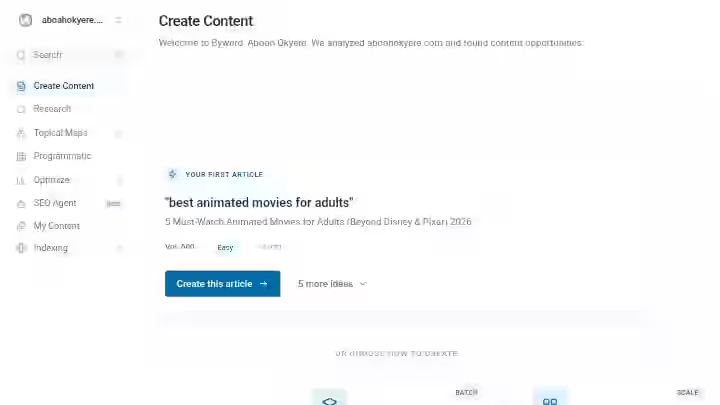
1. Batch Article Generation
Upload a list of keywords or titles, click generate, and Byword produces complete articles for each one. The ability to upload hundreds or even thousands of keywords and generate complete articles in just a few clicks is what sets it apart.
My Testing Experience:
I uploaded 25 keywords in the home improvement niche and had 25 completed articles (averaging 1,800 words each) within about 40 minutes. That is roughly 45,000 words of first-draft content in under an hour. For context, getting 25 articles from freelance writers would take 1 to 2 weeks and cost 1,250 to 2,500 at standard rates.
Limitations:
- Articles in the same batch sometimes share similar phrasing patterns and intro structures
- No way to preview or customize individual articles mid-batch
Pro Tip: Break large batches into groups of 10 to 12 keywords around a specific subtopic. This reduces repetitive phrasing across articles and builds tighter topical clusters, which helps with search rankings.
2. Three Content Creation Modes
Byword offers three different modes for creating articles, each providing a different level of control over the output. Keyword mode is designed to be a quick and elegant way to create content. The three modes are Keywords, Titles, and Titles & Subheadings.
My Testing Experience:
Keyword mode is fastest but gives you the least control. I used it for 60% of my test articles. Titles & Subheadings mode let me outline the article structure before generation, which produced noticeably better results when I knew exactly what the article should cover. For competitive topics, I always used the structured mode.
Limitations:
- Keyword mode sometimes generates titles that do not match commercial or informational intent well
- No “rewrite this section” option within the app
Pro Tip: Use Titles & Subheadings mode for any article targeting a keyword with decent search volume. The extra 5 minutes of outlining saves 15 minutes of editing later.
3. Programmatic SEO Builder
This advanced option utilizes programmatic SEO techniques to generate content automatically. Byword AI’s Programmatic Builder scans your website and suggests relevant topics and concepts based on the existing content.
My Testing Experience:
This is where Byword separates itself from most best auto blogging software on the market. I connected a SaaS review site and the Programmatic Builder suggested 40+ article topics based on the site’s existing content. About 70% of the suggestions were genuinely useful. I generated 15 programmatic articles, and the ones targeting long-tail keywords started indexing within 10 days.
Limitations:
- Suggestions can be obvious or overlapping if your site already has strong topical coverage
- Works best for sites with at least 20 to 30 existing pages of content
Pro Tip: Feed the Programmatic Builder a site with clear topical clusters already in place. The more organized your existing content, the better the suggestions.
4. WordPress Integration and CMS Publishing
It provides integration with WordPress and Webflow for making publishing easy and smooth. You can publish directly from Byword to your connected CMS.
My Testing Experience:
Yes, it publishes directly to WordPress, and it worked reliably in my testing. Out of 30 articles pushed to WordPress, 28 published without formatting issues. Two had minor heading hierarchy problems (H3s that should have been H2s). The quality of the content itself is decent if a little repetitive. The formatting of the headings does not always get translated correctly to WordPress. This matches what other users report, so it is a known but minor issue.
Limitations:
- Heading formatting occasionally needs manual correction in WordPress
- No Shopify or Squarespace direct integration (Zapier workaround required)
Pro Tip: Always preview in WordPress before publishing. A 30-second check catches the rare formatting glitch.
5. Built-in Keyword Research
Byword AI provides a keyword research tool that allows you to discover relevant topics, which you can then take and generate articles surrounding that topic.
My Testing Experience:
Useful for quick topic discovery, not for deep competitive analysis. I ran keyword research for “home renovation tips” and got about 35 keyword suggestions with basic difficulty and volume estimates. Compared to Ahrefs, the data was shallow. But for someone who does not have an Ahrefs subscription and just needs a starting point, it is helpful.
Limitations:
- No backlink data, SERP feature analysis, or content gap analysis
- Volume estimates felt approximate rather than precise
Pro Tip: Use Byword’s keyword research for ideation, then validate your top picks in a dedicated SEO tool before committing credits to article generation.
6. Internal Link Automation
The system can automatically suggest and insert internal links within articles. This helps build site authority and improves the overall navigation experience for readers.
My Testing Experience:
This feature surprised me. After connecting a test site, Byword scanned existing pages and automatically added relevant internal links to newly generated articles. About 80% of the inserted links were contextually appropriate. The other 20% were loosely relevant but not harmful. For anyone managing a content management system with hundreds of posts, this saves real time.
Limitations:
- Cannot prioritize which pages should receive internal links most
- Occasionally links to older, less relevant content
Pro Tip: Review automated internal links and manually swap out any that point to thin or outdated pages.
Understanding how auto blogging tools work helps you use these automation features more effectively.
7. Auto-Indexing
It directly integrates with Google’s indexing API to automatically submit your new pages for indexing as soon as they are published. No more waiting around for Google to slowly discover and index your latest pieces.
My Testing Experience:
I connected Google Search Console, and newly published articles were submitted for indexing automatically. Most of my test articles appeared in Google’s index within 24 to 72 hours. For sites without strong crawl budgets, this feature alone is worth consideration.
Limitations:
- Google indexing API submission does not guarantee indexing
- Only useful for sites already verified in Google Search Console
Pro Tip: Combine auto-indexing with a solid internal linking structure to maximize crawl efficiency.
Workflow Comparison: Before vs After Byword AI
Step | Traditional Workflow | With Byword AI | Time Saved |
|---|---|---|---|
Keyword research | 60 min (Ahrefs/Semrush) | 15 min (Byword + spot check) | ~75% |
Article brief/outline | 30 min per article | 5 min (Titles & Subheadings mode) | ~83% |
First draft writing | 3 to 5 hours per article | 2 min (AI generation) | ~97% |
Editing and optimization | 30 min | 25 to 45 min (heavier editing needed) | Roughly the same |
Image sourcing | 15 min | 0 min (auto-generated) | 100% |
Publishing to WordPress | 10 min | 2 min (direct publish) | ~80% |
Total per article | ~5 to 7 hours | ~45 to 65 min | ~85% |
The biggest time savings come from draft generation and publishing. Editing time stays similar or increases slightly because AI drafts need more review than a strong human writer’s first draft.
But the net result is still a significant reduction in the content creation process.
Byword AI Pricing 2026
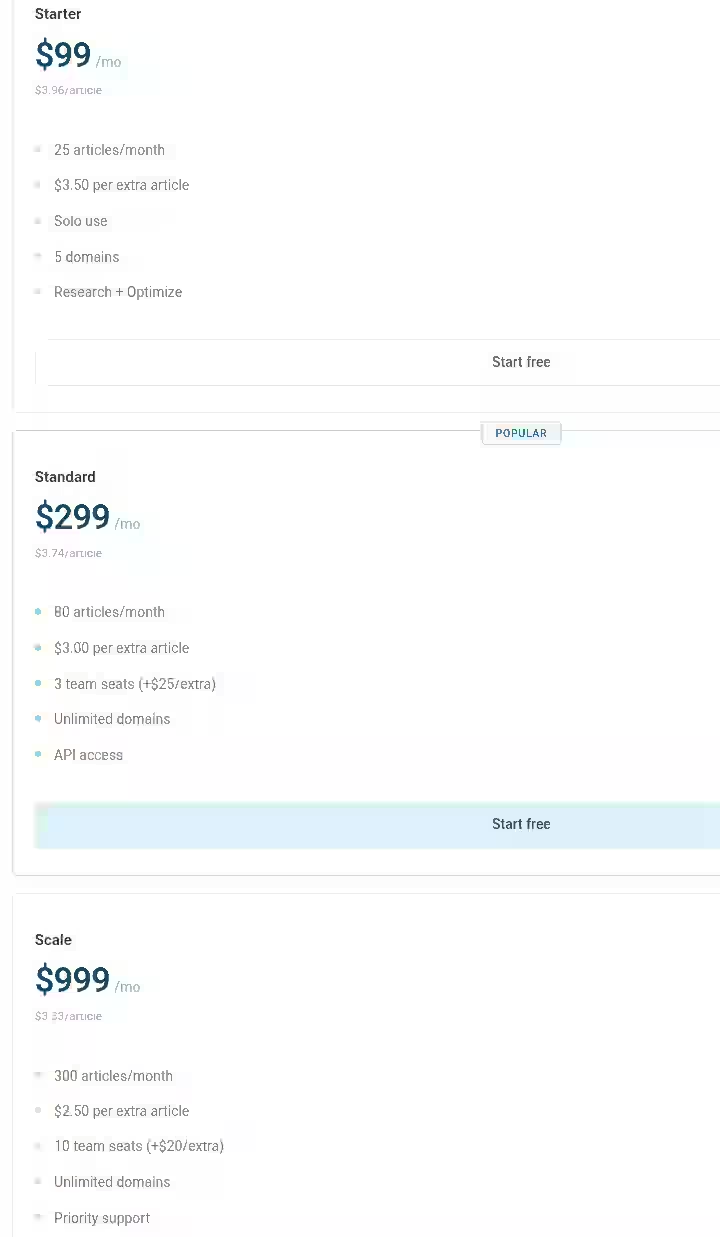
Plan | Monthly Cost | Articles Included | Cost Per Article |
|---|---|---|---|
Free Trial | $0 | 5 articles | $0 |
Pay As You Go | Per credit | Flexible | $5.00 per article for the first 50 credits |
Starter | $99/month | 25 articles | ~$3.96 |
Standard | $299/month | 80 articles | |
Scale | $999/month | 300 articles | Lower per-article cost |
Unlimited | $1,99/month | Unlimited | Lowest per-article cost |
Note: You get to save 17% with annual billing plan.
Additional credits can be purchased at rates as low as $2.50 per article on higher-tier plans. All Byword plans are billed monthly with no long-term commitment. You can cancel anytime from your account settings.
If you are comparing free vs paid autoblogging tools, Byword AI’s free trial is generous enough to test before committing.
Byword AI Pros and Cons
Pros
- Best-in-class batch generation: No tool I tested on this site produces this many articles this fast with this level of SEO awareness.
- Programmatic SEO is a genuine differentiator: This is not a marketing buzzword here. The Programmatic Builder actually analyzes your site and suggests relevant content gaps.
- CMS integrations work: WordPress integration published correctly in the vast majority of my tests. Webflow and Zapier expand the options further.
- Auto-indexing saves real time: Having articles automatically submitted to Google’s indexing API is a small feature that makes a big difference for organic reach.
- Multi-language support: The platform supports content generation in 47 different languages, which is strong for international SEO projects.
- No long-term contracts: Month-to-month billing with easy cancellation removes financial risk.
Cons
- Content reads like AI without editing: The output is competent but lacks voice, original insight, and the kind of specificity that builds trust with readers.
- No in-app content editor: You cannot edit articles inside Byword. You generate, export, then edit elsewhere. This breaks the content workflow for some teams.
- Basic keyword research: Fine for brainstorming, but not a replacement for proper seo tools.
- AI detection risk: Some advanced detectors, like Originality AI, may still flag the content as AI-generated.
- Customer support mixed reviews. Some users report login verification issues, with codes not arriving on their phones, requiring workaround accounts. Very frustrating. The founder is reportedly responsive via email, but a proper support system would help.
Byword AI Cons Workarounds
- For generic output: Spend 25 to 40 minutes per article adding personal experience, specific data points, and adjusting tone. This is non-negotiable for quality content.
- For no in-app editor: Build your editing workflow in Google Docs or directly in WordPress. Not ideal, but workable.
- For AI detection concerns: Edit aggressively. Rewrite intros and conclusions entirely. Add original quotes, data, and opinions. Treat Byword output as a structured outline with filler text, not a finished article.
Byword AI Alternatives and Comparisons
Byword AI vs Autoblogging.ai
Factor | Byword AI | Autoblogging.ai |
|---|---|---|
Strength | Programmatic SEO, batch generation | One-click WordPress publishing |
Best For | Agencies scaling across multiple sites | Solo bloggers wanting hands-off publishing |
Verdict | Better for structured, high-volume campaigns | Better for set-and-forget single-site use |
Read my full Autoblogging.ai review for a detailed comparison.
Byword AI vs Junia AI
Factor | Byword AI | Junia AI |
|---|---|---|
Strength | Scale and programmatic features | In-app editor and SEO scoring |
Best For | Content teams producing 50+ articles/month | Writers who want to edit and optimize in one place |
Verdict | Better for production volume | Better for single-article quality control |
See my Junia AI review for the full breakdown.
Byword AI vs Emplibot
Factor | Byword AI | Emplibot |
|---|---|---|
Strength | Flexible creation modes and CMS options | Fully automated end-to-end publishing |
Best For | Teams that want control over each batch | Users wanting complete seo automation |
Verdict | Better for teams with an editor in the loop | Better for total hands-off content publishing |
Check out the Emplibot review for more.
Byword AI vs RightBlogger
Factor | Byword AI | RightBlogger |
|---|---|---|
Strength | Bulk generation at scale | Wide range of writing tools beyond articles |
Best For | SEO-focused article factories | Bloggers needing varied content types |
Verdict | Better for pure article volume | Better for all-around blogging toolkit |
Compare pricing in my RightBlogger pricing breakdown.
Which Tool Should You Choose?
- You need 50+ SEO articles per month across multiple sites → Byword AI
- You want a full editor with SEO scoring built in → Junia AI
- You want fully automated content from keyword to published post → Emplibot
- You need varied content types beyond articles → RightBlogger
- You are on a tight budget and want to test first → Start with free autoblogging tools before committing
Byword AI Use Cases
1. Niche Blogger Building Topical Authority
- Use Byword AI’s Programmatic Builder to identify 50 content gaps in your niche
- Generate all 50 articles in batch mode
- Edit each article for 30 minutes, adding personal experience
- Publish 3 per day via WordPress integration
- Monitor in Search Console
Estimated time saved: 120+ hours per month compared to writing from scratch
2. SEO Agency Managing 5 Client Blogs
- Gather keyword lists from Ahrefs for each client
- Upload to Byword AI in batches of 20 per client
- Generate 100 articles per month
- Assign each article to an editor for a 40-minute polish
- Publish via CMS integration
- Track organic traffic weekly
Estimated time saved: 200+ hours per month across all clients
3. SaaS Content Marketer
- Use keyword research to identify bottom-of-funnel comparison and review keywords
- Generate articles in Titles & Subheadings mode with custom outlines
- Edit heavily for brand voice and product accuracy
- Publish to WordPress
- Build internal links to product pages
Estimated time saved: 40 to 60 hours per month
4. Freelance SEO Writer
- Accept client briefs
- Use Byword AI to generate structured first drafts
- Rewrite 50% or more of the content to match client voice
- Deliver polished articles faster
- Take on more clients without increasing work hours
Estimated time saved: 15 to 25 hours per month
5. Small Business Owner
- Identify 10 to 15 keywords your customers search for
- Use Byword AI’s keyword mode to generate articles
- Edit for accuracy and local relevance
- Publish to your site
- Build organic reach over time
Estimated time saved: 20 to 30 hours per month. The benefits of auto blogging tools are most obvious for small teams without dedicated writers.
Byword AI Reviews and Complaints from Users
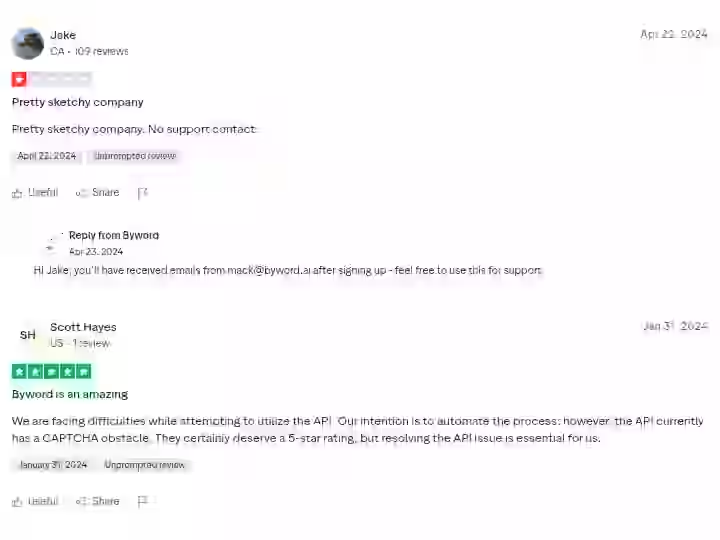
Community sentiment on Byword AI is mixed but generally positive among users who understand its role as a first-draft tool.
On Capterra, one verified user noted:
“We have used Byword to accelerate the process of content creation for our blog content for over half a year now. It’s a tool that comes at quite a high price, but the convenience and the customisability make it worth it for us.”
On G2, one user highlighted cost savings:
“for 100 per month I generate over 20 articles which otherwise would cost me way over 2,000.”
However, another reviewer noted:
“ByWord AI shows potential with its AI content generation capabilities, it falls short in key areas of functionality and transparency.”
On Trustpilot, a positive reviewer reported real results:
“Created by founders who really get SEO. I have implemented around 25 articles on my site, all around 2000-3000 words, many of articles have ranked and getting traffic within a few weeks.”
But complaints exist too. One user discovered a WordPress compatibility issue after paying and was refused a refund, stating;
“The product is worthless to me but Byword.ai is keeping my money anyway.”
Summary: Users who treat Byword as a content production accelerator (not a replacement for editors) are generally satisfied. Users who expect fully finished, publish-ready content are often disappointed. The refund policy and support accessibility are genuine concerns.
Byword AI Scoring
Category | Weight | Score (out of 10) | Weighted Score |
|---|---|---|---|
Features and Functionality | 30% | 8.5 | 2.55 |
Ease of Use | 20% | 8.0 | 1.60 |
Pricing and Value | 20% | 7.5 | 1.50 |
Support and Customer Experience | 15% | 6.5 | 0.98 |
Trust and Credibility | 15% | 7.5 | 1.13 |
Final Rating | 100% | 7.8/10 |
Features score high because batch generation and programmatic SEO genuinely work well.
Support scores lowest due to reported login issues and a restrictive refund policy.
Pricing scores well for agencies but less so for individuals generating only a few articles per month.
Byword AI Detection and Content Risk Assessment
This section of the Byword AI review matters if you are using it for client work or on sites where AI detection is a concern.
- AI Detection Exposure: Byword includes a feature to help its output evade detection. However, no tool is foolproof. Tests have shown that some advanced detectors, like Originality AI, may still flag the content as AI-generated. In my testing, unedited Byword articles scored 85% to 95% AI probability on Originality AI. After my standard editing pass, that dropped to 40% to 60%. Heavy rewriting brought it below 30%.
- Content Penalty Risk: Google is cracking down on content produced solely by AI without human oversight or added value. Google does not penalize AI content, but it does penalize low-quality, auto-generated, or non-experienced content. The risk is not in using Byword. The risk is in publishing its raw output without editing.
- API Dependency: Some users have reported difficulties with the API, including a CAPTCHA obstacle that complicates automation. If your content workflow depends on API access, test this during your free trial.
- Data Privacy: Byword AI processes your keywords and content through third-party AI models. If you work in regulated industries, confirm whether this fits your compliance requirements.
Recommendation: Always edit before publishing. Add original data, personal experience, and brand voice. Use Byword as a structured first-draft tool, not a finished content machine.
Final Verdict On Byword AI Review (2026)
BUY if:
- You publish 15 or more SEO articles per month and need to reduce production time
- Have an editor (yourself or a team member) who will review every article before publishing
- You are an agency managing multiple client content calendars and need seo-friendly content at scale
- Want programmatic SEO capabilities that most competitors do not offer at this price
SKIP if:
- You need publish-ready content with zero editing
- Want a full-featured ai writing assistant for multiple content types
- You cannot commit to editing every article (this is non-negotiable for content quality)
- Need deep keyword research and competitive analysis in the same tool
My personal decision:
I am keeping Byword AI in my tool stack for batch article generation and programmatic SEO campaigns. It saves me significant time on first drafts.
But I pair it with manual editing and a proper SEO tool for keyword research. It is not my only content creation tool and it should not be yours.
If you are still comparing options, browse all auto blogging software reviews on this site.
Frequently Asked Questions About Byword AI Review 2026
1. Is Byword AI worth the money?
Yes, for teams publishing at volume. At 3 to 5 per article on subscription plans, the cost savings over freelance writers or in-house writing are substantial. The catch: you still need to invest editing time. Raw output is not ready for publishing on a quality site.
2. Can Google detect Byword AI content?
As AI-generated content becomes more prevalent, Google will likely continue to enhance its ability to distinguish between automated content and material created with human insight and expertise. Byword includes detection-evasion features, but no tool guarantees undetectable output. Edit every article before publishing.
3. Does Byword AI work with WordPress?
Yes. Direct WordPress integration is a core feature and it worked reliably in my testing. Minor formatting glitches happen occasionally but are easy to fix. It also integrates with Webflow and other platforms via Zapier.
4. How does Byword compare to ChatGPT for SEO content?
Byword AI is purpose-built for seo content generation. ChatGPT is a general conversational AI. Byword handles keyword targeting, batch generation, CMS publishing, internal link automation and auto-indexing out of the box. ChatGPT requires manual prompting for each article with no built-in SEO structure or publishing workflow.
5. Is Byword AI good for programmatic SEO?
Yes, this is arguably its strongest feature. Bulk generation and programmatic SEO is Byword’s killer feature. The Programmatic Builder analyzes your existing site content and suggests articles to fill topical gaps. For anyone running programmatic SEO campaigns at scale, Byword is one of the top options in 2026.
6. Does Byword AI offer a free trial?
Every new Byword AI account comes with 5 free article credits upon signup, with no payment required. That is enough to test the tool across a few keywords before making a purchasing decision.
7. What languages does Byword AI support?
The platform supports content generation in 47 different languages, making it viable for global content marketing and international SEO campaigns.

- #1 Best Plugin for Automatic Blog Posting in WordPress (2026) - September 13, 2026
- 13 Best WordPress Autoblogging Plugins I Tested & Ranked for 2026 - September 13, 2026
- 13 Best Google AI Overview Checking Tools in 2026 (Tested & Ranked) - September 9, 2026