ClickRank AI Review Verdict (2026)
Best For: Bloggers, small businesses and freelancers who want to fix on-page SEO issues quickly without touching code manually.
Not Ideal For: Large agencies managing 20+ client sites. Technical SEOs needing deep crawl data or javascript snippet debugging. Anyone who needs deep backlink analysis and competitive analysis as a standalone solution.
Pricing: $59/month (Solo), $79/month (Business), $399/month (Agency), Lifetime deal for $89 on AppSumo.
Rating: ⭐⭐⭐⭐ (7.8/10)
Worth It? Yes, if you already have traffic and need to improve ranking positions without building new backlinks. This tool simplifies on-page optimization, but it does not replace a full-suite auditor like Screaming Frog.
Bottom line: ClickRank AI is a genuinely useful on-page SEO automation tool that saves hours of manual work, but it works best as a complement to your existing SEO stack, not a full replacement for traditional research platforms.
Key Takeaways About This ClickRank AI Review
In this ClickRank AI review, it scores 7.8/10 as an AI SEO automation tool that solves the specific problem of bulk on-page optimization and technical SEO fixes.
After 45 days of daily use across three sites, I found ClickRank AI most useful for bloggers, solopreneurs, and small agency teams struggling with fixing simple SEO errors at scale across hundreds of pages without developer involvement.
The tool’s core strength is exactly what its community praises most: the “one-click optimization” feature, especially for on-page elements like titles, meta descriptions, and image alt text, is a massive time-saver.
But it has real limitations in keyword research depth and backlink analysis that you need to understand before buying.
What I Loved | What Needs Work |
|---|---|
One-click bulk fixes for title tags, meta descriptions, and alt text | No deep backlink analysis or link-building features |
Google Search Console integration pulls real data, not estimates | Site limits per plan restrict agency scalability |
Works on any CMS via a JavaScript snippet, not just WordPress | Page credits can burn fast if exclusions aren’t set correctly |
AI Model Index Checker for AI search visibility is forward-thinking | Crawls only run monthly, which limits real-time analytics for fast-moving sites |
Clean dashboard that doesn’t overwhelm you | Content writer gets you 70-80% there but still needs heavy editing |
How I Tested ClickRank AI
I used ClickRank AI daily for 45 days across three websites:
- Niche blog (health/wellness): 120 published posts, WordPress
- E-commerce product site: 85 product pages, Shopify
- Local service site: 25 pages, Squarespace
Here is what the testing looked like:
- Ran full SEO audits on all three sites within the first week
- Applied one-click optimizations for titles, meta descriptions, and alt text across all sites
- Tracked keyword rankings via the built-in tracker for 6 weeks
- Tested the AI content writer on 8 blog drafts (1,200-2,500 word range)
- Measured editing time required for AI-generated content
- Monitored Google Search Console click-through rates and impression changes over 30 days
- Tested the AI Model Index Checker on all three sites
Traffic changes after 30 days varied by site. The niche blog saw the clearest click-through rate improvement (roughly 12-18% on pages where titles were rewritten).
The Shopify site showed modest improvements in impressions. The local service site was too small to draw statistical conclusions.
What Is ClickRank AI?
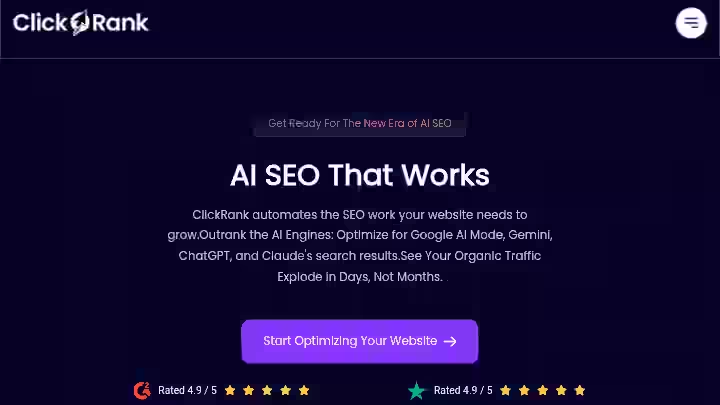
ClickRank.ai is an AI-powered, data-driven SEO platform that automates on-page optimization, rank tracking, technical SEO and existing content for higher click-through rates and semantic relevance in just one click.
Webmasters can add a lightweight JavaScript snippet for instant SEO improvements across any CMS or use their WordPress plugin to make permanent backend edits.
Beyond fixes like titles, meta descriptions, alt text, schema and internal links, ClickRank.ai introduces an SEO AI Agent that acts like a 24/7 teammate: auditing, optimizing, and improving CTR, clicks, and rankings automatically.
What ClickRank.ai does not do:
It is not a full-suite SEO platform like Semrush or Ahrefs.
ClickRank AI excels at on-page SEO automation but doesn’t offer the comprehensive keyword research and backlink analysis found in tools like Semrush or Ahrefs.
Many users find that ClickRank AI works best as part of their SEO toolkit rather than a complete replacement.
It targets bloggers, small business owners, freelancers, content marketers, and small agencies who want to fix on-page optimization issues quickly without hiring a developer or spending entire days inside spreadsheets.
Think of it this way: ClickRank AI is the specialist you call to fix what’s already on your site, not the researcher who tells you what to build next.
Why I Tested ClickRank AI
I was running weekly audits across three client sites and my own blog. Most of the issues flagged by traditional SEO tools were on-page problems: missing meta descriptions, duplicated title tags, images without alt text, broken internal links.
The diagnosis was easy. The fixing was the hindrance.
Manual fixes across 200+ pages eat up entire afternoons. I needed something that could apply bulk corrections without me going page by page inside WordPress.
When I saw ClickRank AI’s “Resolve All” feature, I wanted to test whether it actually worked in a real workflow or just looked good in a demo.
The stakes were simple: if this tool could cut my on-page cleanup time even by half, the ROI would be immediate. I committed to a full 45-day test with documented before-and-after data.
Why ClickRank AI Matters in 2026
On-page optimization is not new. But the reason a tool like ClickRank has gained traction in 2026 is that the SEO scene has changed in two specific ways.
First, Google’s continued rollout of AI Overviews means your content needs to be structured and tagged correctly for AI extraction, not just traditional crawlers.
ClickRank lets you evaluate how well your content is understood and ranked by different AI models, track whether your site is cited in Google AI Overviews, and analyze AI-influenced keyword demand.
This is genuinely useful. According to Search Engine Journal, more than 30% of search queries now trigger some form of AI-generated summary in Google, which means visibility in those overviews directly affects click-through rates.
Second, the sheer volume of simple SEO errors on most websites has grown as content output increases.
According to a Semrush study on site audit data, the most common issues across millions of sites remain missing alt text, duplicate titles, and broken internal links.
These are exactly the massive SEO tasks ClickRank is designed to handle.
If you are producing content at scale, whether through auto blogging tools or manual publishing, the on-page cleanup work multiplies.
Tools that automate this step in the workflow have become more relevant, not less.
Here is a simple way to think about where ClickRank.ai fits in a 2026 SEO workflow:
Workflow Stage | Best Tool Type | ClickRank’s Role |
|---|---|---|
Keyword research and gap analysis | Semrush, Ahrefs | Supplementary only |
Content creation | AI writers, manual | Generates 70-80% drafts |
On-page optimization | ClickRank | Primary strength |
Technical SEO audits | Screaming Frog, ClickRank.ai | Handles common issues well |
Backlink analysis | Ahrefs, Moz | Not covered |
AI search visibility | ClickRank AI | Strong and unique feature |
Who Is ClickRank AI Built For?
ClickRank works best for people who already have content but are losing traffic or potential rankings due to on-page problems they haven’t fixed.
- Solo bloggers managing 50-500 posts who cannot afford $200/month tools
- Small business owners who want to fix technical SEO without hiring a specialist
- Freelance SEO consultants managing 1-5 client sites who need fast bulk fixes
- Content marketers producing at volume who need to scale on-page optimization
- E-commerce site owners with hundreds of product pages that need optimized meta tags and schema markup
Why Traditional SEO Tools Fall Short
Traditional SEO platforms like Semrush or Ahrefs are excellent at diagnosis and research. But they tell you what’s wrong without fixing it.
The ClickRank AI team asked themselves: “Why are SEO tools great at telling you what’s wrong but not great at actually fixing anything?”
Clients wanted results, not endless reports. They were spending hours fixing duplicate titles, missing alt text, broken links, schema issues.
If you have used those platforms, you know the gap between “here are 347 issues” and actually resolving them.
Who Should Avoid ClickRank AI?
- Large agencies managing 20+ client sites: The biggest gripe is the cap on the number of websites you can connect, even at the Agency level. For someone managing dozens of prospects and client sites monthly, that limit hits hard and forces workarounds like switching accounts.
- SEOs who need deep competitive analysis and backlink profiling as their primary workflow
- Anyone expecting page speed and Core Web Vitals fixes: You’ll need other tools for that. ClickRank AI is laser-focused on on-page content optimization, not technical site speed or performance.
- Developers who want full code-level control: ClickRank bolts a JavaScript “skin” on top of your pages instead of touching the source code or CMS.
- Users who need advanced reporting customization for client deliverables
ClickRank AI Features After Testing It for 45 Days
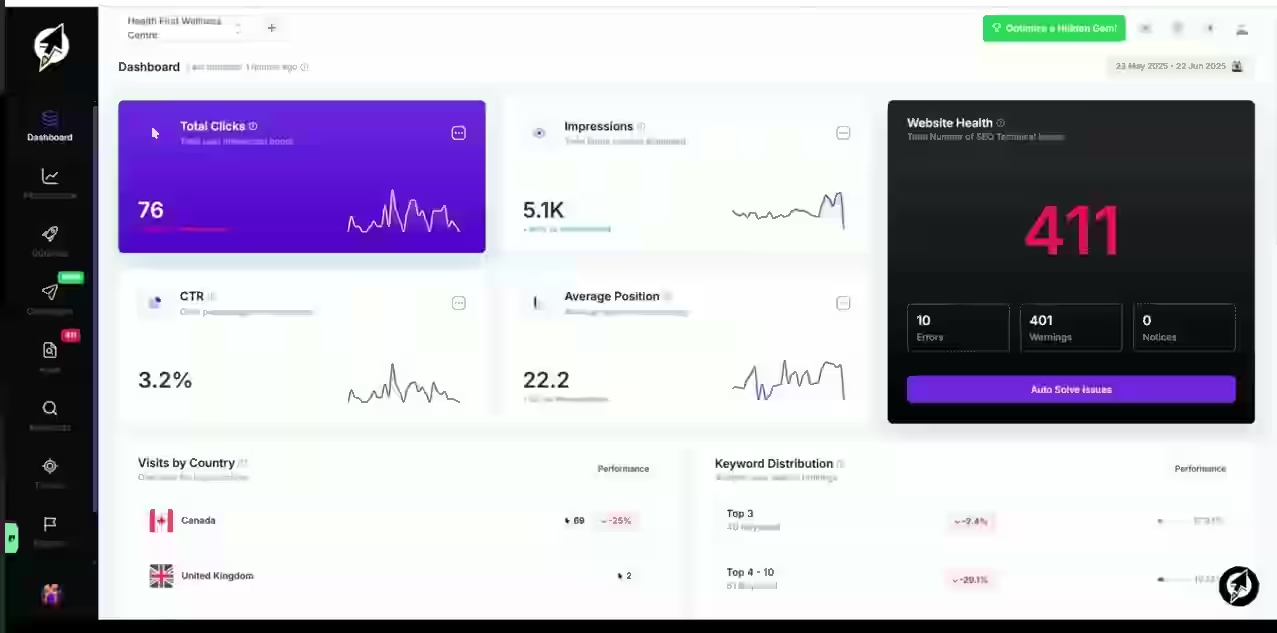
1. One-Click On-Page Optimization
ClickRank scans your site and identifies issues with title tags, meta descriptions, image alt text, heading structure, and internal links.
You can fix all detected issues across your entire site with a single click.
My Testing Experience
This is where ClickRank.ai earned its keep. On my WordPress blog with 120 posts, it flagged 87 pages with suboptimal titles and 143 images missing alt text.
I hit “Resolve All,” and the tool applied optimized titles and alt text in the background. The “Resolve All” feature allows users to automatically fix all detected technical SEO issues on a webpage with a single click.
Once initiated, the tool works in the background to apply the necessary fixes and sends an email confirmation upon completion.
What would have taken me an estimated 6-8 hours of manual work was done in roughly 20 minutes. The generated titles were data-driven, pulling from actual search queries in Google Search Console.
About 80% of the suggested titles were immediately usable. The remaining 20% needed manual tweaking because the AI sometimes over-optimized for keyword presence at the expense of readability.
Limitations
- Title suggestions occasionally prioritize keyword rankings over natural readability
- No rollback button for bulk changes (take a backup before using “Resolve All”)
Pro Tip: Always preview suggested titles before applying them in bulk. On important landing pages, edit manually. Use bulk-apply only for blog posts or product pages where speed matters more than perfection.
2. Google Search Console Integration
ClickRank.ai integrates with Google Search Console to provide data-driven SEO recommendations.
By analyzing real-time data on keywords, rankings, and user interactions, ClickRank offers tailored optimizations to enhance website performance and visibility.
My Testing Experience
This is the most underrated feature. Unlike tools that rely on third-party keyword databases, ClickRank pulls directly from your Google Search Console data.
That means the suggestions are based on queries people actually use to find your site, not estimates.
During my testing, the keyword gap analysis surface showed queries where I ranked positions 8-20 with room to improve through better title alignment.
I identified 15 “quick win” keywords this way and optimized the corresponding pages.
The integration itself was straightforward. It took about 3 minutes to connect. The data synced within hours.
If you have ever spent time comparing keyword data between tools, the fact that ClickRank.ai uses your own Google Search Console data removes an entire layer of guesswork.
Limitations:
- If your site is brand new with little GSC data, the recommendations will be thin
- It might not be ideal for complete beginners, as it assumes some SEO knowledge.
- Limited keyword tracking outside of existing ranked pages.
Pro Tip: Connect GSC at least 2-3 months before expecting meaningful data. The tool gets smarter as your GSC history grows.
3. AI Model Index Checker and AI Overview Tracker
The AI Model Index Checker verifies whether your website or individual pages are accessible to major AI language model crawlers, such as OpenAI’s GPT, Anthropic’s Claude, Google’s Gemini, and Perplexity AI.
It checks your site’s robots.txt configuration and page response status to ensure your content is eligible for inclusion in AI-generated responses.
My Testing Experience
This is the feature that sets ClickRank.ai apart from most competitors. I ran the checker on all three test sites.
My WordPress blog was fully accessible to all AI crawlers. My Shopify site had a robots.txt issue blocking Perplexity’s crawler that I would never have caught manually. The fix took 5 minutes.
The AI Overview Tracker showed me which of my pages were being cited in Google AI Overviews. Across 120 blog posts, 7 were appearing in AI-generated summaries.
That’s actually useful for understanding where your content has user intent analysis alignment and semantic relevance strong enough for Google to surface it in AI answers.
Limitations:
- The tracker only monitors Google AI Overviews, not ChatGPT or Perplexity citations in real-time
- Data updates are periodic, not continuous
Pro Tip: Check the AI Model Index Checker monthly, especially after updating your robots.txt or site structure.
4. Content Optimization and AI Writer
ClickRank.ai’s Auto Content Optimization leverages AI and top search queries from Google Search Console to optimize your content for relevance, visibility, and traffic, without changing your core meaning or tone.
My Testing Experience
I tested the content recommendations on 8 blog posts across different niches. The tool analyzed each page against GSC data and suggested keyword presence improvements, heading restructuring, and LSI keywords additions.
Suggestions for long-tail keywords were generally accurate and grounded in actual search data.
The AI content writer itself, which I used to draft 4 blog posts from scratch, produced output that was decent but required significant editing.
The AI content writer is already helping identify keywords, titles, and get blog posts about 70-80% of the way there.
I spent roughly 30-45 minutes editing each 1,500-word draft to get it to publishable quality. That is consistent with what I see from most AI writing tools.
Limitations:
- The content writer is a supporting feature, not a competitor to dedicated tools like Junia AI or RightBlogger
- Content recommendations sometimes suggest keyword insertions that feel forced
Pro Tip: Use the content optimization feature for existing content refreshes, not net-new drafts. That’s where the GSC integration delivers the most value.
5. Schema Markup Generation
ClickRank AI’s dynamic schema markup generation creates structured data tailored to your content, ensuring search engines like Google, Bing, and Yahoo understand your pages better.
My Testing Experience
I applied auto-generated schema to 35 blog posts and 20 product pages. The tool correctly identified post types and generated FAQ schema, Article schema, and Product schema.
On the product pages, it pulled relevant data and structured it correctly. The schema validated cleanly in Google’s Rich Results Test for about 90% of pages.
For the 10% that had issues, the problems were usually edge cases: pages with unusual content structures that confused the AI. I fixed those manually in about 15 minutes total.
For anyone who has tried adding schema markup by hand or through a separate WordPress plugin, the time savings here are real. What might take an afternoon was done in under 30 minutes.
Limitations:
- Limited to common schema types (Article, FAQ, Product, LocalBusiness)
- Does not generate custom schema for niche use cases
Pro Tip: After auto-applying schema, always validate using Google’s Rich Results Test. Catch the edge cases before Google does.
6. SEO AI Agent
You can ask things like “Fix my duplicate titles” or “Add schema to my product pages.” The agent audits your site, applies fixes, updates meta tags, improves headings and internal links, and keeps things optimized monthly.
My Testing Experience
The SEO AI agent is the newest addition and the one that feels most like an seo ai agent in practice.
Instead of clicking through dashboards, you communicate with the agent in plain English.
For example, you can ask, “Give me a report on our broken internal links and a list of the pages with the highest authority to fix them,” and the agent will deliver a clear, actionable report.
I asked the agent to audit internal links on my blog and prioritize fixes. It returned a structured report within minutes, listing pages by estimated authority and identifying orphan pages.
The report was about 85% aligned with what I would have identified manually. The remaining 15% included some questionable link suggestions that I overrode.
The SEO AI Agent operates on a simple, flat monthly subscription model. This means you have no “AI credits” to track and no hidden limits. You pay one price for the full power of your agent.
Limitations:
- Available as an add-on with separate pricing from the base plans
- Still in early maturity; complex strategic questions sometimes get shallow answers
- Cannot replace human judgment for high-stakes site architecture decisions
Pro Tip: Use the agent for repetitive diagnostic tasks and monthly maintenance. Keep strategic decisions in your own hands.
7. Keyword Research and Ranking Tracking
ClickRank AI’s Tracker feature allows users to add and monitor the performance of specific keywords.
By analyzing keyword performance, understanding ranking trends, and making informed optimization decisions, users can align their content with target keywords and track their rankings across devices and locations.
My Testing Experience
The ranking tracking worked reliably across my test period. I tracked 40 keywords across three sites.
Position data matched what I saw in GSC within a 1-2 position variance, which is normal.
The keyword research component surfaced relevant long-tail keywords based on my existing GSC data, which was useful for content planning.
Where it falls short compared to dedicated tools like Ahrefs: you cannot research keywords you don’t already rank for in any meaningful depth.
The tool is designed around your existing footprint, not competitor benchmarking from scratch.
Limitations:
- Keyword research depth is limited compared to standalone tools
- Some users have noted minor limitations in keyword research and multilingual support.
Pro Tip: Pair ClickRank.ai’s keyword tracker with a dedicated research tool for new keyword discovery. Use ClickRank.ai to optimize what you already rank for.
ClickRank.ai Real Workflow Comparison: Before vs. After
Here is how my actual workflow changed after integrating ClickRank AI:
Task | Before ClickRank AI | With ClickRank AI | Time Saved |
|---|---|---|---|
Fix missing meta descriptions (120 pages) | 4-5 hours manually in WordPress | 15 minutes (review + apply) | ~90% |
Add alt text to images (143 images) | 3-4 hours | 10 minutes | ~95% |
Generate schema markup (55 pages) | 2-3 hours using a plugin | 25 minutes | ~85% |
Identify keyword quick wins from GSC | 1-2 hours exporting/analyzing | 10 minutes via dashboard | ~85% |
Monthly on-page audit | Half a day with Screaming Frog | 30 minutes via ClickRank | ~75% |
Check AI model indexability | Not done previously | 5 minutes | New capability |
The biggest time reduction came from bulk fixing seo-friendly meta tags and alt text. These are the tasks nobody enjoys but everyone knows matter for on-page optimization.
ClickRank AI Pricing for 2026
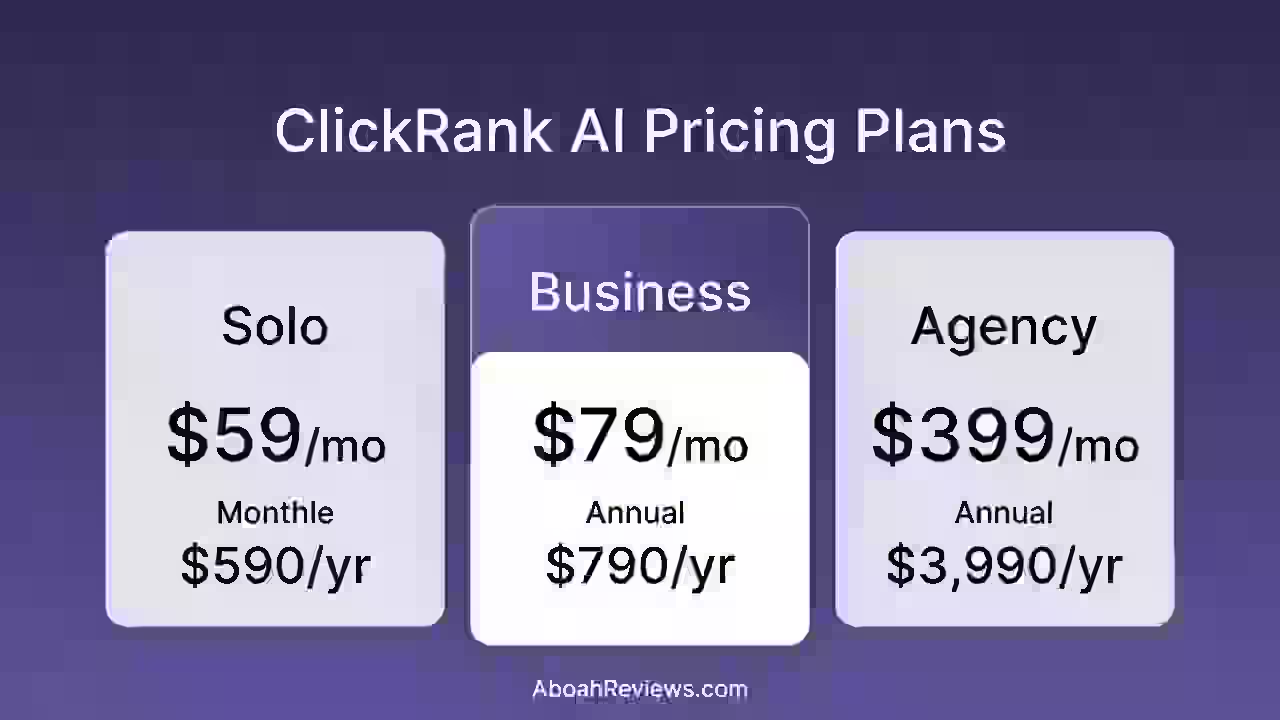
ClickRank AI has 3 pricing editions, from $59 to $399. Here is how the pricing breaks down based on available data from ClickRank.ai site:
| Plans | Monthly | Annual | Best For |
|---|---|---|---|
| Solo | $59/month | $590/year | Small business owners managing a single website |
| Business | $79/month | $790/year | Growing businesses managing multiple websites |
| Agency | $399/month | $3,990/year | SEO agencies and large teams handling many websites |
ClickRank AI Pricing (Full Breakdown)
1. Solo Plan
Best suited for individuals or small website owners who want essential SEO crawling and optimization tools.
Features include:
- 1 website project
- 1 team member access
- Crawl up to 2,000 pages
- Unlimited optimizations
- Monthly crawl interval
- Priority email support
- 7-day money-back guarantee
2. Business Plan
Designed for businesses that manage multiple websites and require more frequent crawling and collaboration.
Features include:
- 3 websites
- 3 team members
- Crawl up to 10,000 pages
- Unlimited optimizations
- Bi-weekly crawl interval
- Priority chat support
- 7-day money-back guarantee
3. Agency Plan
Built for SEO agencies and large teams that manage several websites and need deeper crawling capabilities.
Features include:
- 10 websites
- 10 team members
- Crawl up to 60,000 pages
- Unlimited optimizations
- Weekly crawl interval
- Priority phone support
- 7-day money-back guarantee
ClickRank AI Pros and Cons
Pros
- Bulk on-page fixes are genuinely fast: The “Resolve All” feature works and delivered measurable click-through rate improvements on optimized pages during my test.
- GSC-native approach means accurate, site-specific data: No third-party estimates. Your recommendations come from your actual search performance.
- Works on any CMS: ClickRank AI can be integrated with any CMS by adding a small JavaScript snippet to your website’s header, allowing users to apply optimizations without the need for plugins or extensive coding. I confirmed this on WordPress, Shopify, and Squarespace.
- AI search visibility tools are forward-thinking: The AI Model Index Checker and AI Overview Tracker address a real 2026 need that most competing tools ignore.
- Clean dashboard: Users find it refreshingly simple with no noise and no endless dashboards to wrestle with. I agree. The UI is one of the better ones I’ve used in an SEO tool this year.
Cons
- No deep backlink analysis: Users mention a lack of granular control and insufficient backlink tracking, limiting advanced SEO strategies. If backlink work is your focus, you need Ahrefs or Moz alongside this.
- Site caps are restrictive for agencies: Even on the Agency plan, the number of connected sites has a ceiling that does not work for large-scale operations.
- Monthly crawl frequency is too slow for some use cases: One user noted, “I wish it would crawl my site more than once a month.” For sites publishing daily, this is a real limitation.
- Content writer is decent but not best-in-class: It works for first drafts, but if content quality is your priority, dedicated tools like Outrank or BlogSEO do it better.
- Page credit system can surprise you: Without proper exclusion settings, you can burn through your page quota on tag and category pages you never intended to optimize.
ClickRank AI Limitations Workarounds’
- Backlink gap: Use Ahrefs’ free backlink checker or Moz’s Link Explorer alongside ClickRank.
- Site cap: Stack AppSumo codes (up to 4) for additional sites. Not ideal but functional.
- Crawl frequency: Supplement with a monthly Screaming Frog audit for sites that need more frequent crawling.
- Page credit burn: Set exclusions for /tag, /category, ?page=, and /archive immediately after connecting a site. Do this before running any optimization.
ClickRank AI Alternatives and Comparisons
ClickRank AI vs. Semrush
Category | ClickRank AI | Semrush |
|---|---|---|
Strength | Automated on-page fixes | Comprehensive keyword and competitive analysis |
Best For | Fixing what’s already on your site | Research, planning, and monitoring |
On-Page Automation | One-click bulk fixes | Manual implementation required |
Pricing | $59+/month | $139.95+/month |
Verdict | Better for execution speed | Better for research depth |
ClickRank AI vs. Ahrefs
Category | ClickRank AI | Ahrefs |
|---|---|---|
Strength | On-page optimization automation | Backlink analysis, keyword research |
Best For | Non-technical users who need fast fixes | SEO professionals who need research depth |
Backlink Analysis | Minimal | Industry-leading |
Pricing | $59+/month | $129+/month |
Verdict | Better for on-page automation | Better for off-page and competitive intelligence |
ClickRank AI vs. RivalFlow AI
Category | ClickRank AI | RivalFlow AI |
|---|---|---|
Strength | Bulk on-page fixes and AI search readiness | Content gap analysis against competitors |
Best For | Fixing existing pages quickly | Finding what’s missing in your content vs. competitors |
Pricing | $59+/month | $99+/month |
Verdict | Better for technical on-page | Better for competitive content structure analysis |
Which Tool Should You Choose?
- You need to fix on-page issues in bulk fast: ClickRank AI
- You need deep keyword research and competitive analysis: Semrush or Ahrefs
- You need content recommendations based on competitor gaps: RivalFlow AI
- You need automated content publishing: Check the best auto blogging software instead
- You’re on a tight budget and want a free alternative first: Use Google Search Console directly and a free tool like RightBlogger for
ClickRank AI Use Cases
1. Solo Blogger with 200+ Posts
You have years of blog posts with outdated titles, missing alt text, and no schema.
Workflow:
- Connect ClickRank to your site and GSC
- Set exclusions for /tag, /category, and /archive pages
- Run a full site audit
- Review suggested title and meta description changes
- Apply “Resolve All” for alt text and schema
- Manually review and edit titles on your top 20 pages
- Apply bulk fixes for remaining pages
Estimated Time Saved: 10-15 hours vs. doing it manually
2. Freelance SEO Consultant (3-5 Clients)
manage on-page optimization for 3-5 small business clients who need regular maintenance.
Workflow:
- Set up each client site with the JavaScript snippet
- Run monthly SEO audits via ClickRank
- Use the keyword tracker to monitor ranking tracking progress
- Apply one-click fixes for new issues each month
- Export reports for client meetings
Estimated Time Saved: 5-8 hours per month across all client sites
3. E-Commerce Store Owner
You have a Shopify store with 200 product pages that need optimized meta tags and schema.
Workflow:
- Install the JavaScript snippet in your Shopify theme header
- Run the audit to identify missing product schema and weak meta descriptions
- Apply bulk fixes for schema and seo-friendly meta tags
- Use the AI Model Index Checker to ensure product pages are visible to AI search
- Track click-through rates improvement over 30 days in GSC
Estimated Time Saved: 6-10 hours for initial optimization
4: Small Agency Running SEO for Local Businesses
Your agency manages SEO for 8-10 local businesses, mostly WordPress sites.
Workflow:
- Install the WordPress plugin or JavaScript snippet on each site
- Use the SEO AI agent to run automated site crawls and flag issues
- Apply bulk fixes for common problems (missing H1s, duplicate titles, broken links)
- Use keyword gap analysis to find quick wins for each client
- Generate monthly reports showing resolved issues and ranking changes
Estimated Time Saved: 15-25 hours per month across all client sites
This workflow works well until you hit the site cap. If you manage more than 10 sites, you’ll need multiple accounts or stacked codes, which gets clunky.
Understanding common autoblogging tool mistakes can help you avoid similar pitfalls when automating content and SEO workflows.
ClickRank AI Reviews from Users
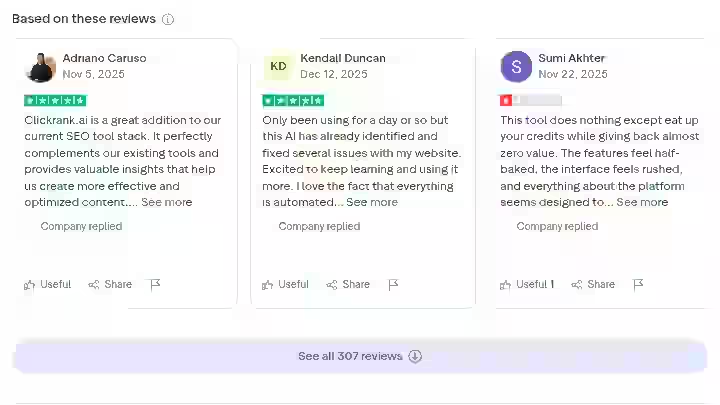
ClickRank.ai is rated 4.5 out of 5 based on reviews from 473+ verified users on AppSumo. On Trustpilot, 307 customers have shared their feedback, at the time of writing.
Common Praise:
- Users consistently praise ClickRank for its ease of use and one-click optimization features, which simplify complex SEO tasks and save time. The intuitive interface and real-time insights help users quickly implement changes.
- One user reported going from “700 to zero” warnings with one click, bringing website health up to 100%.
- Users on Trustpilot consistently mention the simplicity of setup and the speed of visible results.
Common Complaints:
- Some users note limitations in advanced reporting and the cap on the number of websites that can be managed.
- One reviewer called the tool “absolutely useless” and doubted if it actually helps with modern Google rankings.
- Customer service complaints pop up here and there. Someone had trouble getting email responses about crawl credits and lifetime subscription details.
- Some users have raised concerns about long-term effectiveness and occasional issues with the accuracy of recommendations.
Sentiment Summary:
The overwhelming majority of reviews are positive, with the strongest praise going to speed and ease of use.
The negative feedback clusters around two themes: scaling limitations for agencies and occasional questions about long-term ranking impact.
The tool’s G2 profile shows that “Limited Features” and “SEO Limitations” are the most common criticisms, though they’re outnumbered by positive mentions of time savings and usability.
ClickRank AI Scoring
Category | Weight | Score (out of 10) | Weighted Score |
|---|---|---|---|
Features and Functionality | 30% | 7.5 | 2.25 |
Ease of Use | 20% | 9.0 | 1.80 |
Pricing and Value | 20% | 8.0 | 1.60 |
Support and Customer Experience | 15% | 7.0 | 1.05 |
Trust and Credibility | 15% | 7.5 | 1.13 |
Total | 100% | 7.83/10 |
- Features and Functionality (7.5): On-page optimization and AI search tools are strong. But the lack of backlink analysis, limited keyword research depth, and monthly crawl frequency hold it back from a higher score.
- Ease of Use (9.0): One of the easiest SEO tools I’ve tested. Setup takes minutes. The dashboard is clean and not overwhelming. The one-click fixes work as advertised.
- Pricing and Value (8.0): Good value at the Solo tier. The AppSumo lifetime deal is excellent. The Agency tier’s site cap limits its value for larger operations.
- Support and Customer Experience (7.0): Generally responsive via live chat. Some users have reported slower email response times for billing and technical issues. Room for improvement.
- Trust and Credibility (7.5): 468 verified AppSumo reviews, 306 Trustpilot reviews, and 150+ G2 reviews with mostly organic, verified feedback. The tool was built by a team with a prior track record (Katteb.com, 500K+ users). Credible, though still a newer entrant compared to established platforms.
ClickRank.ai Privacy and Content Risks
1. JavaScript Snippet Dependency
ClickRank bolts a JavaScript “skin” on top of your pages instead of touching the source code or CMS.
This means if you remove the snippet, all ClickRank optimizations disappear instantly. Your original, unoptimized content returns. This is worth understanding before you rely on it long-term.
For WordPress users, the WordPress plugin makes permanent backend edits, which is the safer route.
2. Data Privacy
Your Google Search Console data is completely safe. They do not store any data on their servers.
All data is fetched directly into your user session from Google’s servers, ensuring maximum privacy and security.
This is a strong privacy posture. The API dependency on Google’s servers means you need an active GSC connection, but your data isn’t sitting in a third-party database.
3. AI Content and Detection Risk
The AI content writer uses OpenAI’s API. Any content generated should be reviewed and edited before publishing, not just for quality but to ensure it aligns with your brand voice and passes editorial standards.
I did not test AI detection rates specifically, but you should treat AI-generated content the same way you would from any AI writing tool: edit it, add your expertise, and don’t publish raw output.
4. Over-Optimization Risk
Any tool that auto-generates titles and meta descriptions at scale carries the risk of over-optimization.
If every title on your site follows the same AI-generated pattern, it can look unnatural to both readers and search engines.
Mix in manually written titles for your most important pages.
Final Verdict On ClickRank AI Review
BUY if:
- You’re a blogger, freelancer, or small business owner who needs to fix on-page SEO issues at scale without technical expertise
- Your main bottleneck is execution (fixing things), not diagnosis (finding things)
- You want AI search visibility tools that address Google AI Overviews and ChatGPT indexing
- You can get the AppSumo lifetime deal, which is strong value
SKIP if:
- You need a complete SEO platform with deep keyword research, backlink analysis, and competitive analysis
- You manage 15+ client sites and need unlimited scaling
- Your primary need is content creation rather than content optimization
- You want page speed and Core Web Vitals optimization
For more context on how SEO automation tools compare overall, check out my guide on the benefits of auto blogging tools and my look at the future of autoblogging tools in the current AI search era.
Frequently Asked Questions About ClickRank AI Review
1. Is ClickRank AI worth the money?
Yes, for most solo site owners and small teams. The time savings on bulk on-page fixes alone justify the cost at the Solo tier. If you’re spending more than 5 hours a month fixing meta tags, alt text, and schema manually, ClickRank.ai pays for itself quickly.
2. Can ClickRank AI replace Semrush or Ahrefs?
No. ClickRank handles on-page optimization and AI search visibility well, but it lacks the keyword research depth, backlink database, and competitive analysis features that make Semrush and Ahrefs indispensable for research-heavy SEO workflows.
3. Does ClickRank AI work with non-WordPress sites?
Yes, ClickRank can be integrated with any CMS by adding a small JavaScript snippet to your website’s header. This allows users to apply SEO optimizations without the need for plugins or extensive coding. I confirmed this on Shopify and Squarespace during my testing.
4. Is SEO dying due to AI?
No, but SEO is changing. Google’s AI Overviews and AI search engines like ChatGPT and Perplexity are shifting how users discover content. According to Moz, organic search still drives the majority of website traffic, but optimizing for AI citation and visibility is becoming an additional priority. Tools like ClickRank.ai that address both traditional and AI search are better positioned for this shift.
5. How do you spot fake AI tool reviews?
Look for specifics. Fake reviews tend to use vague superlatives without mentioning actual features, workflows, or limitations. Verified reviews on platforms like G2 (which show “organic review” badges) and AppSumo (which verify purchasers) are more reliable. Any review that claims a tool is perfect with zero downsides should raise a flag. Also, check if the reviewer has a history of reviewing multiple products or just one.
6. Is paying someone to do SEO worth it?
It depends on your revenue and time. If your site generates revenue and you don’t have time to handle SEO yourself, hiring a professional or using an automated tool like ClickRank AI is worth it. For most small businesses, a tool like ClickRank at $59/month costs far less than a freelance SEO consultant at 500-2,000/month, and it handles the most common on-page tasks. For strategy, content planning, and link building, human expertise still matters.
7. Does ClickRank AI actually improve rankings?
Based on my 45-day test, I saw measurable improvements in click-through rates on pages where titles and meta descriptions were optimized. Ranking position changes were modest (1-3 positions on targeted keywords). The biggest impact was on pages that already ranked positions 5-15, where better titles and meta descriptions pulled more clicks from existing impressions. ClickRank AI does not guarantee ranking improvements; no tool can. But fixing on-page issues removes friction that was likely holding your pages back.

- Crafting Captivating Headlines: Your awesome post title goes here - October 9, 2026
- The Art of Drawing Readers In: Your attractive post title goes here - October 9, 2026
- Mastering the First Impression: Your intriguing post title goes here - October 9, 2026