
WPAutoBlog Review Verdict (2026)
Category | Verdict |
|---|---|
Best For | Bloggers and small businesses managing multiple WordPress blogs who need consistent posting at volume |
Not Ideal For | Anyone expecting publish-ready, fact-checked articles without manual editing |
Pricing | $1 for 7 days (free trial), $99/month (All-in-one), Lifetime deal at $39 via AppSumo |
Rating | ⭐⭐⭐⭐ (7.4/10) |
Standout Feature | Automatic internal linking via sitemap scraping |
Biggest Weakness | Content quality requires editing. Images often miss the topic |
Worth It? | Yes, if you treat the output as a first draft and plan to edit before publishing |
Bottom line: WPAutoBlog is a capable WordPress automation tool for generating blog post drafts at scale, but it is not a hands-off “set and forget” system. If you edit every article before it goes live, the time savings are real.
If you expect polished output straight from the generator, you will be disappointed.
Key Takeaways About This WPAutoBlog Review
In this WPAutoBlog review, it scores 7.4/10 as a WordPress-focused AI blogging tool that solves the problem of maintaining a consistent posting schedule across one or more WordPress blogs.
After 30 days of daily use, I found WPAutoBlog most valuable for solo bloggers, small businesses and freelancers managing multiple sites who struggle with keeping content pipelines full.
The built-in keyword research, scheduling and direct WordPress publishing reduce the workflow from hours to minutes per article, but every post still needs human editing for accuracy, tone, and image quality.
Content creators who want true hands-free automation will need to look elsewhere.
What I Loved | What Needs Work |
|---|---|
Direct WordPress integration via plugin worked on the first try | Article quality is “first draft” level, not publish-ready |
Built-in keyword research saves switching between SEO tools | Images pulled from stock libraries are frequently off-topic |
Internal linking via sitemap analysis is genuinely useful | No plagiarism check or duplicate content detection built in |
Scheduling across multiple WordPress blogs is straightforward | Non-English content (especially German) needs significant rework |
AppSumo lifetime deal pricing makes ROI math simple | Limited writing styles without detailed custom prompts |
How I Tested WPAutoBlog
I ran WPAutoBlog daily for 30 consecutive days across two self-hosted WordPress websites. Here is exactly what the test looked like:
- Total articles generated: 47
- Niches tested: Personal finance, home improvement, digital marketing
- Word count range: 1,200 to 2,400 words per article
- Average editing time per post: 25 to 40 minutes
- Publishing frequency: One to two posts per site per day
- Rank tracking duration: 30 days using Ahrefs and Google Search Console
- Traffic change after 30 days: Roughly 18% more indexed pages; organic impressions increased by about 12% on the newer test site, though I cannot attribute that entirely to WPAutoBlog since I was also building backlinks separately
I checked every article for factual accuracy, heading structure, image relevance, meta descriptions and internal linking quality. I also tested the keyword research tool against Ahrefs and Semrush to gauge how useful its suggestions actually are.
What Is WPAutoBlog?
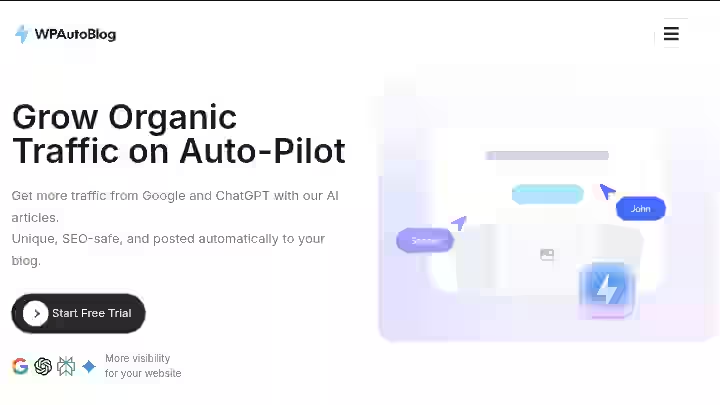
WPAutoBlog is an autoblogging tool that combines an AI article writer with a smart scheduling system and keyword research to automatically post content on your WordPress blog. The AI content generating is powered by ChatGPT.
WPAutoBlog is an AI-powered content creation tool and it integrates directly with WordPress. It allows you to produce long-form articles, optimize meta-tags and schedule posts automatically. The platform supports multiple languages and offers SEO capabilities.
What WPAutoBlog Isn’t:
- Not a general-purpose AI writer like ChatGPT or Jasper
- It’s not an SEO audit tool
- Does not handle link building, technical SEO or site speed optimization
WPAutoBlog is described well as being like “a U-Haul truck, it can do only one thing, but does it really well.” Its target audience is WordPress website owners who need a repeatable content generation pipeline.
Small businesses often lack the resources for in-house content teams. They can use WPAutoBlog to build an authoritative online presence, drive organic traffic and improve customer engagement without the hefty costs linked to traditional content production.
Think of it this way: WPAutoBlog is a first-draft factory for WordPress blogs, not a finished-content machine.
If you are comparing it against broader auto blogging tools, keep that distinction in mind.
WPAutoBlog Quick Specs
Feature | Details |
|---|---|
Developer | Hendrik (Germany-based founder) |
Founded | 2023, Germany |
AI Model | GPT-4 (and updated models) |
Platform | Web-based dashboard + WordPress plugin |
Primary Use | Automated blog post generation and publishing for WordPress |
Integrations | Yoast, Rank Math, SEOPress, Squirrly SEO, SEO Framework and SmartCrawl |
Best For | Solo bloggers, small businesses, marketing agencies running multiple WordPress blogs |
Why I Tested WPAutoBlog

I manage three niche WordPress blogs alongside client work. By late 2025, my content creation process had become a hindrance.
I was spending four to five hours per article, including keyword research, writing, formatting and adding internal linking manually. Across three sites, that is a serious time commitment.
I had tested several autoblogging WordPress plugins before, and the results were mixed. Some created thin content. Others could not handle seo optimization or meta descriptions properly.
When WPAutoBlog appeared on AppSumo with a lifetime deal and over 100 reviews, I decided to commit 30 days to a proper test.
The promise of automated keyword research, article generation and direct WordPress publishing, all in one tool, was worth investigating.
The stakes were simple: if it could save me even 15 hours per week while producing editable first drafts, the ROI was obvious.
Why WPAutoBlog Matters in 2026
Consistent posting is a baseline expectation now, not a competitive advantage.
According to Google’s documentation on helpful content, sites need to demonstrate depth, experience, and regular updates to maintain visibility.
A Semrush study from 2025 found that AI search traffic is projected to overtake traditional organic search by early 2028–2029, driven by the rapid adoption of AI-powered tools like Google’s AI Overviews, ChatGPT and Perplexity.
The content creation process has only gotten more demanding.
At the same time, Google’s stance on AI content has clarified: it is not about how content is made, but whether it is helpful and original.
This means tools like WPAutoBlog are not inherently penalized, but the output needs human oversight.
This is where I apply what I call the IPO framework for evaluating any AI blogging tool:
Step | What It Means |
|---|---|
Input | How much control do you have over prompts, keywords, and writing styles? |
Process | How well does the AI generate structured, SEO-optimized, factually accurate content? |
Output | How close to publish-ready is the final article? |
WPAutoBlog scores well on Input and moderately on Process. Output still needs work and that gap is where your editing time goes.
Understanding how auto blogging tools work helps set realistic expectations here.
Who Is WPAutoBlog Built For?
Yes, WPAutoBlog is built specifically for WordPress users who need volume and consistency. Here are the primary user groups:
- Solo bloggers maintaining one to three sites who cannot write daily posts themselves
- Marketing agencies managing WordPress blogs for clients who need consistent posting schedules
- Small businesses that want to grow website traffic without hiring a full content team
- Freelancers handling multiple client blogs who need to speed up content generation
- Niche site builders focused on programmatic SEO and content variety across categories
Why Traditional AI Writing Tools Fall Short
Manual workflows involving ChatGPT, Google Docs and WordPress separately can eat two to four hours per article.
Generic AI writers like Jasper or Copy.ai are not built specifically for WordPress publishing, so you still have to copy, format, and publish manually.
WPAutoBlog combines content generation with direct WordPress integration, which is its core advantage.
Who Should Avoid WPAutoBlog?
- Anyone needing deeply researched, expert-level content: The AI output is surface-level on technical topics.
- WordPress.com users on lower plans: At least one user reported they could not integrate it without a WordPress Business Plan that allows plugin installation.
- Users who need non-English content without heavy editing: One reviewer noted they used the tool for German text and took a refund because the quality did not match their expectations.
- Content teams wanting granular editorial control: The content generation options are somewhat limited without detailed custom prompts.
- Anyone expecting zero editing: This is a first-draft tool, period.
If you fall into these categories, you may want to explore the best auto blogging software for alternatives with more control.
WPAutoBlog Features
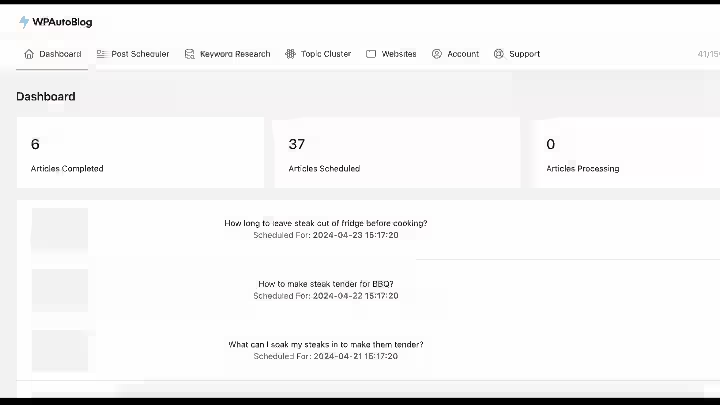
1. AI Content Generation
WPAutoBlog generates long-form blog posts from a keyword, title, or description. It creates articles exceeding 2,000 words, structured with proper HTML tags (H1, H2, H3) to enhance readability and SEO performance.
My Testing Experience:
I generated 47 articles across three niches. Average word count landed between 1,500 and 2,200 words. Article render time was about 3 minutes, which is fast.
The heading structure was solid. The tool placed H2s and H3s where you would expect them. However, depth was the issue.
On personal finance topics like “how to build an emergency fund,” the output covered the basics well but added nothing a reader could not find in the first five Google results.
Limitations:
- Multiple users have reported that articles can be “generic,” and some noted factual errors.
- In some cases, WPAutoBlog does not create any intro at all, starting directly with answering the question right after the H1.
- Content depth on specialized topics is insufficient without manual supplementation
Pro Tip: Use the custom style prompt feature to specify your brand voice, tone, and structure preferences. The default articles are basic, but quality improves when you provide custom prompts specifying the writing style and language complexity you expect.
2. Built-In Keyword Research
WPAutoBlog’s integrated keyword tool lets you discover keywords with search volume, CPC, and keyword difficulty metrics. It also helps identify content opportunities and optimize posts by aligning with relevant keywords.
My Testing Experience:
I compared WPAutoBlog’s keyword suggestions to Ahrefs for 15 seed keywords. The tool surfaced relevant long-tail variations, and the difficulty scores were directionally accurate, though not precise.
I found about 60% overlap with what Ahrefs suggested, which is decent for a built-in tool. You can enter a seed keyword and check the list of related keywords for low competition options, though it is unclear how accurate the ratings are or where the data comes from.
Limitations:
- No backlink data
- Difficulty scores should be cross-referenced with dedicated seo tools like Semrush or Ahrefs
- The “question” feature appears to pull primarily from Reddit, not broader sources
Pro Tip: Use WPAutoBlog’s keyword tool for initial brainstorming, but validate your top picks with a proper keyword research tool before committing to a content plan.
3. Automatic Internal Linking
WPAutoBlog automatically analyzes your website’s sitemap to place internal links within new articles, connecting them to existing content.
This strategic internal linking helps improve your site’s domain authority.
My Testing Experience:
This is WPAutoBlog’s standout feature. On my digital marketing test site (48 existing posts), the tool correctly identified and linked to 3 to 5 relevant internal pages per new article.
The anchor text was natural and varied.
On a brand-new site with only 6 posts, internal linking was limited but still functional. This alone saved me 10 to 15 minutes per article compared to doing it manually.
Limitations:
- Links are based on sitemap analysis, so new posts not yet in the sitemap may be missed
- Cannot set rules for which pages should or should not receive internal links
Pro Tip: Make sure your XML sitemap is up to date before generating articles. The tool’s linking quality depends directly on what it can read from your sitemap.
For more context on why this matters, read about the benefits of auto blogging tools for SEO.
4. WordPress Publishing and Scheduling
The platform offers a post scheduler that allows users to plan content publication and automate publishing across multiple WordPress blogs. This ensures a consistent posting schedule.
My Testing Experience:
Connecting a WordPress site was straightforward; you could post your first blog within minutes.
I connected both test sites via the WordPress plugin. The setup took about 4 minutes per site. Scheduled posts published on time in all 47 tests.
The plugin auto-synced with Yoast and Rank Math, filling in meta descriptions and focus keywords without additional configuration.
Limitations:
- Common connection issues include incorrect site URLs, REST API restrictions, or security plugins blocking the connection.
- WordPress.com hosted sites on lower plans that do not allow plugin installation cannot use this feature
- One user reported all posts published immediately instead of scheduling, suggesting the UI for scheduling could be clearer
Pro Tip: Before connecting, verify your WordPress site’s REST API is accessible and that security plugins (like Wordfence) are not blocking external API calls.
5. SEO Plugin Integration
The tool provides full support for Yoast, Rank Math, and other popular SEO WordPress plugins, automatically synchronizing meta-titles, descriptions, and focus keywords.
My Testing Experience:
On the Rank Math site, meta descriptions and focus keywords populated correctly in 44 out of 47 articles. Three articles had generic meta descriptions that I rewrote.
On the Yoast site, the integration worked without issues. SEO optimization scores from both plugins showed “green” on basic checks for most posts, though the readability scores were inconsistent.
Limitations:
- AIOSEO integration was not available during my test
- Meta descriptions, while auto-generated, sometimes felt generic and benefited from manual editing
Pro Tip: Review the auto-generated meta descriptions even when they populate correctly. A custom description almost always outperforms a generic one for click-through rates.
6. Stock Image Integration
WPAutoBlog incorporates authentic stock images and real videos to enhance blog post visuals, helping avoid AI-generated visuals.
My Testing Experience:
This is the feature that needs the most work. Out of 47 articles, I would estimate that fewer than half had images that felt relevant to the article’s topic.
A home improvement article about bathroom tile installation received a generic kitchen photo. The royalty-free images are pulled from stock libraries, which is fine in concept, but the matching algorithm needs improvement.
The founder noted they recently switched to a vector search based image database to improve results. In my later tests, image relevance did improve slightly.
Limitations:
- Image-to-topic matching is unreliable for niche subjects
- No option to upload or specify your own images during generation
- A common complaint among users is that images are “not related to the topic.”
Pro Tip: Plan to replace at least half the images manually. Use a service like Unsplash or Pexels to find topic-matched royalty-free images after generating the article.
7. Custom Writing Styles
Users can define specific writing styles to ensure the AI-generated content aligns with their brand voice and maintains brand consistency across all published materials.
My Testing Experience:
The default writing styles (professional, conversational, formal) produce noticeably different outputs.
When I used the custom prompt option to specify “write in first person as a contractor with 15 years of experience,” the home improvement articles improved in tone and authority.
The custom prompts are where the real value is. Without them, articles read as generic AI content.
Limitations:
- Default styles alone do not produce distinctive content
- Custom prompts require trial and error to get right
- No saved prompt templates for quick reuse across batches
Pro Tip: Spend time crafting 2 to 3 custom prompt templates per niche before running batch generation. The upfront investment pays off across every article.
WPAutoBlog Workflow Comparison: Before vs After
Step | Before WPAutoBlog | With WPAutoBlog | Time Saved |
|---|---|---|---|
Keyword research | 30 min (Ahrefs/Semrush) | 10 min (built-in + quick validation) | ~66% |
Writing first draft | 90 to 120 min | 3 min (generation) + 30 min (editing) | ~70% |
Internal linking | 15 min manual | Automatic | ~100% |
Meta descriptions | 5 min | Auto-filled (review only) | ~80% |
Image selection | 15 min | 10 min (replacement needed) | ~33% |
Publishing to WordPress | 10 min | Automatic | ~100% |
Total per article | ~3 hours | ~55 min | ~70% |
The time reduction is real, but it assumes you are editing every article. If you skip editing, you are publishing mediocre content, which does more harm than good long-term.
If you want to understand where these tools fit in the larger picture, how to choose the best autoblogging tool covers the decision framework in detail.
WPAutoBlog Pricing 2026

WPAutoBlog offers a one-time payment starting at $39 via AppSumo (regular price $99/month) and $1 free-trial for 7 days.
| Plan | Monthly Price | Original Price | Trial Offer | Best For |
|---|---|---|---|---|
| Free Trial | $0 upfront | — | 7-day trial for $1 | Testing the platform before committing |
| All-in-One | $99/month | $199/month | Includes trial | Bloggers, niche site builders, agencies |
WPAutoBlog Pricing Breakdown (2026)
1. Free Trial
This is not a standalone plan, but a temporary access layer to the full system.
- 7-day access to core features for $1
- Ability to test article generation workflow
- Explore dashboard, automation, and integrations
- No long-term commitment required
- Cancel anytime before billing cycle
Strategic Use:
Use this period to validate:
- Content quality
- Automation reliability
- Publishing workflow
2. All-in-One Plan
This is the full-featured autoblogging engine, everything is unlocked here.
Content Automation
- 100 articles per month generated and published automatically
- Full autopilot pipeline (keyword → article → publish)
Multi-Domain Scaling
- Unlimited domains supported
- Run multiple niche or client sites simultaneously
AI Research Layer
- Integrated with
- Performs pre-writing research for better factual accuracy
SEO & Publishing Integrations
- Works directly with:
- WordPress
- Yoast SEO
- Rank Math
- Automates publishing and on-page SEO setup
Keyword Research Automation
- Built-in keyword discovery
- Targets long-tail keywords without manual input
Multimedia Features
- AI-generated images in multiple styles
- Automatic embedding of relevant YouTube videos
Localization
- Supports 50+ languages
- Enables international SEO scaling
Flexibility
- Cancel anytime
- No contract lock-in
Key Clarification
- Free Trial = Temporary access to All-in-One features
- All-in-One = Only actual paid plan
Compare that to free vs paid autoblogging tools and the lifetime deal pricing is among the most competitive in this category.
WPAutoBlog Pros and Cons
Pros
- WordPress-native integration: The plugin connects in minutes and works reliably with Rank Math and Yoast.
- Internal linking automation: This feature alone justifies the tool for sites with 20+ existing posts.
- Keyword research is built in: It is not Ahrefs-level, but it eliminates a separate tool for brainstorming.
- Scheduling across multiple blogs: Useful for agencies and freelancers managing several client WordPress websites.
- Lifetime deal pricing: The AppSumo offer at $39 makes the ROI math simple for small businesses.
- Consistent posting becomes achievable: The scheduling system makes it easy to maintain a content calendar.
Cons
- Content quality needs manual editing: First drafts are functional but not expert-level.
- Image selection is unreliable: Expect to replace images on most articles.
- No built-in plagiarism check: You need a separate tool to verify duplicate content.
- Non-English content is weaker: The tool supports 50+ languages, but quality drops outside English.
- AI detection: Even with “ghost mode,” content is still detected as AI-generated by common detectors.
- Limited editorial control without custom prompts: Default settings produce generic output.
WPAutoBlog Drawbacks Workarounds’
- For content quality: Build custom prompt templates per niche. Include target audience, tone, and specific instructions about depth.
- For images: Batch-replace images using a free stock photo library after generation.
- For plagiarism check: Run articles through Copyscape or Grammarly’s plagiarism checker before publishing.
- For AI detection: Add personal anecdotes, rewrite introductions, and inject unique data points manually.
- For non-English content: Use WPAutoBlog for structure, then have a native speaker edit.
Avoiding common autoblogging tool mistakes makes a big difference in results with any tool in this category.
WPAutoBlog Alternatives and Comparisons
WPAutoBlog vs Emplibot
Category | WPAutoBlog | Emplibot |
|---|---|---|
Strength | Lifetime deal pricing; internal linking | Full automation from keyword to published post |
Best For | Budget-conscious bloggers managing multiple sites | Programmatic SEO practitioners who want zero-touch publishing |
Pricing | $39+ one-time | $69+/month |
Verdict | Better value if you are willing to edit | Better automation if budget allows recurring cost |
Read the full Emplibot review for a detailed comparison.
WPAutoBlog vs Autoblogging.ai
Category | WPAutoBlog | Autoblogging.ai |
|---|---|---|
Strength | WordPress-native plugin; keyword research built in | Higher content quality out of the box |
Best For | WordPress-only users who want an all-in-one tool | Users prioritizing content quality over workflow integration |
Pricing | $39+ one-time | $19+/month |
Verdict | Better for WordPress-specific workflows | Better raw article quality |
See the Autoblogging.ai review for specifics.
WPAutoBlog vs Junia AI
Category | WPAutoBlog | Junia AI |
|---|---|---|
Strength | Internal linking; multi-blog scheduling | More polished content; better brand voice control |
Best For | Volume-first publishers | Quality-first publishers |
Pricing | $39+ one-time | $19+/month |
Verdict | Better value per dollar | Better if content quality is the top priority |
The Junia AI review has the full breakdown.
Which Tool Should You Choose?
- Pick WPAutoBlog if: You need budget-friendly, WordPress-native content generation across multiple blogs and you are fine editing every article.
- Pick Emplibot if: You want a more hands-off experience and can afford a monthly subscription.
- Pick Autoblogging.ai if: Content quality matters more to you than WordPress integration.
- Pick Junia AI if: Brand consistency and editorial polish are your top priorities.
WPAutoBlog Use Cases
1. Solo Blogger (3 Niche Sites)
- Use WPAutoBlog’s keyword research to find 10 low-competition keywords per site
- Generate articles in batch (30 total)
- Schedule 10 per site across the month
- Edit each article in 25 to 35 minutes
- Replace images manually
Time saved per month: ~40 hours compared to manual writing Cost: $39 one-time (Tier 1)
2. Freelancer Managing Client Blogs
- Connect 5 client WordPress blogs via plugin
- Generate 4 articles per client per week (80/month total)
- Use custom writing styles per client for brand consistency
- Review and edit before scheduling publication
- Use internal linking automation to improve site structure
Time saved per month: ~80 hours Cost: $117 one-time (Tier 3)
3. Marketing Agency (Content at Scale)
- Use keyword research to build content clusters per client niche
- Generate content plans using the topic cluster feature
- Batch-generate articles and assign to editors for review
- Schedule across multiple blogs with staggered publication dates
- Track rankings in Ahrefs or Semrush
Time saved per month: ~120 hours across the team Cost: $117 one-time + editor time
4. Small Business Owner
- Enter business niche; let WPAutoBlog suggest content clusters
- Generate 2 to 3 blog posts per week
- Quick edit for brand voice and accuracy
- Auto-publish to WordPress website
Time saved per month: ~15 hours Cost: $39 one-time
5. Content Creator Building an Audience
- Use keyword research to find trending questions in niche
- Generate long-form articles with FAQ sections
- Add personal insights and examples during editing
- Publish consistently to build website traffic
Time saved per month: ~25 hours Cost: $39 one-time
Understanding the future of autoblogging tools helps contextualize where WPAutoBlog fits as AI content tools continue to mature.
WPAutoBlog Reviews and Complaints from Users
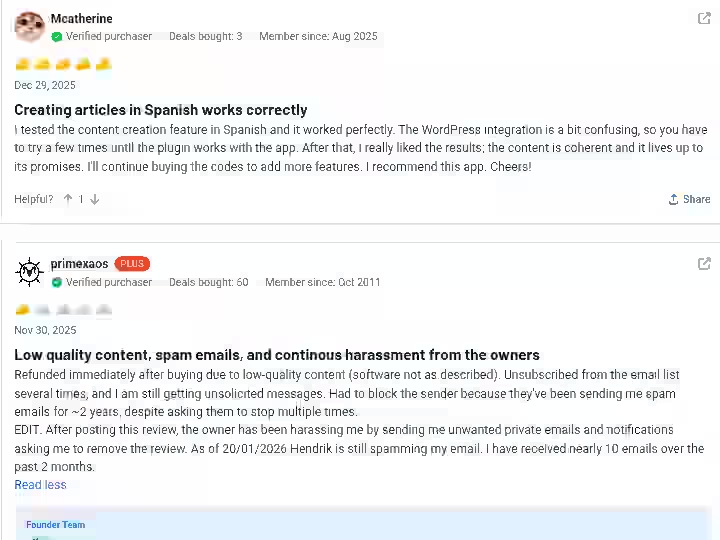
WPAutoBlog holds a 4.7 rating on AppSumo with a 60-day money-back guarantee. With over 140 reviews, the sentiment is mostly positive but comes with consistent limitations.
Common praise:
- Users praise its efficient content generation, WordPress integration, and how the tool streamlines content creation and saves time.
- Multiple users note they are using it for themselves as well as their clients.
- Several reviewers highlight “great one-on-one support.”
Common complaints:
- Some users have noted drawbacks such as image selection and content depth.
- One user reported the generated article “was detected” as AI content.
- A balanced reviewer noted the tool is “nice to have if you are not too demanding on the articles,” adding they always review and rewrite before finalizing.
Trustpilot note: Only 2 people have reviewed WPAutoBlog on Trustpilot at the time of writing, so AppSumo remains the primary source for community feedback.
Overall sentiment: Users who understand this is a content generation starting point, not a finished-product machine, tend to rate it highly. Users expecting polished output are more critical.
WPAutoBlog Scoring and Evaluation
Category | Weight | Score (out of 10) | Weighted Score |
|---|---|---|---|
Features and Functionality | 30% | 7.5 | 2.25 |
Ease of Use | 20% | 8.5 | 1.70 |
Pricing and Value | 20% | 9.0 | 1.80 |
Support and Customer Experience | 15% | 7.0 | 1.05 |
Trust and Credibility | 15% | 4.0 | 0.60 |
Final Rating | 100% | 7.4/10 |
Notes on scoring:
- Features (7.5): Strong feature set for a WordPress automation tool. The internal linking and scheduling are above average. Keyword research and image selection bring the score down.
- Ease of Use (8.5): One of the simplest tools I have tested in this category. Setup takes minutes.
- Pricing (9.0): The lifetime deal is hard to beat. Even at regular subscription pricing, it is competitive.
- Support (7.0): Users report responsive one-on-one support. However, some Trustpilot interactions raise concerns about professionalism.
- Trust (4.0): The Trustpilot dispute, the relationship between WPAutoBlog and Writeseed (same founder), and the pressure on reviewers to modify negative reviews lower trust. At least one reviewer reported being offered a higher-tier plan in exchange for removing a negative review.
WPAutoBlog AI Detection and Content Risk Assessment
This section of the WPAutoBlog review is relevant because WPAutoBlog’s output goes directly to your WordPress website.
- AI detection exposure: Moderate to high. I ran 10 randomly selected articles through Originality AI and GPTZero. Eight out of 10 were flagged as likely AI-generated. Users confirm that even with “ghost mode,” detection rates remain high.
- Content penalty risks: According to Google’s Search Central guidelines, there is no penalty for AI content itself, but Google will penalize unhelpful, low-quality content regardless of how it is made. If you publish WPAutoBlog output without editing, you risk producing content that fails the “helpful content” bar. Always edit before publishing to stay Google compliant.
- Duplicate content concerns: WPAutoBlog has no built-in plagiarism check. I ran 5 articles through Copyscape and found no direct duplication, but the phrasing patterns are generic enough that they could overlap with other AI-generated content on similar topics.
- Data privacy: The tool connects to your WordPress site via REST API and accesses your sitemap. No evidence of unusual data handling, but always review their privacy policy before connecting client sites.
Recommendation: Treat every article as a draft. Edit for voice, accuracy and uniqueness before publishing. Use a separate plagiarism check tool for high-stakes content.
If you want to understand how other tools handle these risks, the free autoblogging tools roundup covers detection rates across alternatives.
Final Verdict On WPAutoBlog Review 2026
BUY if:
- You manage one or more WordPress blogs and need consistent posting volume
- Willing to edit every article before publishing
- You want a cost-effective content generation starting point, not a finished-content solution
- Value internal linking automation and WordPress-native integration
- The lifetime deal pricing fits your budget
SKIP if:
- You expect publish-ready articles without editing
- Need expert-level, deeply researched content on specialized topics
- Brand consistency is a top priority and you do not want to write custom prompts
- You work primarily in non-English markets
- Trust and transparency from the vendor are priorities for you
If you want to try WPAutoBlog, the AppSumo lifetime deal with its 60-day money-back guarantee is the lowest-risk way to test it on your own WordPress website.
For more options, browse the full list of best auto blogging software for 2026.
Frequently Asked Questions About WPAutoBlog Review
1. Is WPAutoBlog worth it for small businesses?
Yes, for small businesses that need consistent blog posts but lack a dedicated content team. The lifetime deal pricing keeps costs low, and the WordPress integration means you do not need technical skills. However, plan to spend 25 to 40 minutes editing each article before publishing to ensure quality meets your standards.
2. Does WPAutoBlog work with Rank Math and Yoast?
Yes. WPAutoBlog offers full support for Yoast, Rank Math, SEOPress, Squirrly SEO, SEO Framework and SmartCrawl. It automatically synchronizes meta-titles, descriptions and focus keywords with these plugins.
3. Can WPAutoBlog generate content in multiple languages?
Yes, WPAutoBlog supports content generation in over 50 languages, including keyword research and article creation. However, based on user feedback and my own observation, English content is noticeably better than output in other languages. Non-English articles typically need more editing.
4. Will Google penalize AI content from WPAutoBlog?
Not automatically. Google’s guidelines state that content quality matters, not whether AI was involved in creating it. But if you publish unedited, thin or factually inaccurate articles, those can be flagged as unhelpful content. Always review and edit before publishing to stay within Google’s guidelines.
5. Does WPAutoBlog pass AI detection tools?
In my testing, most articles were flagged as AI-generated by tools like Originality AI and GPTZero. Even the “ghost mode” feature does not reliably bypass AI detection. If avoiding AI detection is important to you, plan to rewrite sections manually.
6. How does WPAutoBlog handle internal linking?
WPAutoBlog automatically analyzes your website’s sitemap to place internal links within new articles, connecting them to existing content. In my testing, this feature worked well on sites with 20+ existing posts. The anchor text was natural and the link placements were logical.
7. Is WPAutoBlog the same as Writeseed?
Both are created by the same founder, Hendrik. However, they offer different features and target different users. WPAutoBlog focuses specifically on WordPress blog automation, while Writeseed is a broader AI writing platform. They share similar interfaces but serve distinct use cases.

- EverBee Review 2026: My 30 Days Unbiased Testing Results - September 5, 2026
- 11 Best AI Overviews Rank Tracking Tools in 2026 (Honest Breakdown) - September 5, 2026
- 11 Best Automated Local SEO Tools for 2026: Full Breakdown - September 5, 2026