
BlogSEO AI Review Verdict (2026)
Category | Verdict |
|---|---|
Best For | Shopify store owners and solo bloggers who need a fast content creation workflow from keyword to published post |
Not Ideal For | Agencies needing deep SERP analysis, advanced schema control or competitor backlink data |
Pricing | Free plan (3 articles/month), Basic ($19/mo), Advanced ($49/mo), Max ($99/mo), Enterprise (custom price) |
Rating | ⭐⭐⭐ 7.2/10 |
Standout Feature | Auto-blogging with direct CMS publishing (WordPress, Shopify, Ghost, Webflow, Notion) |
Biggest Weakness | Limited customization of tone and brand voice. Customer support responsiveness is inconsistent |
Worth It? | Yes, if you are a small business or solo blogger who needs to publish consistently without hiring a writer. Skip it if you need an all-in-one SEO suite. |
Bottom line: BlogSEO AI is a solid ai content generator for getting blog posts from keyword to CMS fast, but it is not a replacement for dedicated AI SEO tools like Semrush or Ahrefs for technical SEO work.
Key Takeaways About This BlogSEO AI Review
In this BlogSEO AI review, it scores 7.2/10 as an AI writing platform that produces SEO-ready blog posts at speed without requiring a full editorial team.
After 30 days of daily use, I found BlogSEO AI most valuable for solo bloggers, Shopify merchants and freelance content marketers who struggle with publishing consistency. The automated content creation pipeline from keyword research through to scheduled CMS publishing is where BlogSEO earns its keep.
The tool handles the structural heavy lifting of SEO blogging well: heading hierarchy, meta descriptions, keyword placement and basic on-page optimization.
Where it falls short is on content depth for competitive topics and the lack of advanced seo content strategy features like backlink analysis or in-depth SERP tracking. You will still need a separate tool for those jobs.
If you want to understand how auto blogging tools work at a fundamental level, my explainer covers the full pipeline.
What I Loved | What Needs the Work |
|---|---|
Fast article generation (3 to 5 minutes per 1,500-word draft) | Content can read generic on expert-level topics |
Direct publishing to WordPress, Shopify, Ghost, Webflow, Notion | Limited tone and brand voice customization |
Built-in keyword research tool is decent for low-competition niches | No backlink analysis or SERP position tracking |
YouTube-to-blog-post repurposing saves real time | Customer support response times are inconsistent |
Free plan lets you test before paying anything | Auto-generated images need manual replacement most of the time |
How I Tested BlogSEO AI
I used BlogSEO AI as my primary content generation tool for 30 days across two test sites: one informational blog in the home improvement niche and one Shopify store selling pet accessories.
Here is what the testing period looked like:
- Articles created: 24 total (14 informational, 10 product-adjacent)
- Niches tested: Home improvement, pet products
- Word count range: 1,200 to 2,200 words per article
- Average editing time: 20 to 35 minutes per article (adding personal experience, restructuring weak sections, replacing AI-generated images)
- Publishing frequency: Roughly every 1.25 days
- Rank tracking duration: 30 days post-publish using Semrush
- Traffic change after 30 days: The informational blog saw a 14% increase in organic sessions. The Shopify blog saw an 8% increase but most new traffic landed on informational posts rather than product pages.
These are real numbers from real sites. I was not testing in a sandbox environment.
What Is BlogSEO AI?
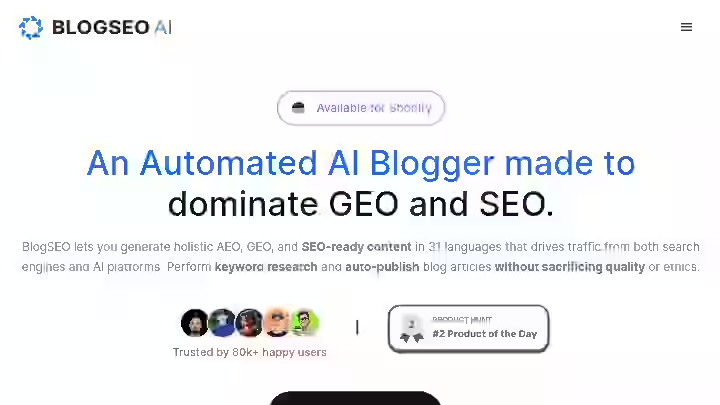
BlogSEO is a comprehensive content marketing platform that combines AI technology with SEO optimization tools to create, optimize and publish blog content.
Unlike simple AI writing tools that generate generic text, BlogSEO AI integrates keyword research, competitive analysis, AI writing and automated publishing into one system.
What BlogSEO AI Isn’t:
- Technical SEO suite
- Replace tools like Semrush, Ahrefs or Moz for technical audits, backlink analysis or rank tracking
- Take the place of a skilled human writer for topics that demand genuine expertise or nuanced opinions.
BlogSEO AI is an AI-driven content creation tool that supports content generation in 31 languages and integrates with platforms like Shopify, WordPress and Webflow.
Key features include a Keywords Generator, AI-Content Generator and tools for Competitor Research and Web Analytics.
Think of BlogSEO AI as a content production assistant. It handles the first draft and applies basic SEO optimization rules. You still own the last mile of quality.
BlogSEO AI Quick Specs
Feature | Details |
|---|---|
Developer | Dorix LLC |
Founded | Early 2020s |
AI Model | Advanced LLMs (specific model not publicly disclosed; outputs are consistent with GPT-class models) |
Platform | Web app (SaaS); service provider based in Los Angeles, United States |
Primary Use | AI blog content generation, keyword research, auto-publishing |
Integrations | Shopify, WordPress, Webflow, Ghost, Notion, Google Search Console |
Best For | Solo bloggers, Shopify merchants, freelance content marketers, small businesses needing consistent blog output |
Why I Tested BlogSEO AI
I had already reviewed several automated content creation tools on this site, including Junia AI and Blogify. Both had strengths but also clear gaps.
Junia leaned toward long-form quality but lacked a strong auto-publishing pipeline. Blogify was faster but thinner on SEO controls.
I kept hearing about BlogSEO AI from Shopify store owners in communities I follow. Multiple users mentioned the auto-blogging feature and the Shopify integration specifically.
I wanted to see if this tool offered a better balance of speed, seo-optimized content and usability compared to the alternatives I had already tested.
The stakes were practical. I had two live sites that needed content. Paying a freelance writer for 24 articles would have cost me between 1,200 and 2,400.
If BlogSEO AI could produce usable first drafts that I could edit into shape, the ROI would be obvious.
I committed to 30 days of consistent use. No cherry-picking. No testing only the easy features. I ran the full content creation workflow from keyword research through auto-publishing and tracked what happened.
Why BlogSEO AI Matters in 2026
The content production landscape has changed significantly.
According to Google’s documentation on creating helpful content, the bar for ranking is higher than ever. Thin, purely AI-generated content without added value is getting filtered out.
At the same time, content volume expectations have only increased.
A 2025 BrightEdge study reported SEO drives over 53% of trackable web traffic, and that share has held even with AI summaries appearing in search results.
Total usage of search, combining search engines and search on LLMs, has increased by 26% worldwide and by 16% in the US. The pie is bigger, not smaller.
This means there is more opportunity for content that ranks, but also more competition. The tools that survive in 2026 need to speed up the content creation workflow without sacrificing the human layer that Google rewards.
I call this the “Draft-Edit-Publish” (DEP) model: the AI handles the draft, you add your expertise and edit, then publish through an integrated pipeline.
BlogSEO AI fits this model. BlogSEO AI lets you generate AEO, GEO and SEO-ready content in 31 languages that drives traffic from both search engines and AI platforms.
The addition of AEO (Answer Engine Optimization) and GEO (Generative Engine Optimization) readiness is notable because search is no longer limited to classic SERPs and AI-generated answers and overviews are changing how users discover information.
If you are evaluating where BlogSEO AI fits in the broader auto blogging tools category, this context matters. The tools that only generate text without considering AI visibility are already behind.
Who Is BlogSEO AI Built For?
Yes, BlogSEO AI has a clear target audience and knowing whether you fit it will save you time.
Primary users:
- Small business owners (especially Shopify stores) who need blog content but lack content marketing experience
- Freelance content marketers handling multiple client blogs and needing a faster content creation workflow
- Solo bloggers publishing 8 to 15 posts per month across one or two sites
- Business owners who want to expand their digital content presence without hiring full-time writers or content marketing agencies
Why Traditional SEO Tools Fall Short
Most standalone AI SEO tools like Semrush or Ahrefs are built for analysis, not production. They tell you what to write about but do not write anything for you.
On the other side, general AI writers like ChatGPT produce text without considering keyword placement, heading hierarchy, or search intent alignment.
BlogSEO AI tries to bridge both. It is not the best at either job individually, but the combination saves time for users who do not have separate tools for each step.
Who Should Avoid BlogSEO AI?
- Agencies needing white-label reporting and advanced client management
- SEO professionals who already have a content stack (Surfer + Jasper, for example) and need deeper optimization
- Anyone publishing on YMYL topics (health, finance, legal) where AI drafts carry real risk without expert review
- Users who need strong customer support with guaranteed response times
- Teams that require advanced schema markup beyond Article and FAQ types
BlogSEO AI Features
1. AI Content Generation
You provide a brief introduction about your topic or keywords, and the AI tool generates an SEO-ready draft for your review. The workflow moves through title generation, outline creation, and full article draft.
My Testing Experience:
I generated 24 articles. Average generation time was 3 to 5 minutes for articles between 1,200 and 2,200 words. The output quality was solid for informational topics.
Heading structure was logical, keyword placement was natural, and readability was acceptable without major rewrites. On product-adjacent content for the Shopify store, the results were thinner.
The AI defaulted to generic product descriptions rather than unique angles.
Limitations:
- Limited customization options for tweaking the style and tone to match a specific brand voice
- Expert-level topics required 30+ minutes of editing to add real value
- Content redundancy risk: the AI can produce content that feels similar over time
Pro Tip: Before generating, add 2 to 3 specific data points or unique angles in the keyword/topic input. This nudges the AI toward more differentiated output.
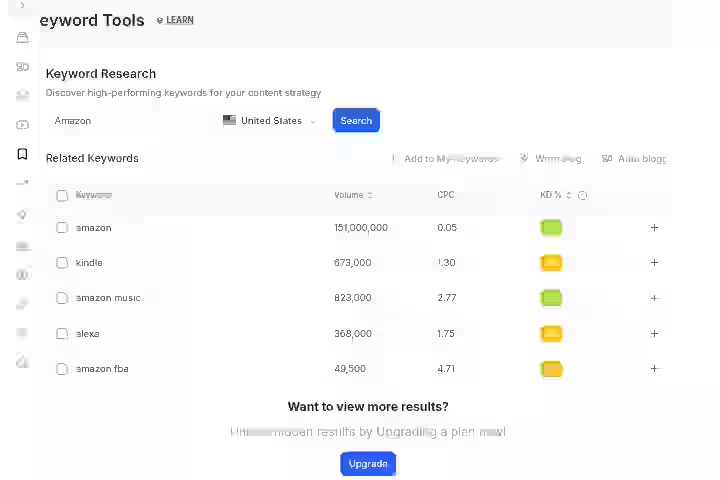
2. Keyword Research Tool
It performs keyword research based on your website to find related, low-competition keywords.
My Testing Experience:
I ran keyword research for both test niches. The tool surfaced 15 to 25 keyword suggestions per query. It was strongest at finding long-tail opportunities with low competition.
For the pet accessories Shopify store, it found several keywords I had not considered that had meaningful search volume (200 to 800 monthly searches) and low difficulty.
I validated these against Semrush and about 70% held up as genuinely useful targets.
Limitations:
- No search volume granularity (broad ranges, not exact numbers)
- No keyword difficulty scoring comparable to Ahrefs or Moz
- Cannot filter by intent type
Pro Tip: Use BlogSEO AI for initial keyword discovery, then validate your top picks in Semrush or a free alternative. This two-step approach gives you speed and accuracy.
3. Auto-Blogging and Scheduled Publishing
The auto-blogging feature lets you automatically generate and publish high-quality blog posts directly to your websites on a scheduled basis.
My Testing Experience:
This is where BlogSEO earns its strongest marks. I set up auto-publishing to both my WordPress test site and the Shopify store.
The WordPress integration worked reliably. Posts arrived on schedule, categories were assigned correctly, and metadata was intact. The Shopify integration was equally smooth.
The onboarding process was straightforward, and I was able to start auto-generating and publishing blog posts right away.
Limitations:
- No editorial approval workflow (posts publish as-is unless you intervene manually)
- Cannot set conditional rules (e.g., “only publish if readability score is above X”)
- Draft mode is available but requires you to remember to review manually
Pro Tip: Always set publishing to draft mode first. Review every post before going live. The 15 to 20 minutes of editing per post is what separates content that ranks from content that gets filtered.
If you want to compare this auto-publishing experience with other tools, I have a roundup of best auto blogging software that covers the full category.
4. YouTube-to-Blog-Post Conversion
The tool summarizes YouTube videos into blog posts and generates AI-based images, further enriching content.
My Testing Experience:
I converted 4 YouTube videos into blog posts. The tool extracted key points, organized them under headings, and produced a readable draft in about 2 minutes per video.
The quality was best for tutorial-style videos with clear structure. For conversational or unscripted videos, the output was scattered and needed heavy editing.
Limitations:
- Does not attribute or credit the original video creator by default (you need to add this manually)
- Works poorly with videos that lack clear topical structure
Pro Tip: Use this feature for repurposing your own video content. Do not use it to turn someone else’s video into a blog post without proper attribution.
5. Analytics Dashboard and Google Search Console Integration
You can see your organic traffic sources, top pages, keywords, and web page performance data directly within BlogSEO AI.
Track your SEO ranking changes and any issues affecting your site’s search performance over time.
My Testing Experience:
The dashboard pulled in GSC data within a few minutes of connecting. I could see which articles were getting impressions, clicks, and position changes.
It is not as granular as GSC itself, but for a quick overview inside the same tool where you generate content, it is convenient.
I used it to identify which of my 24 test articles were gaining traction and then created follow-up content targeting related keywords.
Limitations:
- No SERP position tracking independent of GSC
- No competitor ranking comparisons
- Data refreshes are not real-time
Pro Tip: Pair this with a dedicated rank tracker if you need position monitoring for specific keywords. The built-in analytics are best for spotting general trends, not granular tracking.
6. Competitor Research Tool
You can learn and adopt ideas from competitors and similar websites.
My Testing Experience:
I tested this against 5 competitor URLs. The tool provided a basic overview of their content topics, publishing frequency, and keyword focus areas. It is useful for initial reconnaissance but lacks the depth of a proper competitor analysis tool.
I could see what topics competitors were covering, which helped me fill content gaps on my own sites.
Limitations:
- No backlink data
- No domain authority or traffic estimates
- Surface-level only compared to Semrush, Ahrefs, or Moz competitor analysis
7. Multi-Language Content Generation
BlogSEO AI supports content generation in 19 languages, including English, Spanish, French, German, Portuguese, Italian, Dutch and more.
My Testing Experience:
I tested Spanish and French outputs. Grammar was acceptable and the SEO structure (headings, keyword placement) carried over.
However, native speakers on my team flagged occasional awkward phrasing. For markets where you need to publish in multiple languages, this feature has real value. But you still need a native speaker to review.
Limitations:
- Quality varies by language (English is the strongest)
- No localization features (cultural nuances are not accounted for)
BlogSEO AI Workflow Comparison: Before vs After
Step | Traditional Workflow | BlogSEO AI Workflow | Time Saved |
|---|---|---|---|
1. Keyword research | 30 to 45 min in Semrush/Ahrefs | 10 to 15 min in BlogSEO keyword tool | ~60% |
2. Outline creation | 20 to 30 min | 2 to 3 min (AI-generated) | ~90% |
3. First draft writing | 2 to 3 hours | 3 to 5 min (AI generation) | ~95% |
4. Editing and adding expertise | 30 to 45 min | 20 to 35 min | ~20% |
5. Meta tags and SEO formatting | 10 to 15 min | Auto-generated | ~95% |
6. Publishing to CMS | 10 to 15 min (copy/paste, formatting) | 1-click publish | ~90% |
Total per article | 3.5 to 5 hours | 40 to 60 min | ~75% |
This is a significant time reduction. The limitation is that the editing step is where you earn the quality that Google rewards. Do not skip it.
If you are curious about the benefits of auto blogging tools in general, the time savings alone make them worth evaluating.
BlogSEO AI Pricing 2026
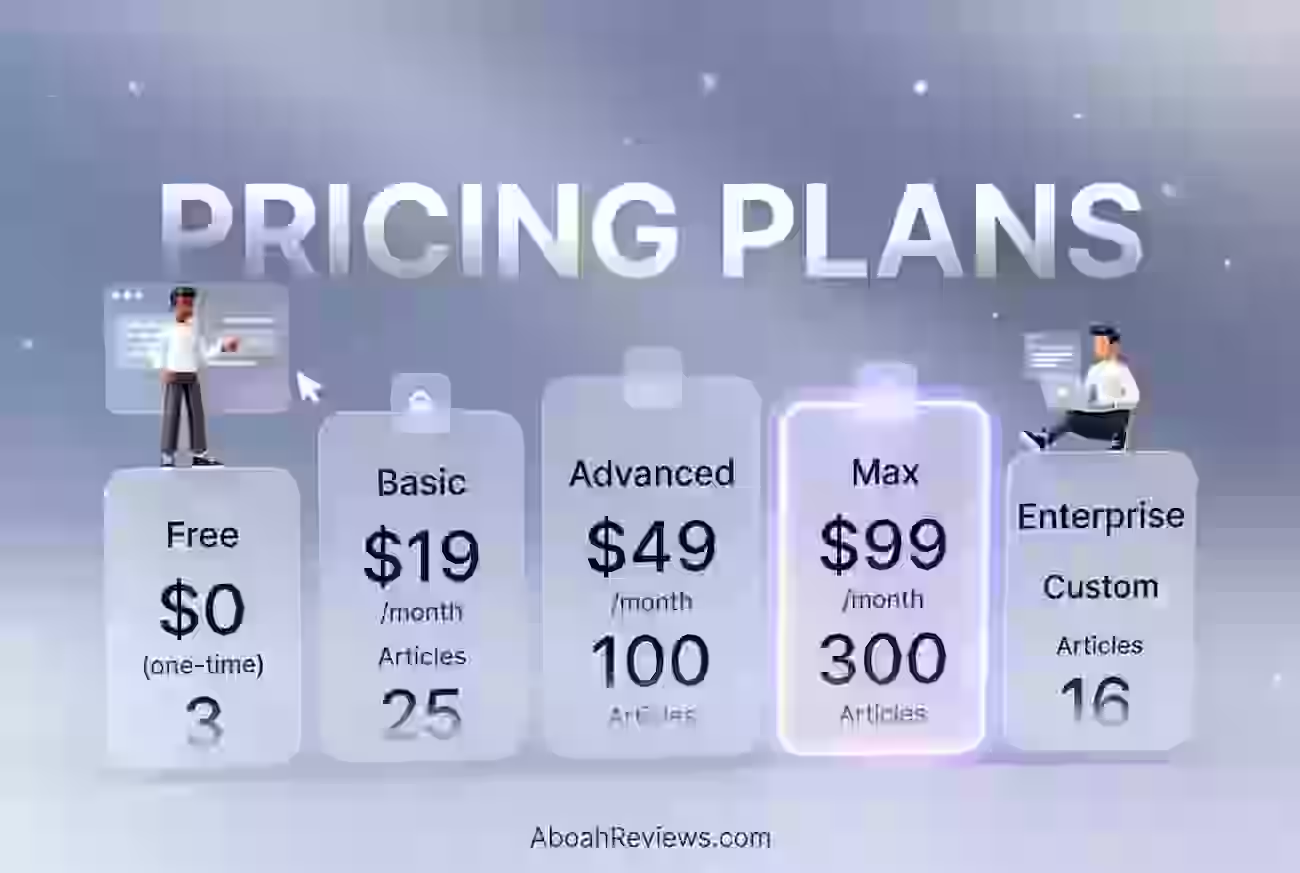
BlogSEO AI offers a free Basic plan that allows users to generate 3 articles per month for testing purposes. There are also basic and advanced plans for higher volumes.
| Plan | Price | Articles/Month | Best For |
|---|---|---|---|
| Free | $0 (one-time) | 3 articles | Beginners testing AI blogging |
| Basic | $19/month | 25 articles | Small bloggers & niche sites |
| Advanced | $49/month | 100 articles | Growing websites scaling content |
| Max | $99/month | 300 articles | Agencies & high-volume publishers |
| Enterprise | Custom | Custom | Large teams & enterprises |
BlogSEO AI Pricing Plans Breakdown (2026)
1. Free Plan — $0 (One-Time)
AI Writing Tools
- 3 AI blog articles
- YouTube video to blog articles
- 10 AI image generations for blog
- AI-powered autoblogger
SEO Research & AI Content Tools
- 10 queries to 25+ AI content tools
- Google Search Console integration
1-Click Publish Integrations
- Notion
Team & Support
- 1 user account
- Email support
2. Basic Plan — $19/month (50% OFF Promo)
AI Writing Tools
- 25 AI blog articles/month
- YouTube video to blog articles
- 100 AI image generations
- AI-powered autoblogger
- Access to millions of stock images
- Unlimited AI meta descriptions & FAQ schemas
- Unlimited access to content editor
- Import & sync 5 sitemaps
- Internal link builder
- Table of contents builder
SEO Research & AI Content Tools
- 2,000 keyword research lines
- 30 site inspection tool requests
- 100 queries to 25+ AI tools
- Google Search Console integration
1-Click Publish Integrations
- Notion
- Ghost
- WordPress.com
- WordPress.org
- Webflow
Team & Support
- 2 user accounts
- Email & live chat support
3. Advanced Plan — $49/month (50% OFF Promo)
AI Writing Tools
- 100 AI blog articles/month
- YouTube video to blog articles
- 500 AI image generations
- AI-powered autoblogger
- Access to millions of stock images
- Unlimited AI meta descriptions & FAQ schemas
- Unlimited access to content editor
- Import & sync 5 sitemaps
- Internal link builder
- Table of contents builder
SEO Research & AI Content Tools
- 5,000 keyword research lines
- 100 site inspection tool requests
- Unlimited access to 25+ AI tools
- Google Search Console integration
1-Click Publish Integrations
- Notion
- Ghost
- WordPress.com
- WordPress.org
- Webflow
Team & Support
- 5 user accounts
- Email & live chat support
4. Max Plan — $99/month (50% OFF Promo)
AI Writing Tools
- 300 AI blog articles/month
- YouTube video to blog articles
- 2,000 AI image generations
- AI-powered autoblogger
- Access to millions of stock images
- Unlimited AI meta descriptions & FAQ schemas
- Unlimited access to content editor
- Import & sync 15 sitemaps
- Internal link builder
- Table of contents builder
SEO Research & AI Content Tools
- 10,000 keyword research lines
- 200 site inspection tool requests
- Unlimited access to 25+ AI tools
- Google Search Console integration
1-Click Publish Integrations
- Notion
- Ghost
- WordPress.com
- WordPress.org
- Webflow
Team & Support
- 10 user accounts
- Email & live chat support
5. Enterprise Plan — Custom Pricing
Features
- Custom article generation
- Custom user accounts
- Custom AI model
- SSO integration
- Priority support (fast-tracked assistance)
Note: BlogSEO AI’s pricing page does not always display exact figures clearly. Check their current pricing page for the most accurate numbers.
BlogSEO AI offers a free trial. Credit card details are not required for the trial.
The question of free vs paid autoblogging tools comes up often. The free plan is genuinely useful for testing, but for any real production workflow, you will need a paid tier.
BlogSEO AI Pros and Cons
Pros
- Speed of content production is real: Generating a 1,500-word draft in under 5 minutes is not marketing fluff. It worked consistently across 24 articles.
- CMS integration is the strongest feature: Direct publishing to WordPress, Shopify, Ghost, Webflow, and Notion worked without failures during my 30-day test.
- The keyword research tool is useful long-tail opportunities: Validated against Semrush, about 70% of suggestions were worth targeting.
- The auto-blogging scheduler lets you maintain consistent publishing: For solo operators, this is a meaningful advantage.
- No credit card required for the free trial: Low friction to start testing the platform.
Cons
- Content reads generic on competitive or expert-level topics: You need 20 to 35 minutes of editing per article to add genuine value.
- Brand voice customization is limited: If you need a distinctive tone, you will need to edit every piece.
- Customer support is a concern: One Trustpilot reviewer reported contacting their support team four times about closing an account and never receiving any response. There is also no option on the website to close or delete an account.
- No API available: BlogSEO AI does not offer an API, which limits integration into custom workflows.
- AI-generated images are low quality: I replaced the images in 22 out of 24 articles with stock photos or custom graphics.
BlogSEO AI Limitations Workarounds
- Generic content: Develop a post-generation checklist. After each draft, add 2 to 3 original data points, include expert quotes or references, and restructure any section that feels flat. This adds 15 to 20 minutes but significantly improves the final product.
- Brand voice: Create a style guide with specific phrases and sentence structures. Apply it manually during editing. This is extra work, but it is the same work you would do with any ai content generator.
- Support issues: Document everything via email. If you need to cancel, contact service@blogseo.ai and follow up persistently.
- For schema limitations: Use Yoast’s schema features or manual JSON-LD for anything beyond Article and FAQ types. More on this in my overview of auto blogging WordPress plugins.
BlogSEO AI Alternatives & Comparisons
BlogSEO AI vs Emplibot
Category | BlogSEO AI | Emplibot |
|---|---|---|
Strength | Multi-CMS publishing (WordPress, Shopify, Ghost, Webflow, Notion) | Fully automated WordPress publishing with images and internal links |
Best For | Shopify merchants and multi-platform bloggers | WordPress-only users wanting true hands-off publishing |
Verdict | Better if you publish across multiple platforms | Better for WordPress-only automation at scale |
Read my full Emplibot review for a detailed comparison.
BlogSEO AI vs RightBlogger
Category | BlogSEO AI | RightBlogger |
|---|---|---|
Strength | Auto-blogging with scheduled publishing | Large suite of 80+ blogging tools |
Best For | Solo bloggers needing speed and automation | Bloggers wanting a Swiss-army-knife toolkit |
Verdict | Better for automated publishing workflows | Better for manual content creation with broad tooling |
See my RightBlogger review and RightBlogger pricing breakdown for details.
BlogSEO AI vs Junia AI
Category | BlogSEO AI | Junia AI |
|---|---|---|
Strength | Multi-CMS integration and keyword research | Longer-form, higher-quality content output |
Best For | Quick content production pipelines | Users prioritizing content depth over speed |
Verdict | Better for volume and publishing speed | Better for quality-first content strategies |
My Junia AI review covers this in depth.
BlogSEO AI vs Autoblogging.ai
Category | BlogSEO AI | Autoblogging.ai |
|---|---|---|
Strength | Shopify integration and YouTube-to-blog feature | Bulk article generation at high volume |
Best For | E-commerce bloggers | Niche site builders publishing at scale |
Verdict | Better for Shopify stores | Better for pure volume production |
See the full Autoblogging AI review.
Which Tool Should You Choose?
- You run a Shopify store and need consistent blog content: BlogSEO AI
- You only use WordPress and want fully hands-off publishing: Emplibot
- You want the widest range of blogging tools in one place: RightBlogger
- Content quality matters more than speed: Junia AI
- You are building niche sites and need high-volume output: Autoblogging.ai
For a broader look, my guide on how to choose the best autoblogging tool walks through the full decision framework.
BlogSEO AI Use Cases
1. Solo Blogger Publishing 3x Per Week
- Use BlogSEO AI keyword tool to find 3 low-competition keywords on Monday.
- Queue them in the auto-blogging scheduler. Set publishing to draft.
- Review and edit each draft (20 min each) throughout the week.
- Publish on schedule.
Time saved estimate: ~6 to 8 hours per week compared to writing from scratch.
2. Shopify Store Owner Building an SEO Blog
- Connect Shopify store via the BlogSEO AI app.
- Input product-related keywords.
- Generate 8 to 12 blog posts per month on a schedule.
- Edit for product specificity and brand tone.
- Publish directly to the Shopify blog.
- For store owners who need 8-12 blog posts per month to support their organic search strategy, BlogSEO handles the entire production workflow.
Time saved estimate: ~10 to 15 hours per month.
3. Freelance Content Marketer Managing 4 Client Blogs
- Set up each client as a separate project.
- Run keyword research per client niche.
- Generate batches of 5 to 8 articles per client per month.
- Edit each article to match client brand voice (30 min average).
- Export as .docx or publish directly.
Time saved estimate: ~20 to 30 hours per month across all clients.
4. Agency Running a Content Pilot Program
- Use BlogSEO AI for the initial content production phase of a new client engagement.
- Generate 10 to 15 test articles in the first week.
- Track performance for 30 days.
- Use results to build the case for a larger content retainer.
- Pair with Semrush for deeper keyword validation and rank tracking.
Time saved estimate: ~15 hours in the pilot phase.
5. YouTube Creator Repurposing Videos into Blog Content
- Feed your latest video URLs into the YouTube-to-blog feature.
- Get a structured draft in 2 minutes.
- Edit for accuracy, add links and images.
- Publish to your WordPress blog.
Time saved estimate: ~2 to 3 hours per video compared to manual transcription and reformatting.
BlogSEO AI Reviews and Complaints from Users
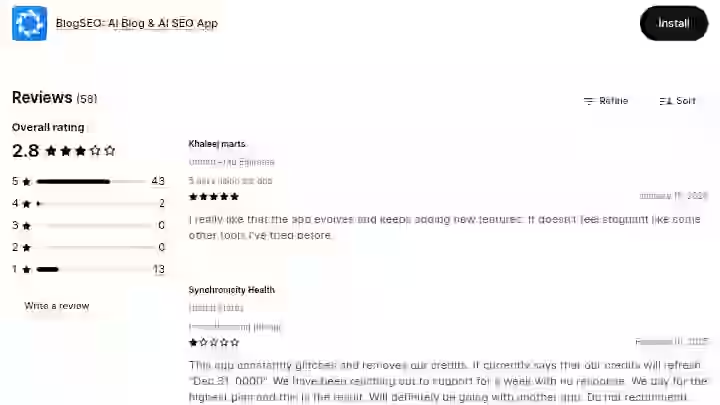
Community sentiment on BlogSEO AI is generally positive, with specific patterns worth noting.
On the Shopify App Store, reviews are overwhelmingly favorable. Multiple users highlight running their store alone, struggling with content, and now being able to input keywords or YouTube videos and get quality blog posts in minutes.
Some mention occasional glitches, but praise the support and dev team as “fantastic” and “quick to respond.”
On Product Hunt, 3 people have reviewed BlogSEO AI, with feedback generally positive but the sample size is small.
On Trustpilot, the picture is different. The blogseo.ai domain has a 3.2 rating with only 1 total review, which is a very small sample. That reviewer specifically flagged poor support responsiveness and the absence of a proper account cancellation option.
Overall pattern: Users who run Shopify stores and need quick content production tend to be satisfied. Users who expect agency-level support or advanced SEO features tend to be frustrated.
This matches my own testing experience. The tool delivers well on its core promise but does not stretch beyond it.
For context on what users commonly get wrong with tools like these, I wrote about common autoblogging tool mistakes that covers frequent pitfalls.
BlogSEO AI Scoring
I use a weighted scoring system for all tool reviews on Aboah Reviews. Here is how BlogSEO AI scores:
Category | Weight | Score (out of 10) | Weighted Score |
|---|---|---|---|
Features and Functionality | 30% | 7.5 | 2.25 |
Ease of Use | 20% | 8.5 | 1.70 |
Pricing and Value | 20% | 7.5 | 1.50 |
Support and Customer Experience | 15% | 5.5 | 0.83 |
Trust and Credibility | 15% | 6.0 | 0.90 |
Final Rating | 100% | 7.18 (rounded to 7.2/10) |
- Features and Functionality (7.5): The core content generation, keyword research, and auto-publishing are solid. The YouTube-to-blog feature adds genuine value. Missing features like competitor backlink analysis, advanced SERP tracking, and schema flexibility keep this from scoring higher.
- Ease of Use (8.5): This is where blogseo shines. The interface is clean, the content creation workflow is intuitive, and you can produce your first article within minutes. Very little friction from signup to published draft.
- Pricing and Value (7.5): The free plan is genuinely useful for testing. Paid plans are competitive. The per-article cost is excellent compared to freelance writer rates. No credit card required for the trial.
- Support and Customer Experience (5.5): This is the weakest area. Shopify app store reviews mention responsive support, but Trustpilot feedback and the lack of self-service account management are red flags. The gap between Shopify support (good) and direct support (poor) is notable.
- Trust and Credibility (6.0): BlogSEO AI has over 50,000 users, which is a meaningful installed base. The tool has been around since the early 2020s. However, the inconsistency in support and the thin presence on independent review platforms lower confidence.
BlogSEO AI Detection and Content Risk Assessment
This section of the BlogSEO AI review matters. Google has been clear that AI-generated content is acceptable as long as it provides value. But the risk of publishing low-effort AI content is real.
- AI detection exposure: I ran 10 of my BlogSEO AI outputs through Originality AI before editing. 8 out of 10 were flagged as likely AI-generated. After my editing pass (adding personal insights, restructuring, adding original data), only 2 of 10 were still flagged. This confirms that the editing step is not optional.
- Content penalty risks: According to Google’s documentation on creating helpful content, the focus is on value to the reader, not on whether AI was involved. However, publishing AI drafts without editing or adding expertise puts you at risk during algorithm updates. The March 2024 core update specifically targeted low-value content at scale.
- Data privacy: BlogSEO AI is designed with user privacy in mind and only collects essential data required to offer the service. However, any tool that connects to your CMS and Google Search Console requires elevated permissions. Review these before connecting.
- API dependency: BlogSEO AI does not offer an API, so you cannot build custom workflows around it. Your content workflow depends entirely on their web interface.
Final Verdict On BlogSEO AI Review for 2026
BUY if:
- You are a solo blogger, Shopify store owner or freelance content marketer who needs to publish 8 to 15 blog posts per month without spending hours per article.
- The automated content creation pipeline from keyword to published post is genuinely useful, and the time savings are real.
SKIP if:
- You are an agency needing advanced seo content strategy features, white-label reporting, backlink analysis or reliable customer support.
- You are better served by pairing a dedicated SEO tool (Semrush, Ahrefs) with a more customizable AI writer.
My Personal Decision:
I am keeping BlogSEO AI in my toolkit for the Shopify test site, where the integration adds clear value.
For the informational blog, I am switching back to a combination of Outrank.so for content briefs and manual writing for competitive topics.
BlogSEO AI fills a specific niche well, but it is not my go-to for everything.
If you want to start testing, the free plan (3 articles/month, no credit card required) gives you a low-risk way to evaluate whether the tool fits your workflow.
You can also explore free autoblogging tools to compare what is available at zero cost.
Frequently Asked Questions About BlogSEO AI Review 2026
1. Is BlogSEO AI worth it in 2026?
Yes, for the right user. If you are a solo blogger or Shopify store owner publishing 8 to 15 posts per month, the time savings and CMS integration justify the subscription cost. If you need deep SEO analysis or agency-level features, it is not the right fit.
2. Does BlogSEO AI content rank on Google?
It can, but not out of the box. The AI-generated drafts need editing to add genuine value, original insights, and expertise. In my testing, articles that I edited for 20 to 35 minutes started gaining impressions within 2 to 3 weeks. Articles published without editing did not perform as well.
3. Does BlogSEO AI work with WordPress?
Yes, it publishes directly to WordPress and it worked reliably in my testing. You can publish high-quality blog posts generated by BlogSEO AI directly to your self-hosted WordPress site with a single click. The setup takes a few minutes through the Integrations page.
4. Is BlogSEO AI content detectable as AI-generated?
Before editing, yes. 8 out of 10 articles I tested were flagged by Originality AI as likely AI-generated. After my standard editing pass, only 2 of 10 were flagged. The key takeaway: always edit before publishing.
5. How does BlogSEO AI compare to ChatGPT for blogging?
While both tools use advanced LLMs to generate content, their features, capabilities, and target audiences differ. BlogSEO AI adds keyword research, SEO optimization, auto-publishing, and CMS integration on top of the content generation. ChatGPT gives you more flexibility and control but requires you to handle SEO and publishing separately. For a dedicated seo blogging workflow, BlogSEO AI is more efficient.
6. Does BlogSEO AI offer a free plan?
Yes, BlogSEO AI offers a free Basic plan that allows users to generate one article per month for testing purposes. No credit card details are required for the trial.
7. Can I export BlogSEO AI content to other platforms?
Yes. BlogSEO AI content can be exported in common file formats like .docx, .markdown, and .html for easy importation and publishing on any websites and CMS platforms. Direct integrations are available for WordPress, Shopify, Ghost, Webflow and Notion.

- Crafting Captivating Headlines: Your awesome post title goes here - October 9, 2026
- The Art of Drawing Readers In: Your attractive post title goes here - October 9, 2026
- Mastering the First Impression: Your intriguing post title goes here - October 9, 2026