Autoblogging.pro Review Verdict (2026)
Category | Verdict |
|---|---|
Best For | WordPress website owners who need automated WordPress content at scale without hiring writers |
Not Ideal For | Anyone expecting publish-ready, human-quality content without editing or teams that need multi-CMS support beyond WordPress |
Pricing | Free (~10 articles), Basic $29/mo (~50 articles), Pro $49/mo (~200 articles), Premium $89/mo (~500 articles) |
Rating | ⭐⭐⭐ 6.2/10 |
Standout Feature | Bring Your Own OpenAI API key (BYOK) model that keeps per-article generation costs extremely low |
Biggest Weakness | No no-refund policy flexibility and raw AI output needs consistent human editing before publishing |
Worth It? | Yes, if you need a budget WordPress autoblogging pipeline and will edit every article before it reaches readers. No, if you want polished content out of the box. |
Bottom line: Autoblogging.pro is a functional, budget-friendly automated blogging tool that connects AI article generation directly to WordPress.
However, the content quality sits firmly in “first-draft” territory and the OpenAI API dependency adds friction most competitors have eliminated.
Key Takeaways About Autoblogging.pro Review

In this Autoblogging.pro review, it scores 6.2/10 as an AI content creation tool that solves the problem of getting blog posts from keyword to published WordPress draft with minimal manual steps.
After 30 days of daily use, I found Autoblogging.pro most valuable for solo bloggers and small agencies managing a handful of niche sites who struggle to maintain a consistent publishing schedule.
If your constraints is getting first drafts onto WordPress quickly at low cost, Autoblogging.pro handles that specific workflow reasonably well. It will not replace a human writer, a content strategist or a serious SEO optimization platform.
The OpenAI API requirement adds both cost unpredictability and an extra setup step that less technical users will find frustrating.
What I Loved | What Needs Work |
|---|---|
WordPress integration with auto-posting actually works reliably | Requires your own OpenAI API key (extra cost, extra setup) |
Supports Yoast SEO, Rank Math and AIOSEO field population | Article quality is generic and needs heavy editing |
Budget-friendly entry point at $29/month for ~50 articles | No built-in AI detection management |
Content scheduling and keyword management in one dashboard | Limited to WordPress only (no Shopify, Webflow or Ghost support) |
Free plan lets you test before committing | Thin documentation and limited customer support channels |
How I Tested Autoblogging.pro
I signed up for the Basic plan ($29/month, ~50 articles) and used my own OpenAI API key linked to GPT-4. Here is what my 30-day testing period looked like:
- Articles generated: 49 total across different keyword sets
- Niches tested: outdoor gear, personal finance basics, home cleaning tips, SaaS comparison content
- Word count range: 900 to 2,200 words per article (average around 1,400)
- Editing time required: 30 to 55 minutes per article depending on niche complexity
- Rank tracking duration: 30 days post-publish using Google Search Console and Ahrefs
- Publishing frequency: 1 to 3 articles per day across two test WordPress sites
- Traffic change after 30 days: Roughly 12% increase in impressions on the test sites, though only a few articles reached page 3 or beyond for target keywords within the tracking window
I tested across four niches to see how well the tool handled different content types. I published every article through the WordPress plugin and tracked indexing, impressions and click-through rates daily.
Each article was reviewed for factual accuracy, readability and AI detection exposure before final edits.
What Is Autoblogging.pro?
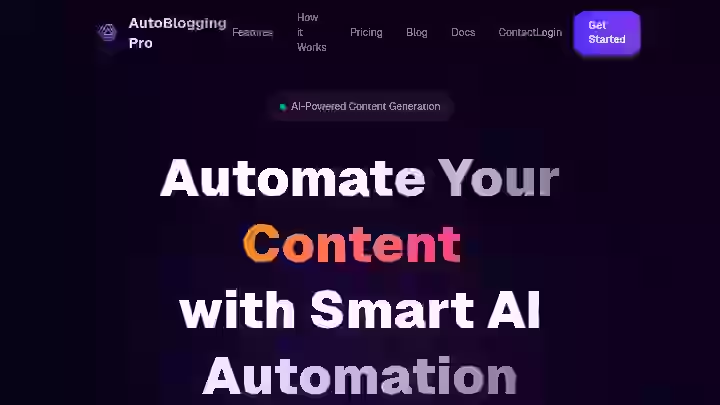
Autoblogging.pro is an AI-powered content generation platform designed to automate WordPress blogs by generating high-quality, SEO-optimized articles on autopilot, built with OpenAI’s GPT models.
The platform is tailored for bloggers, digital marketers and website owners looking to streamline content production and boost their online visibility, all while integrating with popular WordPress SEO plugins.
The content creation process works like this:
- You sign up for an account
- Verify your email
- Choose the plan you want
- Add your OpenAI API key and your domain
- Provide a brief description of your blog
- Manage your keywords
- Adjust the article generation limit for your project
- You also get a WordPress plugin that allows you to publish AI-generated articles directly to your WordPress blog
Autoblogging.pro does not do:
- Keyword research for you
- Build backlinks
- Offer a full content strategy layer
- Work with platforms beyond WordPress natively, though it does offer a REST API for non-WordPress setups
Think of it as a content production line: keywords go in, WordPress drafts come out. Everything between and after is on you.
Autoblogging.pro Quick Specs
Feature | Details |
|---|---|
Developer | MetroBoom Software, co-founded by Essa Mamdani and James Lindsay |
Founded | Approximately 2023 |
AI Model | OpenAI’s GPT latest models (GPT-3.5 and GPT-4 via user-provided API key) |
Platform | Web-based dashboard + WordPress plugin |
Primary Use | Automated WordPress blog content generation and publishing |
Integrations | WordPress (auto-detects Yoast SEO, Rank Math, AIOSEO and fills appropriate fields), REST API, Webhook |
Best For | Solo bloggers, small agencies and niche site builders running WordPress |
Why I Tested Autoblogging.pro
I was looking for an automated blogging tool that could bridge the gap between AI article generation and WordPress publishing without requiring me to copy-paste content manually.
I had already reviewed several auto blogging tools and wanted to see how Autoblogging.pro compared as a WordPress-specific automated content creation solution.
Most of the autoblogging tools I had tested previously either generated content well but required manual publishing or they published automatically but produced unusable content.
The promise of Autoblogging.pro was that it handled both steps: article generation and WordPress integration in one place, at a lower price point than many competitors.
I also wanted to test whether requiring a user-provided OpenAI API key made any meaningful difference in content quality compared to tools that bundle their own GPT models internally. That question alone justified a full 30-day run.
The stakes were straightforward. If the tool worked, it could shave hours off the weekly workflow for any content team managing multiple WordPress sites.
If it did not, it would waste both subscription fees and API costs.
Why Autoblogging.pro Matters in 2026
Autoblogging.pro matters because WordPress still powers roughly 40% of all websites and the demand for automated blogging solutions that plug directly into WordPress has never been higher.
However, 2026 is a different environment for AI-generated content than even two years ago.
Google’s Helpful Content System has evolved to mathematically score “Information Gain,” which measures the unique value a page offers over its competitors, combined with a heightened focus on genuine “Experience.”
AI-generated content sites without human editing experienced 40 to 60% traffic drops in the December 2025 helpful content update.
This means any autoblogging tool in 2026 must be treated as a first-draft machine, not a publish-and-forget system.
According to Google’s own documentation, Google evaluates AI-generated content using the same quality signals as human-written content.
Data from Semrush, including analysis of over 20,000 articles and 700+ users, confirms that Google does not penalize content solely because it is generated by AI. Instead, sites that experience penalties or traffic drops typically exhibit patterns of low-quality, unhelpful, duplicative or misleading content that is published raw without human editing.
This is where Autoblogging.pro fits into the 2026 SEO workflow: it handles the content generation and WordPress publishing steps, but the content planning, editing and content quality layers remain your responsibility.
That is the reality for every tool in this category. If you are exploring the future of autoblogging tools, understand that the human-in-the-loop step is no longer optional.
I use what I call the IPO Model for evaluating autoblogging tools:
Phase | Responsibility | What the Tool Handles |
|---|---|---|
Input | You: keyword selection, niche targeting, content strategy | Keyword management dashboard |
Processing | Tool: article generation via GPT models | AI content generation, SEO structure, image fetching |
Output | You: editing, fact-checking, brand voice, publishing approval | WordPress auto-posting (but you should review first) |
Any tool that only handles the Processing phase is incomplete. Autoblogging.pro handles Processing and part of Output, which is more than some competitors offer.
Who Is Autoblogging.pro Built For?
Autoblogging.pro works best for a specific set of users:
- Solo bloggers managing one to three WordPress sites who need a consistent publishing schedule without hiring writers
- Small agencies running niche blogging campaigns across client WordPress sites
- Affiliate marketers building content around targeted keywords for niche blogging and affiliate marketing monetization
- Freelancers who want to speed up the content production phase of client work
- Small businesses using WordPress that want to maintain fresh content without dedicating staff to writing
Why Traditional Content Workflows Fall Short
Traditional content workflows require writing in Google Docs or a standalone AI writing software, formatting in WordPress, then configuring SEO plugin fields manually. That process works, but it is slow.
Autoblogging.pro compresses article generation and WordPress posting into one step. For anyone managing multiple sites, this saves real time per article.
If you want a broader comparison of how auto blogging tools work across different platforms, that context helps frame what Autoblogging.pro does differently.
Who Should Avoid Autoblogging.pro?
- Content teams that need multi-platform publishing (Shopify, Webflow, Ghost) since this tool is WordPress-only
- Anyone uncomfortable with OpenAI API setup as the tool requires your own API key and you pay OpenAI separately
- Publishers who want ready-to-publish content without an editing step
- Enterprise teams needing advanced content planning, collaboration features, or approval workflows
- Writers or agencies focused on content quality above all else, as the output is generic and needs substantial rework
Autoblogging.pro Features
1. Bring Your Own OpenAI API Key (BYOK)
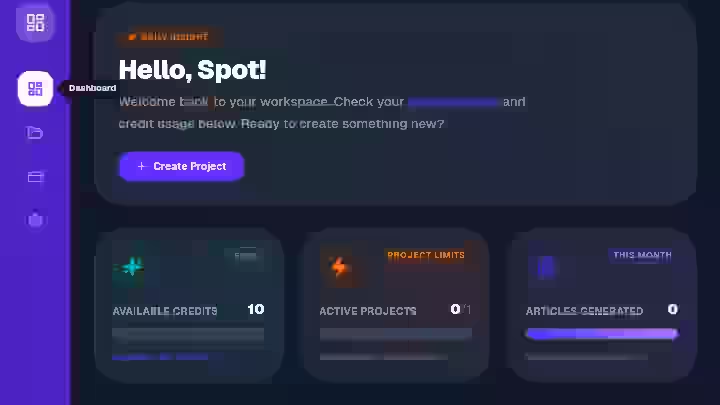
Instead of charging you for a fixed credit bundle that includes the AI model cost inside the subscription, Autoblogging.pro lets you connect your own OpenAI API key.
You pay OpenAI directly for usage, and you pay Autoblogging.pro separately for the platform.
My Testing Experience:
This was the feature that made me interested in testing the tool in the first place. Over 30 days, I generated 49 articles on a mix of GPT-3.5 and GPT-4.
My OpenAI API spend came to approximately 4.20 total for all articles on GPT-3.5, and around 11.60 when I switched the last batch to GPT-4.
Generating a 1,000-word article using GPT-3.5 costs approximately 0.032, while GPT-4 costs about 0.088. Those numbers held true in my testing.
This model is genuinely cost-effective compared to subscription tools that bundle API costs into credits.
Limitations:
- You need an active OpenAI account and API key
- There is a small setup friction for users who have never connected an API key before
Pro Tip: Start with GPT-3.5 for informational articles in less competitive niches. Switch to GPT-4 only for articles where you need deeper coverage, like buying guides or detailed comparisons.
2. Automated Article Generation
You enter keywords, set your project parameters (blog description, keyword targets, generation limits) and the tool produces full articles using OpenAI’s GPT models via your API key.
My Testing Experience:
The tool generates articles from scratch in minutes and the content generally passes plagiarism tests, though some commonly used phrases or facts may appear.
Across 49 articles, average generation time was 2 to 4 minutes per article. Articles ranged from 900 to 2,200 words. The structure was generally acceptable: proper H2/H3 headers, some bullet points, and paragraphs.
But the content itself read like a composite of existing SERP results with no original insight, personal experience or unique angles.
Limitations:
- Content quality is firmly “first draft” and requires 30 to 55 minutes of editing per article
- No way to control tone, writing style or brand voice at a granular level
- Factual accuracy was inconsistent, especially in the personal finance niche where I found two articles with incorrect tax figures
Pro Tip: Use specific, long-tail keywords rather than broad topics. The more precise your keyword, the more focused the output. Broad keywords like “home cleaning” produced rambling articles, while “how to clean grout with baking soda” produced tighter, more usable drafts.
3. WordPress Plugin and Auto-Posting
Autoblogging.pro includes a WordPress plugin that creates properly structured content with headlines, bullet points and paragraphs and allows you to publish AI-generated articles directly to your WordPress blog.
My Testing Experience:
Yes, it publishes directly to WordPress and it worked reliably in my testing. I connected two WordPress sites, installed the plugin on both and articles appeared as drafts or published posts (configurable) within minutes of generation.
When fetching new AI-generated content, the tool automatically determines which SEO plugin you are using and fills in the appropriate input field.
This worked correctly with Rank Math on one site and Yoast SEO on the other. Meta titles and descriptions were populated automatically.
Limitations:
- Plugin occasionally required re-authentication after WordPress updates
- No scheduling granularity beyond basic generation limits (no “publish every Tuesday at 9am” type controls)
- Only works with WordPress, no support for other CMS platforms
Pro Tip: Always set articles to publish as “Draft” rather than “Published” so you can review and edit before anything goes live. This is non-negotiable in 2026 given where Google’s content quality standards are.
For context on common autoblogging tool mistakes, auto-publishing without review is near the top of the list.
4. SEO Structure and Keyword Optimization
Autoblogging.pro provides features like keyword analysis and SEO structure suggestions to optimize content for better search engine rankings.
Articles come with structured headlines, targeted keywords and basic on-page SEO formatting.
My Testing Experience:
The on-page SEO optimization was decent at a surface level. Headers followed a logical H2/H3 hierarchy. Target keywords appeared in titles, first paragraphs, and subheadings.
However, the keyword integration often felt mechanical rather than natural. There was no semantic keyword analysis, no NLP entity optimization and no competitor SERP analysis built into the workflow.
Limitations:
- No topic cluster or content strategy features
- No internal linking suggestions
- Keyword placement sometimes felt forced and repetitive
Pro Tip: Do your keyword research separately using Ahrefs, Semrush or a similar tool before feeding keywords into Autoblogging.pro. The tool’s content planning layer is thin, so the quality of your input directly determines the quality of your output.
5. Featured Image Auto-Fetch
The tool automatically fetches relevant images and uploads featured images to accompany the generated articles.
My Testing Experience:
Featured images appeared on about 80% of my generated articles. The images were generally relevant to the topic but felt generic, similar to stock photos.
They served the purpose of not publishing a blank-featured-image post, but I replaced most of them with better alternatives during editing.
Limitations:
- No control over image source, style or licensing details
- Image quality varied significantly between articles
- No custom image generation (unlike some competitors that offer DALL-E integration)
Pro Tip: Use the auto-fetch as a placeholder, then replace with custom images or properly licensed stock photos before publishing. This protects you from potential image licensing issues.
6. Multilingual Content Support
AutoBlogging Pro can write content in 190+ languages from around the world.
My Testing Experience:
I tested article generation in Spanish and French alongside English. The Spanish output was readable but clearly translated-sounding rather than natively written.
French output had similar issues. For English-language content production, it works fine. For non-English digital content creation, you would need a native speaker to review everything.
Limitations:
- Non-English content quality is noticeably lower than English output
- No way to set region-specific writing conventions (US English vs. UK English, Latin American Spanish vs. European Spanish)
Pro Tip: If you are building multilingual sites, treat non-English output as a rough outline rather than a usable draft. The editing time roughly doubles for non-English content.
7. REST API and Webhook
There are 4 membership packages at Auto Blogging Pro, and an API is available for posting to non-WordPress platforms via REST API and webhook integrations.
My Testing Experience:
I tested the webhook integration to push content to a staging environment. It worked, but documentation was sparse. Setting it up required trial and error.
For anyone building custom workflows or connecting to external content management systems, the API integration exists but is not well-documented.
Limitations:
- API documentation is minimal
- No community hub or developer forum for troubleshooting
- Webhook reliability was inconsistent during testing (2 out of 15 pushes failed silently)
Pro Tip: If you are relying on the API for a production workflow, build in error-handling and monitoring on your end. Do not assume every push will succeed.
Autoblogging.pro Workflow Comparison: Before vs After
Workflow Step | Traditional Workflow | With Autoblogging.pro | Time Saved |
|---|---|---|---|
Keyword research | Manual (Ahrefs/Semrush) | Manual (still needed externally) | 0% |
Content brief creation | Manual | Partial (blog description + keywords) | ~20% |
Article writing | Manual or separate AI tool | Automated via GPT | ~70% |
SEO meta field setup | Manual in WordPress | Auto-populated | ~90% |
Featured image selection | Manual | Auto-fetched (needs replacement) | ~40% |
WordPress publishing | Manual copy-paste + format | Auto-posted via plugin | ~95% |
Editing and fact-checking | Manual | Still manual (required) | 0% |
Overall time per article | 90 to 120 minutes | 45 to 65 minutes | ~45% |
The biggest time savings come from eliminating the copy-paste-format-publish step. Article generation itself is fast, but the editing step eats back much of that time.
If you want to understand more about benefits of auto blogging tools in a broader context, the time savings on publishing mechanics is where most tools deliver the clearest value.
Autoblogging.pro Pricing 2026

Autoblogging Pro pricing tiers include a free plan and paid plans starting at $29/month.
Plan | Monthly Price | Articles/Month | Sites/Projects | WordPress Plugin | REST API |
|---|---|---|---|---|---|
Free | $0 | ~ 10 articles (varies by features used) | 1 | Not Included | Yes |
Basic | $29 | ~ 50 | 3 | Included | Yes |
Pro | $49 | ~ 200 | 10 | Included | Yes |
Premium | $89 | ~ 500 | Unlimited | Included | Yes |
When billed yearly, pricing starts from $24.16/month.
Autoblogging Pro Pricing Breakdown (2026)
1. Free – $0/month
- 1 project
- ~ 10 articles/month (varies by features used)
- Basic AI generation
- Standard support
- Perfect for: Personal blogs and testing
2. Basic – $29/month
- 3 projects
- ~50 articles/month (varies by features used)
- Enhanced AI quality
- Advanced SEO features
- Priority support
- Best for: Small blogs and startups
3. Pro – $49/month
- 10 projects
- ~200 articles/month (varies by features used)
- Premium AI quality
- Advanced SEO features
- API access
- Webhooks
- Priority support
- Best for: Agencies and professional bloggers
4. Pro Plus – $89/month
- Unlimited projects
- ~500 articles/month (varies by features used)
- Ultra AI quality
- Advanced SEO features
- API access
- Webhooks
- Priority support
- White-label options
- Best for: Large agencies and enterprises
Hidden cost: OpenAI API fees. You need to have an OpenAI API key to use the tool, and this key allows the tool to access OpenAI’s GPT 3.5 or 4 models.
For a detailed look at free vs paid autoblogging tools and where the value inflection points sit, that comparison adds useful context to this pricing analysis.
Autoblogging.pro Pros and Cons
Pros
- Reliable WordPress integration that actually works as promised, including SEO plugin field auto-population
- Low entry price at $29/month with a generous 50-article limit
- Fast article generation averaging 2 to 4 minutes per piece
- Simple project-based workflow that organizes content by site and keyword set
- Free plan available for initial testing without credit card commitment
Cons
- OpenAI API key requirement adds setup friction, hidden cost and dependency on an external service
- Generic content quality that requires substantial human editing for every article
- No content strategy features such as topic clusters, competitive analysis or content gap identification
- WordPress-only with no native support for Shopify, Webflow, Ghost or other platforms
- Limited documentation and support making troubleshooting harder than it should be
Autoblogging.pro Drawbacks Workarounds
- API key complexity: Create a dedicated OpenAI account with spending limits set to avoid surprise bills. Use GPT-4 for important content and GPT-3.5 for high-volume, lower-priority pages.
- Content quality: Build a standardized editing checklist: fact-check all claims, add personal experience or original data, rewrite introductions and conclusions and run through an AI detection tool before publishing.
- Missing content strategy features: Use a separate tool like Ahrefs or Semrush for keyword research and content planning. Feed only validated keywords into Autoblogging.pro.
If you are evaluating how to choose the best autoblogging tool for your stack, content strategy integration is a key differentiator between tools.
Autoblogging.pro Alternatives & Comparisons
Autoblogging.pro vs Autoblogging.ai
Category | Autoblogging.pro | Autoblogging.ai |
|---|---|---|
AI Model | GPT via user API key | Proprietary multi-model (GPT-3, 3.5, 4) |
API Key Required | Yes (user provides) | No (bundled) |
Article Modes | Single mode | Quick, Pro, Godlike modes |
Amazon Reviews | No | Yes |
Starting Price | $29/mo | $49/mo |
Best For | Budget WordPress autoblogging | Higher-quality bulk article generation |
Verdict | Cheaper but less capable | More expensive, better output quality |
I reviewed Autoblogging.ai in depth separately. If your budget allows $49/month and you want better content quality without managing your own API key, Autoblogging.ai is the stronger choice.
Autoblogging.pro vs Emplibot
Category | Autoblogging.pro | Emplibot |
|---|---|---|
Automation Level | Semi-automated (needs keyword input) | Near-full automation |
Content Quality | First-draft level | Better structured, still needs editing |
WordPress Integration | Plugin-based | Direct integration |
Best For | Budget-conscious solo bloggers | “Set it and forget it” WordPress automation |
Verdict | Cheaper, more manual | More expensive, less hands-on |
For those considering Emplibot, I have a full Emplibot review that covers its automation approach in detail.
Autoblogging.pro vs Junia AI
Category | Autoblogging.pro | Junia AI |
|---|---|---|
Content Quality | Generic, needs heavy editing | Higher quality, better readability |
SEO Depth | Basic on-page | Advanced semantic SEO |
Target User | Niche site builders on a budget | Serious bloggers focused on content quality |
Verdict | Volume-first approach | Quality-first approach |
My Junia AI review covers why it is one of the top picks for content quality in this category.
Which Autoblogging Tool Should You Choose?
- Choose Autoblogging.pro if you need the cheapest WordPress-specific autoblogging pipeline and you are comfortable managing your own OpenAI API key
- Select Autoblogging.ai if you want better content quality, multiple generation modes and Amazon product reviews without managing an API key
- Choose Emplibot if you want maximum automation with minimal input
- Select Junia AI if content quality is your top priority over volume
For a full roundup, see my comparison of the best auto blogging software tested this year.
Autoblogging.pro Use Cases
1. Solo Blogger Building a Niche Site
- Research 20 long-tail keywords in Ahrefs for your niche
- Create a project in Autoblogging.pro with your site description and keywords
- Set generation limit to 5 articles per day
- Review drafts in WordPress each morning (set auto-post to “Draft”)
- Edit, add personal experience, and publish 3 to 4 per day
Estimated time saved: 2 to 3 hours per day compared to writing from scratch. Content scaling becomes possible on a solo schedule.
2. Small Agency Managing Client WordPress Sites
- Set up separate projects for each client site
- Load client-approved keyword lists into each project
- Generate bulk article batches weekly
- Assign editing to junior team members
- Client reviews and approves before publishing
Estimated time saved: 5 to 8 hours per week per client site. Editing cost is still present but the article generation step is nearly eliminated.
3. Affiliate Marketer Building Content Clusters
- Map out a content strategy with pillar pages and supporting articles
- Use Autoblogging.pro to generate supporting articles targeting long-tail keywords
- Write pillar pages manually with original research and affiliate marketing links
- Edit generated articles to include internal links to pillar pages
- Maintain a weekly publishing schedule via the WordPress plugin
Estimated time saved: 4 to 6 hours per week on supporting content creation. Pillar content still requires manual effort.
4. Freelancer Offering Blog Management Services
- Use the tool to generate initial drafts for clients
- Heavily edit and add client-specific voice, data, and examples
- Deliver finished articles at a higher margin than fully manual writing
Estimated time saved: 1 to 2 hours per article, improving hourly rate on blog management retainers.
Autoblogging.pro Reviews and Complaints from Users
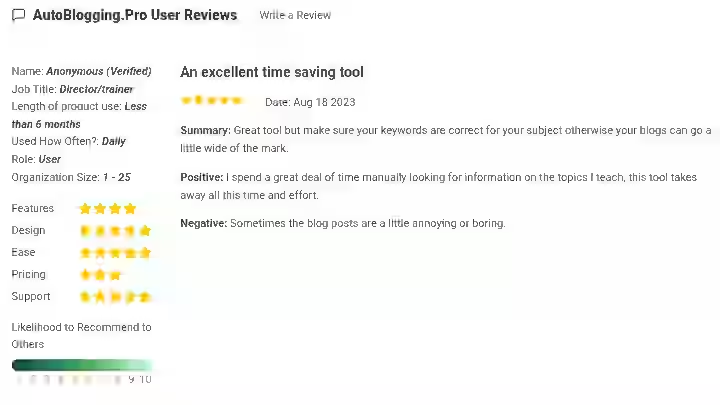
Community feedback for Autoblogging.pro specifically is limited.
On review platforms like G2 and Capterra, the tool has very few user reviews, which is worth noting for anyone doing due diligence.
On Slashdot, one reviewer summarized it as a “great tool but make sure your keywords are correct for your subject otherwise your blogs can go a little wide of the mark,” noting that it saves time on manual research but that “sometimes the blog posts are a little annoying or boring.”
The broader autoblogging community sentiment aligns with what I experienced: these tools are useful for generating volume, but the output requires editing.
Human editing and involvement in the content creation process still matters a lot for voice, accuracy, including real examples and establishing trust with your audience and all website owners should review the content any automated blogging tools create on their behalf.
The limited review footprint is itself a data point. Compared to competitors like Autoblogging.ai or Jasper, which have hundreds of user reviews across multiple platforms, Autoblogging.pro is a smaller, less established player.
That does not make it bad, but it does mean less community knowledge to draw from when troubleshooting.
Autoblogging.pro Scoring
Category | Weight | Score (out of 10) | Weighted Score |
|---|---|---|---|
Features and Functionality | 30% | 6.0 | 1.80 |
Ease of Use | 20% | 6.5 | 1.30 |
Pricing and Value | 20% | 7.5 | 1.50 |
Support and Customer Experience | 15% | 5.0 | 0.75 |
Trust and Credibility | 15% | 5.5 | 0.83 |
Final Rating | 100% | 6.18 = 6.2 |
- Features and Functionality (6.0): Article generation works, WordPress integration is solid, but it lacks content strategy tools, advanced SEO optimization, and multi-platform support.
- Ease of Use (6.5): The dashboard is straightforward, but the OpenAI API key setup adds unnecessary friction for non-technical users.
- Pricing and Value (7.5): Among the most affordable autoblogging options available. The per-article cost is hard to beat if you have editing capacity.
- Support and Customer Experience (5.0): Documentation is thin. No community forum. Support is available via contact form only. Response time during my testing was 24 to 48 hours.
- Trust and Credibility (5.5): MetroBoom Software has specialized in LLM and AI applications, offering consulting services that help businesses integrate AI into their workflows. The company is real and the product works. But the limited user review base and sparse public documentation make it harder to build full confidence compared to more established competitors.
Autoblogging.pro AI Detection and Content Risk Assessment
This section of the Autoblogging.pro review matters for anyone using autoblogging tools in 2026.
- AI detection exposure: Content generated by Autoblogging.pro is produced by OpenAI’s GPT models with no proprietary humanization layer. In my testing, running articles through Originality AI flagged 85 to 95% of unedited content as AI-generated. After manual editing (rewriting introductions, adding personal examples, restructuring sections), detection scores dropped to 30 to 50% on average.
- Content penalty risks: While Google does not automatically penalize AI-generated content, specific violations can result in ranking reductions. Semrush data and 2026 industry analyses confirm that Google does not penalize content simply because it is generated by AI. Instead, penalties, ranking drops and de-indexing target low-quality, unedited, or deceptive content that violates spam policies Publishing unedited Autoblogging.pro output at scale would fall into the risk zone.
- API dependency: Your content generation depends entirely on OpenAI’s API availability and pricing. If OpenAI raises API prices or experiences outages, your content pipeline stops. During my testing, I experienced one brief API timeout that delayed a batch generation by about 20 minutes.
- Data privacy: Your keywords, blog descriptions and content pass through both Autoblogging.pro’s servers and OpenAI’s API. Review both privacy policies before using the tool with sensitive or proprietary content.
If you want deeper context on how AI detection plays into autoblogging strategy, my guide on autoblogging fundamentals covers the risk landscape in more detail.
Final Verdict On Autoblogging.pro Review 2026
Conditional BUY for a narrow use case.
Autoblogging.pro is a budget-friendly, WordPress-specific automated content creation tool that does exactly one thing well: it moves content from keyword to WordPress draft quickly and cheaply. For that specific workflow, it delivers.
Who should buy:
- Solo bloggers or niche site builders on a tight budget who need content volume on WordPress
- Small agencies that already have editing processes in place and want to reduce article generation time
- Users comfortable with OpenAI API setup who want maximum control over their AI model usage
Who should skip:
- Anyone who wants ready-to-publish, engaging content without editing
- Teams needing multi-CMS support beyond WordPress
- Users who are not comfortable managing an OpenAI API key and monitoring API costs
- Anyone looking for built-in content strategy, AI detection management, or advanced SEO optimization
If you want to test it yourself, Autoblogging.pro offers a free lifetime plan that allows you to generate a few articles to try the tool before committing. Start there.
Generate 4 to 5 articles in your niche, edit them and judge whether the output is worth the editing investment for your workflow.
Frequently Asked Questions About Autoblogging.pro Review 2026
1. Is Autoblogging.pro worth it in 2026?
Yes, but only if your primary need is generating WordPress blog drafts at low cost and you have the editing capacity to improve every article before publishing. At $29/month plus OpenAI API costs, it is one of the cheapest autoblogging options available. It is not worth it if you expect publish-ready content.
2. Does Autoblogging.pro require an OpenAI API key?
Yes, you need to have an OpenAI API key to use the tool, which allows it to access OpenAI’s GPT 3.5 or 4 models. This means you pay Autoblogging.pro’s subscription fee plus OpenAI’s API usage fees separately. Budget roughly $15 to $25/month in API costs for moderate usage.
3. Can Autoblogging.pro publish directly to WordPress?
Yes, you install a plugin after creating your project, connect it to your WordPress site, and articles are automatically published or saved as drafts. The plugin also auto-detects and populates fields for Yoast SEO, Rank Math and AIOSEO.
4. Will Google penalize content from Autoblogging.pro?
Google evaluates AI-generated content using the same quality signals as human-written content. Autoblogging.pro content is not inherently penalized, but publishing unedited AI drafts at scale carries risk. Always edit, add original insights and fact-check before publishing.
5. How does Autoblogging.pro compare to Autoblogging.ai?
Autoblogging.pro is cheaper but requires your own OpenAI API key and offers fewer features. Autoblogging.ai bundles its own AI models, offers multiple generation modes (Quick, Pro, Godlike) and supports Amazon product reviews. For higher content quality and less setup friction, Autoblogging.ai is the better choice.
6. Does Autoblogging.pro work with platforms other than WordPress?
Not natively. It offers a REST API and webhook for non-WordPress setups, but the core product and plugin are designed specifically for WordPress integration. If you run Shopify, Webflow, or Ghost sites, look elsewhere.
7. Is there a free plan for Autoblogging.pro?
Yes, there is a free lifetime plan that allows you to generate 5 articles. This is enough to test the workflow and evaluate content quality before deciding on a paid plan.

- Searchable Review 2026: My Honest Test Results With This AI Visibility Platform - October 9, 2026
- Ryze AI Review 2026: My 30 Days Full Breakdown of This Autonomous SEO & GEO Platform - October 9, 2026
- #1 Best Plugin for Automatic Blog Posting in WordPress (2026) - September 13, 2026