The best WordPress autoblogging plugin depends entirely on what type of content you are automating and how much oversight you want to keep in the process.
- Best overall AI autoblogger: ClearPost AI. The Google Search Console integration and native WordPress pipeline make it the strongest choice for site owners who want AI-driven SEO content without running a separate dashboard.
- Best AI SEO agent: RankYak. If you want fully automated daily publishing with no topic selection required, RankYak does that job reliably.
- Best fully automated AI content platform: Emplibot. For complete hands-off operation with AI-generated content, images, and linking.
- Best advanced automation: CyberSEO Pro. The widest source support and strongest technical feature set for experienced users.
- Best RSS aggregator: WP RSS Aggregator. Well-maintained, reliable, and the default choice for RSS-based content hubs.
- Best RSS-to-post option: Feedzy. Cleaner interface, affiliate link support, and solid duplicate controls.
- Best campaign-based RSS tool: WPeMatico. Campaign organization makes it the better choice when managing many feeds with different rules.
- Best lightweight RSS importer: RSS Retriever. When you need simple feed importing without the overhead of a larger plugin.
If you are exploring alternatives to specific tools before committing, the best autoblogging tools overview page cover the broader market.
Whatever plugin you choose, the automation handles the publishing. The strategy, accuracy, and editorial quality still come from you.
Best WordPress Autoblogging Plugins at a Glance
This guide covers the 13 best WordPress autoblogging plugins tested and ranked for 2026, covering AI content generators, RSS aggregators, and multi-source automation tools. The main takeaway: pick your plugin based on your content source and editorial process, because automated publishing alone won’t earn you rankings.
If you want a quick overview of how autoblogging works before picking a plugin, that is worth reading first.
| Plugin | Type | Best For |
|---|---|---|
| ClearPost AI | AI Content Generator | Autonomous SEO content with GSC integration |
| RankYak | AI Content Generator | Daily AI SEO publishing automation |
| WordRocket AI | AI Content Generator | Bulk content generation at low cost |
| Emplibot | AI Content Generator | Fully automated AI blogging |
| CyberSEO Pro | Multi-Source Automation | Advanced content automation from 10+ source types |
| WP RSS Aggregator | RSS Aggregator | RSS-to-WordPress feed importing |
| Feedzy | RSS Aggregator | RSS feeds, feed-to-post, and content curation |
| WPeMatico | RSS Aggregator | Campaign-based RSS automation |
| RSS Retriever | RSS Aggregator | Lightweight feed importing |
| WP Content Pilot | Multi-Source Automation | Content curation and affiliate sites |
| Auto Robot | Multi-Source Automation | RSS and multi-source content importing |
| WP Automatic | Multi-Source Automation | Broad-source autoblogging |
| WP Robot | Multi-Source Automation | Automated content aggregation from 32+ sources |
What Are WordPress Autoblogging Plugins?
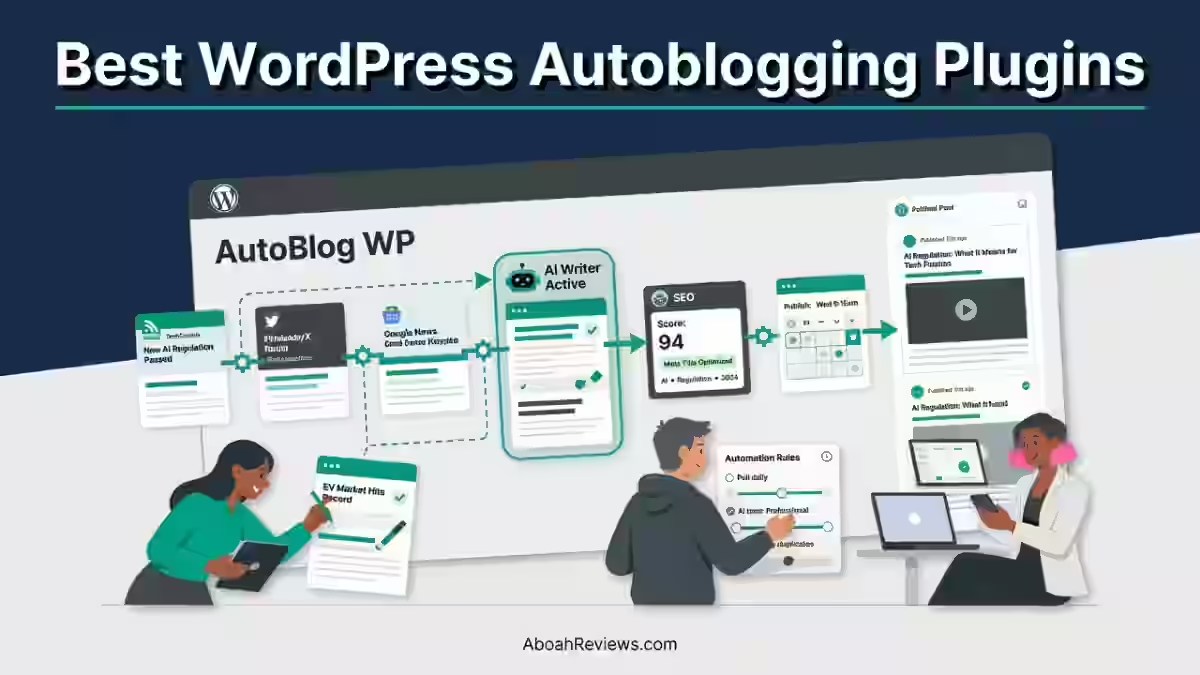
WordPress autoblogging plugins are tools that automate the process of finding, generating or importing content and publishing it to a WordPress site on a schedule. They remove (or reduce) the manual work of drafting and posting new content.
Here is the typical autoblogging workflow, regardless of plugin type:
- Define your content sources (RSS feeds, keywords, URLs, or AI prompts)
- Import or generate the content inside or outside WordPress
- Process and filter that content (rewriting, translating, or summarizing)
- Add images, internal links, categories and metadata
- Schedule or trigger automatic publication
- Publish posts to WordPress
The key difference between AI autoblogging and content scraping is originality. AI generators create new articles from keyword inputs. Scrapers and RSS aggregators pull existing content from third-party sources. That distinction matters enormously for SEO and copyright compliance.
Automated publishing does not guarantee search rankings or traffic. Google evaluates all content based on quality, relevance and helpfulness to the reader, rather than whether a human or an artificial intelligence (AI) created it.
A plugin that publishes 30 thin posts per month will not overcome those signals. Human oversight remains part of the equation regardless of which plugin you use.
For a deeper look at the legal side of things, check out is autoblogging legal before you start any RSS or scraping setup.
Are Autoblogging Plugins Good for SEO?
Autoblogging plugins can support SEO, but only when the content they produce adds genuine value. Automated content that is original, accurate, properly structured, and built around real keyword intent can rank.
Republished RSS content with no added commentary, analysis, or editing almost never does.
Google’s scaled content abuse policy explicitly targets content produced at scale without adding value, not automation as a production method itself. That is an important distinction. The tool is not the problem, what you do with it is.
The risks of thin or duplicated automated content are real:
- Duplicate content: RSS-imported posts are already indexed elsewhere
- Thin content: Short, unedited AI drafts with no depth or original analysis
- Keyword cannibalization: Multiple auto-generated posts targeting the same or overlapping keywords with no internal linking strategy
- Manual penalties: Scaled content abuse can trigger manual actions in Google Search Console
You can read more about common autoblogging mistakes to avoid if you want the full breakdown.
Types of WordPress Autoblogging Plugins
1. AI Content Generators
AI content generators create original articles from keywords, topics, or SEO content plans rather than importing existing content. Examples include ClearPost AI, RankYak, WordRocket AI, and Emplibot.
These tools work best for:
- SEO blogs that need original, keyword-targeted articles
- Affiliate sites requiring product-focused content at scale
- Niche websites building topical authority
- Programmatic content workflows where hundreds of pages need to be created from structured data
- Publishers who want AI-generated drafts with human editing layers built in
The output quality varies significantly between tools. AI generators still produce factual errors, especially on technical topics. Human review is not optional if accuracy matters to your brand.
2. RSS Feed Aggregators
RSS feed aggregators import content from RSS and Atom feeds and convert that content into WordPress posts. Examples include WP RSS Aggregator, Feedzy, WPeMatico, and RSS Retriever.
Feedzy is a lightweight plugin that can import RSS feed items as WordPress posts automatically and also display feed content using shortcodes or Gutenberg blocks.
WPeMatico offers a wide range of configuration options through a campaign system, with premium add-ons that extend functionality for features like full text extraction and filtering.
These tools work best for:
- News aggregation websites
- Content curation hubs
- Industry news pages that want to stay current without writing everything from scratch
- Feed-to-post automation workflows
- Content hubs that attribute original sources and add their own editorial framing
The critical thing to understand here: republishing RSS content without transformation, attribution, or added value is not an SEO strategy. It is content borrowing. You need to add something, whether that is commentary, categorization or original context to make that content worth indexing.
Check out my guide on using RSS feeds for autoblogging for a closer look at doing this responsibly.
3. Multi-Source Autoblogging Plugins
Multi-source plugins combine multiple content sources and publishing methods into one system. Examples include CyberSEO Pro, WP Content Pilot, Auto Robot, WP Automatic and WP Robot.
While other WordPress autoblogging plugins only support RSS and Atom feeds, CyberSEO Pro allows you to import XML feeds, JSON feeds, HTML web pages, XML Sitemaps, CSV files, XLS files, and raw text dumps. Its supported content sources also include video platforms, social networks like Instagram, Reddit, Tumblr, and Flickr, as well as online marketplaces like Amazon, AliExpress, and ShareASale.
These tools work best for:
- Content aggregation at scale across multiple niches or sites
- Affiliate websites that pull product data from multiple sources
- News websites with varied feed types and sources
- Publishers running large-scale automation across 10+ WordPress installs
- Teams comfortable managing more complex automation setups and troubleshooting
13 Best WordPress Autoblogging Plugins (Tested & Ranked)
1. ClearPost AI: Best AI Autoblogging Plugin
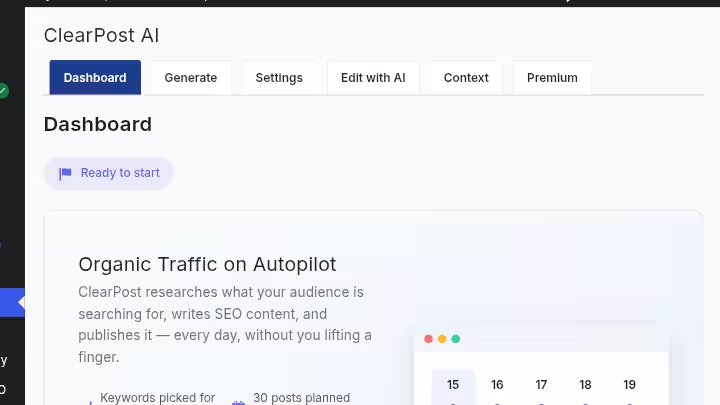
ClearPost AI is the strongest native WordPress AI autoblogging plugin for teams that want keyword research, content generation, and publishing managed from inside their WordPress dashboard without managing a separate SaaS platform.
ClearPost takes a different approach: it connects to your Google Search Console data, understands your business vertical, identifies keyword opportunities you’re missing, builds a content calendar, and executes on it. You can review posts before they go live or let it run on full autopilot.
That Google Search Console integration is what separates it from most AI writing tools. Instead of you guessing what to write about, ClearPost analyzes what your site is already being found for and builds content to fill the gaps.
ClearPost offers a WordPress-native publishing pipeline with keyword research from Google Search Console data, content scheduling, internal linking automation, and an approval gate where you review every post before it goes live.
Key features:
- Native WordPress plugin (not an external SaaS dashboard)
- Google Search Console integration for keyword discovery
- Content calendar and scheduling
- Automated internal linking
- SEO metadata generation
- Human approval gate before publishing
- Supports multiple AI models
Pros:
- Operates entirely inside WordPress
- Built-in editorial review step
- Genuine keyword intelligence from real GSC data
- No per-post pricing
Cons:
- Requires Google Search Console access to get the most from keyword features
- $99/month may be high for solo bloggers publishing fewer than 10 posts per month
- Less flexible for bulk-keyword-list workflows where you supply all the topics
Best for: WordPress site owners, small content teams, and agencies who want AI-driven SEO content without managing a separate platform. Works especially well when you want to hand off keyword strategy to the tool.
Pricing: ClearPost starts at $99/month with no onboarding fees or long-term contracts. The per-post cost works out to $3 to $10 depending on your plan tier and publishing volume. A 7-day free trial is available.
Read my full ClearPost AI review for a deeper breakdown.
2. RankYak: Best AI SEO Agent for Autoblogging
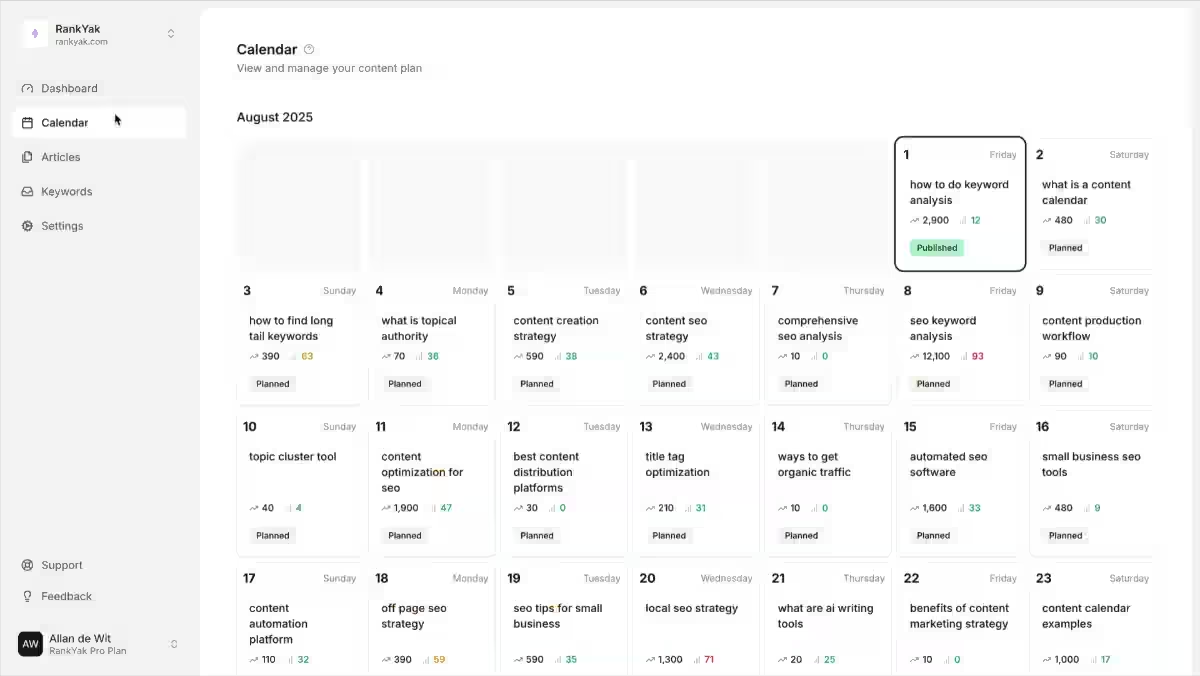
RankYak is the best option if you want a set-it-and-forget-it daily publishing rhythm driven entirely by AI keyword research. You connect your site and it does the rest.
RankYak’s AI agents automate your SEO growth: they find low-competition keywords, create a monthly content plan, and automatically write and publish SEO-optimized articles.
Automatic keyword research begins once you connect your website, based on your site, target audience, and industry. A monthly content plan is automatically generated, and a high-quality article is generated every day for the planned keyword.
RankYak’s model is built around a single constraint: one article per day, every day, published automatically. It analyzes your site, identifies low-competition keywords, builds a monthly editorial calendar, and generates daily articles without requiring input beyond the initial setup.
That daily cadence is a genuine differentiator. Most autoblogging tools give you a monthly quota to use however you want. RankYak enforces consistent daily publishing, which sends strong frequency signals to search engines.
Key features:
- Automated keyword research and content planning
- 1 article per day, published automatically
- Internal and external link automation
- Auto-generated featured images
- Supports 40+ languages and publishes to 9+ CMS platforms through native integrations
Pros:
- Zero-touch operation after setup
- Consistent publishing cadence
- Built-in internal linking
- WordPress.org listed as an AI SEO agent
Cons:
- RankYak picks every topic automatically, and by its own description there is no way to edit an article before it publishes unless you pause auto-publishing entirely
- Fixed daily schedule may not suit sites that prefer batched publishing
- Less control over individual article structure
Best for: Solo site owners, bloggers, and small business owners who want fully automated daily publishing without managing a content calendar themselves.
Pricing: RankYak starts at $99/month for 30 articles on one site. Agency plan is also available for client, priced at the same as the first.
3. WordRocket AI: Best for Large Volume & Low Cost Content
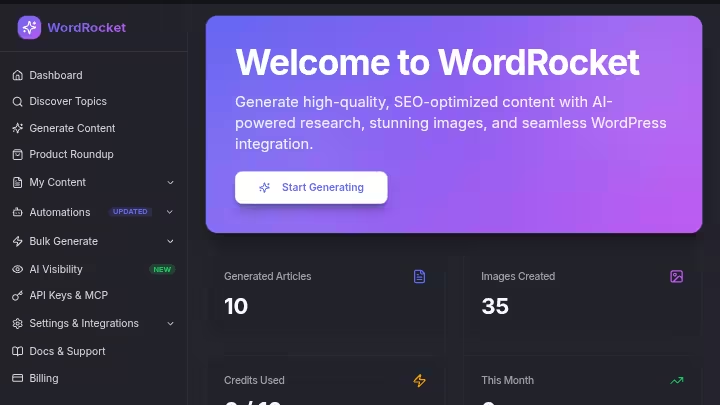
WordRocket AI is built for publishers who need to generate a high volume of articles at a lower per-post cost than most SaaS autoblogging platforms.
It focuses on bulk AI article generation with publishing controls, making it a practical fit for programmatic SEO campaigns, affiliate site builds, and niche site operators working across multiple domains.
The workflow is more hands-on than ClearPost or RankYak. You supply the keyword lists or the platform does it for you, using its BYOK (Bring Your Own Key) model.
Key features:
- Bulk AI article generation from keyword lists
- Scheduled WordPress publishing
- SEO metadata and formatting
- Content templates and post structure controls
Pros:
- Lower per-article cost at scale
- Good for programmatic workflows
- Flexible keyword input options
Cons:
- Less autonomous than ClearPost AI or RankYak
- The built-in keyword research tool is limited
Best for: Niche site builders, programmatic SEO operators, and affiliate marketers who already have a keyword strategy and want to produce articles in bulk without a high per-post cost.
See the full WordRocket AI review and the WordRocket pricing breakdown for current plan details.
4. Emplibot: Best Fully Automated AI Blogger
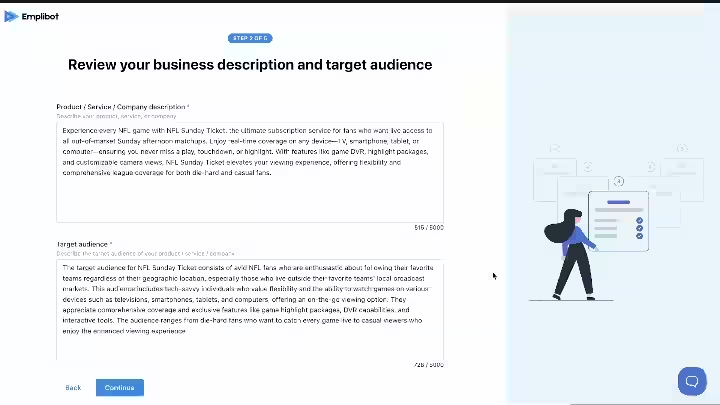
Emplibot is the most hands-off AI autoblogging solution on this list. You connect it to WordPress and it handles keyword research, content generation, internal and external linking, featured image creation, and publishing without requiring you to approve anything.
Emplibot is described as the best for WordPress autopilot, offering end-to-end WordPress automation from $69/month with social sharing included.
Key features:
- Automated keyword research built in
- AI article generation from discovered topics
- Internal and external link automation
- Auto-generated infographics
- Auto-generated featured images
- Direct WordPress publishing with no approval step required
- Automatic social sharing to LinkedIn, X, Facebook, Instagram
Pros:
- True end-to-end automation
- No content queue management needed
- Infographic generation included
- Strong for time-poor site owners
Cons:
- No editorial review step by default
- Fully automated output increases risk of factual errors going live unchecked
- Less control over individual post formatting and structure
- Costs can scale quickly as site count or post volume increases
Best for: Solo bloggers and small business owners who want to run a WordPress blog on autopilot and are willing to accept some quality variance in exchange for zero operational overhead.
Pricing: Emplibot starts at $69/month for end-to-end WordPress automation. Check the Emplibot review for the latest plan details.
5. CyberSEO Pro: Best Advanced Autoblogging Automation
CyberSEO Pro is the most technically capable multi-source autoblogging plugin on this list. It is not beginner-friendly, but it is also not trying to be. If you need to pull content from sources that other plugins cannot handle, this is the tool.
While other WordPress autoblogging plugins only support RSS and Atom feeds, CyberSEO Pro allows you to import XML feeds, JSON feeds, HTML web pages, XML Sitemaps, CSV files, XLS files, and raw text dumps. Its supported content sources also include video platforms, social networks, and online marketplaces including Amazon, AliExpress, and ShareASale.
Beyond source flexibility, CyberSEO Pro also supports AI-powered content rewriting, GPT integration, template-based post formatting, translation, and spintax. That makes it one of the few plugins that genuinely bridges old-school content automation with modern AI generation.
Key features:
- RSS/Atom, XML, JSON, HTML, CSV, XLS, and raw text import
- Social network and marketplace feed support
- AI content generation and rewriting via OpenAI/GPT
- Template-based post formatting
- Translation and spintax support
- Advanced scheduling and campaign controls
Pros:
- Widest source support of any plugin on this list
- Strong for technical users who want full control
- AI rewriting reduces duplicate content risk from imported feeds
- One-time license pricing available
Cons:
- Steep learning curve for non-technical users
- Requires understanding of API keys, templates, and feed structures
- AI rewriting does not eliminate the need for human spot checks
- Interface is functional rather than polished
Best for: Experienced WordPress publishers, developers, and agencies managing large-scale content automation across multiple sources, niches, or client sites.
Pricing: CyberSEO Pro is priced at $399.95 as a one-time payment with one year of updates included.
6. WP RSS Aggregator: Best RSS Aggregator
WP RSS Aggregator is the most established and actively maintained RSS-to-WordPress plugin available. It is the default recommendation for anyone building a feed-based content hub or news aggregator on WordPress.
The free version handles basic feed importing. Premium tiers unlock feed-to-post conversion, keyword filtering, AI-assisted summarization, full-text RSS extraction, and attribution controls.
Key features:
- RSS and Atom feed importing
- Feed-to-post conversion (premium)
- Feed filtering and duplicate detection
- Attribution settings
- AI content summarization (premium add-on)
- Content curation display options
Pros:
- Reliable, well-maintained plugin with a long track record
- Clear upgrade path from free to premium
- Strong documentation
- Good for content hubs and news sites
Cons:
- Feed-to-post and full-text features are premium only
- Does not generate original AI content
- Imported content still needs editorial framing to have SEO value
- Premium plans are annual subscriptions, not one-time payments
Best for: Content curators, news aggregators, and niche sites that want to import and display content from trusted RSS sources reliably.
Pricing: The core plugin is free. WP RSS Aggregator’s premium plans cost $599 to $699 annually depending on the plan and included features.
7. Feedzy: Best for RSS-to-Post Automation
Feedzy is the most popular alternative to WP RSS Aggregator for RSS-to-post workflows. Feedzy is a popular freemium RSS aggregator with both feed-to-post and feed display capabilities, currently standing at 40,000 active installs with a solid rating.
Where Feedzy stands out is in its affiliate marketing integration and template system. If you are running a content site that monetizes through affiliate links, Feedzy lets you inject affiliate parameters directly into imported feed content.
Key features:
- Unlimited RSS feed importing
- Feed-to-post automation with scheduling
- Duplicate content detection and removal
- Multiple display templates
- Affiliate link integration
- Content spinning and translation (premium)
- AI content rewriting (premium)
Pros:
- Clean interface compared to older RSS plugins
- Affiliate link injection built in
- Solid duplicate control
- Active development and support
Cons:
- Full text import in “feed to post” costs $179 on one site at the relevant premium tier
- No original AI content generation
- Spinner feature requires careful use to avoid thin content issues
Best for: Content curators and affiliate site operators who want RSS-to-post automation with affiliate link management and a well-designed interface.
Pricing: Feedzy’s Personal plan starts at $99 per year and supports one site. Higher tiers cover multiple sites and additional features.
8. WPeMatico: Best Campaign-Based RSS Autoblogging Plugin
WPeMatico takes a different structural approach to RSS autoblogging. Instead of managing individual feeds, it organizes everything into campaigns. Each campaign has its own feeds, schedule, rules, categories, and post settings.
WPeMatico is a powerful freemium RSS autoblogging plugin that automatically fetches feeds and publishes the content to your WordPress site as posts. It is essentially another feed-to-post engine for WordPress, making it a good solution for running an autoblog or news aggregator site.
That campaign structure is genuinely useful when you are managing 10 or more feed sources with different publishing rules. You set it up once per campaign and WPeMatico handles the rest.
Key features:
- Campaign-based feed organization
- RSS, Atom, and XML feed support
- Scheduled fetch and publish
- Full-text content extraction (premium)
- Media importing and management
- Keyword filtering (premium)
- A Synchronizer feature as a premium add-on that checks the original source and keeps published content in sync
Pros:
- Campaign system makes multi-feed management much cleaner
- Free version is functional for basic autoblogging
- Good for news aggregators managing many source feeds
Cons:
- WPeMatico does not appear to include different layout or design options for displaying feed content, nor does it integrate with AI tools to manipulate the feed content after import
- Full-text extraction requires premium add-ons
- Less polished UI than Feedzy
Best for: News sites and content aggregators managing multiple distinct feed campaigns with different rules, schedules, and categories.
Pricing: WPeMatico is available in both free and premium versions. The free version covers basic feed importing. Premium add-ons are available individually or as a bundle, starting around $82 for a single site.
9. RSS Retriever: Best Lightweight RSS Importer
RSS Retriever is the simplest tool on this list. If you need to pull content from RSS feeds into WordPress without a steep setup process or a large feature list, this is the plugin to install.
It supports RSS, Atom, Google Product Feeds, Yandex feeds, and YouTube feeds. It is maintained by the same team behind CyberSEO Pro, which means the underlying parsing engine is solid even if the interface is minimal.
Key features:
- RSS and Atom feed importing
- Google Product Feed support
- Yandex feed support
- YouTube feed importing
- Lightweight setup with minimal configuration required
Pros:
- Fast to set up
- Supports more feed types than most lightweight importers
- Low resource footprint
- Free or low-cost entry point
Cons:
- Limited customization compared to WP RSS Aggregator or Feedzy
- No AI rewriting or content transformation features
- Not suitable for complex multi-feed campaigns
Best for: Bloggers and small site owners who want a simple RSS-to-WordPress import tool without paying for premium features they do not need.
10. WP Content Pilot: Best for Content Curation and Affiliate Sites
WP Content Pilot is a multi-source content automation plugin built around curation and affiliate workflows. It pulls content from RSS feeds, article directories, and other sources, and publishes it to WordPress on a schedule.
What sets it apart from pure RSS aggregators is its affiliate site focus. The plugin includes features for pulling product content, inserting affiliate links, and structuring posts around commercial keywords.
Key features:
- RSS feed importing
- Multiple content source support
- Affiliate link automation
- Scheduled publishing
- Category and tag assignment
- Content filtering and keyword targeting
Pros:
- Solid for affiliate content workflows
- Multiple content source support beyond RSS
- Good scheduling controls
Cons:
- Imported content still needs editorial value added for SEO
- Heavier plugin footprint than lightweight RSS tools
- Requires thoughtful keyword filtering to avoid cannibalization
Best for: Affiliate marketers and content site operators who want to pull and publish content from multiple sources with affiliate link integration.
Pricing: WP Content Pilot costs $499.99 plus an unknown yearly renewal fee for unlimited site licensing, making it better suited to multi-site operators than single-site bloggers.
11. Auto Robot: Best for Multi-Source Content Automation
Auto Robot is a CodeCanyon plugin built for publishers who need a flexible, campaign-based content automation system that pulls from multiple source types beyond just RSS.
With Auto Robot, you can let your site autoblog and always stay fresh with new content, which can improve content marketing, boost SEO, increase audience engagement, and potentially earn more revenue. It supports RSS campaigns, YouTube campaigns, and social media feed importing, making it useful for media-heavy content sites.
Key features:
- RSS-to-post automation
- Multiple source types including RSS, YouTube, and Facebook
- Campaign-based organization
- Scheduling and WP Cron integration
- Media importing and storage
- Google Translate API integration
- Keyword rotation features
Pros:
- Good range of source types
- Campaign system keeps multi-feed management organized
- YouTube content support is useful for media sites
- One-time CodeCanyon license pricing
Cons:
- CodeCanyon support model is slower than subscription-based plugins
- AI content generation is not a native feature
- Facebook feed support is unpredictable due to API changes
Best for: News sites, media publishers, and content aggregators who need to pull from RSS and video sources simultaneously inside one campaign system.
12. WP Automatic: Best for Broad Content Sources
WP Automatic is a long-standing multi-source autoblogging plugin with one of the widest source lists available. It handles RSS feeds, scraping, YouTube, Amazon, and other sources from a single plugin install.
Key features:
- RSS, Atom, and XML feed importing
- Web page scraping for content extraction
- YouTube, Amazon, and social media source support
- AI content rewriting options
- Scheduling and campaign controls
- Image and media handling
Pros:
- Wide source support
- Good for multi-niche content operations
- Affordable one-time license for unlimited sites
- Long update history
Cons:
- Scraping workflows carry copyright and quality risks
- Interface has not changed significantly in years
- AI rewriting features are basic compared to native AI tools
Best for: Content operators running multiple niche sites who need a broad-source automation tool on a one-time license budget.
Pricing: WP Automatic costs $199 as a one-time payment for unlimited sites with lifetime updates.
13. WP Robot: Best for Automated Content Aggregation
WP Robot is one of the original WordPress autoblogging plugins. It has been running since 2009 and is used on over 1 million WordPress sites.
WP Robot is an autoblogging and content curation plugin that allows you to create WordPress blog posts automatically. By drip-feeding quality content related to any niche, WP Robot makes sure your sites stay fresh and updated, even while you are asleep.
Its strength is the sheer number of supported content sources. WP Robot supports 32 sources, which is more than any other plugin on this list. That makes it well-suited for content aggregation across multiple niches.
Key features:
- 32+ supported content sources
- Drip-feed and bulk publishing
- Template-based post formatting
- AI content generation via OpenAI module
- Automatic translation
- Spinning software integration
- Includes a Comparison Page Creator as a free add-on, a $59 value that allows you to create “product X vs Y”-style comparison pages for affiliate products
Pros:
- Most content sources of any plugin on this list
- Long update history and active maintenance
- Good for affiliate content workflows with comparison page builder
- OpenAI module adds AI rewriting capabilities
Cons:
- Legacy interface design
- Spinning software integration can produce poor-quality output if misconfigured
- Not a native AI content generator
Best for: Affiliate marketers and niche site operators who want the widest source library possible with a long-supported plugin that has a proven track record.
Best WordPress Autoblogging Plugins by Use Cases
| Use Case | Best Choice | Starting Price |
|---|---|---|
| Best overall AI autoblogging | ClearPost AI | $99/month |
| Best AI SEO automation | RankYak | $99/month |
| Best fully automated AI blogging | Emplibot | $69/month |
| Best advanced multi-source automation | CyberSEO Pro | $399.95 one-time |
| Best RSS aggregator | WP RSS Aggregator | Free (premium from $599/year) |
| Best RSS-to-post plugin | Feedzy | $99/year |
| Best campaign-based RSS automation | WPeMatico | Free (premium ~$82/site) |
| Best lightweight RSS importer | RSS Retriever | Free / Low cost |
| Best broad-source autoblogging | WP Automatic | $199 one-time |
| Best content curation and affiliate | WP Content Pilot | $499.99 one-time |
| Best multi-source import automation | Auto Robot | One-time CodeCanyon license |
| Best content aggregation library | WP Robot | Paid (tiered by sites) |
| Best bulk content at low cost | WordRocket AI | Free plan ($10/month + API key) |
AI Autoblogging vs RSS Autoblogging vs Content Scraping
These are three different workflows. Treating them as interchangeable is one of the most common mistakes I see people make when evaluating autoblogging plugins for WordPress.
AI Autoblogging
AI autoblogging generates new content from keyword inputs or topic briefs. The articles do not exist anywhere else before the tool creates them. That makes them eligible for original indexing by Google, though quality and accuracy still determine whether they rank.
Strengths:
- Original content eligible for standalone indexing
- Keyword-driven, allowing targeting of specific search queries
- Can include SEO metadata, internal links, and structured formatting
- Suitable for building topical authority over time
Limitations:
- AI-generated content contains factual errors and requires fact-checking
- Output quality varies significantly by topic complexity
- Still needs human review for accuracy, tone, and brand fit
RSS Autoblogging
RSS autoblogging imports content that already exists and is already indexed on the original publisher’s site. Publishing it as-is provides almost no SEO benefit. The content is duplicate by definition.
Where RSS autoblogging works is in curation: pulling content from trusted sources, attributing it properly, and adding original editorial commentary, summaries, or categorization.
Duplicate content alone does not cause penalties, but it does dilute page authority and reduce the chance of ranking over the original source.
Strengths:
- Fast to set up, no content generation costs
- Useful for news aggregation and content hubs
- Keeps sites updated with fresh industry content
Limitations:
- Republished content rarely outranks the original
- Requires proper attribution and potentially licensing
- Thin republished content can trigger quality issues over time
Multi-Source Scraping
Multi-source scraping is the most flexible and also the most technically and legally complex workflow. Plugins like WP Automatic and CyberSEO Pro can pull content from web pages, social platforms, marketplaces, and other sources beyond RSS feeds.
Used carefully, this approach supports content aggregation and affiliate operations. Used carelessly, it creates copyright exposure and thin-content penalties.
Understanding what you can and cannot scrape is non-negotiable before you set up any scraping workflow.
Comparison Table
| Feature | AI Autoblogging | RSS Autoblogging | Multi-Source Automation |
|---|---|---|---|
| Generates original articles | Yes | Usually no | Sometimes |
| RSS support | Sometimes | Yes | Usually |
| Keyword-based content | Yes | Limited | Depends on plugin |
| Content scraping | Usually no | Limited | Often |
| AI rewriting included | Often | Sometimes | Often |
| Best for SEO content | High potential | Limited | Depends on use |
| Best for news aggregation | Moderate | Excellent | Excellent |
| Setup difficulty | Moderate | Easy | Moderate to Advanced |
| Copyright considerations | Low | Medium | Higher |
If you want a full breakdown of the trade-offs, the autoblogging vs traditional blogging comparison covers the strategic differences in detail.
How to Choose the Best WordPress Autoblogging Plugin
The right plugin depends on where your content comes from, how much you want to be involved, and what your publishing goals are.
Select an AI Autoblogger if you:
- Want original, keyword-targeted articles published to WordPress
- Have a strategy built around ranking for specific search queries
- Want metadata, internal linking, and formatting handled automatically
- Are willing to review and fact-check content before or after publishing
- Do not have reliable external RSS sources for your niche
Best options: ClearPost AI, RankYak, Emplibot, WordRocket AI
Choose an RSS Aggregator if you:
- Already have a set of trusted RSS sources in your niche
- Are building a news aggregator or content hub site
- Want to curate and display industry content with proper attribution
- Need reliable feed-to-post automation with scheduling controls
- Have a publishing strategy that includes editorial commentary on imported content
Best options: WP RSS Aggregator, Feedzy, WPeMatico, RSS Retriever
Pick a Multi-Source Plugin if you:
- Need to pull from more than just RSS, including marketplaces, video platforms, and social feeds
- Operate affiliate or content websites that require product data imports
- Have the technical background to configure templates, API keys, and campaign rules
- Are managing automation across multiple WordPress installs
- Need AI rewriting layered on top of imported content
Best options: CyberSEO Pro, WP Automatic, WP Robot, WP Content Pilot, Auto Robot
Not sure which category fits your workflow? The how to choose the best autoblogging tool guide walks through the decision framework in more detail.
Pros and Cons of WordPress Autoblogging Plugins
Pros
- Saves publishing time and removes repetitive manual work
- Automates scheduling so you can publish consistently without managing a calendar
- Scales content operations without proportionally scaling headcount
- Reduces manual RSS feed monitoring and import work
- Can integrate AI generation directly into a WordPress publishing workflow
Cons
- AI content can contain factual errors that go live if there is no review step
- Imported content can be duplicate by definition and offer little SEO lift
- Scraping can create copyright exposure if source permissions are not checked
- Poor automation without keyword strategy produces pages that compete with each other
- Plugins require ongoing maintenance as WordPress core, themes, and APIs change
I remember losing an affiliate site’s rankings after publishing 42 auto-generated posts with zero internal linking or keyword filtering. The content cannibalized itself. Terms that should have had one strong, comprehensive page ended up split across five thin pages, each of which ranked for nothing. It took a full content audit to recover the site’s traffic.
The fix was not to stop using automation. It was to add keyword mapping, internal linking, and a proper content architecture before hitting publish.
How to Use Autoblogging Plugins Without Creating Low-Quality Content
This is the part most guides skip. Getting a plugin to publish automatically is the easy part. Getting that content to rank and stay ranked requires a few guardrails.
- Start with a clearly defined niche so every published post is topically relevant to your site’s core subject matter
- Use reputable content sources for RSS-based workflows, including authoritative publishers with original reporting
- Add original information and analysis to any imported content before or after it is published
- Fact-check AI-generated content before it goes live, especially on health, finance, legal, or technical topics
- Review articles before publishing even if it slows your publishing cadence
- Remove duplicate or thin content through regular content audits rather than letting it accumulate
- Use relevant internal links across all published posts to build topical authority and prevent cannibalization
- Optimize titles and metadata rather than accepting the default output from any plugin
- Monitor search performance using Google Search Console to identify pages getting impressions but no clicks
- Do not treat publishing volume as an SEO strategy by itself because 10 strong posts will consistently outperform 100 thin ones
For a practical framework on scaling autoblogging without the risk, the SEO automation guide covers the workflow in depth.
Frequently Asked Questions About Autoblogging With WordPress
What is the best autoblogging plugin for WordPress?
ClearPost AI is the best overall pick for most users because it combines a free AI content generator with an affordable premium SEO automation layer. For fully hands-off AI SEO, RankYak is a strong alternative, and for RSS-based publishing, WP RSS Aggregator is the more established choice.
Are WordPress autoblogging plugins good for SEO?
They can help SEO when the content is reviewed, fact-checked, and adds original value, but they can hurt SEO when used to publish thin or duplicated content at scale. Google’s spam policies apply to the outcome of the content, not the method used to create it, so the plugin itself isn’t what determines your rankings.
Can autoblogging plugins get my site penalized?
Yes, if you publish large volumes of low-value or duplicate content without editorial review. This is why manual review, internal linking, and original commentary matter more than the automation software itself.
What’s the difference between AI autoblogging and RSS autoblogging?
AI autoblogging generates new articles from keywords or prompts, while RSS autoblogging imports and republishes existing content from other sources. AI autoblogging is generally better suited for original SEO content, while RSS autoblogging works well for news aggregation and content curation.
Do I need a paid plugin, or does a free autoblogging plugin work?
Free plugins can work for basic RSS importing or light AI drafting, but most serious SEO workflows eventually need premium features like automated keyword research or AI rewriting.
How much editorial review does autoblogged content actually need?
Every autoblogged post should get at least a quick human pass for factual accuracy, tone, and duplicate content before publishing. In my experience, this takes 10 to 15 minutes per post and is the single biggest factor separating sites that keep their rankings from sites that lose them.
Is autoblogging still worth it?
Yes, but only when it’s paired with editorial oversight and a clear content strategy, not used as a replacement for both. I go into more depth on this exact question in whether autoblogging still works, including what’s changed since Google’s scaled content abuse policy took effect.

- 13 Best WordPress Autoblogging Plugins I Tested & Ranked for 2026 - September 13, 2026
- 13 Best Google AI Overview Checking Tools in 2026 (Tested & Ranked) - September 9, 2026
- 10 Best Google AI Overview Trackers in 2026 - September 8, 2026